
Fast, comprehensive DNS performance testing with DNSSEC validation, DoH/DoT support, and enterprise features
⚠️ this project has moved and is no longer maintained. install the successor:
pip install net-benchmarkrepository: https://github.com/net-benchmark/net-benchmark all existing commands and flags remain fully compatible.
Fast, comprehensive DNS performance testing with DNSSEC validation, DoH/DoT support, and enterprise features
pip install dns-benchmark-tool
dns-benchmark benchmark --use-defaults --formats csv,excel
🎉 1,400+ downloads · 600+ active users 🚀 The web dashboard is now live! Try BuildTools free →
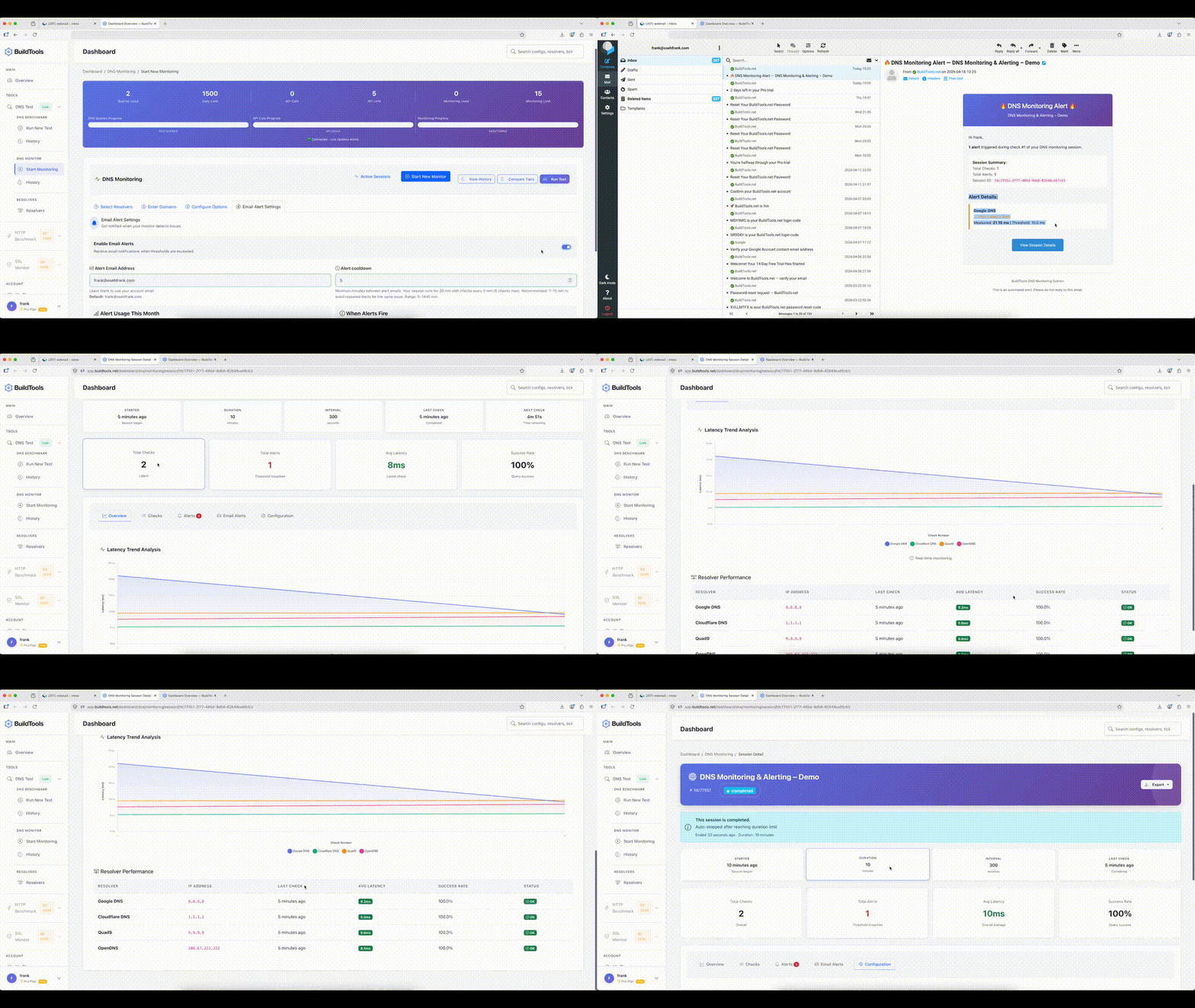
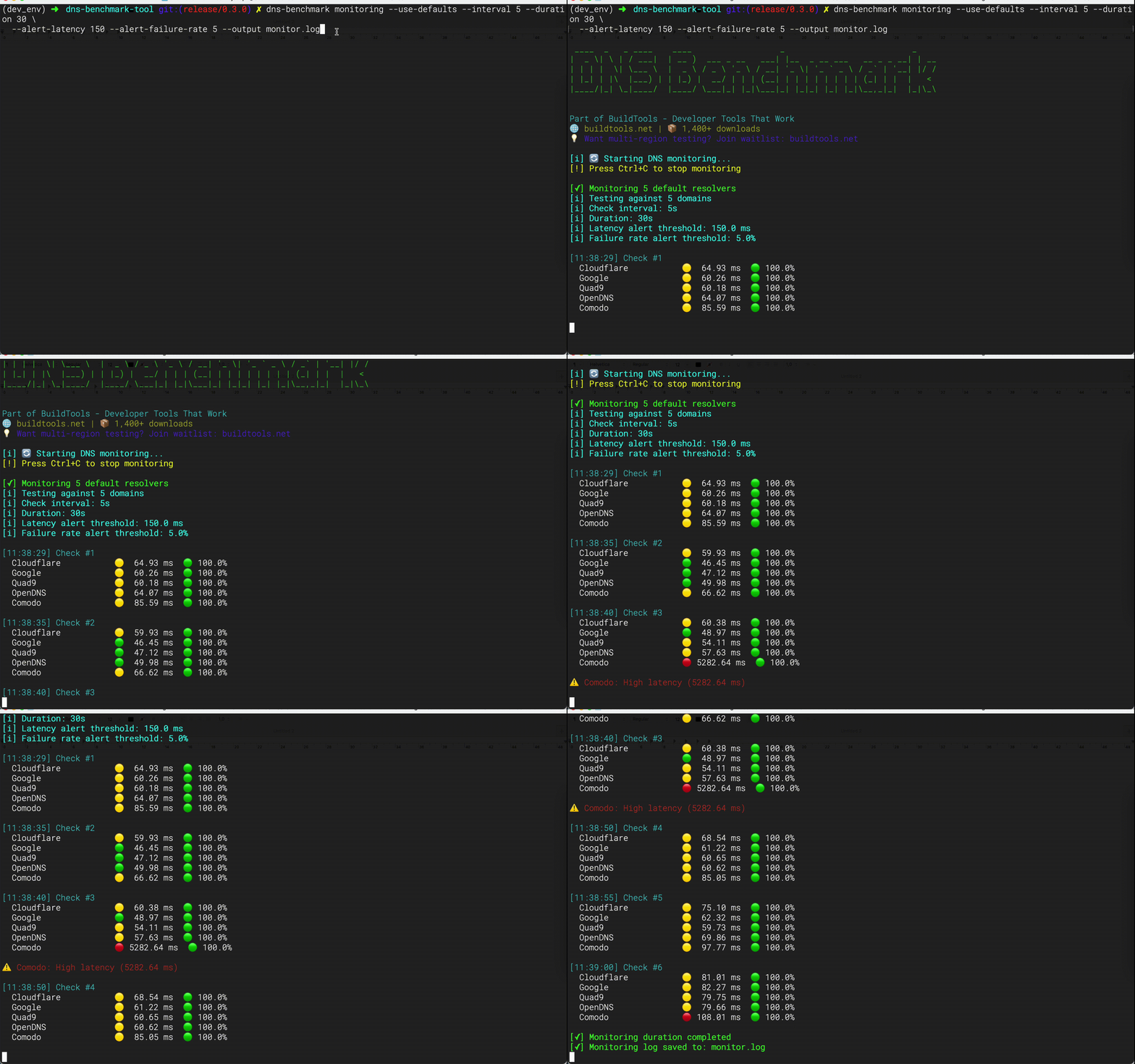
Real Time Tracking
Real Time Tracking - Web UI
Monitor DNS queries live with email alerts
We've added three powerful CLI commands and full support for DoH, DoT, and DNSSEC:
# Quick resolver ranking
dns-benchmark top
# Compare resolvers side-by-side
dns-benchmark compare Cloudflare Google Quad9 --show-details
# Run monitoring for 1 hour with alerts
dns-benchmark monitoring --use-defaults --formats csv,excel --interval 30 --duration 3600 \
--alert-latency 150 --alert-failure-rate 5 --output monitor.log
# Encrypted DNS
dns-benchmark benchmark \
--resolvers "Cloudflare,Google" \
--domains "bing.com,google.com" \
--doh \
--doh-url "https://cloudflare-dns.com/dns-query,https://dns.google/dns-query" \
--iterations 1 \
--formats csv \
--output ./doh_results_explicit_urls
dns-benchmark benchmark \
--resolvers "Cloudflare,Quad9" \
--domains "cloudflare.com,quad9.net" \
--dot
DNS resolution is often the hidden bottleneck in network performance. A slow resolver can add hundreds of milliseconds to every request.
dns-benchmark-tool helps you:
pip install dns-benchmark-tool
# Test default resolvers against popular domains
dns-benchmark benchmark --use-defaults --formats csv,excel
Results are automatically saved to ./benchmark_results/ with:
That's it! You just benchmarked 5 DNS resolvers against 10 domains.
# Find your fastest resolver right now
dns-benchmark top --limit 5
# Compare the big three
dns-benchmark compare Cloudflare Google Quad9 --show-details
# Monitor with DoT and alerts for 1 hour
dns-benchmark monitoring --use-defaults --dot \
--interval 30 --duration 3600 \
--alert-latency 150 --output monitor.log
Three protocols are fully supported — each adds privacy at a latency cost.
⚠️ Tradeoffs
- DoH and DoT add TLS handshake overhead on first query per resolver. Use
--warmup-fastto absorb this before measuring.--dnssec-validaterequests RRSIG records and enforces the AD flag. Only ~33% of common domains are DNSSEC-signed — expectDNSSEC_FAILEDresults on unsigned domains. Latency numbers with and without this flag are not directly comparable.- Results on mobile/hotspot will show 2–5× higher variance than wired ethernet. Use
--iterations 5and compare median latency, not average.
# DoH benchmark
dns-benchmark benchmark \
--resolvers "Cloudflare,Google" \
--domains "cloudflare.com,google.com" \
--doh --warmup-fast
# custom resolvers — must supply urls 1:1, order matters, or it fails early
dns-benchmark benchmark \
--resolvers "Cloudflare,Google" \
--domains "bing.com,google.com" \
--doh \
--doh-url "https://cloudflare-dns.com/dns-query,https://dns.google/dns-query" \
--iterations 1 \
--formats csv \
--output ./doh_results_explicit_urls
# DoT with DNSSEC on signed domains
dns-benchmark benchmark \
--resolvers "Cloudflare,Quad9" \
--domains "cloudflare.com,quad9.net" \
--dot \
--dnssec-validate
# DOH rank top resolvers
dns-benchmark top --doh --limit 5
# DOT rank top resolvers
dns-benchmark top --dot --metric reliability --limit 5
# Compare DoH resolvers
dns-benchmark compare Cloudflare Google --doh --iterations 3
# Monitor with DoT
dns-benchmark monitoring --use-defaults --dot \
--interval 60 --alert-latency 300
# DoH + DNSSEC enforced + export
dns-benchmark benchmark --use-defaults --doh --dnssec-validate --formats csv,excel
# DoT + DNSSEC enforced + multiple iterations
dns-benchmark benchmark \
--resolvers "Cloudflare,Quad9,Google" \
--domains "cloudflare.com,quad9.net,google.com" \
--dot \
--dnssec-validate \
--iterations 5 \
--formats excel
# DoH + custom urls + monitoring
dns-benchmark monitoring \
--resolvers "Cloudflare,Google" \
--doh \
--doh-url "https://cloudflare-dns.com/dns-query,https://dns.google/dns-query" \
--interval 30 --duration 7200
Early failure examples — these fail immediately before any query runs:
# --doh and --dot are mutually exclusive
dns-benchmark benchmark --use-defaults --doh --dot
# ERROR: --doh and --dot are mutually exclusive.
# --doh-url count must match --resolvers count
dns-benchmark benchmark --resolvers "Cloudflare,Google" --doh \
--doh-url "https://cloudflare-dns.com/dns-query"
# ERROR: --doh-url has 1 URL(s) but --resolvers has 2 resolver(s). Counts must match.
# Custom IP with --doh requires --doh-url
dns-benchmark benchmark --resolvers "192.168.1.1" --doh
# ERROR: --doh requires a DoH URL for: 192.168.1.1. Use --doh-url to supply them explicitly.
⚠️ These flags are documented for visibility but not yet implemented.
They represent upcoming advanced features.
--zone-transfer → AXFR/IXFR zone transfer testing (coming soon)--tsig → TSIG-authenticated queries (coming soon)--idna → Internationalized domain name support (coming soon)Example:
dns-benchmark benchmark \
--max-concurrent 200 \
--iterations 5 \
--timeout 3.0 \
--warmup
Example:
# Test DoH resolvers
dns-benchmark benchmark \
--doh \
--resolvers doh-providers.json \
--dnssec-validate
Example:
# Validate DNS migration
dns-benchmark benchmark \
--resolvers old-provider.json,new-provider.json \
--zone-transfer \ # coming soon
--output migration-report/ \
--formats pdf,excel
Example:
# Detailed analysis
dns-benchmark benchmark \
--use-defaults \
--formats csv,excel \
--domain-stats \
--record-type-stats \
--error-breakdown \
--formats csv,excel,pdf
Example:
# Test internationalized domains
dns-benchmark benchmark \
--domains international-domains.txt \
--record-types A,AAAA,MX \
--resolvers custom-resolvers.json
💡 Most users only need basic features. These advanced capabilities are available when you need them.
# Find fastest DNS for your API endpoints
dns-benchmark benchmark \
--domains api.myapp.com,cdn.myapp.com \
--record-types A,AAAA \
--resolvers production.json \
--iterations 10
Result: Reduce API latency by 100-300ms
# Test new DNS provider before switching
dns-benchmark benchmark \
--resolvers current-dns.json,new-dns.json \
--use-defaults \
--dnssec-validate \
--output migration-report/ \
--formats csv,excel
Result: Verify performance and security before migration
# Compare Pi-hole against public resolvers
dns-benchmark compare \
--resolvers pihole.local,1.1.1.1,8.8.8.8,9.9.9.9 \
--domains common-sites.txt \
--rounds 10
Result: Data-driven proof your self-hosted DNS is faster (or not!)
# Add to crontab for monthly reports
0 0 1 * * dns-benchmark benchmark \
--use-defaults \
--output /var/reports/dns/ \
--formats excel,csv \
--domain-stats \
--error-breakdown
Result: Automated compliance and SLA reporting
# Benchmark privacy-focused DoH/DoT resolvers
dns-benchmark benchmark \
--doh \
--resolvers privacy-resolvers.json \
--domains sensitive-sites.txt \
--dnssec-validate
Result: Find fastest encrypted DNS without sacrificing privacy
pip install dns-benchmark-tool
git clone https://github.com/frankovo/dns-benchmark-tool.git
cd dns-benchmark-tool
pip install -e .
dns-benchmark --version
dns-benchmark --help
# Test with defaults (recommended for first time)
dns-benchmark benchmark --use-defaults --formats csv,excel
# Basic test with progress bars
dns-benchmark benchmark --use-defaults --formats csv,excel
# Basic test without progress bars
dns-benchmark benchmark --use-defaults --formats csv,excel --quiet
# Test with custom resolvers and domains
dns-benchmark benchmark --resolvers data/resolvers.json --domains data/domains.txt
# Quick test with only CSV output
dns-benchmark benchmark --use-defaults --formats csv
# Export a machine-readable bundle
dns-benchmark benchmark --use-defaults --json --output ./results
# Test specific record types
dns-benchmark benchmark --use-defaults --formats csv,excel --record-types A,AAAA,MX
# Custom output location and formats
dns-benchmark benchmark \
--use-defaults \
--output ./my-results \
--formats csv,excel
# Include detailed statistics
dns-benchmark benchmark \
--use-defaults \
--formats csv,excel \
--record-type-stats \
--error-breakdown
# High concurrency with retries
dns-benchmark benchmark \
--use-defaults \
--formats csv,excel \
--max-concurrent 200 \
--timeout 3.0 \
--retries 3
# Website migration planning
dns-benchmark benchmark \
--resolvers data/global_resolvers.json \
--domains data/migration_domains.txt \
--formats excel,pdf \
--output ./migration_analysis
# DNS provider selection
dns-benchmark benchmark \
--resolvers data/provider_candidates.json \
--domains data/business_domains.txt \
--formats csv,excel \
--output ./provider_selection
# Network troubleshooting
dns-benchmark benchmark \
--resolvers "192.168.1.1,1.1.1.1,8.8.8.8" \
--domains "problematic-domain.com,working-domain.com" \
--timeout 10 \
--retries 3 \
--formats csv \
--output ./troubleshooting
# Security assessment
dns-benchmark benchmark \
--resolvers data/security_resolvers.json \
--domains data/security_test_domains.txt \
--formats pdf \
--output ./security_assessment
# Performance monitoring
dns-benchmark benchmark \
--use-defaults \
--formats csv \
--quiet \
--output /var/log/dns_benchmark/$(date +%Y%m%d_%H%M%S)
# New top commands
# Run a basic benchmark (default: rank by latency)
dns-benchmark top
# → Tests all resolvers with sample domains, ranks by latency
# Limit the number of resolvers shown
dns-benchmark top --limit 5
# → Shows only the top 5 resolvers
# Rank by success rate
dns-benchmark top --metric success
# → Ranks resolvers by highest success rate
# Rank by reliability (combined score: success rate + latency)
dns-benchmark top --metric reliability
# → Uses weighted score to rank resolvers
# Filter resolvers by category
dns-benchmark top --category privacy
dns-benchmark top --category family
dns-benchmark top --category security
# → Tests only resolvers in the specified category
# Use a custom domain list
dns-benchmark top --domains domains.txt
# → Loads domains from a text file instead of built-in sample list
# Specify DNS record types
dns-benchmark top --record-types A,AAAA,MX
# → Queries multiple record types (comma-separated)
# Adjust timeout and concurrency
dns-benchmark top --timeout 3.0 --max-concurrent 50
# → Sets query timeout to 3 seconds and limits concurrency to 50
# Export results to JSON
dns-benchmark top --output results.json
# → Saves results in JSON format
# Export results to CSV
dns-benchmark top --output results.csv
# → Saves results in CSV format
# Export results to TXT
dns-benchmark top --output results.txt
# → Saves results in plain text format
# Quiet mode (no progress bar, CI/CD friendly)
dns-benchmark top --quiet
# → Suppresses progress output
# Example combined usage
dns-benchmark top --limit 10 --metric reliability --category privacy --output top_resolvers.csv
# → Benchmarks privacy resolvers, ranks by reliability, shows top 10, exports to CSV
# New compare commaands
# Comparison of resolvers by name
dns-benchmark compare Cloudflare Google Quad9
# ^ Compares Cloudflare, Google, and Quad9 resolvers using default domains and record type A
# Basic compare resolvers by IP address
dns-benchmark compare 1.1.1.1 8.8.8.8 9.9.9.9
# ^ Directly specify resolver IPs instead of names
# Increase iterations for more stable results
dns-benchmark compare "Cloudflare" "Google" --iterations 5
# ^ Runs 5 rounds of queries per resolver/domain/record type
# Use a custom domain list from file
dns-benchmark compare Cloudflare Google -d ./data/domains.txt
# ^ Loads domains from domains.txt instead of sample domains
# Query multiple record types
dns-benchmark compare Cloudflare Google -t A,AAAA,MX
# ^ Tests A, AAAA, and MX records for each domain
# Adjust timeout and concurrency
dns-benchmark compare Cloudflare Google --timeout 3.0 --max-concurrent 200
# ^ Sets query timeout to 3 seconds and allows 200 concurrent queries
# Export results to JSON
dns-benchmark compare Cloudflare Google -o results.json
# ^ Saves comparison summary to results.json
# Export results to CSV
dns-benchmark compare Cloudflare Google -o results.csv
# ^ Saves comparison summary to results.csv (via CSVExporter)
# Suppress progress output
dns-benchmark compare Cloudflare Google --quiet
# ^ Runs silently, only prints final results
# Show detailed per-domain breakdown
dns-benchmark compare Cloudflare Google --show-details
# ^ Prints average latency and success counts per domain for each resolver
# New monitoring commands
# Start monitoring with default resolvers and sample domains
dns-benchmark monitoring --use-defaults
# ^ Runs indefinitely, checking every 60s, using built-in resolvers and 5 sample domains
# Monitor with a custom resolver list from JSON
dns-benchmark monitoring -r resolvers.json --use-defaults
# ^ Loads resolvers from resolvers.json, domains from defaults
# Monitor with a custom domain list
dns-benchmark monitoring -d domains.txt --use-defaults
# ^ Uses default resolvers, but domains are loaded from domains.txt
# Change monitoring interval to 30 seconds
dns-benchmark monitoring --use-defaults --interval 30
# ^ Runs checks every 30 seconds instead of 60
# Run monitoring for a fixed duration (e.g., 1 hour = 3600 seconds)
dns-benchmark monitoring --use-defaults --duration 3600
# ^ Stops automatically after 1 hour
# Set stricter alert thresholds
dns-benchmark monitoring --use-defaults --alert-latency 150 --alert-failure-rate 5
# ^ Alerts if latency >150ms or failure rate >5%
# Save monitoring results to a log file
dns-benchmark monitoring --use-defaults --output monitor.log
# ^ Appends results and alerts to monitor.log
# Combine options: custom resolvers, domains, interval, duration, and logging
dns-benchmark monitoring -r resolvers.json -d domains.txt -i 45 --duration 1800 -o monitor.log
# ^ Monitors resolvers from resolvers.json against domains.txt every 45s, for 30 minutes, logging to monitor.log
# Run monitoring for 1 hour with alerts
dns-benchmark monitoring --use-defaults --interval 30 --duration 3600 \
--alert-latency 150 --alert-failure-rate 5 --output monitor.log
⚠️ Note for new commands: Resolvers with no successful queries are excluded from ranking and will display Avg Latency: N/A.
This patch introduces full support for comma‑separated inline values for the
--resolvers and --domains flags, fixing issue #39 and improving cli usability without breaking any existing workflows.
--resolvers "1.1.1.1,8.8.8.8,9.9.9.9"--domains "google.com,github.com"--resolvers "1.1.1.1" or --domains "google.com"--resolvers "cloudflare,google,quad9"--resolvers "1.1.1.1,cloudflare,8.8.8.8"dns-benchmark benchmark \
--resolvers data/resolvers.json \
--domains data/domains.txt
# Inline (New)
dns-benchmark benchmark \
--resolvers "1.1.1.1,8.8.8.8,9.9.9.9" \
--domains "google.com,github.com" \
--timeout 10 \
--retries 3 \
--formats csv \
--output ./troubleshooting
# Files (STILL WORKS)
dns-benchmark benchmark \
--resolvers data/resolvers.json \
--domains data/domains.txt \
--formats csv
# Named resolvers
dns-benchmark benchmark \
--resolvers "Cloudflare,Google,Quad9" \
--domains "google.com,github.com" \
--timeout 10 \
--retries 3 \
--formats csv \
--output ./troubleshooting_named
# Mixed input
dns-benchmark benchmark \
--resolvers "1.1.1.1,Cloudflare,8.8.8.8" \
--domains "google.com,github.com" \
--timeout 10 \
--retries 3 \
--formats csv \
--output ./troubleshooting_mixed
# Single
dns-benchmark benchmark \
--resolvers "1.1.1.1" \
--domains "google.com" \
--timeout 10 \
--retries 3 \
--formats csv \
--output ./troubleshooting
# Show default resolvers and domains
dns-benchmark list-defaults
# Browse all available resolvers
dns-benchmark list-resolvers
# Browse with detailed information
dns-benchmark list-resolvers --details
# Filter by category
dns-benchmark list-resolvers --category security
dns-benchmark list-resolvers --category privacy
dns-benchmark list-resolvers --category family
# Export resolvers to different formats
dns-benchmark list-resolvers --format csv
dns-benchmark list-resolvers --format json
# List all test domains
dns-benchmark list-domains
# Show domains by category
dns-benchmark list-domains --category tech
dns-benchmark list-domains --category ecommerce
dns-benchmark list-domains --category social
# Limit results
dns-benchmark list-domains --count 10
dns-benchmark list-domains --category news --count 5
# Export domain list
dns-benchmark list-domains --format csv
dns-benchmark list-domains --format json
# View all available categories
dns-benchmark list-categories
# Generate sample configuration
dns-benchmark generate-config --output sample_config.yaml
# Category-specific configurations
dns-benchmark generate-config --category security --output security_test.yaml
dns-benchmark generate-config --category family --output family_protection.yaml
dns-benchmark generate-config --category performance --output performance_test.yaml
# Custom configuration for specific use case
dns-benchmark generate-config --category privacy --output privacy_audit.yaml
# Basic test with progress bars
dns-benchmark benchmark --use-defaults
# Quick test with only CSV output
dns-benchmark benchmark --use-defaults --formats csv --quiet
# Test specific record types
dns-benchmark benchmark --use-defaults --record-types A,AAAA,MX
Add-on analytics flags:
# Include domain and record-type analytics and error breakdown
dns-benchmark benchmark --use-defaults \
--domain-stats --record-type-stats --error-breakdown
JSON export:
# Export a machine-readable bundle
dns-benchmark benchmark --use-defaults --json --output ./results
# Compare internal vs external DNS
dns-benchmark benchmark \
--resolvers "192.168.1.1,1.1.1.1,8.8.8.8,9.9.9.9" \
--domains "internal.company.com,google.com,github.com,api.service.com" \
--formats excel,pdf \
--timeout 3 \
--max-concurrent 50 \
--output ./network_audit
# Test DNS failover scenarios
dns-benchmark benchmark \
--resolvers data/primary_resolvers.json \
--domains data/business_critical_domains.txt \
--record-types A,AAAA \
--retries 3 \
--formats csv,excel \
--output ./failover_test
# Comprehensive ISP resolver comparison
dns-benchmark benchmark \
--resolvers data/isp_resolvers.json \
--domains data/popular_domains.txt \
--timeout 5 \
--max-concurrent 100 \
--formats csv,excel,pdf \
--output ./isp_performance_analysis
# Regional performance testing
dns-benchmark benchmark \
--resolvers data/regional_resolvers.json \
--domains data/regional_domains.txt \
--formats excel \
--quiet \
--output ./regional_analysis
# Test application dependencies
dns-benchmark benchmark \
--resolvers "1.1.1.1,8.8.8.8" \
--domains "api.github.com,registry.npmjs.org,pypi.org,docker.io,aws.amazon.com" \
--formats csv \
--quiet \
--output ./app_dependencies
# CI/CD integration test
dns-benchmark benchmark \
--resolvers data/ci_resolvers.json \
--domains data/ci_domains.txt \
--timeout 2 \
--formats csv \
--quiet
# Security-focused resolver testing
dns-benchmark benchmark \
--resolvers data/security_resolvers.json \
--domains data/malware_test_domains.txt \
--formats csv,pdf \
--output ./security_audit
# Privacy-focused testing
dns-benchmark benchmark \
--resolvers data/privacy_resolvers.json \
--domains data/tracking_domains.txt \
--formats excel \
--output ./privacy_analysis
# Corporate network assessment
dns-benchmark benchmark \
--resolvers data/enterprise_resolvers.json \
--domains data/corporate_domains.txt \
--record-types A,AAAA,MX,TXT,SRV \
--timeout 10 \
--max-concurrent 25 \
--retries 2 \
--formats csv,excel,pdf \
--output ./enterprise_dns_audit
# Multi-location testing
dns-benchmark benchmark \
--resolvers data/global_resolvers.json \
--domains data/international_domains.txt \
--formats excel \
--output ./global_performance
The DNS Benchmark Tool now includes three specialized commands for different workflows:
Quickly rank resolvers by speed and reliability.
# Rank resolvers quickly
dns-benchmark top
# Use custom domain list
dns-benchmark top -d domains.txt
# Export results to JSON
dns-benchmark top -o results.json
Benchmark resolvers side‑by‑side with detailed statistics.
# Compare Cloudflare, Google, and Quad9
dns-benchmark compare Cloudflare Google Quad9
# Compare by IP addresses
dns-benchmark compare 1.1.1.1 8.8.8.8 9.9.9.9
# Show detailed per-domain breakdown
dns-benchmark compare Cloudflare Google --show-details
# Export results to CSV
dns-benchmark compare Cloudflare Google -o results.csv
Continuously monitor resolver performance with alerts.
# Monitor default resolvers continuously (every 60s)
dns-benchmark monitoring --use-defaults
# Monitor with custom resolvers and domains
dns-benchmark monitoring -r resolvers.json -d domains.txt
# Run monitoring for 1 hour with alerts
dns-benchmark monitoring --use-defaults --interval 30 --duration 3600 \
--alert-latency 150 --alert-failure-rate 5 --output monitor.log
--use-cache is enabled).get_failed_resolvers().get_cache_stats(), showing number of cached entries and whether cache is enabled.iteration=0 in raw data, making them easy to filter out in analysis.Example summary output:
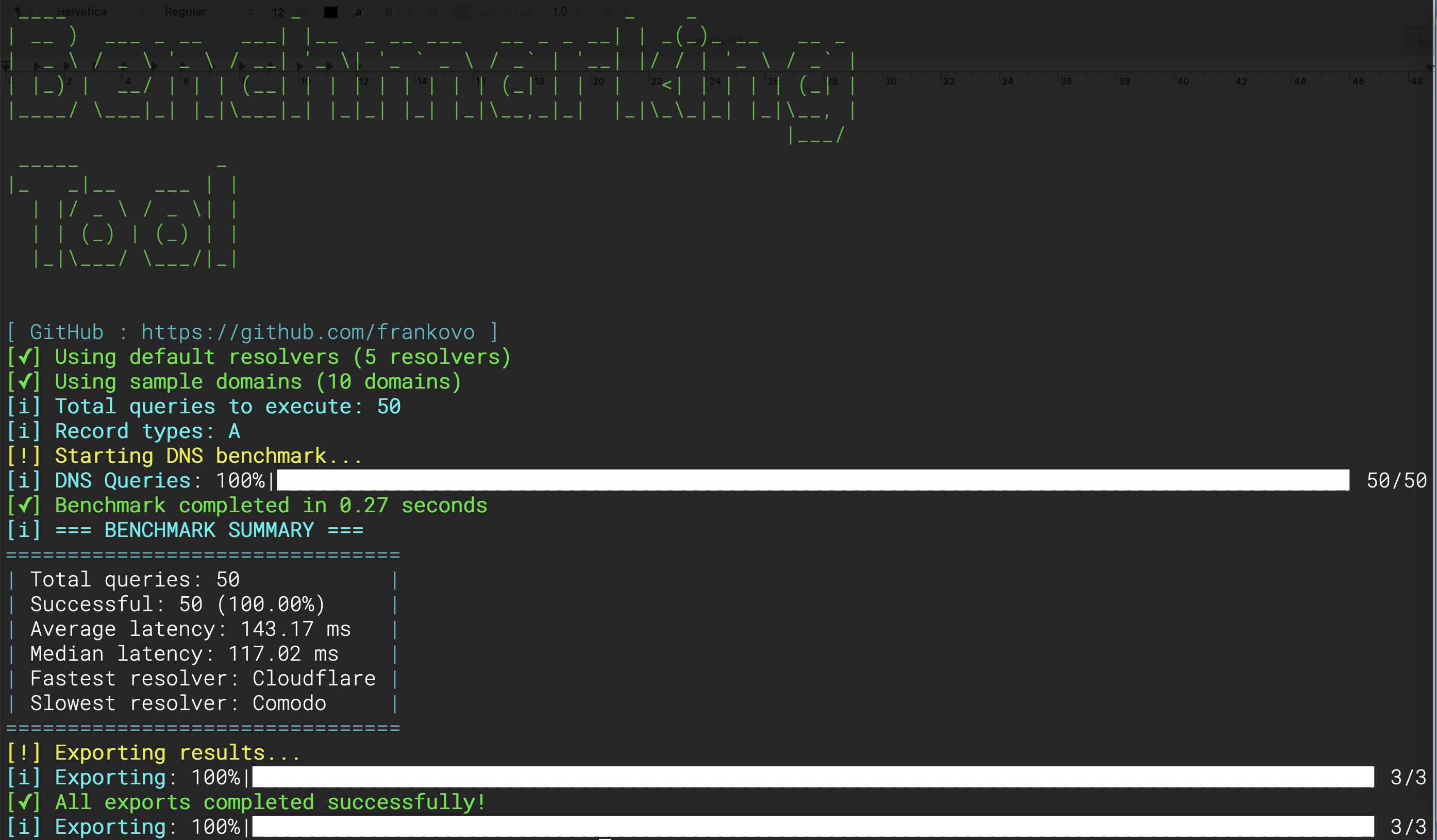
=== BENCHMARK SUMMARY ===
Total queries: 150
Successful: 140 (93.33%)
Average latency: 212.45 ms
Median latency: 198.12 ms
Fastest resolver: Cloudflare
Slowest resolver: Quad9
Iterations: 3
Cache hits: 40 (26.7%)
{
"resolvers": [
{
"name": "Cloudflare",
"ip": "1.1.1.1",
"ipv6": "2606:4700:4700::1111"
},
{
"name": "Google DNS",
"ip": "8.8.8.8",
"ipv6": "2001:4860:4860::8888"
}
]
}
# Popular websites
google.com
github.com
stackoverflow.com
# Corporate domains
microsoft.com
apple.com
amazon.com
# CDN and cloud
cloudflare.com
aws.amazon.com
By default, the tool supports CSV and Excel exports.
PDF export requires the extra dependency weasyprint, which is not installed automatically to avoid runtime issues on some platforms.
pip install dns-benchmark-tool[pdf]
Once installed, you can request PDF output via the CLI:
dns-benchmark --use-defaults --formats pdf --output ./results
If weasyprint is not installed and you request PDF output, the CLI will show:
[-] Error during benchmark: PDF export requires 'weasyprint'. Install with: pip install dns-benchmark-tool[pdf]
The DNS Benchmark Tool uses WeasyPrint to generate PDF reports.
If you want PDF export, you need extra system libraries in addition to the Python package.
sudo apt install python3-pip libpango-1.0-0 libpangoft2-1.0-0 \
libharfbuzz-subset0 libjpeg-dev libopenjp2-7-dev libffi-dev
brew install pango cairo libffi gdk-pixbuf jpeg openjpeg harfbuzz
Install GTK+ libraries using one of these methods:
MSYS2: Download MSYS2, then run:
pacman -S mingw-w64-x86_64-gtk3 mingw-w64-x86_64-libffi
GTK+ 64‑bit Installer: Download GTK+ Runtime and run the installer.
Restart your terminal after installation.
After installing the system libraries, install the Python extra:
pip install dns-benchmark-tool[pdf]
Then run:
dns-benchmark --use-defaults --formats pdf --output ./results
dns-benchmark generate-config \
--category privacy \
--output my-config.yaml
# Large-scale testing (1000+ queries)
dns-benchmark benchmark \
--resolvers data/many_resolvers.json \
--domains data/many_domains.txt \
--max-concurrent 50 \
--timeout 3 \
--quiet \
--formats csv
# Unstable networks
dns-benchmark benchmark \
--resolvers data/backup_resolvers.json \
--domains data/critical_domains.txt \
--timeout 10 \
--retries 3 \
--max-concurrent 10
# Quick diagnostics
dns-benchmark benchmark \
--resolvers "1.1.1.1,8.8.8.8" \
--domains "google.com,cloudflare.com" \
--formats csv \
--quiet \
--timeout 2
# Command not found
pip install -e .
python -m dns_benchmark.cli --help
# PDF generation fails (Ubuntu/Debian)
sudo apt-get install libcairo2 libpango-1.0-0 libpangocairo-1.0-0 \
libgdk-pixbuf2.0-0 libffi-dev shared-mime-info
# Or skip PDF
dns-benchmark benchmark --use-defaults --formats csv,excel
# Network timeouts
dns-benchmark benchmark --use-defaults --timeout 10 --retries 3
dns-benchmark benchmark --use-defaults --max-concurrent 25
# Verbose run
python -m dns_benchmark.cli benchmark --use-defaults --formats csv
# Minimal configuration
dns-benchmark benchmark --resolvers "1.1.1.1" --domains "google.com" --formats csv
# Daily monitoring
0 2 * * * /usr/local/bin/dns-benchmark benchmark --use-defaults --formats csv --quiet --output /var/log/dns_benchmark/daily_$(date +\%Y\%m\%d)
# Time-based variability (every 6 hours)
0 */6 * * * /usr/local/bin/dns-benchmark benchmark --use-defaults --formats csv --quiet --output /var/log/dns_benchmark/$(date +\%Y\%m\%d_\%H)
- name: DNS Performance Test
run: |
pip install dnspython pandas click tqdm colorama
dns-benchmark benchmark \
--resolvers "1.1.1.1,8.8.8.8" \
--domains "api.service.com,database.service.com" \
--formats csv \
--quiet
Place images in docs/screenshots/:
docs/screenshots/cli_run.pngdocs/screenshots/excel_report.pngdocs/screenshots/pdf_summary.pngdocs/screenshots/pdf_charts.pngdocs/screenshots/excel_charts.pngdocs/screenshots/real_time_monitoring.pngdns-benchmark --help
dns-benchmark benchmark --help
dns-benchmark list-resolvers --help
dns-benchmark list-domains --help
dns-benchmark list-categories --help
dns-benchmark generate-config --help
Common scenarios:
# I'm new — where to start?
dns-benchmark list-defaults
dns-benchmark benchmark --use-defaults
# Test specific resolvers
dns-benchmark list-resolvers --category security
dns-benchmark benchmark --resolvers data/security_resolvers.json --use-defaults
# Generate a management report
dns-benchmark benchmark --use-defaults --formats excel,pdf \
--domain-stats --record-type-stats --error-breakdown --json \
--output ./management_report
Prerequisites
make gpg-check to verify.Prepare release (signed)
Patch/minor/major bump:
make release-patch # or: make release-minor / make release-major
release/X.Y.Z.Open PR: from release/X.Y.Z into main, then merge once CI passes.
Tag and publish
Create signed tag and push:
make release-tag VERSION=X.Y.Z
vX.Y.Z (signed).Manual alternative
Create branch and commit signed:
git checkout -b release/manually-update-version-based-on-release-pattern
git add .
git commit -S -m "Release release/$NEXT_VERSION"
git push origin release/$NEXT_VERSION
CLI stays free forever. The web dashboard is now available at buildtools.net
→ Sign up free at buildtools.net
We love contributions! Here's how you can help:
This project includes a Makefile to simplify installation, testing, and code quality checks.
.PHONY: install install-dev uninstall mypy black isort flake8 cov test clean cli-test
# 🔧 Install package (runtime only)
install:
pip install .
# 🔧 Install package with dev extras (pytest, mypy, flake8, black, isort, etc.)
install-dev:
pip install .[dev]
# 🔧 Uninstall package
uninstall:
pip uninstall -y dns-benchmark-tool \
dnspython pandas aiohttp click pyfiglet colorama Jinja2 weasyprint openpyxl pyyaml tqdm matplotlib \
mypy black flake8 autopep8 pytest coverage isort
mypy:
mypy .
isort:
isort .
black:
black .
flake8:
flake8 src tests --ignore=E126,E501,E712,F405,F403,E266,W503 --max-line-length=88 --extend-ignore=E203
cov:
coverage erase
coverage run --source=src -m pytest -vv -s
coverage html
test: mypy black isort flake8 cov
clean:
rm -rf __pycache__ .pytest_cache htmlcov .coverage coverage.xml \
build dist *.egg-info .eggs benchmark_results
cli-test:
# Run only the CLI smoke tests marked with @pytest.mark.cli
pytest -vv -s -m cli tests/test_cli_commands.py
Install runtime only
make install
Install with dev dependencies
make install-dev
Run type checks, linting, formatting, and tests
make test
Run CLI smoke tests only
make cli-test
Clean build/test artifacts
make clean
Local ISP DNS often has caching advantages but may lack:
Test both and decide based on YOUR priorities!
Yes! Just add it to a custom resolvers JSON file:
{
"resolvers": [
{"name": "My DNS", "ip": "192.168.1.1"}
]
}
CLI (Free Forever):
Web Dashboard (Live at buildtools.net):
Yes! The tool only performs DNS lookups (read operations). It does NOT:
All tests are standard DNS queries that any resolver handles daily.
DNS performance varies due to:
Run multiple iterations (--iterations 5) for more consistent results.
This project is licensed under the MIT License — see the LICENSE file for details.
Built with ❤️ by @frankovo
Part of BuildTools - Network Performance Suite
| Command | What it does | Quick example |
|---|
benchmark | Full DNS benchmark with exports | dns-benchmark benchmark --use-defaults |
top | Rank all resolvers by speed | dns-benchmark top --limit 5 |
compare | Side-by-side resolver comparison | dns-benchmark compare Cloudflare Google Quad9 |
monitoring | Continuous monitoring with alerts | dns-benchmark monitoring --use-defaults |
| Protocol | Flag | Typical overhead | When to use |
|---|
| Plain UDP | (default) | baseline | Latency benchmarking |
| DNS-over-HTTPS | --doh | +50–200ms | Privacy, firewall bypass |
| DNS-over-TLS | --dot | +200–500ms cold, ~50ms warm | Encrypted transport |
| DNSSEC | --dnssec-validate | +30–100ms | Validating resolver integrity |
| Option | Description | Example |
|---|
--iterations, -i | Run the full benchmark loop N times | dns-benchmark benchmark --use-defaults -i 3 |
--use-cache | Allow cached results to be reused across iterations | dns-benchmark benchmark --use-defaults -i 3 --use-cache |
--warmup | Run a full warmup (all resolvers × domains × record types) | dns-benchmark benchmark --use-defaults --warmup |
--warmup-fast | Run a lightweight warmup (one probe per resolver) | dns-benchmark benchmark --use-defaults --warmup-fast |
--include-charts | Embed charts and graphs in PDF/Excel reports for visual performance analysis | dns-benchmark benchmark --use-defaults --formats pdf,excel --include-charts |
| Command | Purpose | Typical Use Case | Key Options | Output |
|---|
| top | Quick ranking of resolvers by speed and reliability | Fast check to see which resolver is best right now | --domains, --record-types, --output | Sorted list of resolvers with latency & success rate |
| compare | Side‑by‑side comparison of specific resolvers | Detailed benchmarking across chosen resolvers/domains | --domains, --record-types, --iterations, --output, --show-details | Table of resolvers with latency, success rate, per‑domain breakdown |
| monitoring | Continuous monitoring with alerts | Real‑time tracking of resolver performance over time | --interval, --duration, --alert-latency, --alert-failure-rate, --output, --use-defaults | Live status indicators, alerts, optional log file |
| Mode | Recommended Flags | Purpose |
|---|
| Quick Run | --iterations 1 --timeout 1 --retries 0 --warmup-fast | Fast feedback, minimal retries, lightweight warmup. Good for quick checks. |
| Thorough Run | --iterations 3 --use-cache --warmup --timeout 5 --retries 2 | Multiple passes, cache enabled, full warmup. Best for detailed benchmarking. |
| Debug Mode | --iterations 1 --timeout 10 --retries 0 --quiet | Long timeout, no retries, minimal output. Useful for diagnosing resolver issues. |
| Balanced Run | --iterations 2 --use-cache --warmup-fast --timeout 2 --retries 1 | A middle ground: moderate speed, some retries, cache enabled, quick warmup. |
Open PR and merge into main.
Then tag:
make release-tag VERSION=$NEXT_VERSION
Notes
git commit -S ...git tag -s vX.Y.Z -m "Release vX.Y.Z"pyproject.toml and src/dns_benchmark/__init__.py