 nccgroup/httpsignatures
A Burp Suite extension implementing the Signing HTTP Messages draft-ietf-httpbis-message-signatures-01 draft.

HTTPSignatures Burp Suite ExtensionHTTPSignatures is a Burp Suite extension that implements the Signing HTTP Messages draft-ietf-httpbis-message-signatures-01 specification draft document.
This allows Burp Suite users to seamlessly test applications that require HTTP Signatures.
rsa-sha256 algorithm for signing messages (RSASSA-PKCS1-v1_5 [RFC8017] using SHA-256 [RFC6234]) and SHA-256 for the digest header.Download the latest JAR release file and add it in Burp Suite through Extender Tab / Extensions / Add.
Header Name, the keyId, and the Private key file name and path to be configured. See below for the detailed description.Header Name.After HTTPSignatures has been correctly configured, the Burp Suite extension will replace the HTTP header value configured in the Header Name setting (e.g. Signature) with a new signature for every HTTP request sent through Burp Proxy, Repeater, Intruder, and Scanner.
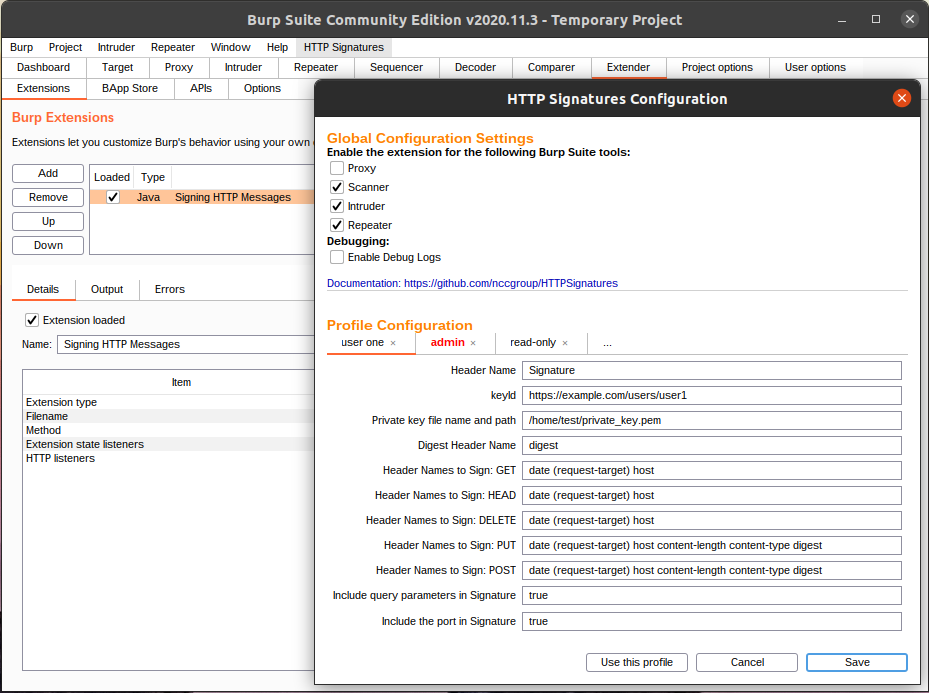
The Burp Suite extension must be configured before it can be used.
The HTTPSignatures configuration can be found in the Burp menu after it has been loaded (usually on the right of the Help menu).
The Header Name, the keyId, and the Private key file name and path have to be correctly configured for the extension to work.
The remaining settings can optionally be adjusted.
Header Name: (sample values: Authorization, Signature): The name of the HTTP request header that includes the signature.
The IETF draft is using the Signature header name. Oracle Cloud (OCI) is using the Authorization header name.
keyId: The keyId parameter is a US-ASCII string used by a verifier to identify and/or obtain the signature's verification key.
Sample values can look like https://mastodon.example.com/users/myUser (for ActivityPub) or ocid1.tenancy.oc1.../ocid1.user.oc1.../{fingerprint} for OCI.
Private key file name and path: The full path and file name containing the private key (e.g. /home/${USER}/private_key.pem).
Digest Header Name: The name of the header containing the digest. This should be either x-content-sha256 (for OCI) or digest for most other implementations.
Header Names to Sign: GET: The header names to include for GET requests (e.g. date (request-target) host).
The (request-target) value is a special identifier consisting of the request method and the path and query of the request URI (e.g. get /foo?param=value).
Header Names to Sign: HEAD: The header names to include in HEAD requests (e.g. date (request-target) host).
Header Names to Sign: DELETE: The header names to include in DELETE requests (e.g. date (request-target) host).
Header Names to Sign: PUT: The header names to include in PUT requests (e.g. date (request-target) host content-length content-type digest).
Header Names to Sign: POST: The header names to inlcude in POST requets (e.g. date (request-target) host content-length content-type digest).
Include query parameters in Signature: This boolean value specifies if query parameters (e.g. ?param=value) should be included in the signature.
While the draft standard specifies that query parameters are part of the (request-target) identifier, not all implementations include query parameters.
The default value is true.
Include the port in Signature: Some implementations do not include the port in the host header (e.g. localhost:8080).
This setting allows to remove the port from the host header value if set to false.
The default value is true.
The HTTPSignatures configuration allows to configure multiple profiles in tabs.
Create a new tab by clicking on the ... tab.
You can name tabs by double clicking on a tab.
To save a tab click the "Save" button.
To mark a tab as the active profile, click the "Use this profile" button.
The active tab (profile) is marked with red font and border.
The global configuration section contains settings that apply to all profiles.
Enable the extension for the following Burp Suite tools: The extension can be enabled or disabled for the following Burp Suite tools:
The proxy is disabled by default. The other tools are enabled by default. The proxy tool should usually only be enabled when using the intercept feature. The extension will not update the signature when it is disabled.
Enable Debug Logs: Enabling this checkbox will print debug logs to the standard output. The output can be configured in Burp Suite under Extender -> Extensions, then select the Signing HTTP Messages extension. In the Output tab you can select where the standard output will be shown. The default is Shown in UI where the output will be displayed within Burp Suite.
ActivityPub uses HTTP Signatures for server to server authentication and authorization.
Signaturehttps://mastodon.online/users/viktor.
You can use curl to retrieve the key: curl https://mastodon.online/users/viktor -H 'Accept: application/activity+json'|jq/home/user/private_key.pemdigestdate (request-target) hostdate (request-target) hostdate (request-target) hostdate (request-target) host content-length content-type digestdate (request-target) host content-length content-type digesttruetrueAll Oracle Cloud Infrastructure (OCI) API requests require HTTP Signatures. The implementation is based on the draft specification with some modifications.
