 nccgroup/collaboratorplusplus
Burp Suite extension enhancing Collaborator with context capture, polling history, and optional AES-encrypted authentication for private server deployments.

Released as open source by NCC Group Plc - http://www.nccgroup.com/
Developed by Corey Arthur, [email protected]
http://www.github.com/nccgroup/CollaboratorPlusPlus
This project is released under AGPL see LICENSE for more information
Download from releases here.
This tool aims to extend upon the existing Collaborator functionality provided by Burp Suite, providing a number of quality of life features, and the implementation of an authentication mechanism to secure private collaborator deployments, while still being compatible with all existing extensions which generate and poll Collaborator contexts.
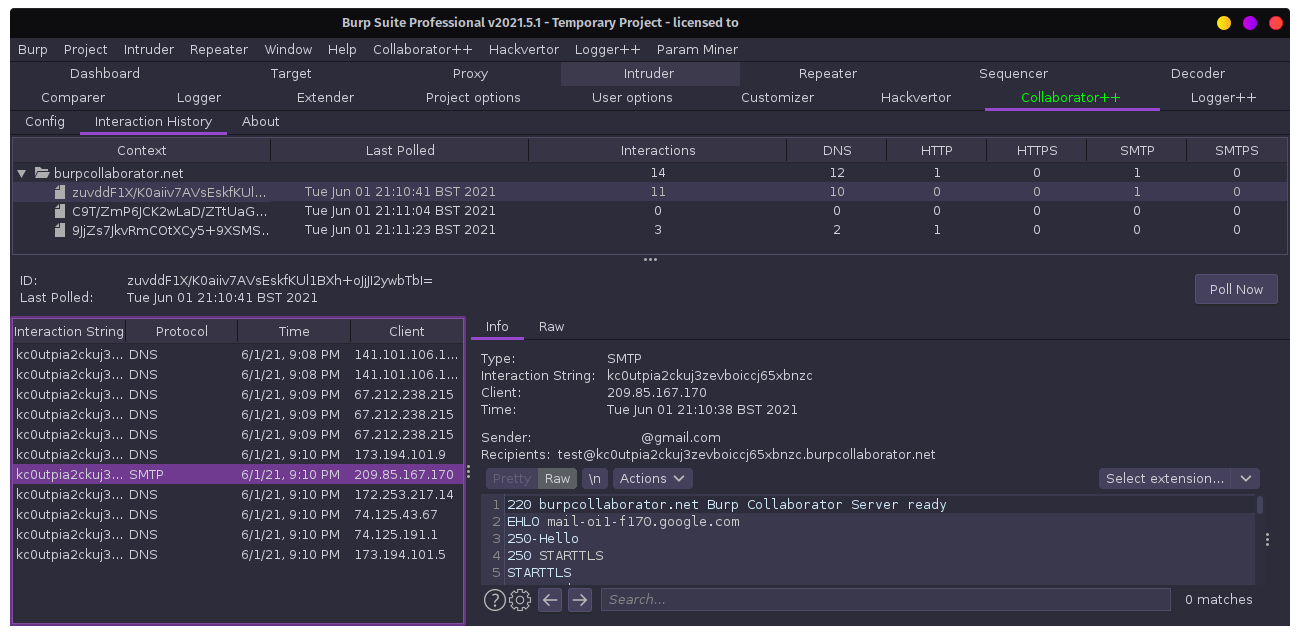
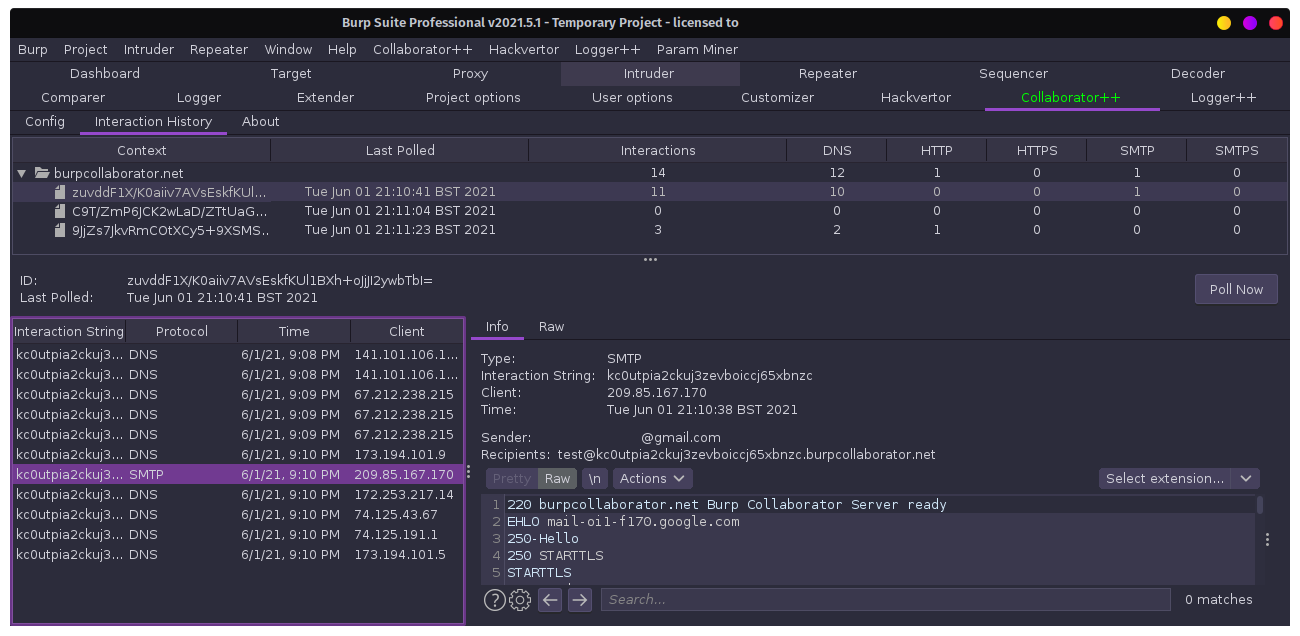
CollaboratorPlusPlus acts as a proxy between Burp and the configured Collaborator server, allowing the capture of Collaborator contexts being used by the client. CollaboratorPlusPlus can then store and display the observed contexts and their retrieved interactions in a central interface. In addition, old contexts can be polled manually, allowing interactions to be retrieved even after the Collaborator client window has been closed.
In addition to the Burp Extension, the Collaborator++ project also includes an optional server-side authentication component to authenticating incoming polling requests before passing them to the Collaborator server. This can be deployed by owners of private Burp Collaborator servers to restrict polling to only those with knowledge of the shared secret.
When Burp requests the list of interactions received by the Collaborator server, the extension encrypts the polling requests with the AES256-CBC encryption scheme, using the shared secret to generate the encryption key. Provided the shared secret is correct, the authentication server is able to decrypt the request and forward it to the Collaborator server to retrieve the interactions for the given Collaborator instance. The response is then encrypted with the shared-secret before being sent back to the Burp client.
By using the shared-secret to encrypt the transmission between the Burp client and the authentication server, the shared-secret does not need to be transmitted along with the request, allowing confidentiality to be maintained even in cases where HTTP communication must be used between the client and server.
A few additional settings have been added to Collaborator Auth for convenience.
Use SSL: Toggle the use of SSL between the client and server. Be sure your server is configured to use SSL on the target port too.
Ignore Certificate Errors: Disables certificate validity checks. Allows usage of self-signed / expired certificates.
Enable SSL Hostname Verification: Do not check the certificate hostname matches the target domain.
Block Public Collaborator Server: Prevents accidental usage of the public Burp collaborator server. Adds a DNS entry for "burpcollaborator.net" to 127.0.0.1 in Burp's hostname resolution config.
java -jar CollaboratorPlusPlus.jar to generate the default configuration.
java -jar CollaboratorPlusPlus.jar YOURCONFIGFILE.propertiesNote: To allow HTTP and HTTPS requests to the Collaborator++ Auth server, create two copies of the configuration file, configuring one for HTTP and one for HTTPS and run two instances of the Collaborator++ Auth server.
To enable the usage of SSL, generate a certificate for the server and use one of the below methods to configure the server.
For both methods, ensure enable_ssl is true in the config file.
openssl req -newkey rsa:2048 -nodes -keyout privatekey.pem -x509 -days 365 -out certificate.pemssl_private_key_path to the path of your private key.ssl_certificate_path to the path of your certificate.ssl_intermediate_certificate_path to the path of your intermediate certificate.This method was added purely for compatability reasons. I highly recommend using the simple configuration unless there is a reason otherwise.
ssl_private_key_path to an empty string "".
openssl req -newkey rsa:2048 -nodes -keyout privatekey.pem -x509 -days 365 -out certificate.pemopenssl pkcs12 -export -in certificate.pem -inkey privatekey.pem -out polling.p12 -name pollingkeytool -importkeystore -deststorepass NEW_PASSWORD_FOR_KEYSTORE -destkeypass NEW_PASSWORD_FOR_PRIVATE_KEY \
-destkeystore polling.jks -srckeystore polling.p12 -srcstoretype PKCS12 \
-srcstorepass PASS_FROM_PREVIOUS_STEP -alias pollingjava -jar CollaboratorAuth-SERVER.jar CollaboratorServer.propertiesTo prevent polling of the Collaborator Server without the usage of Collaborator Auth, the Burp Collaborators polling location must be restricted.
This may be done using your firewall, or by modifying the listening interface for polling events.
Option 1 - Always require usage of Collaborator Auth.
Should you wish to force users of your Burp Collaborator instance to authenticate regardless of their network, Burp Collaborator can be configured to listen to polling events only on the local machine (i.e. from Collaborator Auth).
This can be done by changing Burp Collaborator's listening address for polling events to the loopback interface (127.0.0.1) or using something like iptables to drop incoming requests.
Option 2 - Only require usage of Collaborator Auth on external networks.
To allow Burp Collaborator to be used as normal when on the same network as the server, but require Collaborator Auth to be used when on an external network, Burp Collaborator can be configured to listen to polling events from internal addresses.
This can be done by changing Burp Collaborator's listening address to polling events to the server's internal address (192.168.x.x, 10.x.x.x, etc.).
