 mwemuorg/mwemu
Pure Rust x86 hardware emulator and Windows process simulator for malware analysis, shellcode emulation, and payload unpacking. Supports 32/64-bit PE executables, Metasploit, Cobalt Strike, and complex malware families.









It's a hardware emulator + OS process simulator implemented in pure rust.
This approach is very convenient to malware analysis and other stuff (PE, shellcode etc)
Supports x86 32/64-bit and AArch64 architectures. The primary target OS is Windows (full process emulation with PEB/TEB/LDR, WinAPI and syscall interception), with growing support for Linux and macOS (syscalls, ELF/Mach-O loaders, libc shims).

The project was renamed from scemu to mwemu.
r2con2025 using radare2 from mwemu for doing static analisys and visualization inside an emulation moment.
📦 rust safety, good for emulating malware.
⚡ very fast emulation
make test_speed (builds release and emulates 20M instructions of enigma, reporting elapsed time)powered by iced-x86 rust dissasembler awesome library.
commandline tool, rust library, and python library.
iteration detector.
memory and register tracking.
colorized.
stop at specific moment and explore the state or modify it.
339 CPU instructions implemented.
260 winapi 32bits implemented of 15 dlls.
204 winapi 64bits implemented of 10 dlls.
all linux syscalls.
SEH chains.
vectored exception handler.
PEB, TEB structures.
dynamic linking.
IAT binding.
delay loading.
memory allocator.
react with int3.
non debugged cpuid.
32bits and 64bits shellcode emulation.
pe32 and pe64 executables emulation.
fully emulation with known payloads:
partial emulation with complex malware functions:
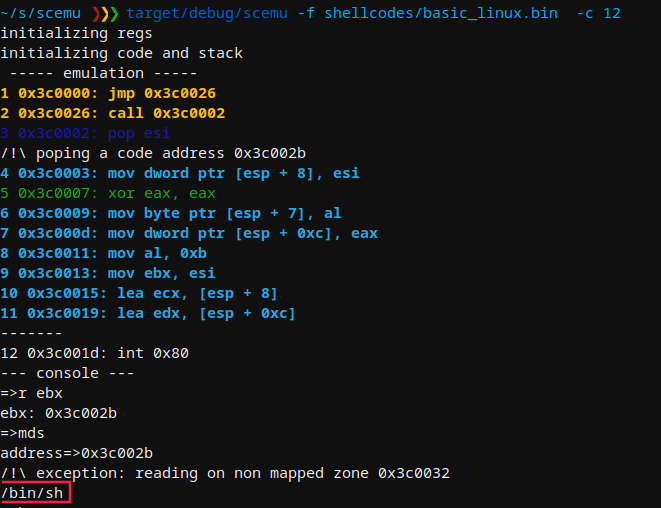
During the emulation you can see the nubmer of cpu instructions emulated, that's an unique ID for an emulation moment.
With -c flag you stop the emulation in a specific moment and inspect what is going on with the console.
MWEMU emulator for malware 0.7.11
@sha0coder

USAGE:
    mwemu [FLAGS] [OPTIONS]

FLAGS:
    -6, --64bits         enable 64bits architecture emulation
        --banzai         skip unimplemented instructions, and keep up emulating what can be emulated
        --flags          trace the flags hex value in every instruction.
    -F, --fpu            trace the fpu states.
    -h, --handle         handle Ctrl+C to spawn console
        --help           Prints help information
    -l, --loops          show loop interations, it is slow.
    -m, --memory         trace all the memory accesses read and write.
    -n, --nocolors       print without colors for redirectin to a file >out
    -r, --regs           print the register values in every step.
    -p, --stack_trace    trace stack on push/pop
    -t, --test           test mode
        --version        Prints version information
    -v, --verbose        -vv for view the assembly, -v only messages, without verbose only see the api calls and goes
                         faster

OPTIONS:
    -A, --args <ARGS>                  provide arguments to the EXE like: --args '"aa" "bb"'
        --cmd <COMMAND>                launch a console command
    -b, --base <ADDRESS>               set base address for code
    -c, --console <NUMBER>             select in which moment will spawn the console to inspect.
    -C, --console_addr <ADDRESS>       spawn console on first eip = address
    -d, --dump <FILE>                  load from dump.
    -a, --entry <ADDRESS>              entry point of the shellcode, by default starts from the beginning.
    -e, --exit <POSITION>              exit position of the shellcode
    -f, --filename <FILE>              set the shellcode binary file.
    -i, --inspect <DIRECTION>          monitor memory like: -i 'dword ptr [ebp + 0x24]
        --iso <ISO>                    extract genuine system32 DLLs from a Windows ISO and use them as the maps folder, e.g. --iso ~/Downloads/win11.iso
    -L, --log <LOG_FILENAME>           log output to file
    -M, --maps <PATH>                  select the memory maps folder
        --mxcsr <MXCSR>                set mxcsr register
        --r10 <R10>                    set r10 register
        --r11 <R11>                    set r11 register
        --r12 <R12>                    set r12 register
        --r13 <R13>                    set r13 register
        --r14 <R14>                    set r14 register
        --r15 <R15>                    set r15 register
        --r8 <R8>                      set r8 register
        --r9 <R9>                      set r9 register
        --rax <RAX>                    set rax register
        --rbp <RBP>                    set rbp register
        --rbx <RBX>                    set rbx register
        --rcx <RCX>                    set rcx register
        --rdi <RDI>                    set rdi register
        --rdx <RDX>                    set rdx register
    -R, --reg <REGISTER1,REGISTER2>    trace a specific register in every step, value and content
        --rflags <RFLAGS>              set rflags register
        --rsi <RSI>                    set rsi register
        --rsp <RSP>                    set rsp register
    -x, --script <SCRIPT>              launch an emulation script, see scripts_examples folder
        --stack_address <ADDRESS>      set stack address
    -s, --string <ADDRESS>             monitor string on a specific address
    -T, --trace <TRACE_FILENAME>       output trace to specified file
    -S, --trace_start <TRACE_START>    start trace at specified position
    -V, --verbose_at <NUMBER>          start displaying assembly at specific position (is like -vv enabled in specific
                                       moment)
64bits needs the -6 flag, -vv for viewing ASM, and -c for spawning console at specific moment:
