
CHOMTE.SH is a powerful shell script designed to automate reconnaissance tasks during penetration testing. It utilizes various Go-based tools to gather information and identify the attack surface, making it a valuable asset for bug bounty hunters and penetration testers.



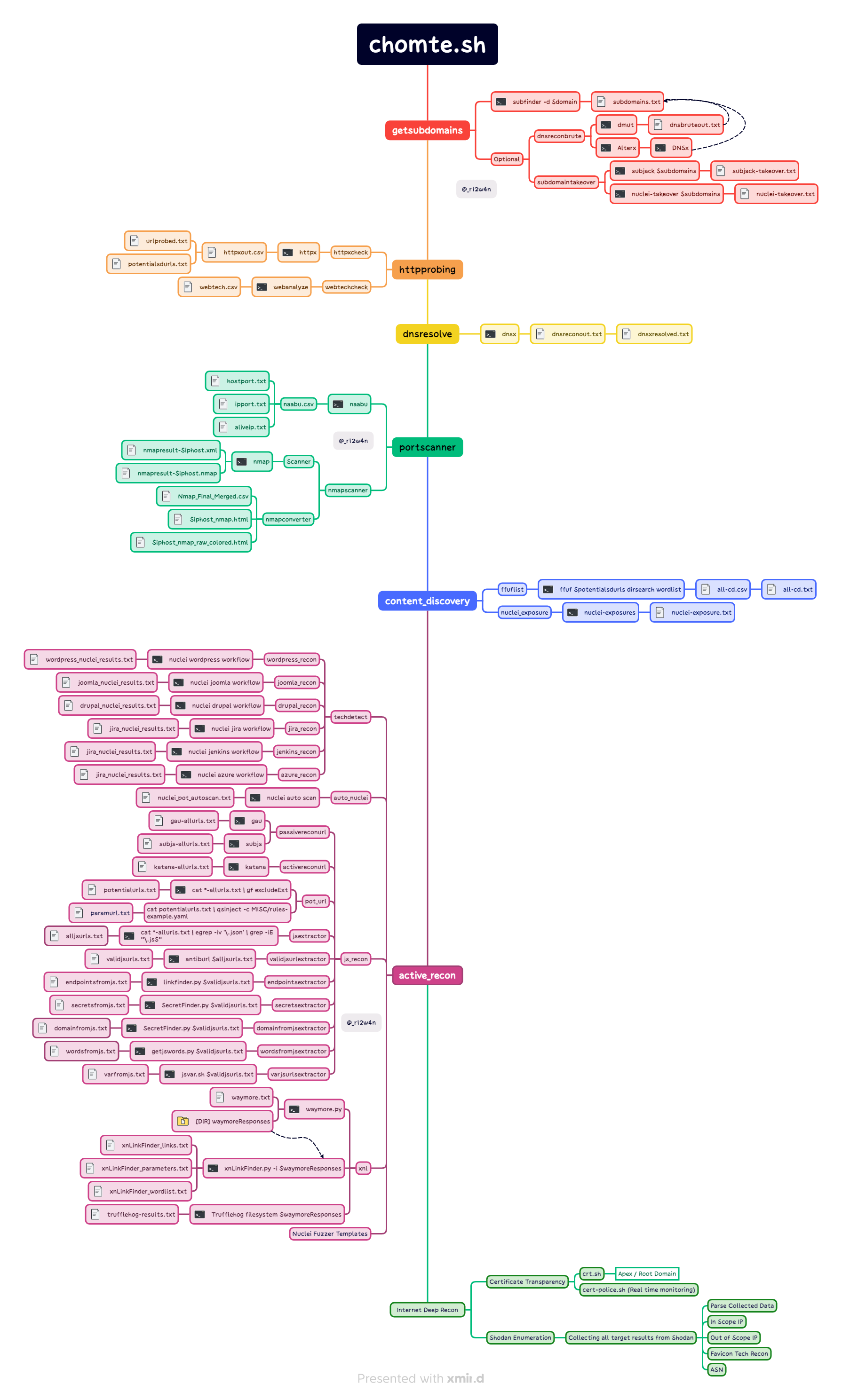
Here are some of the key features that make CHOMTE.SH a must-have for security professionals:
CHOMTE.SH is a game-changer for cybersecurity professionals, offering a comprehensive toolkit to secure your digital assets and strengthen your web application defenses. Stay ahead of threats, protect your online presence, and make CHOMTE.SH a part of your security arsenal.
To install CHOMTE.SH, follow these steps:
git clone https://github.com/mr-rizwan-syed/chomteshcd chomteshsudo suchmod +x *.sh./install.sh./chomte.shTo use CHOMTE.SH, run the script with the following flags:
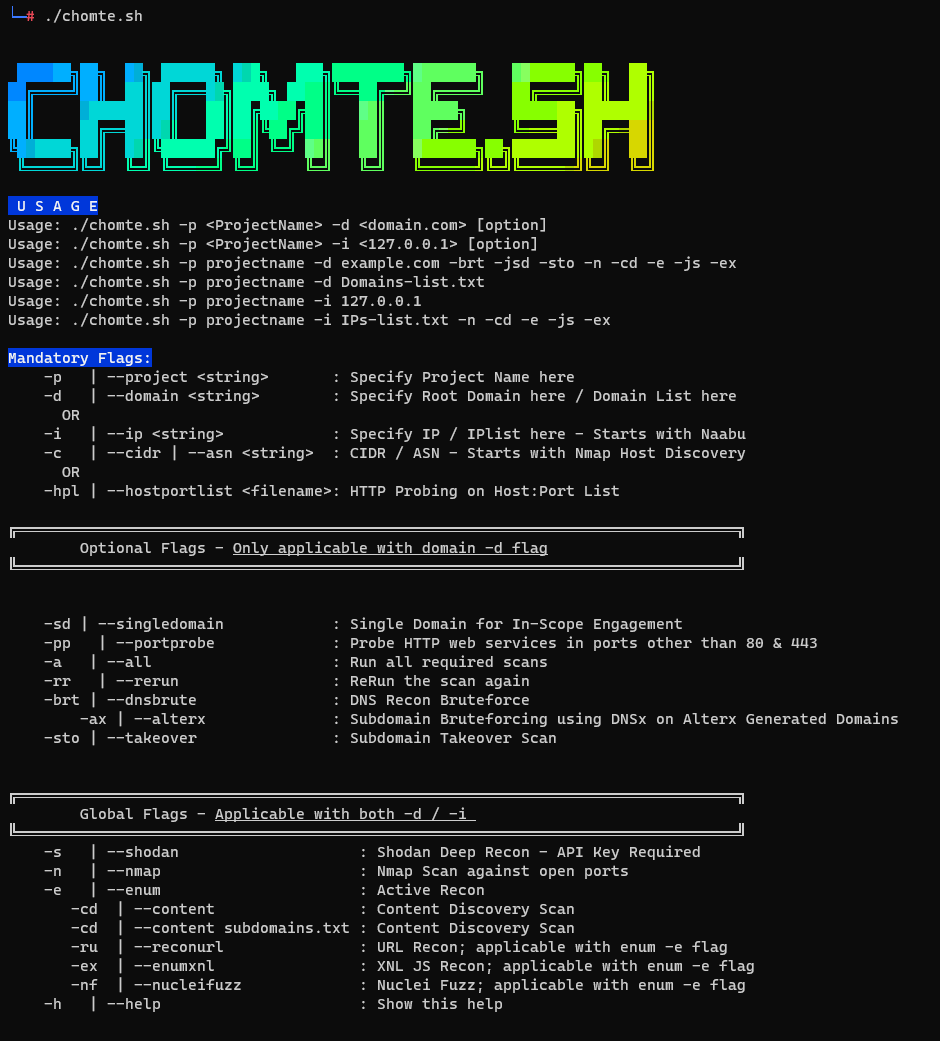
└─# ./chomte.sh


 ██████╗██╗  ██╗ ██████╗ ███╗   ███╗████████╗███████╗   ███████╗██╗  ██╗
██╔════╝██║  ██║██╔═══██╗████╗ ████║╚══██╔══╝██╔════╝   ██╔════╝██║  ██║
██║     ███████║██║   ██║██╔████╔██║   ██║   █████╗     ███████╗███████║
██║     ██╔══██║██║   ██║██║╚██╔╝██║   ██║   ██╔══╝     ╚════██║██╔══██║
╚██████╗██║  ██║╚██████╔╝██║ ╚═╝ ██║   ██║   ███████╗██╗███████║██║  ██║
 ╚═════╝╚═╝  ╚═╝ ╚═════╝ ╚═╝     ╚═╝   ╚═╝   ╚══════╝╚═╝╚══════╝╚═╝  ╚═╝

 U S A G E
Usage: ./chomte.sh -p <ProjectName> -d <domain.com> [option]
Usage: ./chomte.sh -p <ProjectName> -i <127.0.0.1> [option]
Usage: ./chomte.sh -p projectname -d example.com -brt -jsd -sto -n -cd -e -js -ex
Usage: ./chomte.sh -p projectname -d Domains-list.txt
Usage: ./chomte.sh -p projectname -i 127.0.0.1
Usage: ./chomte.sh -p projectname -i IPs-list.txt -n -cd -e -js -ex

Mandatory Flags:
    -p   | --project <string>       : Specify Project Name here
    -d   | --domain <string>        : Specify Root Domain here / Domain List here
      OR
    -i   | --ip <string>            : Specify IP / IPlist here - Starts with Naabu
    -c   | --cidr | --asn <string>  : CIDR / ASN - Starts with Nmap Host Discovery
      OR
    -hpl | --hostportlist <filename>: HTTP Probing on Host:Port List

╔════════════════════════════════════════════════════════════════════════════════╗
        Optional Flags - Only applicable with domain -d flag
╚════════════════════════════════════════════════════════════════════════════════╝


    -sd | --singledomain            : Single Domain for In-Scope Engagement
    -pp   | --portprobe             : Probe HTTP web services in ports other than 80 & 443
    -a   | --all                    : Run all required scans
    -rr   | --rerun                 : ReRun the scan again
    -brt | --dnsbrute               : DNS Recon Bruteforce
        -ax | --alterx              : Subdomain Bruteforcing using DNSx on Alterx Generated Domains
    -sto | --takeover               : Subdomain Takeover Scan


╔════════════════════════════════════════════════════════════════════════════════╗
        Global Flags - Applicable with both -d / -i
╚════════════════════════════════════════════════════════════════════════════════╝
    -s   | --shodan                    : Shodan Deep Recon - API Key Required
    -n   | --nmap                      : Nmap Scan against open ports
    -e   | --enum                      : Active Recon
       -cd  | --content                : Content Discovery Scan
       -cd  | --content subdomains.txt : Content Discovery Scan
       -ru  | --reconurl               : URL Recon; applicable with enum -e flag
       -ex  | --enumxnl                : XNL JS Recon; applicable with enum -e flag
       -nf  | --nucleifuzz             : Nuclei Fuzz; applicable with enum -e flag
    -h   | --help                      : Show this help
-n or --nmap : Nmap scan against open ports.
-brt or --dnsbrute : DNS Recon Bruteforce.
-hpl or --hostportlist : HTTP Probing on Host:Port List
-cd or --content : Content Discovery - Path is optional
-e or --enum : Active Enum based on technologies
-h or --help : Show help.