 mozilla/cipherscan
A very simple way to find out which SSL ciphersuites are supported by a target.

CipherScan
==========
[](https://travis-ci.org/mozilla/cipherscan)
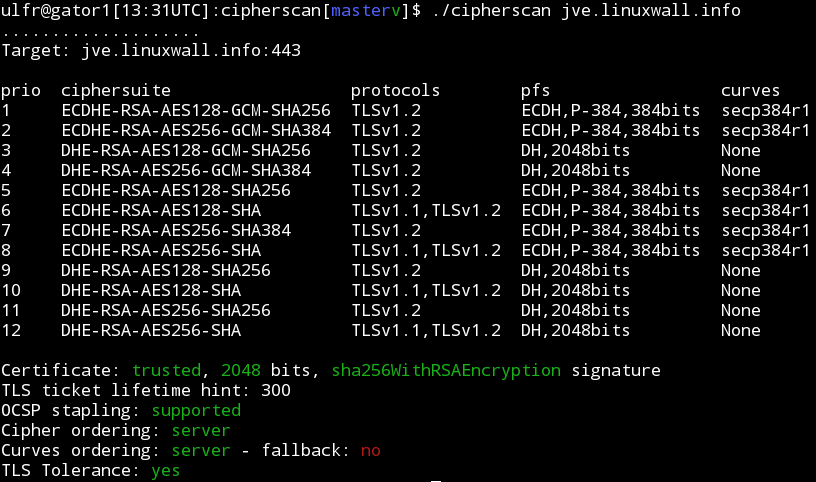
Cipherscan tests the ordering of the SSL/TLS ciphers on a given target, for all major versions of SSL and TLS. It also extracts some certificates informations, TLS options, OCSP stapling and more. Cipherscan is a wrapper above the `openssl s_client` command line.
Cipherscan is meant to run on all flavors of unix. It ships with its own built of OpenSSL for Linux/64 and Darwin/64. On other platform, it will use the openssl version provided by the operating system (which may have limited ciphers support), or your own version provided in the `-o` command line flag.
Examples
--------
Basic test:
```bash
$ ./cipherscan google.com
...................
Target: google.com:443
prio ciphersuite protocols pfs curves
1 ECDHE-RSA-CHACHA20-POLY1305 TLSv1.2 ECDH,P-256,256bits prime256v1
2 ECDHE-RSA-AES128-GCM-SHA256 TLSv1.2 ECDH,P-256,256bits prime256v1
3 ECDHE-RSA-AES128-SHA TLSv1.1,TLSv1.2 ECDH,P-256,256bits prime256v1
4 ECDHE-RSA-RC4-SHA SSLv3,TLSv1,TLSv1.1,TLSv1.2 ECDH,P-256,256bits prime256v1
5 AES128-GCM-SHA256 TLSv1.2 None None
6 AES128-SHA256 TLSv1.2 None None
7 AES128-SHA TLSv1.1,TLSv1.2 None None
8 RC4-SHA SSLv3,TLSv1,TLSv1.1,TLSv1.2 None None
9 RC4-MD5 SSLv3,TLSv1,TLSv1.1,TLSv1.2 None None
10 ECDHE-RSA-AES256-GCM-SHA384 TLSv1.2 ECDH,P-256,256bits prime256v1
11 ECDHE-RSA-AES256-SHA384 TLSv1.2 ECDH,P-256,256bits prime256v1
12 ECDHE-RSA-AES256-SHA SSLv3,TLSv1,TLSv1.1,TLSv1.2 ECDH,P-256,256bits prime256v1
13 AES256-GCM-SHA384 TLSv1.2 None None
14 AES256-SHA256 TLSv1.2 None None
15 AES256-SHA SSLv3,TLSv1,TLSv1.1,TLSv1.2 None None
16 ECDHE-RSA-AES128-SHA256 TLSv1.2 ECDH,P-256,256bits prime256v1
17 ECDHE-RSA-DES-CBC3-SHA SSLv3,TLSv1,TLSv1.1,TLSv1.2 ECDH,P-256,256bits prime256v1
18 DES-CBC3-SHA SSLv3,TLSv1,TLSv1.1,TLSv1.2 None None
Certificate: trusted, 2048 bit, sha1WithRSAEncryption signature
TLS ticket lifetime hint: 100800
OCSP stapling: not supported
Cipher ordering: server
```
Testing STARTTLS:
```
darwin$ $ ./cipherscan --curves -starttls xmpp jabber.ccc.de:5222
................................
Target: jabber.ccc.de:5222
prio ciphersuite protocols pfs curves
1 ECDHE-RSA-AES256-GCM-SHA384 TLSv1.2 ECDH,P-256,256bits prime256v1
2 ECDHE-RSA-AES256-SHA384 TLSv1.2 ECDH,P-256,256bits prime256v1
3 ECDHE-RSA-AES256-SHA TLSv1,TLSv1.1,TLSv1.2 ECDH,P-256,256bits prime256v1
4 DHE-RSA-AES256-GCM-SHA384 TLSv1.2 DH,1024bits None
5 DHE-RSA-AES256-SHA256 TLSv1.2 DH,1024bits None
6 DHE-RSA-AES256-SHA TLSv1,TLSv1.1,TLSv1.2 DH,1024bits None
7 DHE-RSA-CAMELLIA256-SHA TLSv1,TLSv1.1,TLSv1.2 DH,1024bits None
8 AES256-GCM-SHA384 TLSv1.2 None None
9 AES256-SHA256 TLSv1.2 None None
10 AES256-SHA TLSv1,TLSv1.1,TLSv1.2 None None
11 CAMELLIA256-SHA TLSv1,TLSv1.1,TLSv1.2 None None
12 ECDHE-RSA-AES128-GCM-SHA256 TLSv1.2 ECDH,P-256,256bits prime256v1
13 ECDHE-RSA-AES128-SHA256 TLSv1.2 ECDH,P-256,256bits prime256v1
14 ECDHE-RSA-AES128-SHA TLSv1,TLSv1.1,TLSv1.2 ECDH,P-256,256bits prime256v1
15 DHE-RSA-AES128-GCM-SHA256 TLSv1.2 DH,1024bits None
16 DHE-RSA-AES128-SHA256 TLSv1.2 DH,1024bits None
17 DHE-RSA-AES128-SHA TLSv1,TLSv1.1,TLSv1.2 DH,1024bits None
18 DHE-RSA-SEED-SHA TLSv1,TLSv1.1,TLSv1.2 DH,1024bits None
19 DHE-RSA-CAMELLIA128-SHA TLSv1,TLSv1.1,TLSv1.2 DH,1024bits None
20 AES128-GCM-SHA256 TLSv1.2 None None
21 AES128-SHA256 TLSv1.2 None None
22 AES128-SHA TLSv1,TLSv1.1,TLSv1.2 None None
23 SEED-SHA TLSv1,TLSv1.1,TLSv1.2 None None
24 CAMELLIA128-SHA TLSv1,TLSv1.1,TLSv1.2 None None
Certificate: UNTRUSTED, 2048 bit, sha1WithRSAEncryption signature
TLS ticket lifetime hint: None
OCSP stapling: not supported
Cipher ordering: client
Curves ordering: server
Curves fallback: False
```
Exporting to JSON with the `-j` command line option:
```javascript
$ ./cipherscan --curves -j www.ebay.com | j
{
"curves_fallback": "False",
"serverside": "True",
"target": "www.ebay.com:443",
"utctimestamp": "2015-04-03T14:54:31.0Z",
"ciphersuite": [
{
"cipher": "AES256-SHA",
"ocsp_stapling": "False",
"pfs": "None",
"protocols": [
"TLSv1",
"TLSv1.1",
"TLSv1.2"
],
"pubkey": [
"2048"
],
"sigalg": [
"sha1WithRSAEncryption"
],
"ticket_hint": "None",
"trusted": "True"
},
{
"cipher": "ECDHE-RSA-DES-CBC3-SHA",
"curves": [
"prime256v1",
"secp384r1",
"secp224r1",
"secp521r1"
],
"curves_ordering": "server",
"ocsp_stapling": "False",
"pfs": "ECDH,P-256,256bits",
"protocols": [
"TLSv1",
"TLSv1.1",
"TLSv1.2"
],
"pubkey": [
"2048"
],
"sigalg": [
"sha1WithRSAEncryption"
],
"ticket_hint": "None",
"trusted": "True"
}
]
}
```
Analyzing configurations
------------------------
The motivation behind cipherscan is to help operators configure good TLS on their
endpoints. To help this further, the script `analyze.py` compares the results of
a cipherscan with the TLS guidelines from https://wiki.mozilla.org/Security/Server_Side_TLS
and output a level and recommendations.
```bash
$ ./analyze.py -t jve.linuxwall.info
jve.linuxwall.info:443 has intermediate tls
Changes needed to match the old level:
* consider enabling SSLv3
* add cipher DES-CBC3-SHA
* use a certificate with sha1WithRSAEncryption signature
* consider enabling OCSP Stapling
Changes needed to match the intermediate level:
* consider enabling OCSP Stapling
Changes needed to match the modern level:
* remove cipher AES128-GCM-SHA256
* remove cipher AES256-GCM-SHA384
* remove cipher AES128-SHA256
* remove cipher AES128-SHA
* remove cipher AES256-SHA256
* remove cipher AES256-SHA
* disable TLSv1
* consider enabling OCSP Stapling
```
In the output above, `analyze.py` indicates that the target `jve.linuxwall.info`
matches the intermediate configuration level. If the administrator of this site
wants to reach the modern level, the items that failed under the modern tests
should be corrected.
`analyze.py` does not make any assumption on what a good level should be. Sites
operators should know what level they want to match against, based on the
compatibility level they want to support. Again, refer to
https://wiki.mozilla.org/Security/Server_Side_TLS for more information.
Note on Nagios mode:
`analyse.py` can be ran as a nagios check with `--nagios`. The exit code will
then represent the state of the configuration:
* 2 (critical) for bad tls
* 1 (warning) if it doesn't match the desired level
* 0 (ok) if it matches.
cipherscan can take more than 10 seconds to complete. To alleviate any timeout
issues, you may want to run it outside of nagios, passing data through some
temporary file.
OpenSSL
-------
Cipherscan uses a custom release of openssl for linux 64 bits and darwin 64
bits. OpenSSL is build from a custom branch maintained by Peter Mosmans that
includes a number of patches not merged upstream. It can be found here:
https://github.com/PeterMosmans/openssl
You can build it yourself using following commands:
```
git clone https://github.com/PeterMosmans/openssl.git --depth 1 -b 1.0.2-chacha
cd openssl
./Configure zlib no-shared experimental-jpake enable-md2 enable-rc5 \
enable-rfc3779 enable-gost enable-static-engine linux-x86_64
make depend
make
make report
```
The statically linked binary will be `apps/openssl`.
Contributors
------------
* Julien Vehent <[email protected]> (original author)
* Hubert Kario <[email protected]> (co-maintainer)
* Pepi Zawodsky <[email protected]>
* Michael Zeltner <[email protected]>
* Peter Mosmans <[email protected]>
* Vincent Riquer <[email protected]>
* Christian Stadelmann
* Simon Deziel <[email protected]>
* Aaron Zauner <[email protected]>
* Mike <[email protected]>
* Phil Cohen <[email protected]>
* Samuel Kleiner <[email protected]>
* Richard Soderberg <https://twitter.com/floatingatoll>
* Adam Crosby <[email protected]>