 moiz-2x/cve-2025-21420_poc
Proof of Concept CVE-2025-21420 (Windows Disk Cleanup Tool EoP)

The new version of cleanmgr.exe includes a call to the SetProcessMitigationPolicy function.
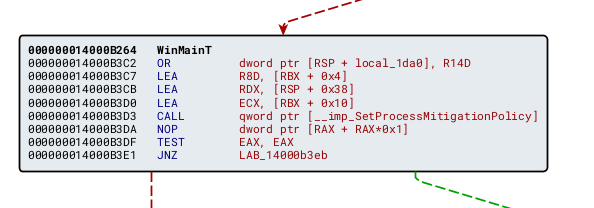
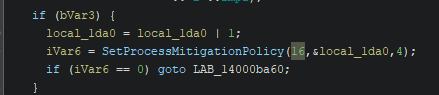
With MitigationPolicy set to 16, corresponding to ProcessRedirectionTrustPolicy.
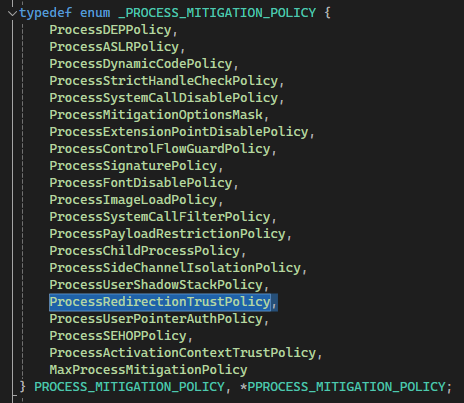
Combined with Microsoft's description of CWE-59: Improper Link Resolution Before File Access ('Link Following'), we can infer that cleanmgr.exe has Redirection Guard enabled.
After reading two blog posts by Simon Zuckerbraun and enigma0x3:
The SilentCleanup task may have sufficient privileges to delete the C:/Config.msi folder, as mentioned by Simon Zuckerbraun. We only need to locate an Arbitrary Folder Delete/Move/Rename vulnerability inside the SilentCleanup task (which runs cleanmgr.exe with Run with highest priv) and redirect it to the C:/Config.msi folder.
Run the SilentCleanup task and observe cleanmgr.exe behavior.
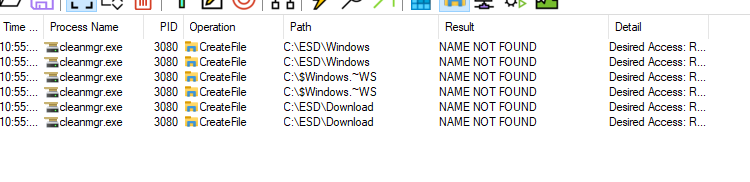
The process checks whether the listed folders exist (interestingly, it doesn't verify if C:\ESD is a junction, but it does check Windows and Download — which we won’t dive into here).
Create the folders C:\$Windows.~WS, C:\ESD\Windows, C:\ESD\Download, drop some random files into them, rerun SilentCleanup and observe again.

We can see SilentCleanup deletes the contents within the Windows and Download folders. This can be leveraged using the technique described in From Folder Contents Delete to SYSTEM EoP.
C:\$Windows.~WS, C:\ESD\Windows, C:\ESD\Download, inserts dummy .txt files and pauses.Config.msi.C:\ESD\Windows to C:/Config.msi.SilentCleanup to trigger content cleanup.osk.exe, then hit Ctrl-Alt-Delete.https://github.com/user-attachments/assets/d66b43ea-6706-4bce-94c4-ca3a6e97857f
