 mister-iks/pcybox-attackgraph
Open source browser lab to build a simulated infrastructure, watch an attack move through it, and check whether your defense works.

Build. Attack. Defend. Understand.
An open source lab that runs entirely in your browser: build a simulated infrastructure, watch an attack move through it, and check whether your defense really works. Every step comes with the reason it worked, and every control says exactly which precondition it breaks.
Live demo · Français · Specification · How the engine works · Lab format · Contributing
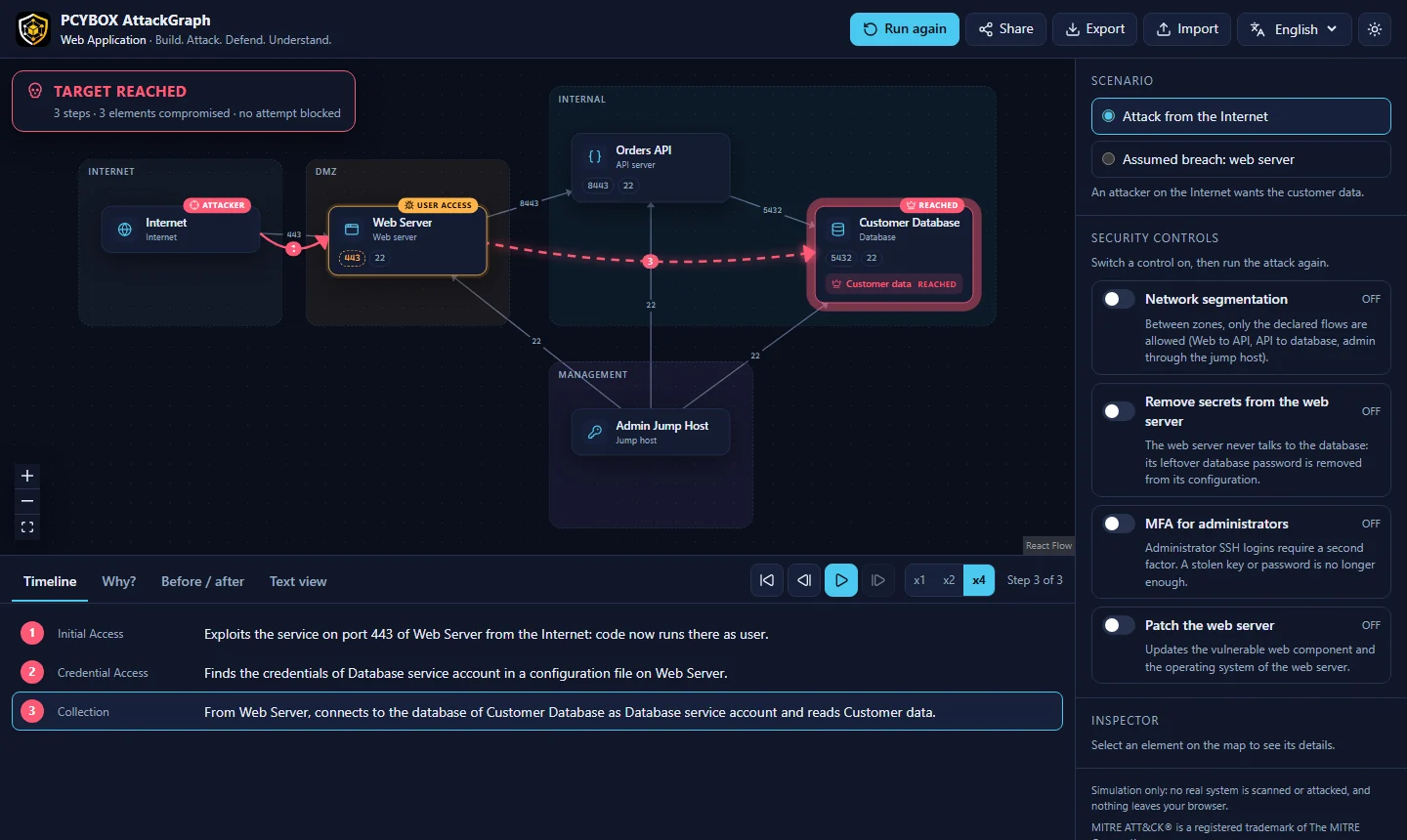
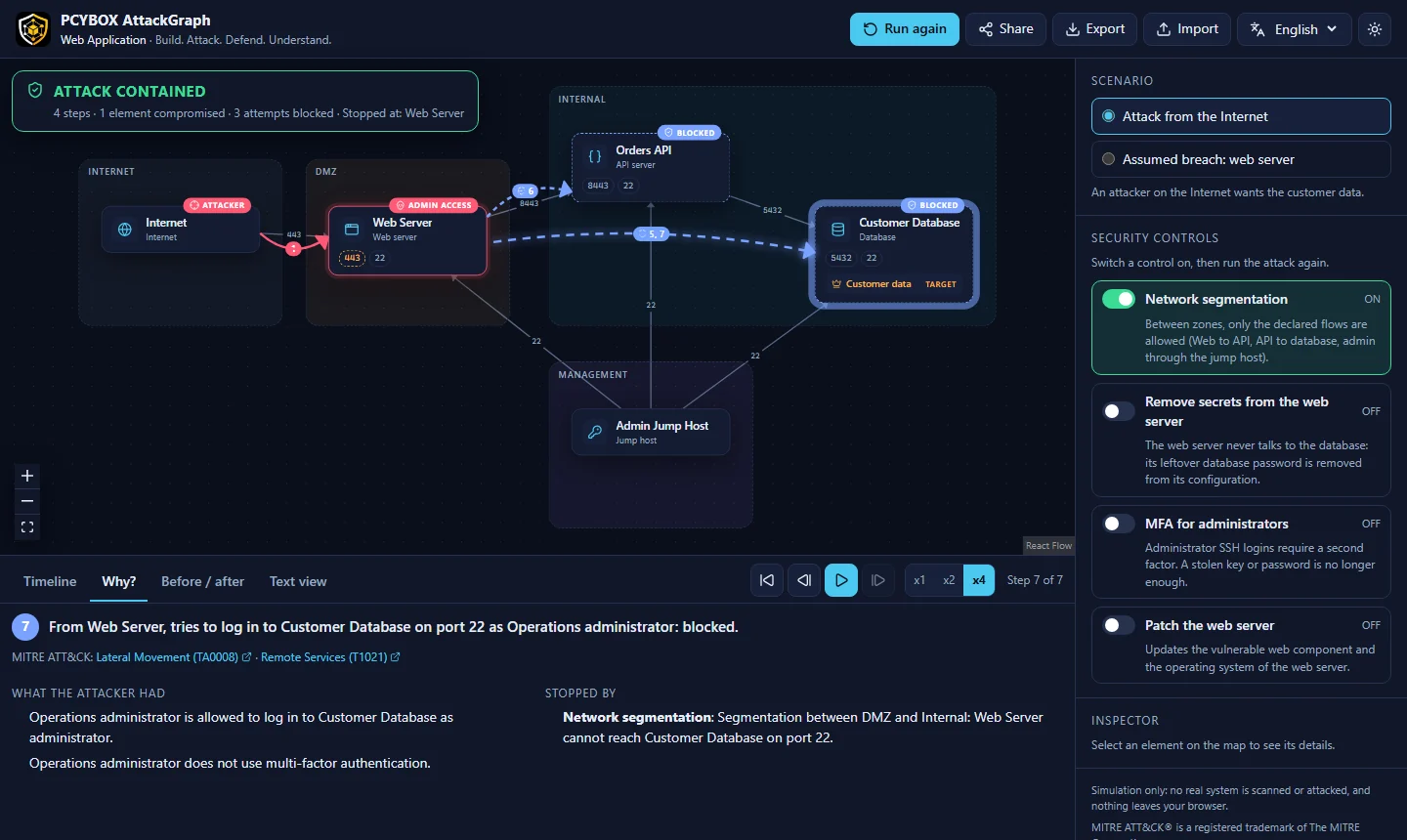
Attack surface, lateral movement, segmentation, blast radius, defense in depth: these ideas are hard to grasp from static diagrams. PCYBOX AttackGraph turns them into something you can see and manipulate:
Simulation only. The lab never scans, contacts or attacks a real system. Techniques are described at a conceptual level, mapped to MITRE ATT&CK, without any exploitation procedure.
Open the live demo: nothing to install, no account. Or run it locally:
git clone https://github.com/Mister-iks/pcybox-attackgraph.git
cd pcybox-attackgraph
pnpm install
pnpm dev
Then open the URL printed in the terminal, click Run attack, switch Network segmentation on, and run again.
Keyboard: Space plays or pauses, arrow keys step through the attack, Home goes back to the start.
Switch to Edit, then drag elements from the palette onto the map, connect them by dragging from the dot on the side of an element, and fill in services, weaknesses, stored credentials, identities, assets, controls and scenarios in the side panel. The Problems tab points out what is probably wrong (a flow to a port without service, a control that applies to nothing...). Undo and redo with Ctrl+Z and Ctrl+Y. Your lab is saved in the browser and can be exported, imported and shared by link.
.attackgraph.json files.See the roadmap for what comes next.
lab (.attackgraph.json) ──▶ validation ──▶ engine (web worker) ──▶ story of events ──▶ map, timeline, Why?
The engine saturates the attacker's capabilities round by round (footholds, credentials, data access). Each technique has preconditions and effects; each control breaks a precise precondition. Because rounds are breadth first, the story replayed for a reached target is one of its shortest derivations. Details in docs/engine.md.
apps/web/           web application (React, React Flow, Vite)
packages/engine/    simulation engine: pure TypeScript, no DOM, fully tested
packages/schema/    JSON Schema of the .attackgraph.json lab format
packages/i18n/      messages (English, French) shared by the app and the CLI
packages/cli/       attackgraph command line tool
content/templates/  ready-to-use labs (CC BY 4.0)
docs/               specification, engine and format documentation
Requirements: Node.js 20 or later and pnpm.
pnpm install
pnpm dev             # start the app
pnpm test            # engine, schema and app unit tests
pnpm e2e             # end-to-end tests (Playwright, desktop and mobile)
pnpm verify          # everything the CI checks: text, types, tests, build, bundle budget
pnpm attackgraph validate content/templates
pnpm attackgraph list content/templates/active-directory.attackgraph.json
pnpm attackgraph simulate content/templates/active-directory.attackgraph.json --scenario phishing --enable tiering
pnpm attackgraph compare content/templates/web-application.attackgraph.json --enable segmentation --lang fr
pnpm attackgraph simulate <lab> --format markdown   # or json, for other tools
Performance budget: at most 250 kB of initial JavaScript (gzip). The CI fails above it.
| Version | Focus |
|---|---|
| v0.1 | One network, one attack, one defense: the Web Application template |
| v0.2 (in progress) | Lab editor, 3 templates, command line tool |
| v0.3 | Attack paths, choke points, blast radius, embeddable view, offline PWA |
| v0.5 | Challenge mode, teacher mode, 10 missions aligned with NICE, ECSF and CyBOK |
| v1.0 | Stable format, 8 templates, 9 languages including Arabic and Chinese |
The complete plan is in the specification (French).
Contributions are welcome: code, labs, translations, and reviews by security practitioners of the technique catalog. Start with CONTRIBUTING.md. Please follow the code of conduct, and report vulnerabilities as described in SECURITY.md.
