microsoft/ethr
Cross-platform CLI for network performance testing over TCP, UDP, HTTP, HTTPS, and ICMP: bandwidth, connections/s, packets/s, latency, loss, jitter, ping, and traceroute.

Ethr is a cross platform network performance measurement tool written in golang. The goal of this project is to provide a native tool for comprehensive network performance measurements of bandwidth, connections/s, packets/s, latency, loss & jitter, across multiple protocols such as TCP, UDP, HTTP, HTTPS, and across multiple platforms such as Windows, Linux and other Unix systems.
Ethr takes inspiration from existing open source network performance tools and builds upon those ideas. For Bandwidth measurement, it is similar to iPerf3, for TCP & UDP traffic. iPerf3 has many more options for doing such as throttled testing, richer feature set, while Ethr has support for multiple threads, that allows it to scale to 1024 or even higher number of connections, multiple clients communication to a single server etc. For latency measurements, it is similar to latte on Windows or sockperf on Linux.
Ethr provides more test measurements as compared to other tools, e.g. it provides measurements for bandwidth, connections/s, packets/s, latency, and TCP connection setup latency, all in a single tool. In the future, there are plans to add more features (hoping for others to contribute) as well as more protocol support to make it a comprehensive tool for network performance measurements.
Ethr is natively cross platform, thanks to golang, as compared to compiling via an abstraction layer like cygwin that may limit functionality. It hopes to unify performance measurement by combining the functionality of tools like iPerf3, ntttcp, psping, sockperf, and latte and offering a single tool across multiple platforms and multiple protocols.
https://github.com/Microsoft/ethr/releases/latest
Linux
wget https://github.com/microsoft/ethr/releases/latest/download/ethr_linux.zip
unzip ethr_linux.zip
Windows Powershell
wget https://github.com/microsoft/ethr/releases/latest/download/ethr_windows.zip -OutFile ethr_windows.zip
Expand-Archive .\ethr_windows.zip -DestinationPath .
OSX
wget https://github.com/microsoft/ethr/releases/latest/download/ethr_osx.zip
unzip ethr_osx.zip
Note: go version 1.11 or higher is required building it from the source.
We use go-module to manage Ethr dependencies. for more information please check how to use go-modules!
git clone https://github.com/Microsoft/ethr.git
cd ethr
go build
If ethr is cloned inside of the $GOPATH/src tree, please make sure you invoke the go command with GO111MODULE=on!
Build image using command:
docker build -t microsoft/ethr .
Make binary:
Linux
docker run -e GOOS=linux -v $(pwd):/out microsoft/ethr make build-docker
Windows
docker run -e BINARY_NAME=ethr.exe -e GOOS=windows -v $(pwd):/out microsoft/ethr make build-docker
OS X
docker run -e BINARY_NAME=ethr -e GOOS=darwin -v $(pwd):/out microsoft/ethr make build-docker
go get github.com/microsoft/ethr
Assuming you are using yay (https://github.com/Jguer/yay):
yay -S ethr
Follow the topic Building from Source to build ethr.exe
Modify ethr.nuspec to add new release version
vim ethr.nuspec
Create a nuget package(like Ethr.0.2.1.nupkg)
nuget.exe pack ethr.nuspec
Upload the package to nuget.org.
Help:
ethr -h
Server:
ethr -s
Server with Text UI:
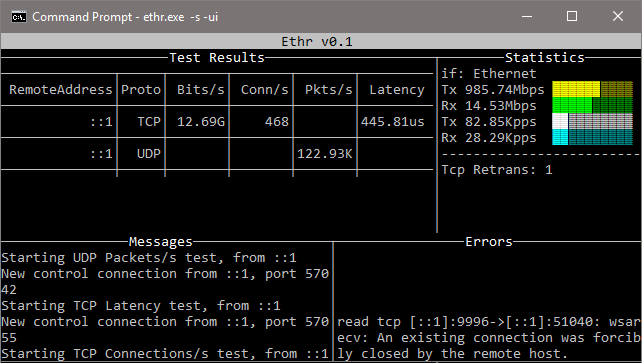
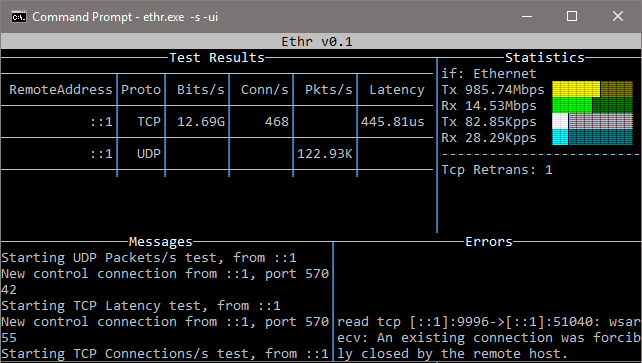
ethr -s -ui
Client:
ethr -c <server ip>
Examples:
// Start server
ethr -s

// Start client for default (bandwidth) test measurement using 1 thread
ethr -c localhost

// Start bandwidth test using 8 threads
ethr -c localhost -n 8

// Start connections/s test using 64 threads to server 10.1.0.11
ethr -c 10.1.0.11 -t c -n 64

// Run Ethr server on port 9999
./ethr -s -port 9999

// Measure TCP connection setup latency to ethr server on port 9999
// Assuming Ethr server is running on server with IP address: 10.1.1.100
./ethr -c 10.1.1.100 -p tcp -t pi -d 0 -4 -port 9999

// Measure TCP connection setup latency to www.github.com at port 443
./ethr -x www.github.com:443 -p tcp -t pi -d 0 -4

// Measure TCP connection setup latency to www.github.com at port 443
// Note: Here port 443 is driven automatically from https
./ethr -x https://www.github.com -p tcp -t pi -d 0 -4

// Measure ICMP ping latency to www.github.com
sudo ./ethr -x www.github.com -p icmp -t pi -d 0 -4

// Run measurement similar to mtr on Linux
sudo ./ethr -x www.github.com -p icmp -t mtr -d 0 -4

// Measure packets/s over UDP by sending small 1-byte packets
./ethr -c 172.28.192.1 -p udp -t p -d 0
For ICMP related tests, Ping, TraceRoute, MyTraceRoute, Windows requires ICMP to be allowed via Firewall. This can be done using PowerShell by following commands. However, use this only if security policy of your setup allows that.
// Allow ICMP packets via Firewall for IPv4
New-NetFirewallRule -DisplayName "ICMP_Allow_Any" -Direction Inbound -Protocol ICMPv4 -IcmpType Any -Action Allow  -Profile Any -RemotePort Any

// Allow ICMP packets via Firewall for IPv6
New-NetFirewallRule -DisplayName "ICMPV6_Allow_Any" -Direction Inbound -Protocol ICMPv6 -IcmpType Any -Action Allow  -Profile Any -RemotePort Any
In addition, for TCP based TraceRoute and MyTraceRoute, Administrator mode is required, otherwise Ethr won't be able to receive ICMP TTL exceeded messages.
For ICMP Ping, ICMP/TCP TraceRoute and MyTraceRoute, privileged mode is required via sudo.