

bash CLI trainer — 30 levels from ls to privilege escalation
# cmdchamp
Bash CLI trainer — 30 levels from `ls` to privilege escalation.
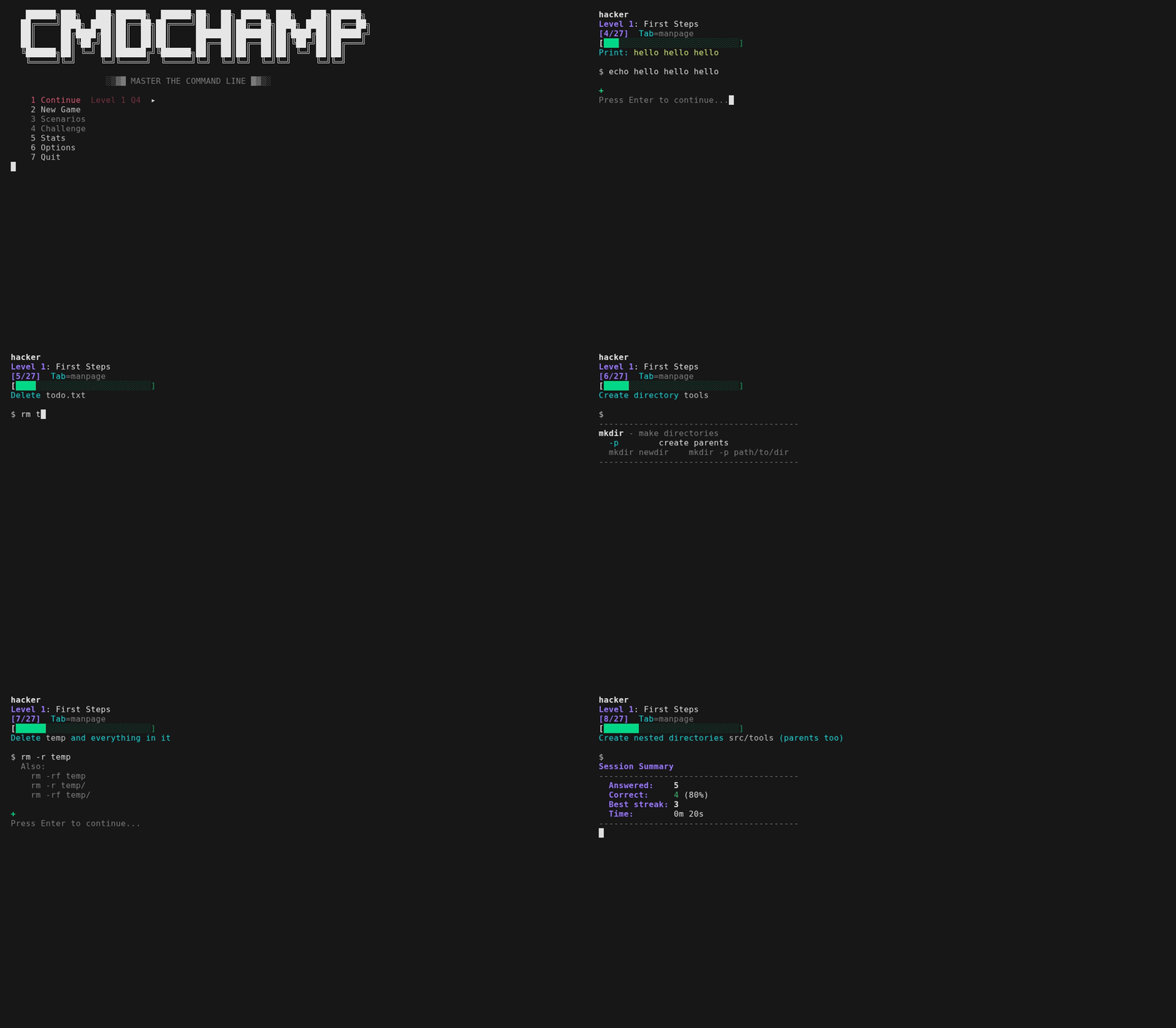
Every question asks you to type a real command — get instant feedback, move on. Miss one and it doesn't just show you the answer: it shows what YOUR command printed against what was wanted, and for a pipeline the line count at every stage, so you can see the point where it died. For text-matched questions it names the accepted answer yours was closest to and the exact flag you left out. Get it right the long way and it shows you the short way — `cat f | grep -c X` earns a `Shorter: grep -c X f`, triggered on fewer pipeline stages as well as fewer characters, because the process you saved is the lesson. Many run against real files in the sandbox, and all accept multiple valid syntaxes (`sort -u` or `sort | uniq`). Tab toggles the manpage when you need a reference — condensed pages for every command the answer runs, plus the shell syntax it leans on (`x=$(cmd)`, `${var:-default}`, `${path##*/}`), so nothing in a question is left for you to guess. The order is randomized each run so you can't memorize it. Mastery tracks what you know: get a question right twice to master it, miss it and it demotes so it comes back sooner. A 5-answer streak triggers fire mode — a banner that runs until you miss.
Each level ends with a boss round — no manpages, 30s timer, 4/5 to pass. Fail and you can retry the boss immediately or go back to practice. Beat all 30 and **challenge mode** unlocks — the endgame gauntlet: multi-command chains that compose the tools from across the whole game into one pipeline. 30s each, one life, no manpages, your best score is the record. Every chain is graded on its real output in the sandbox, so *any* correct pipeline passes. Each run also builds a **fresh randomized sandbox** — different IPs, counts, hosts, and log data — and draws from 50+ chain templates with rotating delimiters, sort order, and aggregates, so the busiest IP, the top URL, the highest count are never the same twice. First run includes a short tutorial and a placement test that lets you skip levels you already know.
With [bubblewrap](https://github.com/containers/bubblewrap), commands run in a real sandboxed filesystem and are graded on their actual output. The box inside is synthetic - user `sandbox`, host `sandbox`, its own `/etc/passwd` and kernel command line - so nothing you type can print your real username, machine name or disk layout to the screen, and `id`, `whoami` and `hostname` answer the same everywhere. This now reaches the forensics tier too: level 28 hands you a real sample binary (`samples/target.bin`) and grades whether you actually pulled the flag, the exfil domain, and the leaked API key out of it — same for the `jq` questions on real JSON. The endgame gauntlet composes those extractions into timed chains. Levels 24-25 now run for real too: a small HTTP service starts on `localhost:8080` inside the sandbox's own network namespace while your answer runs, with three ports listening, so `curl`, `jq` over HTTP, `ss` and `nmap` are graded on what they actually returned. Nothing is exposed to your machine — the namespace still blocks every outbound connection, and the port is invisible from outside. Only the tools that genuinely can't run in a sandbox — wifi/RF, live capture and large memory/disk forensics — stay text-matched. Search levels (16-17) accept both `rg`/`fd` and `grep`/`find` syntax. Vi line editing is built in — motions, operators, counts, registers, undo and visual mode (`v`/`V`, `o` to swap ends), with `?` for the full map.
## Install
**Arch (AUR):**
```bash
paru -S cmdchamp # or: yay -S cmdchamp
```
**Anywhere (single file):**
```bash
mkdir -p ~/.local/bin && curl -sL https://raw.githubusercontent.com/mellen9999/cmdchamp/main/cmdchamp -o ~/.local/bin/cmdchamp && chmod +x ~/.local/bin/cmdchamp
```
Add `~/.local/bin` to PATH if needed: `echo 'export PATH="$HOME/.local/bin:$PATH"' >> ~/.bashrc`
**Or clone:**
```bash
git clone https://github.com/mellen9999/cmdchamp.git
cd cmdchamp && make install
```
**Requires:** bash 4.4+, coreutils, awk
**macOS:** Ships with bash 3.2 — install bash 4.4+ first: `brew install bash`
**Optional:** [bubblewrap](https://github.com/containers/bubblewrap) (`bwrap`) for sandbox mode (Linux only) — most desktop distros include it. Without it, answers are text-matched only
**Optional:** `python3` — serves the sandbox's localhost HTTP service, so the `live api` / `live box` questions on levels 24-25 are graded on real output. Without it those questions fall back to text-matching; nothing else changes
**Accessibility:** Honors `NO_COLOR` and `TERM=dumb`. Layout adapts to `COLUMNS` / `tput cols`. Mastery bars carry both color and a `✓` / `~` / `x` symbol — readable without color.
**Terminals:** Runs on real serial terminals, not just emulators. cmdchamp probes what the terminal can actually display and picks one of three render tiers — unicode, DEC ACS line-drawing, or pure ASCII — so frames stay intact on a VT100/VT220/VT320/VT420 or Wyse. On a monochrome screen, color distinctions are re-encoded as bold/reverse. Force a tier with `CMDCHAMP_ASCII=1` or `CMDCHAMP_UNICODE=1`. `./test_terminals.sh` verifies it.
## Usage
```bash
cmdchamp # Launch the game menu
cmdchamp explain 'CMD' # Explain any command - every flag, plus the shell syntax around it
cmdchamp autopsy # Read your own shell history and map it onto the curriculum
cmdchamp daily # Play today's daily gauntlet (same run for everyone)
cmdchamp daily 2026-02-16 # Replay a specific day's run (race a friend)
cmdchamp play # Free-play sandbox: type any command, see it run
cmdchamp --no-sandbox # Disable sandbox (text-match only)
cmdchamp reset # Clear all progress
cmdchamp test # Run self-tests
cmdchamp version # Print version
cmdchamp help # Show help
```
`cmdchamp explain` (or `cmdchamp x`) is the Tab panel as a standalone tool: hand-written pages for ~300 commands plus the shell syntax around them, offline, no network, no dependencies. It takes a quoted command or the bare words, and reads stdin when given neither — so `history | tail -1 | cmdchamp x` explains what you just ran. Exit 0 when it knows the command, 1 when it doesn't.
`cmdchamp autopsy` reads your shell history — `$HISTFILE`, then `~/.bash_history`, then `~/.zsh_history`, or a file you name, or `-` for stdin — and maps it onto the 30 levels: what you actually reach for, habits worth dropping with your own count beside each (`cat` into `grep`, `find` into `xargs` with no `-print0`, `chmod 777`, `curl | sh`), how many of the commands the game teaches you have ever run, and the earliest level with a gap. It prints **patterns and counts only** — never a line, a fragment, or an "example" from your history, because a history holds tokens and passwords typed as arguments. Nothing leaves the machine, and there is no flag to make it echo your history.
The menu holds continue, new game, scenarios, challenge, daily, practice, stats, options, help and quit on fixed hotkeys `1`-`9` and `0`. A row you haven't unlocked is greyed rather than hidden, so the digit beside a label never moves as you progress. `j`/`k` or arrows move, Enter selects, and `q` (or Esc) quits. The playground lives at the top of the **Scenarios** list — it's the one entry that is never locked. **Help** is the reference, three pages: every key, what each mode costs and unlocks at, how scoring and decay work, what the Stats marks mean, how an answer is judged, and every environment variable. The first-run tutorial is still one keypress away on the last page.
**Daily** (post-ROOT) is a date-seeded gauntlet run — the seed drives both the chains and the randomized sandbox, so everyone everywhere gets byte-identical questions *and* data that day, one scored attempt, a consecutive-day streak, and a copyable score you can share. **Practice** drills any reached level (shown with its mastery %) with hints and no timer, without touching your main progress. **Playground** is a compromised box you take apart with a real shell: someone got in, used it, then tried to tidy up, and every move left a mark on disk. Commands run for real in the sandbox and nothing is graded. Up to 8 `flag{...}` tokens are planted across the tree (more unlock as you clear levels), `map` lays the break-in out phase by phase and marks where you are, `learn` is the 8-module security syllabus behind it, `hint` goes a tier deeper each time you ask, and Tab explains what you typed. The header always names the phase you're hunting and the files it left behind, so you're never staring at a prompt with nowhere to point a command — and if six commands go by with nothing found, the first hint comes to you.
## Stats
Two pages. The first is the thirty level bars — how far you've come. The second is the same mastery projected onto **commands**, weakest first, because a level is far too coarse a bucket to drill from: level 13 alone teaches `cp`, `mv`, `ln`, `chmod`, ACLs, `du`, `tar` and `diff`, and one red bar can't say which of them you keep missing. Only levels you've reached are counted, and the grid is capped to one screen — a worklist you have to scroll isn't a worklist. Under it, the three weakest commands are named with the level that teaches each one, so the page ends where Practice starts — the level names are thematic, and `xargs 0/4` is a dead end if you have to guess that Batch Ops is where it lives.
## Levels
| # | Name | Focus |
|---|------|-------|
| | **Fundamentals** | |
| 1 | First Steps | pwd, ls, echo, cd, mkdir |
| 2 | File Basics | cp, mv |
| 3 | Save Your Work | >, >>, tee |
| 4 | Reading Files | cat, head, tail, less |
| 5 | Basic Pipes | pipes, grep, wc, sort, uniq |
| 6 | Input & Here-Strings | <, <<<, tr, cut, rev, bc |
| 7 | Error Handling | 2>, 2>&1, &>, /dev/null |
| 8 | Logic Gates | &&, \|\| |
| 9 | Variables | `$VAR`, assignment, expansion |
| 10 | Special Variables | `$$`, `$?`, `$!`, `$#`, `$@`, `$0` |
| 11 | Job Control | bg, fg, jobs, &, Ctrl+Z, nice, ulimit |
| 12 | Test Conditions | -f, -d, -z, -n, -eq, -lt |
| 13 | Core File Tools | cp, mv, ln, chmod, ACLs, du, tar, diff |
| 14 | System Admin | ping, df, free, ss, systemctl, ip, sysctl, lsblk, getent |
| 15 | Multiplexers | tmux: sessions, windows, panes |
| 16 | Text Search | grep, ripgrep, regex |
| 17 | File Finding | find, fd, by name/size/time/type |
| 18 | Data Processing | sort, uniq, cut, awk, tr, comm, join, numfmt |
| 19 | String & Arrays | parameter expansion, arrays |
| 20 | Control Flow | if/else, loops, case, functions |
| 21 | Batch Ops | find -exec, xargs, sed -i, crontab |
| 22 | Advanced Regex | lookahead, sed, awk |
| | **DevOps & Security** | |
| 23 | Git | branches, remotes, rebasing, stashing, bisect |
| 24 | Network Tools | tshark, curl, jq, ssh tunnels, openssl, SMB, a live HTTP endpoint |
| 25 | Network Scanning | nmap, service detection, scripts, a live target |
| 26 | WiFi & RF | aircrack-ng, netcat, tcpdump, wireless recon |
| 27 | Hash Cracking | hashcat, john, hydra, encoding |
| 28 | Forensics | strings, readelf, binwalk, volatility, exiftool |
| 29 | Privilege Escalation | SUID, capabilities, GTFOBins, enumeration |
| 30 | ROOT | emergency recovery, chroot, offline survival |
## Scenarios
Multi-step sandbox challenges — state persists between steps. Available from the **Scenarios** menu once you clear the unlock boss, which lists them in unlock order under the playground. The numbers below are scenario ids, which never change.
| # | Name | Unlocks at | Steps |
|---|------|-----------|-------|
| 1 | Permission Lockout | L13 boss | 6 |
| 2 | Archive & Extract | L13 boss | 6 |
| 3 | Find the Needle | L16 boss | 7 |
| 4 | Messy CSV | L18 boss | 4 |
| 5 | The Incident | L18 boss | 5 |
| 6 | The Broken Deploy | L21 boss | 7 |
| 7 | Log Emergency | L21 boss | 5 |
| 8 | Config Surgery | L21 boss | 5 |
| 9 | Git Rescue | L23 boss | 6 |
| 10 | Batch Refactor | L21 boss | 6 |
| 11 | Forensic Sweep | L22 boss | 6 |
| 12 | Wildcard Backup | L29 boss | 4 |
| 13 | PATH Hijack | L29 boss | 4 |
Scenarios 12–13 are exploit boxes: you plant a real tar-checkpoint injection / PATH hijack and are graded on the artifact it produces (a file appears, a secret gets exfiltrated). The exploit's *effect* runs for real in the sandbox; the privilege boundary is simulated — nothing runs as real root.
## Placement test
After the first-run tutorial, you're asked if you want to take the placement test to skip ahead. Accept and it runs 2 questions per level, 30s each, no manpages. Miss one and that's your starting level.
## Easter eggs
8 hidden achievements. The Stats screen shows how many you've found.
## Controls
| Key | Action |
|-----|--------|
| Enter | Submit answer |
| Tab | Toggle manpage |
| Ctrl+d | Quit (session summary) |
| Esc | Vi normal mode |
| ? | All keybindings (normal mode) |
## Data
Progress saves to `${XDG_DATA_HOME:-~/.local/share}/cmdchamp/`.
## License
MIT