Skip to content
KitploitKITPLOIT
ToolsBlog
Submit
ToolsBlog
Submit

Hacking, PenTest, and Cybersecurity Tools for Your Security Arsenal!

Kitploit is a directory of hacking, cybersecurity, and pentesting tools. Discover the latest project updates to find vulnerabilities, analyze systems, automate testing, and strengthen your security.

··Feeds·Contact·Privacy·© 2026 Kitploit

Tool Directory

Categories

View all categories
Loading categories
AV-Chaos-Monkey — Chaos Monkey but for Audio Video Testing (webRTC and UDP) | Kitploit
Tools/GitHubGitHub/mdsadiqmd/av-chaos-monkey
Web SecurityNetwork SecurityPenetration TestingCloud SecurityDevSecOpsChaos Engineering
GitHubmdsadiqmd/av-chaos-monkey

AV-Chaos-Monkey

Chaos Monkey but for Audio Video Testing (webRTC and UDP)

View Repository
5266 months agoReviewed by Kitploit

Most Popular

View all →

Discover the most used tools by our community.

Explore all tools

Browse our collection of tools

View all tools →
Share

AV Chaos Monkey

Distributed chaos engineering platform for load testing video conferencing systems. Simulates 1500+ WebRTC participants with H.264/Opus streams and injects network chaos spikes to validate system resilience under degraded conditions

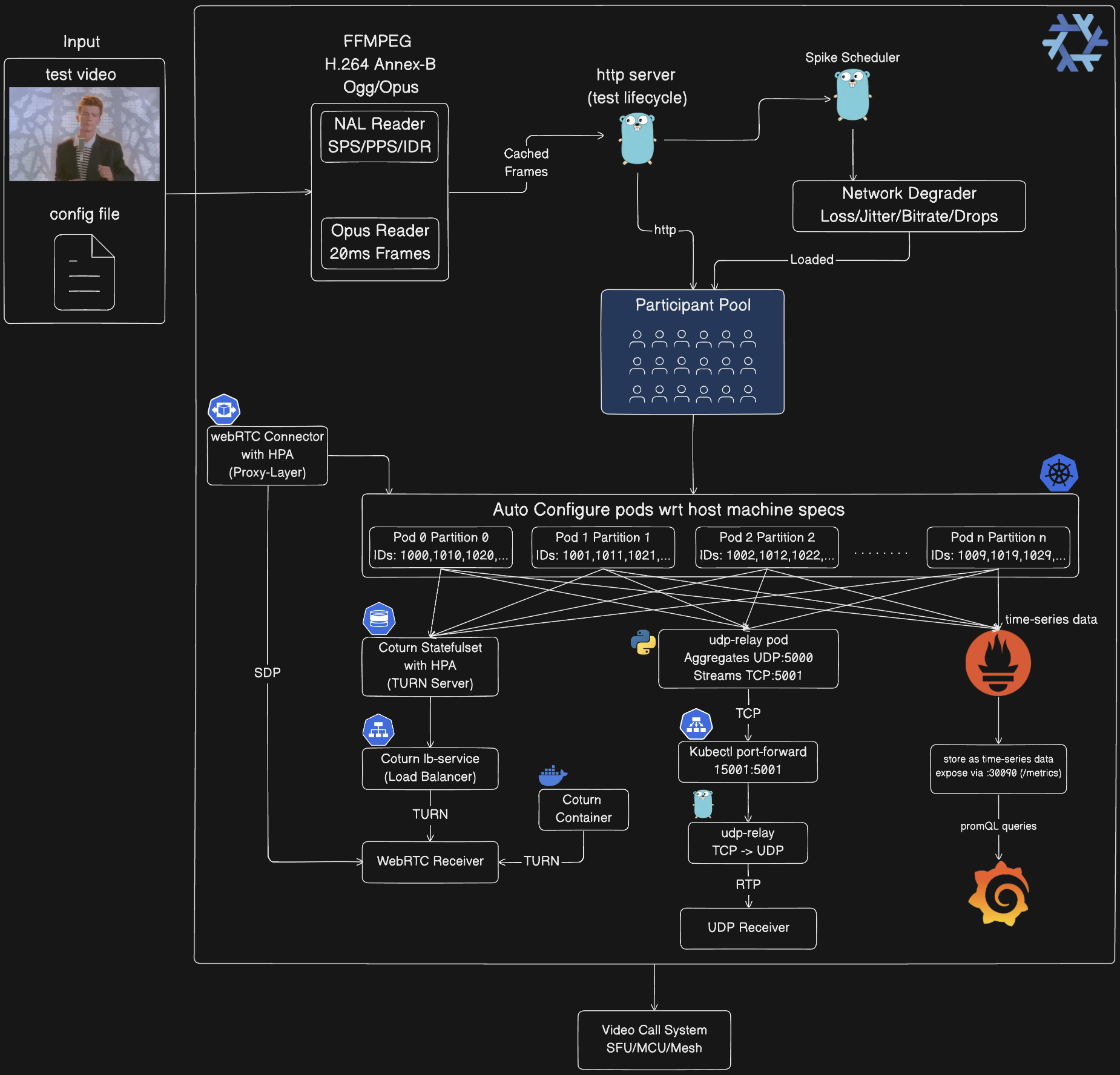
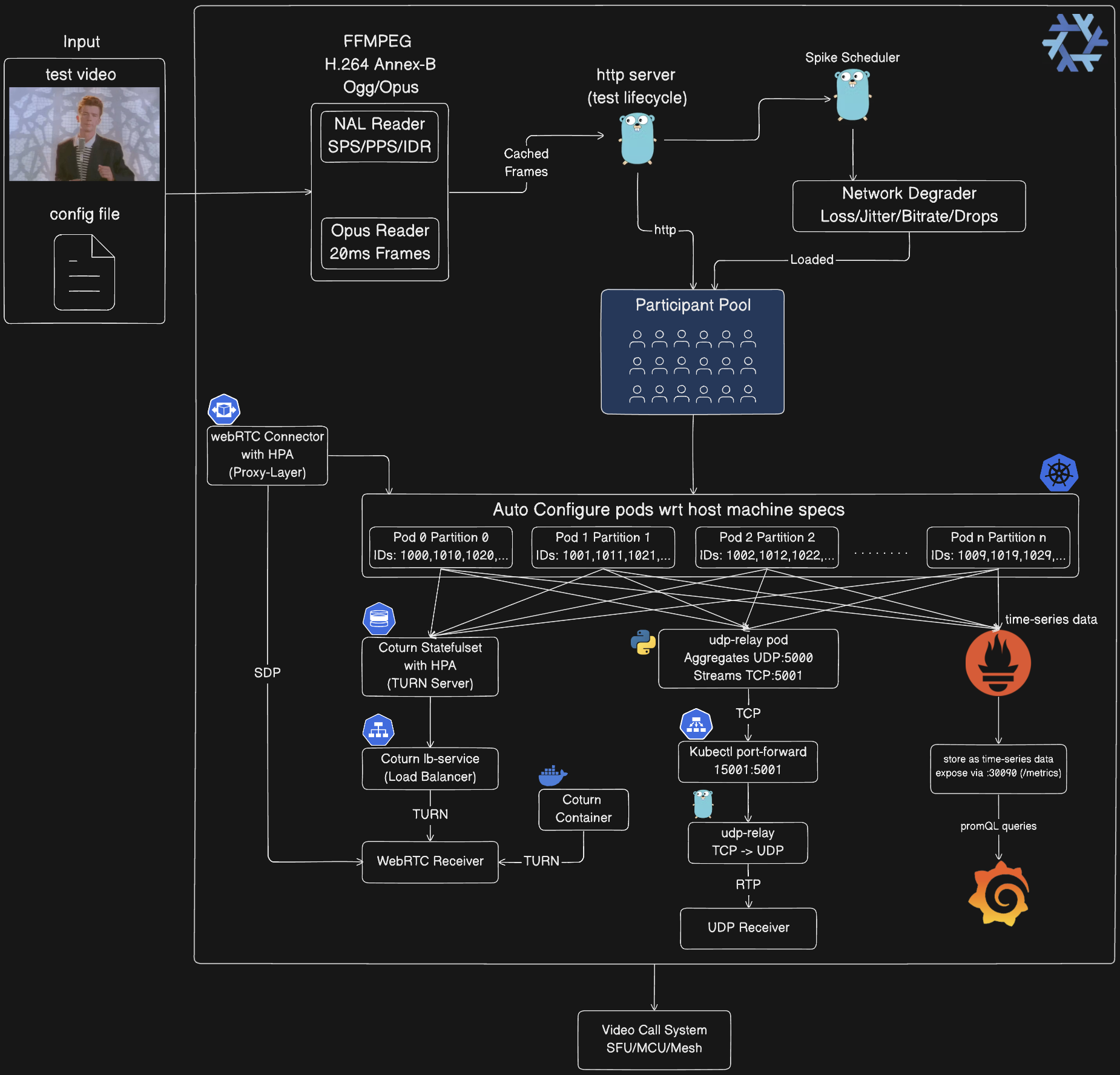
Architecture
image
  1. Media Processing Pipeline:

    • FFmpeg converts input video to H.264 Annex-B and Ogg/Opus at startup
    • NAL Reader parses H.264 stream (SPS/PPS/IDR/Slices)
    • Opus Reader extracts 20ms audio frames from Ogg container
    • Frames cached in memory, shared across all participants (zero-copy)
    • Reduces CPU by ~90% vs per-participant encoding
  2. Control Plane:

    • HTTP Server (:8080) manages test lifecycle via REST API
    • Spike Scheduler distributes chaos events (even/random/front/back/legacy)
    • Network Degrader applies chaos: packet loss (1-25%), jitter (10-50ms), bitrate reduction (30-80%), frame drops (10-60%)
    • Loaded chaos configuration applied to participant pool
  3. Participant Pool:

    • Auto-partitioned across pods using: participant_id % total_partitions = partition_id
    • Each participant generates RTP streams (PT=96 video, PT=111 audio)
    • Participant ID embedded in RTP extension header (ID=1)
    • Pool size: 1-100 (local), 100-500 (Docker), 500-1500 (Kubernetes)
  4. Kubernetes Auto-Configuration:

    • Pods auto-detect partition ID from pod name: →
orchestrator-3
PARTITION_ID=3
  • Port allocation: base_port + (partition_id × 10000) + participant_index
  • Example: Partition 0 uses 5000-14999, Partition 1 uses 15000-24999
  • StatefulSet with 10 replicas, each handling ~150 participants
  • Resources: 1-4 CPU, 2-4Gi memory per pod
  • Auto-configures based on host machine specs
  • UDP Relay Chain (Kubernetes only):

    root@kitploit:~
    Orchestrator Pods (10×) → UDP :5000 → udp-relay Pod (Python)
    → Length-Prefixed TCP :5001 → kubectl port-forward 15001:5001
    → tools/udp-relay (Go) → UDP :5002 → Your Receiver
    
    • Why: kubectl port-forward only supports TCP, not UDP
    • In-cluster relay: Python script aggregates UDP from all pods, streams as TCP with 2-byte length prefix
    • Local relay: Go tool converts TCP stream back to UDP packets
    • Aggregates 1500 participant streams into single connection
  • WebRTC Infrastructure:

    • Coturn StatefulSet: 3 initial replicas, HPA scales 1-10 based on load (~500 participants/replica)
    • coturn-lb Service: Load balances TURN traffic across replicas
    • webrtc-connector: Optional proxy layer (Deployment + HPA 2-10 replicas), handles SDP signaling
    • Docker Mode: Single Coturn container for local testing
    • Ports: 3478 (TURN), 49152-65535 (relay range)
    • Credentials: webrtc/webrtc123
  • Client Integration:

    • UDP Receiver: Receives aggregated RTP stream from all participants via relay chain
    • WebRTC Receiver: Establishes 1:1 WebRTC connections via SDP exchange through TURN servers
    • Both forward to your video call system under test (SFU/MCU/Mesh)
  • Observability Stack (Optional):

    • Prometheus: Scrapes /metrics endpoint from all orchestrator pods every 5s
    • Grafana: Visualizes metrics via pre-configured dashboard (admin/admin)
    • Metrics exposed: participant count, packets sent, bytes sent, active spikes, packet loss %, jitter, MOS score
    • Access: Prometheus on :30090, Grafana on :30030 (NodePort)
    • Orchestrator pods annotated for auto-discovery: prometheus.io/scrape: "true"
  • Core Concepts

    Participant Simulation

    Each virtual participant generates real media streams:

    • Video: H.264 NAL units from actual video files, packetized per RFC 6184
    • Audio: Opus frames from Ogg containers, packetized per RFC 7587
    • RTP: Standards-compliant headers with participant ID extensions
    • Timing: Frame-accurate timing (30fps video, 20ms audio packets)

    Chaos Injection

    Five spike types simulate real-world network conditions:

    • Packet Loss: Drops RTP packets at application layer (1-100%)
    • Network Jitter: Adds latency variation (base + gaussian jitter)
    • Bitrate Reduction: Throttles video encoding (30-80% reduction)
    • Frame Drops: Skips video frames (10-60% drop rate)
    • Bandwidth Limiting: Caps total throughput

    Distribution Strategies

    Spikes are distributed across test duration using configurable strategies:

    • Even: Uniform spacing with jitter (predictable load)
    • Random: Unpredictable timing (realistic chaos)
    • Front-loaded: Dense spikes early (recovery testing)
    • Back-loaded: Baseline then chaos (comparison testing)
    • Legacy: Fixed interval ticker (runtime injection)

    Partitioning

    Kubernetes deployments use participant partitioning for horizontal scaling:

    • Each pod handles participant_id % total_partitions == partition_id
    • Port allocation: base_port + (partition_id * 10000) + participant_index
    • Automatic load distribution across 1-10 pods
    • Scales to 1500+ participants (150 per pod)

    Running the System

    1. Local Development (Native Go)

    Best for: Development, debugging, small-scale tests (1-100 participants)

    root@kitploit:~
    # Start orchestrator
    go run cmd/main.go
    
    # In another terminal: Start UDP receiver
    go run examples/go/udp_receiver.go 5002
    
    # Edit config/config.json to set num_participants: 10
    # Run chaos test
    go run tools/chaos-test/main.go -config config/config.json
    

    What happens:

    • Single orchestrator process on :8080
    • Participants send UDP to 127.0.0.1:5002
    • Chaos spikes injected via HTTP API
    • Real-time metrics displayed every 2s

    Configuration (config/config.json):

    root@kitploit:~
    {
      "base_url": "http://localhost:8080",
      "media_path": "public/rick-roll.mp4",
      "num_participants": 10,
      "duration_seconds": 300,
      "spikes": {
        "count": 20,
        "interval_seconds": 5,
        "types": { "rtp_packet_loss": {...}, "network_jitter": {...} }
      },
      "spike_distribution": {
        "strategy": "random",
        "min_spacing_seconds": 5,
        "jitter_percent": 15
      }
    }
    

    2. Docker Compose (Containerized)

    Best for: Isolated testing, CI/CD, medium-scale tests (100-500 participants)

    Prerequisites:

    • Docker Desktop with 8-16GB memory allocation
    • docker-compose installed
    root@kitploit:~
    # Build and start orchestrator container
    ./scripts/start_everything.sh build
    
    # In another terminal: Start UDP receiver
    go run examples/go/udp_receiver.go 5002
    
    # Edit config/config.json to set num_participants: 100
    # Run chaos test (targets container)
    go run tools/chaos-test/main.go -config config/config.json
    

    Resource Limits (edit docker-compose.yaml):

    root@kitploit:~
    services:
      orchestrator:
        deploy:
          resources:
            limits:
              cpus: "14.0"
              memory: 6G  # Increase for more participants
    

    Scaling Guide:

    Docker MemoryMax ParticipantsCPU Cores
    8 GB~1004
    16 GB~2508
    24 GB~40012
    32 GB~50014

    3. Kubernetes with Nix (Production Scale)

    Best for: Large-scale tests (500-1500 participants), horizontal scaling, production validation

    Prerequisites:

    • Nix with flakes enabled
    • Docker Desktop or kind cluster
    • kubectl configured

    Step 1: Enter Nix Environment

    root@kitploit:~
    # Nix provides: Go, Docker, kubectl, kind, ffmpeg
    nix develop
    
    # Or use direnv for auto-activation
    echo "use flake" > .envrc
    direnv allow
    

    Step 2: Deploy to Kubernetes

    root@kitploit:~
    # Auto-deploy with optimal settings (detects system resources)
    ./scripts/start_everything.sh run -config config/config.json
    
    # Or specify custom media files
    ./scripts/start_everything.sh run --media=path/to/video.mp4 -config config/config.json
    

    What happens:

    1. Builds Docker image with Nix-provided Go toolchain
    2. Creates/uses kind cluster
    3. Deploys StatefulSet with 10 orchestrator pods
    4. Deploys UDP relay pod
    5. Sets up kubectl port-forward for UDP relay
    6. Starts local TCP→UDP relay
    7. Runs chaos test across all pods

    Step 3: Receive Aggregated UDP Stream

    Option A: UDP Receiver (Recommended for Kubernetes)

    root@kitploit:~
    # Receives aggregated stream from all 1500 participants
    go run ./examples/go/udp_receiver.go 5002
    

    Option B: WebRTC Receiver (Multiple Participants)

    root@kitploit:~
    # Connect to up to 150 participants via WebRTC
    go run ./examples/go/webrtc_receiver.go http://localhost:8080 <test_id> 150
    

    Architecture Flow:

    root@kitploit:~
    1500 Participants across 10 pods
      → Each pod: 150 participants
      → Partition by participant_id % 10
      → All send UDP to udp-relay:5000
      → UDP relay aggregates → TCP :5001
      → kubectl port-forward 15001:5001
      → Local relay converts TCP → UDP :5002
      → Your receiver gets all 1500 streams
    

    Note: The start_everything.sh script automatically sets up:

    • kubectl port-forward (udp-relay 15001:5001)
    • Local TCP→UDP relay (tools/udp-relay)
    • You only need to run the receiver

    Manual Kubernetes Setup

    root@kitploit:~
    # Build and load image
    docker build -t chaos-monkey-orchestrator:latest .
    kind load docker-image chaos-monkey-orchestrator:latest
    
    # Deploy
    kubectl apply -f k8s/orchestrator/orchestrator.yaml
    kubectl apply -f k8s/udp-relay/udp-relay.yaml
    
    # Wait for pods
    kubectl wait --for=condition=ready pod -l app=orchestrator --timeout=300s
    
    # Port-forward UDP relay
    kubectl port-forward udp-relay 15001:5001 &
    
    # Start local TCP→UDP relay
    go run tools/udp-relay/main.go &
    
    # In another terminal: Start receiver
    go run ./examples/go/udp_receiver.go 5002
    
    # In another terminal: Run chaos test
    go run tools/chaos-test/main.go -config config/config.json
    

    Cleanup

    root@kitploit:~
    # Delete Kubernetes resources
    ./scripts/cleanup.sh
    
    # Or delete entire cluster
    kind delete cluster --name av-chaos-monkey
    

    Cross-Platform Builds with Nix

    root@kitploit:~
    # Build for Linux x86_64 (most common)
    nix build .#packages.x86_64-linux.av-chaos-monkey
    
    # Build for ARM64 (Raspberry Pi, AWS Graviton)
    nix build .#packages.aarch64-linux.av-chaos-monkey
    
    # Build for macOS Intel
    nix build .#packages.x86_64-darwin.av-chaos-monkey
    
    # Build for macOS Apple Silicon
    nix build .#packages.aarch64-darwin.av-chaos-monkey
    
    # Binary location
    ./result/bin/main
    

    API Reference

    Test Lifecycle

    root@kitploit:~
    # Create test
    POST /api/v1/test/create
    {
      "test_id": "optional_id",
      "num_participants": 100,
      "video": {...},
      "audio": {...},
      "duration_seconds": 600,
      "spikes": [...],
      "spike_distribution": {
        "strategy": "even",
        "min_spacing_seconds": 5,
        "jitter_percent": 15
      }
    }
    
    # Start test
    POST /api/v1/test/{test_id}/start
    
    # Get metrics
    GET /api/v1/test/{test_id}/metrics
    
    # Stop test
    POST /api/v1/test/{test_id}/stop
    

    WebRTC Signaling

    root@kitploit:~
    # Get SDP offer
    GET /api/v1/test/{test_id}/sdp/{participant_id}
    
    # Set SDP answer
    POST /api/v1/test/{test_id}/sdp/{participant_id}
    {"sdp_answer": "v=0..."}
    

    Chaos Injection

    root@kitploit:~
    # Inject spike
    POST /api/v1/test/{test_id}/spike
    {
      "spike_id": "unique_id",
      "type": "rtp_packet_loss",
      "duration_seconds": 30,
      "participant_ids": [1001, 1002],
      "params": {"loss_percentage": "15"}
    }
    

    Configuration

    Spike Types

    TypeParametersEffect
    rtp_packet_lossloss_percentage (0-100)Drops packets at RTP layer
    network_jitterbase_latency_ms, jitter_std_dev_msAdds delay variation
    bitrate_reducenew_bitrate_kbpsThrottles video encoding
    frame_dropdrop_percentage (0-100)Skips video frames
    bandwidth_limitbandwidth_kbpsCaps total throughput

    Distribution Config

    root@kitploit:~
    {
      "spike_distribution": {
        "strategy": "even",
        "min_spacing_seconds": 5,
        "jitter_percent": 15,
        "respect_min_offset": true
      }
    }
    

    Client Integration

    UDP Receiver (Go)

    root@kitploit:~
    # Provided receiver with RTP parsing
    go run examples/go/udp_receiver.go 5002
    

    Output:

    root@kitploit:~
    Listening for RTP packets on UDP port 0.0.0.0:5002
    Packet #100 from 127.0.0.1:xxxxx:
      Participant ID: 1001
      Payload Type: 96 (H.264 video)
      Sequence: 1234
      Timestamp: 90000
      SSRC: 1001000
      Payload Size: 1200 bytes
    
    ═══════════════════════════════════════════════════════════
                        PACKET STATISTICS                       
    ═══════════════════════════════════════════════════════════
    Duration: 60s
    Total Packets: 180000 (3000 pkt/s)
    Total Bytes: 450 MB (60 Mbps)
    
    Media Type Breakdown:
      Video (H.264): 120000 packets (66.7%)
      Audio (Opus):  60000 packets (33.3%)
    
    Unique Streams (SSRCs): 1500
    Unique Participants: 1500
    

    WebRTC Receiver (Go)

    root@kitploit:~
    # Single participant
    go run ./examples/go/webrtc_receiver.go http://localhost:8080 <test_id>
    
    # Multiple participants (up to 150)
    go run ./examples/go/webrtc_receiver.go http://localhost:8080 <test_id> 150
    
    # Example with actual test ID
    go run ./examples/go/webrtc_receiver.go http://localhost:8080 chaos_test_1770831684 150
    

    Note: WebRTC requires 1:1 connections. For Kubernetes, use UDP receiver which aggregates all participants automatically.

    Custom Integration

    RTP Packet Format:

    root@kitploit:~
     0                   1                   2                   3
     0 1 2 3 4 5 6 7 8 9 0 1 2 3 4 5 6 7 8 9 0 1 2 3 4 5 6 7 8 9 0 1
    +-+-+-+-+-+-+-+-+-+-+-+-+-+-+-+-+-+-+-+-+-+-+-+-+-+-+-+-+-+-+-+-+
    |V=2|P|X|  CC   |M|     PT      |       sequence number         |
    +-+-+-+-+-+-+-+-+-+-+-+-+-+-+-+-+-+-+-+-+-+-+-+-+-+-+-+-+-+-+-+-+
    |                           timestamp                           |
    +-+-+-+-+-+-+-+-+-+-+-+-+-+-+-+-+-+-+-+-+-+-+-+-+-+-+-+-+-+-+-+-+
    |           synchronization source (SSRC) identifier            |
    +-+-+-+-+-+-+-+-+-+-+-+-+-+-+-+-+-+-+-+-+-+-+-+-+-+-+-+-+-+-+-+-+
    |  Extension ID=1 | Length=4    |    Participant ID (uint32)    |
    +-+-+-+-+-+-+-+-+-+-+-+-+-+-+-+-+-+-+-+-+-+-+-+-+-+-+-+-+-+-+-+-+
    |                         H.264/Opus Payload                    |
    +-+-+-+-+-+-+-+-+-+-+-+-+-+-+-+-+-+-+-+-+-+-+-+-+-+-+-+-+-+-+-+-+
    

    Payload Types:

    • 96: H.264 video (RFC 6184)
    • 111: Opus audio (RFC 7587)

    Participant ID Extraction:

    root@kitploit:~
    // Extension bit set?
    if (packet[0] & 0x10) != 0 {
        offset := 12 + int(packet[0]&0x0F)*4  // Skip CSRC
        extID := binary.BigEndian.Uint16(packet[offset:])
        if extID == 1 {
            participantID := binary.LittleEndian.Uint32(packet[offset+4:])
        }
    }
    

    Performance

    Resource Requirements

    ParticipantsMemoryCPUBandwidth
    1002GB2 cores250 Mbps
    5006GB8 cores1.2 Gbps
    100012GB16 cores2.5 Gbps
    150018GB24 cores3.7 Gbps

    Kubernetes Scaling

    • Auto-scaling: Calculates optimal pod count based on participant count
    • Pod capacity: 150 participants per pod (configurable)
    • Max pods: 10 (StatefulSet limit)
    • Port range: 10,000 ports per partition

    Throughput

    Per participant (1280x720@30fps + Opus):

    • Video: ~2.5 Mbps (H.264)
    • Audio: ~128 Kbps (Opus)
    • Total: ~2.6 Mbps
    • Packets: ~90 video + 50 audio = 140 pkt/s

    Monitoring

    Prometheus Metrics

    root@kitploit:~
    # Exposed on /metrics endpoint
    av_chaos_monkey_participants_total
    av_chaos_monkey_packets_sent_total
    av_chaos_monkey_bytes_sent_total
    av_chaos_monkey_spikes_active
    av_chaos_monkey_packet_loss_percent
    av_chaos_monkey_jitter_ms
    

    Grafana Dashboard

    root@kitploit:~
    # Docker Mode: Start monitoring stack
    docker-compose --profile monitoring up
    
    # Kubernetes Mode: Deploy monitoring
    kubectl apply -f k8s/monitoring/prometheus-rbac.yaml
    kubectl apply -f k8s/monitoring/prometheus.yaml
    kubectl apply -f k8s/monitoring/grafana.yaml
    
    # Access Grafana
    # Docker: http://localhost:3000
    # Kubernetes: http://localhost:30030 (NodePort)
    # Default credentials: admin/admin
    
    # Access Prometheus
    # Docker: http://localhost:9091
    # Kubernetes: http://localhost:30090 (NodePort)
    

    Kubernetes Auto-Discovery:

    • Orchestrator pods annotated with prometheus.io/scrape: "true"
    • Prometheus scrapes /metrics from all pods every 5s
    • Grafana pre-configured with Prometheus datasource
    • Dashboard auto-provisioned on startup

    Real-time Stats

    root@kitploit:~
    # Get test metrics
    curl http://localhost:8080/api/v1/test/{test_id}/metrics | jq
    
    # Output
    {
      "aggregate": {
        "total_frames_sent": 45000,
        "total_packets_sent": 180000,
        "total_bitrate_kbps": 250000,
        "avg_jitter_ms": 12.5,
        "avg_packet_loss": 2.3,
        "avg_mos_score": 4.1
      }
    }
    

    Troubleshooting

    No UDP Packets Received

    root@kitploit:~
    # Check UDP target configuration
    kubectl logs orchestrator-0 | grep "UDP transmission enabled"
    
    # Verify UDP relay is running
    kubectl get pod udp-relay
    
    # Check port-forward
    ps aux | grep "kubectl port-forward"
    
    # Test UDP connectivity
    nc -u -z localhost 5002
    

    WebRTC Connection Fails

    root@kitploit:~
    # Check TURN server
    kubectl get svc coturn-lb
    
    # Verify ICE candidates
    kubectl logs orchestrator-0 | grep "ICE"
    
    # Test TURN connectivity
    turnutils_uclient -v -u webrtc -w webrtc123 <turn-server>:3478
    

    High Memory Usage

    root@kitploit:~
    # Check participant count per pod
    kubectl exec orchestrator-0 -- curl -s http://localhost:8080/api/v1/test/{test_id}/metrics | jq '.participants | length'
    
    # Scale down participants or increase pod count
    go run tools/k8s-start/main.go -replicas 10 -participants 1000
    
    # Increase Docker memory (Docker Desktop)
    # Settings → Resources → Memory → 16GB
    

    Packet Loss in UDP Receiver

    Single UDP socket cannot handle 3000+ concurrent streams without kernel buffer overflow. Solutions:

    • Use UDP relay (aggregates before forwarding)
    • Increase socket buffer: setsockopt(SO_RCVBUF, 8MB)
    • Accept baseline loss as measurement artifact

    License

    BSD 3-Clause License

    Contributing

    Contributions welcome! Key areas:

    • Additional spike types (CPU throttling, memory pressure)
    • More distribution strategies (wave, burst)
    • Enhanced metrics (MOS calculation, RTCP feedback)
    • Client libraries (Python, Rust, TypeScript)

    References

    • RFC 3550 - RTP: A Transport Protocol for Real-Time Applications
    • RFC 6184 - RTP Payload Format for H.264 Video
    • RFC 7587 - RTP Payload Format for Opus
    • WebRTC Specification
    Download Tool
