
Skip to content
KitploitKITPLOIT
ToolsBlog
Submit
ToolsBlog
Submit

Hacking, PenTest, and Cybersecurity Tools for Your Security Arsenal!

Kitploit is a directory of hacking, cybersecurity, and pentesting tools. Discover the latest project updates to find vulnerabilities, analyze systems, automate testing, and strengthen your security.

··Feeds·Contact·Privacy·© 2026 Kitploit

Tool Directory

Categories

View all categories
Loading categories
sshelf — Fast terminal UI for your SSH hosts: fuzzy-search and connect in two keystrokes, dual-pane SFTP file transfer, and background port forwarding. Keeps its own host database and generates the ssh command — never edits ~/.ssh/config. | Kitploit
Tools/GitHubGitHub/max-rh/sshelf
General Purpose UtilitiesNetwork SecurityUtilities & FrameworksAuthenticationRemote Access Tool
GitHubmax-rh/sshelf

sshelf

Fast terminal UI for your SSH hosts: fuzzy-search and connect in two keystrokes, dual-pane SFTP file transfer, and background port forwarding. Keeps its own host database and generates the ssh command — never edits ~/.ssh/config.


View Repository
66893 days agoReviewed by Kitploit
Website

Most Popular

View all →

Discover the most used tools by our community.

Explore all tools

Browse our collection of tools

View all tools →
Share

sshelf

Fuzzy-search your SSH hosts and connect in two keystrokes.

sshelf keeps its own host list, builds the ssh command for you, and then gets out of the way. It hands the terminal to real OpenSSH and never touches ~/.ssh/config.

crates.io CI docs built with Ratatui MSRV license

sshelf: type a few letters, and it has the ssh command ready

Install

macOS and Linux, x86_64 and arm64. The prebuilt packages need no Rust toolchain. At runtime sshelf wants OpenSSH 8.4+, which is where password auto-supply comes from.

Homebrew (macOS or Linux):

root@kitploit:~
brew install max-rh/tap/sshelf

Shell installer (prebuilt binary, picks your platform):

root@kitploit:~
curl --proto '=https' --tlsv1.2 -LsSf https://github.com/max-rh/sshelf/releases/latest/download/sshelf-installer.sh | sh
More options (Debian/Ubuntu · Fedora/RHEL · Gentoo · cargo)

Debian/Ubuntu: grab the .deb from the latest release, then sudo apt install ./sshelf_*_amd64.deb (or *_arm64.deb).

Fedora / RHEL / Rocky / openSUSE: grab the .rpm (static build, works on any RPM distro) from the latest release, then sudo dnf install ./sshelf-*.x86_64.rpm (or .aarch64.rpm).

Gentoo: community-maintained overlay (unofficial, thanks to @masterwolf-git). Run eselect repository enable masterwolf && emerge --sync && emerge --ask app-admin/sshelf.

Cargo (from crates.io; needs Rust 1.88+): cargo install sshelf.

Shell tab-completion ships with every package. Open a new shell after installing. On Linux, secrets use a pure-Rust Secret Service backend (no libdbus/OpenSSL build deps).

Full details and completions setup: Install guide.

Why I built this

I run a couple of dozen machines (a homelab, some VPSes, a few boxes behind a bastion), and I kept typing ssh -J bastion -i ~/.ssh/some-key -p 2222 user@host from memory or grepping my shell history for it. Every SSH manager I tried wanted either to own ~/.ssh/config or to give me an account and sync my hosts through someone's server. I didn't want either. I wanted a launcher that keeps its own list, builds the command, and gets out of the way. And a place to keep the passwords for the handful of hosts that can't use keys, without ever putting them in a file. So I built it.

What you get

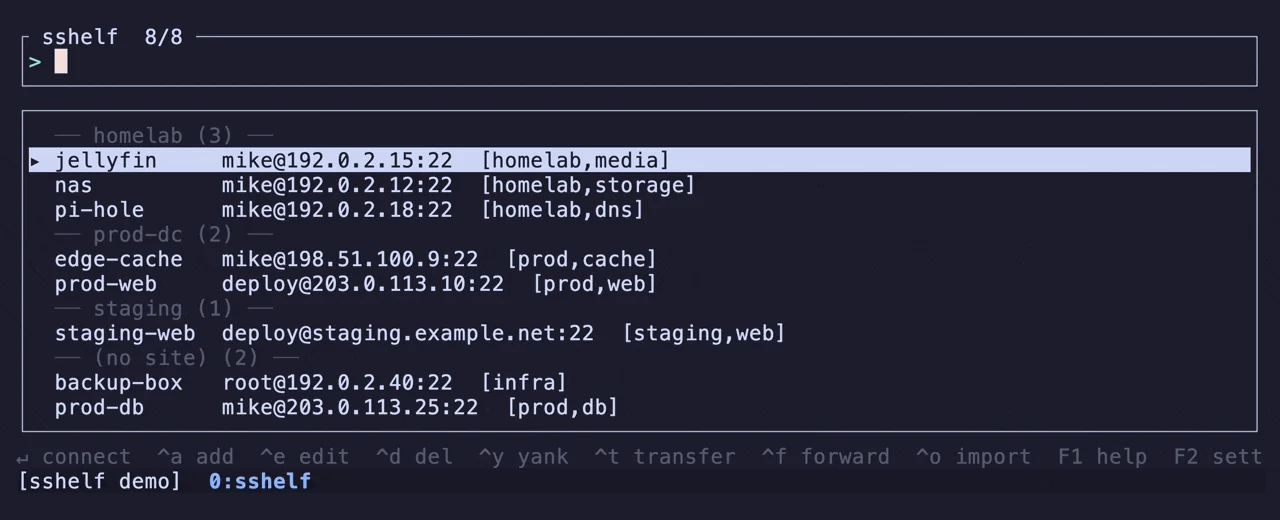
Fuzzy launcher

Type to filter. Enter connects. Your most-used hosts float to the top on their own (frecency: usage count, decayed by recency), and tag:prod / site:homelab narrow the list further. Ctrl-y copies the command it built instead of running it. From the shell, sshelf prod-web connects by name and sshelf - reconnects to the last host, both without opening the TUI.
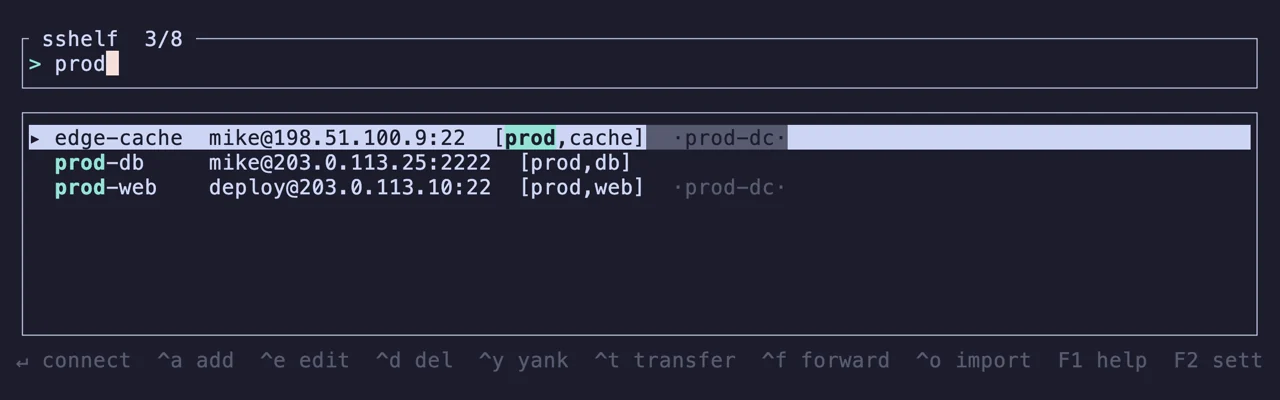
The sshelf launcher filtering three hosts as you type

It exec()s into your ssh

sshelf builds the argv from the host record, tears its own UI down, and then replaces itself with OpenSSH. There is no wrapper between you and the session: a real TTY, your ssh, your config-free flags. When the session ends you're back at your shell, not in a menu. The command it runs is exactly the one Ctrl-y shows you. How the command is built.

Dual-pane file transfer

Ctrl-t opens your files on the left and the host's on the right, over a single authenticated connection. Space marks, Ctrl-a marks everything the filter shows, Ctrl-s sends the whole set either way, F7 makes a directory. A name the destination already has is skipped, never overwritten.
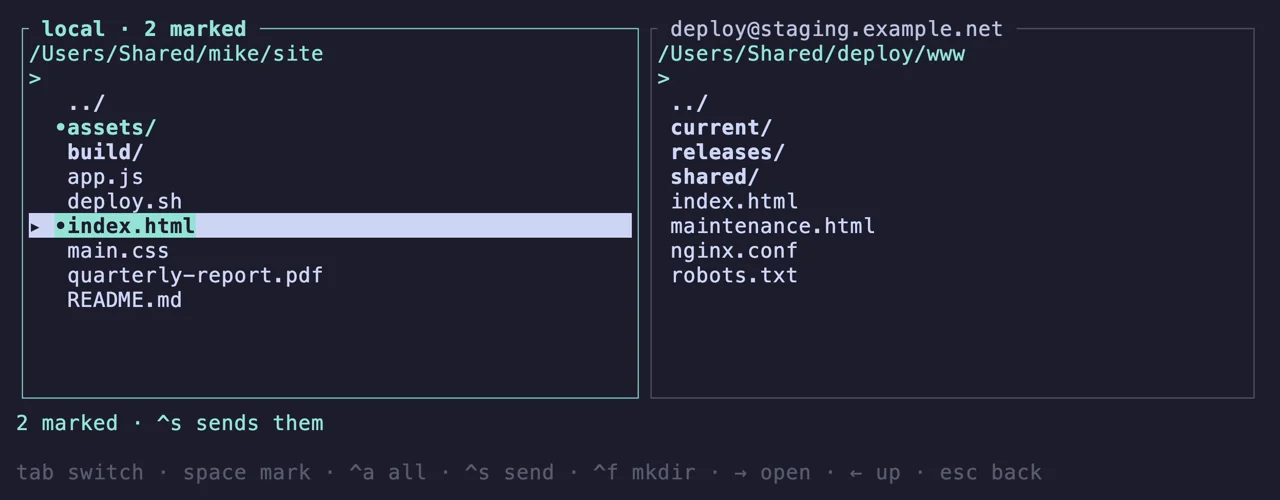
The dual-pane transfer screen with two entries marked

Background port forwards

Ctrl-f opens a Local, Remote, or SOCKS tunnel that keeps running after you quit sshelf, and after you close the terminal. F4 lists every one of them across all hosts and stops the one you pick. They're tracked by pid and reconciled against the processes that are really running, so nothing lingers in a list after it dies. No daemon, no supervisor.
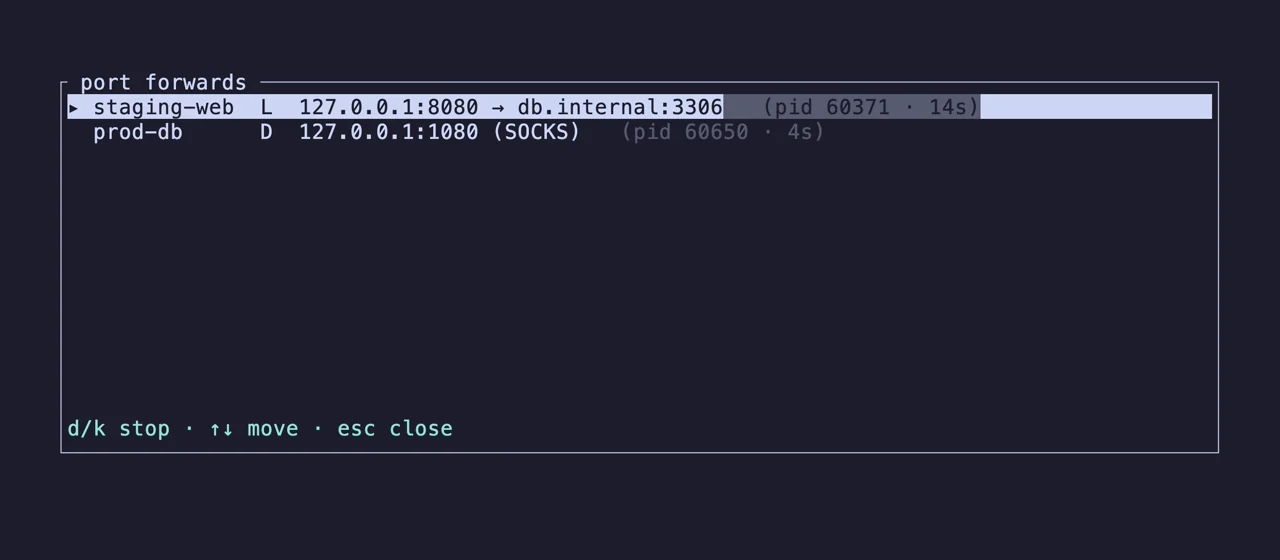
The forwards manager listing two live tunnels

tmux mode

Set tmux = "window" or "pane" and Enter opens the host in a new tmux window (named after the host) or a new pane instead of replacing sshelf. End the session and the picker is still sitting there, still running.
Enter opens the host in a new tmux window; sshelf keeps running

Sites and tags

F3 manages sites: a site groups hosts and can carry a shared bastion, user, port, and key that its members inherit at connect time, filling in only the fields a host leaves unset. Tags are free-form labels you filter on. Both show up in the list, and an inherited bastion shows up in the command sshelf builds.
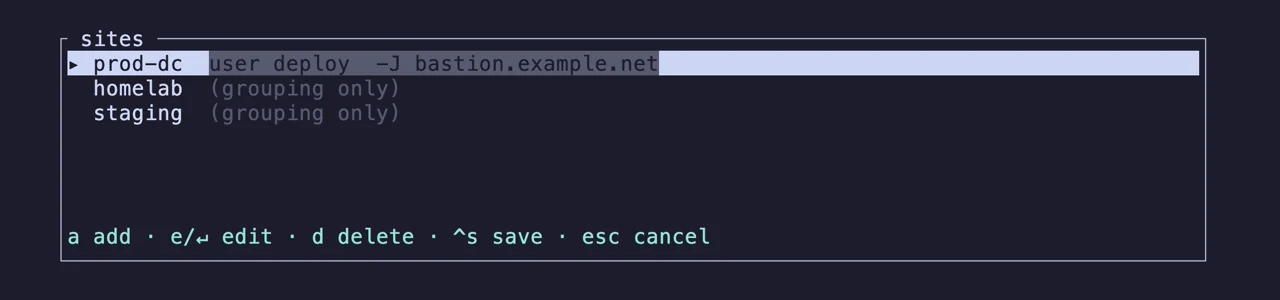
The sites manager with three sites and their shared defaults

Passwords without sshpass

For the hosts that can't use keys, sshelf stores the password in your OS keyring (or an age-encrypted vault on a headless box) and supplies it through SSH_ASKPASS when ssh asks. It answers only prompts with the shape of a real password or passphrase prompt, so a server can't phish the secret with look-alike text. The password is never in a file, never in ps, never on a command line. Hosts that also want a verification code get a prompt for it before the connection starts. Passwords, keys & 2FA · Security.
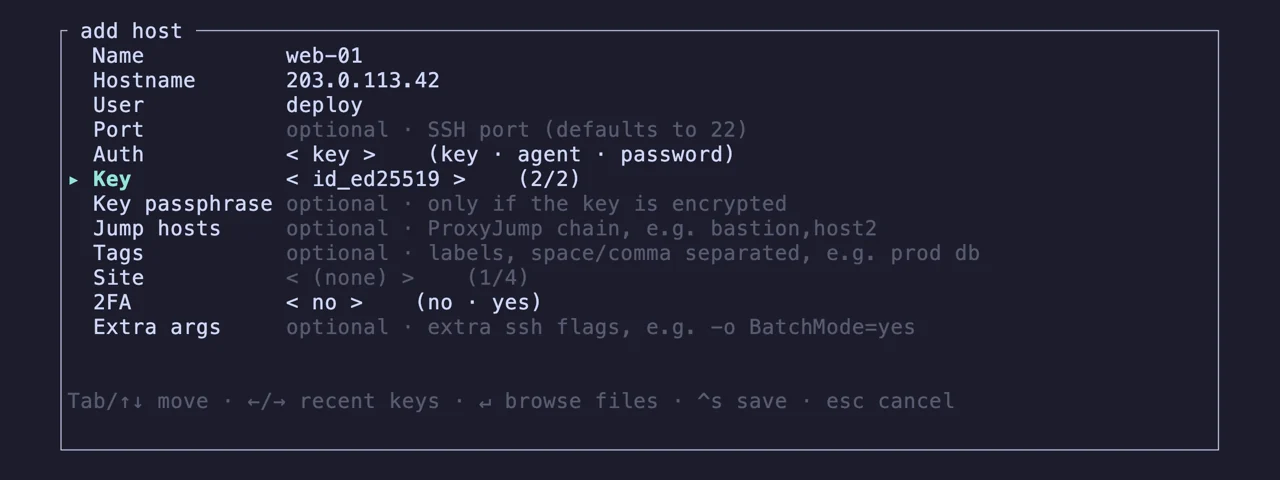
The add-host form on the auth section, choosing a key

Export to ssh_config

sshelf export writes one ssh_config fragment of its own and gives you a single Include line to paste into ~/.ssh/config yourself. After that, plain ssh, scp, rsync, git, and anything that reads SSH config (VS Code Remote-SSH, JetBrains Gateway) resolve your sshelf hosts by name, bastion and all. The file refreshes whenever your hosts change. sshelf still writes nothing under ~/.ssh.

sshelf export writing an ssh_config fragment, and the fragment itself

Import what you already have

sshelf import reads ~/.ssh/config, strictly read-only, and copies over the hosts it can model. sshelf import --tailscale runs your own tailscale CLI and turns your tailnet into searchable hosts, with MagicDNS names, the tailnet as a site, and ACL tags as tags. Both are add-only, so re-running one is always safe, and neither happens unless you ask for it.

sshelf doctor

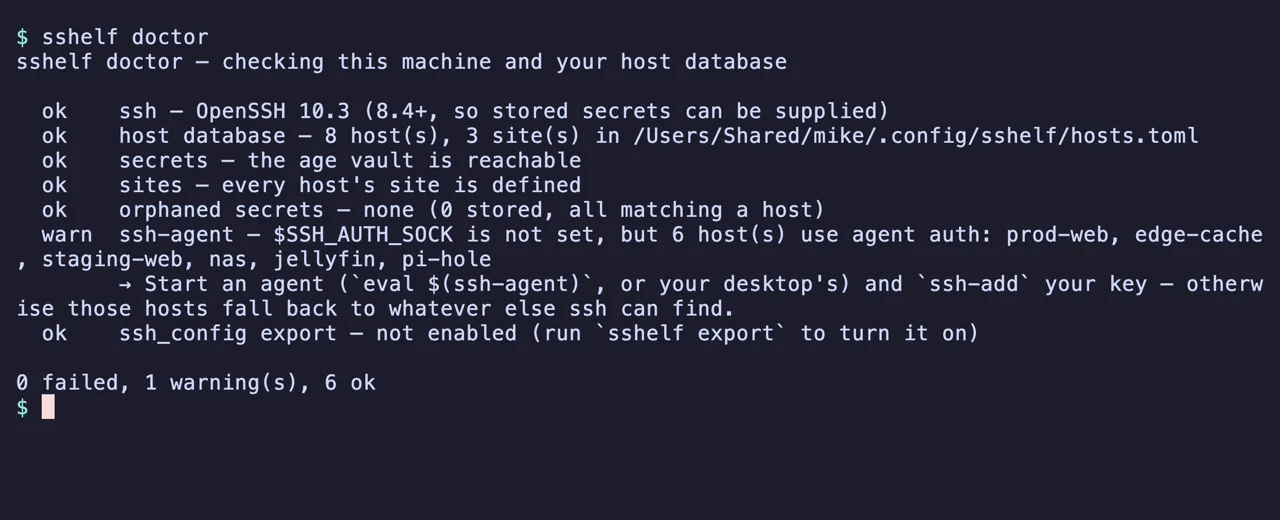
One command for when something isn't working. It checks your OpenSSH version, whether the secret backend actually opens, whether hosts.toml parses, hosts pointing at a site that doesn't exist, a missing agent socket, and an export that has drifted. It names the fix for each. Read-only, exits 1 if anything failed, and it never contacts a host.

sshelf doctor listing its checks, with one warning

How it compares

Compiled in September 2026 from each project's own README (and, for Termius, its site). A cell reading "not stated" means the project's own docs don't say.

sshelfpurpleomnysshVoltiusTermius
Runs interminal (TUI)terminal (TUI)terminal (TUI) + desktop appdesktop app (Tauri)desktop + mobile app
Edits ~/.ssh/configneveryes, in placeno, reads it at startupn/a (own store)n/a (own store)
Account requirednononofor real-time syncyes
Holds tokens for other servicesnoyes, one per cloud providernoyes, for syncnot stated
Network calls of its ownnonecloud provider synchost metrics pollingsync, updates, host metricssync
Secrets custodyyour OS keyring / age vaultkeyring + password managersnot statedits E2EE vaultits encrypted vault
Connectexec() into your sshruns your ssh commandbuilt-in terminalbuilt-in terminalbuilt-in terminal
Port forwardsyes, survive quittingyes, live monitoringnot statedyesyes
File transferdual-pane SFTPsplit-panetwo-panel SFTPdual-pane, drag & dropSFTP
Containers / metrics dashboardsnoyesyesyesnot stated
Team sharingnononopaid tierspaid tiers
PlatformsmacOS, LinuxmacOS, LinuxmacOS, Linux, Windows, TermuxWindows, macOS, LinuxmacOS, Windows, Linux, iOS, Android
LicenseMIT / Apache-2.0MITApache-2.0AGPL-3.0proprietary

sshelf has no dashboards, no container management, no team sharing, and no Windows build. The first three are choices, and PRIVACY.md explains why: each one would mean sshelf holding something of yours, or talking to something on its own.

What it will never do

  • No telemetry. No analytics, no crash reports, no update check.
  • No account, no cloud, no sync server. There is nothing to sign up for.
  • No tokens held. sshelf never stores a cloud or API credential.
  • No network calls of its own. The only traffic is the SSH session you asked for.
  • Never edits ~/.ssh/config, and never writes anything under ~/.ssh.
  • No secrets in hosts.toml. That file is safe to commit and share.
  • No Electron. One binary, about four megabytes.

PRIVACY.md says what it reads, writes, runs, and sends. SECURITY.md is the threat model for stored secrets.

First five minutes

root@kitploit:~
sshelf                        # launch the TUI (Ctrl-a adds your first host)
sshelf import --dry-run       # preview a read-only import from ~/.ssh/config
sshelf import                 # ...do it
sshelf import --tailscale     # ...or import your whole Tailscale tailnet
sshelf prod-web               # connect straight to a saved host (skips the TUI)
sshelf -                      # reconnect to the most recently used host
sshelf list tag:prod --json   # scriptable listing (fields + the ssh command)
sshelf print-command db       # print the ssh command instead of running it
sshelf export                 # Include file so plain ssh/scp/VS Code see your hosts
sshelf doctor                 # something not working? check the setup and get told the fix

In the TUI: type to filter (plus tag:NAME / site:NAME) and Enter to connect. F1 shows every key.

Documentation

The user guide covers everything: Quickstart · CLI reference · Configuration · FAQ · sshelf doctor. There are per-feature pages for file transfer, port forwarding, sites & tags, passwords & 2FA, and SSH-config export. Architecture and design decisions live in docs/, and there's an llms.txt for the machines.

Questions & ideas

Ask, suggest a feature, or show what you built with it in GitHub Discussions. Contributions are welcome. Start with CONTRIBUTING.md.

Support

If sshelf is useful to you, a Bitcoin tip is appreciated (entirely optional):

Donate BTC

Bitcoin: bc1qcdeyhpwq76u97dhymx876n49uq85z4y3ccrpje

License

Dual-licensed under either MIT or Apache-2.0, at your option (the Rust-ecosystem norm).

Download Tool