 matheus-garbelini/esp32_bluetooth_classic_sniffer
Active Bluetooth BR/EDR Sniffer/Injector as cheap as any ESP32 board can get. Works with Scapy ;-)

Simple "Monitor mode" for Bluetooth Classic. Sniff or inject BR/EDR Baseband packets in ESP32 BT connections.
This is a reverse engineered active BR/EDR sniffer and ESP32 patching framework, which can be used to explore the Bluetooth (BT) BR/EDR interaction between ESP32 controller and a remote target.
Differently than passive sniffers, which do not interact with the BT network (piconet), the active sniffer connects itself to the remote BT device (BR/EDR target) and allows testing the BT protocol down to the Baseband layer while guided by a BT host stack such as blue-kitchen. The BrakTooth sniffer supports cheap boards such as ESP32-DOIT ($4) or ESP32-DevKitC ($10).

git clone https://github.com/Matheus-Garbelini/esp32_bluetooth_classic_sniffer
cd esp32_bluetooth_classic_sniffer
./requirements.sh # (sudo required) Installs latest wireshark and standalone python3 runtime
./build.sh 		  # Build BT Host programs and Wireshark h4bcm dissector
Before starting to use BrakTooth Sniffer, you need to upload a custom firmware to your ESP32 board:
sudo chown $USER:$USER /dev/ttyUSB0 # Give user permission to serial port to avoid using sudo
./firmware.py flash /dev/ttyUSB0 # Change ttyUSB0 to match your port name
# Note: ESP-WROVER-KIT or ESP-ETHERNET-KIT uses /dev/ttyUSB1 instead as the first port is for the FTDI JTAG circuit.
Important: Some boards requires you to hold the BOOT button to properly put ESP32 into flashing mode.
Usage: BTSnifferBREDR.py [OPTIONS]
Options:
  --port TEXT       Serial port name (/dev/ttyUSBx for Linux)
  --host TEXT       BDAddress of local host (default: E0:D4:E8:19:C7:68)
  --target TEXT     BDAddress of remote target (ex: a8:96:75:25:c2:ac)
  --live-wireshark  Opens Wireshark live session
  --live-terminal   Show a summary of each packet on terminal
  --bridge-only     Starts the HCI bridge without connecting any BT Host stack
  --help            Show this message and exit.
You can start the sniffer in as either master or slave role. If you use add --target argument, the sniffer will attempt a connection to your remote target. Otherwise, it will just wait for someone to connect to it.
Lastly, the --bridge-only only creates the HCI pseudo terminal (/dev/pts/x) so ESP32 can operate as a standard HCI BT controller. You can use this feature to connect any other BT host stack to ESP32.
./BTSnifferBREDR.py --port=/dev/ttyUSB0 --target=E0:D4:E8:19:C7:69 --live-terminal --live-wireshark
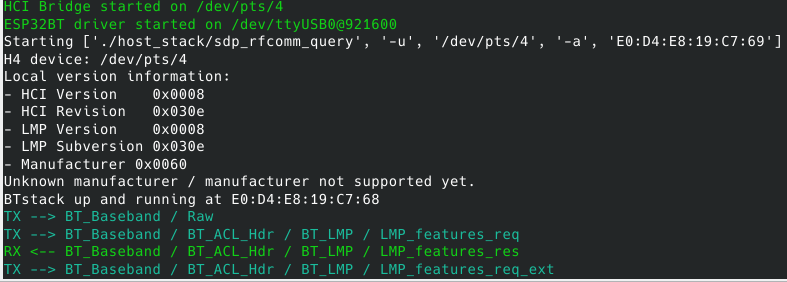
./BTSnifferBREDR.py --port=/dev/ttyUSB0 --live-terminal --live-wireshark
./BTSnifferBREDR.py --port=/dev/ttyUSB0 --bridge-only --live-terminal --live-wireshark
The source code can be built directly from the ESP32 Firmware Patching Framework repository as follows:
cd firmware
./build_from_source.sh # clone submodule & build firmware with platformio environment 'sniffer-serial'
./firmware.py flash <serial port> # flash built firmware to ESP32 via serial port
The ESP32 firmware binaries (firmware.bin, bootloader.bin, partitions.bin) are copied to firmware folder upon successful build. Then, you can proceed to flash the firmware as described in step 1.B).
Since BrakTooth sniffer uses a BT host stack to guide connectivity, the following modified BlueKitchen examples are used:
You can modify or add BT profiles to the current programs by following the official documentation of BlueKitchen. Note that folder host_stack/bluekitchen/example/ already contain some profile examples.
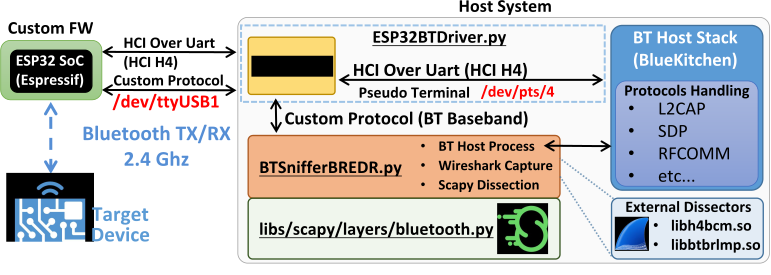
The custom ESP32 BR/EDR Sniffer/Injector firmware communicates with the host system over a USB serial port and waits to receive custom commands or HCI commands. At startup, an HCI bridge is created to separate BrakTooth custom protocol from standard HCI commands sent or received from ESP32. Once the "RX/TX Sniffer" feature is enabled on the ESP32 firmware, Baseband packets are directly forwarded to BTSnifferBREDR.py script which simply decodes sniffed packets over the custom protocol and prints them via Scapy and/or dumps to Wireshark via live capture and to logs folder.
