
Skip to content
KitploitKITPLOIT
ToolsBlog
Submit
ToolsBlog
Submit

Hacking, PenTest, and Cybersecurity Tools for Your Security Arsenal!

Kitploit is a directory of hacking, cybersecurity, and pentesting tools. Discover the latest project updates to find vulnerabilities, analyze systems, automate testing, and strengthen your security.

··Feeds·Contact·Privacy·© 2026 Kitploit

Tool Directory

Categories

View all categories
Loading categories
goscan — Interactive Network Scanner | Kitploit
Tools/GitHubGitHub/marco-lancini/goscan
Vulnerability ScannersNetwork MappingPort ScanningInformation GatheringPenetration Testing
GitHubmarco-lancini/goscan

goscan

Interactive Network Scanner

View Repository
1.0k1476 years agoReviewed by Kitploit

Most Popular

View all →

Discover the most used tools by our community.

Explore all tools

Browse our collection of tools

View all tools →
Share

GoScan is an interactive network scanner client, featuring auto-completion, which provides abstraction and automation over nmap.

Although it started as a small side-project I developed in order to learn @golang, GoScan can now be used to perform host discovery, port scanning, and service enumeration not only in situations where being stealthy is not a priority and time is limited (think at CTFs, OSCP, exams, etc.), but also (with a few tweaks in its configuration) during professional engagements.

GoScan is also particularly suited for unstable environments (think unreliable network connectivity, lack of "screen", etc.), given that it fires scans and maintain their state in an SQLite database. Scans run in the background (detached from the main thread), so even if connection to the box running GoScan is lost, results can be uploaded asynchronously (more on this below). That is, data can be imported into GoScan at different stages of the process, without the need to restart the entire process from scratch if something goes wrong.

In addition, the Service Enumeration phase integrates a collection of other tools (e.g., EyeWitness, Hydra, nikto, etc.), each one tailored to target a specific service.
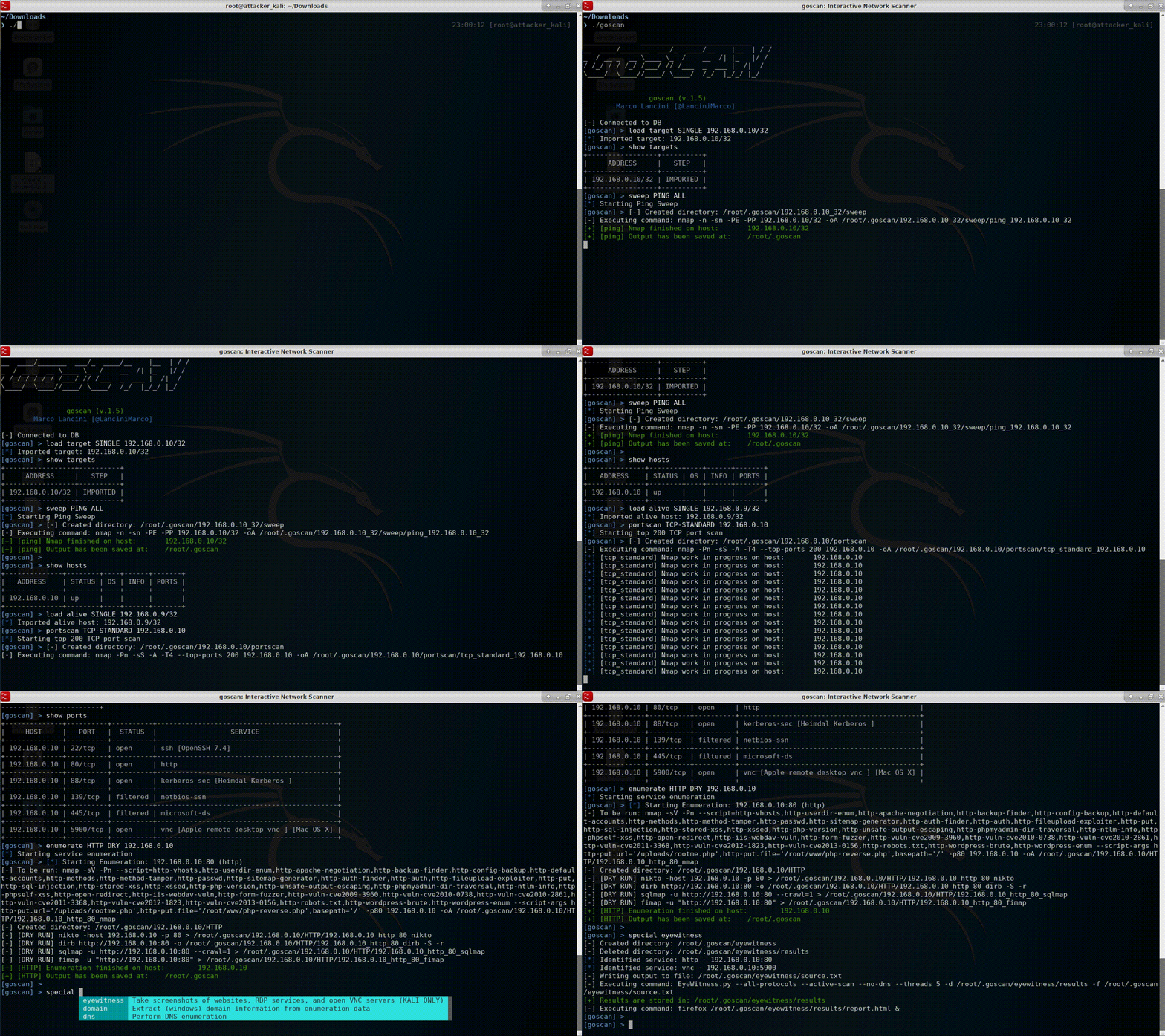
demo

Installation

Binary installation (Recommended)

Binaries are available from the Release page.

root@kitploit:~
# Linux (64bit)
$ wget https://github.com/marco-lancini/goscan/releases/download/v2.4/goscan_2.4_linux_amd64.zip
$ unzip goscan_2.4_linux_amd64.zip

# Linux (32bit)
$ wget https://github.com/marco-lancini/goscan/releases/download/v2.4/goscan_2.4_linux_386.zip
$ unzip goscan_2.4_linux_386.zip

# After that, place the executable in your PATH
$ chmod +x goscan
$ sudo mv ./goscan /usr/local/bin/goscan

Build from source

root@kitploit:~
# Clone and spin up the project
$ git clone https://github.com/marco-lancini/goscan.git
$ cd goscan/
$ docker-compose up --build
$ docker-compose run cli /bin/bash

# Initialize DEP
root@cli:/go/src/github.com/marco-lancini/goscan $ make init
root@cli:/go/src/github.com/marco-lancini/goscan $ make setup

# Build
root@cli:/go/src/github.com/marco-lancini/goscan $ make build

# To create a multi-platform binary, use the cross command via make
root@cli:/go/src/github.com/marco-lancini/goscan $ make cross

Usage

GoScan supports all the main steps of network enumeration:
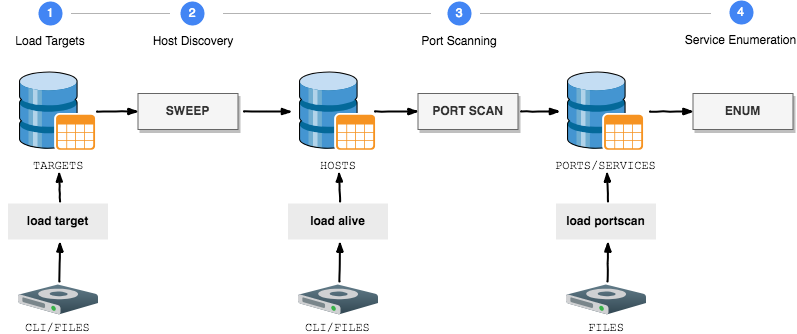
process

External Integrations

The Service Enumeration phase currently supports the following integrations:

License

GoScan is released under a MIT License. See the LICENSE file for full details.

Download Tool
StepCommands
1. Load targets
  • Add a single target via the CLI (must be a valid CIDR): load target SINGLE <IP/32>
  • Upload multiple targets from a text file or folder: load target MULTI <path-to-file>
2. Host Discovery
  • Perform a Ping Sweep: sweep <TYPE> <TARGET>
  • Or load results from a previous discovery:
    • Add a single alive host via the CLI (must be a /32): load alive SINGLE <IP>
    • Upload multiple alive hosts from a text file or folder: load alive MULTI <path-to-file>
3. Port Scanning
  • Perform a port scan: portscan <TYPE> <TARGET>
  • Or upload nmap results from XML files or folder: load portscan <path-to-file>
4. Service Enumeration
  • Dry Run (only show commands, without performing them): enumerate <TYPE> DRY <TARGET>
  • Perform enumeration of detected services: enumerate <TYPE> <POLITE/AGGRESSIVE> <TARGET>
5. Special Scans
  • EyeWitness
    • Take screenshots of websites, RDP services, and open VNC servers (KALI ONLY): special eyewitness
    • EyeWitness.py needs to be in the system path
  • Extract (Windows) domain information from enumeration data
    • special domain <users/hosts/servers>
  • DNS
    • Enumerate DNS (nmap, dnsrecon, dnsenum): special dns DISCOVERY <domain>
    • Bruteforce DNS: special dns BRUTEFORCE <domain>
    • Reverse Bruteforce DNS: special dns BRUTEFORCE_REVERSE <domain> <base_IP>
Utils
  • Show results: show <targets/hosts/ports>
  • Automatically configure settings by loading a config file: set config_file <PATH>
  • Change the output folder (by default ~/goscan): set output_folder <PATH>
  • Modify the default nmap switches: set nmap_switches <SWEEP/TCP_FULL/TCP_STANDARD/TCP_VULN/UDP_STANDARD> <SWITCHES>
  • Modify the default wordlists: set_wordlists <FINGER_USER/FTP_USER/...> <PATH>
WHATINTEGRATION
ARP
  • nmap
DNS
  • nmap
  • dnsrecon
  • dnsenum
  • host
FINGER
  • nmap
  • finger-user-enum
FTP
  • nmap
  • ftp-user-enum
  • hydra [AGGRESSIVE]
HTTP
  • nmap
  • nikto
  • dirb
  • EyeWitness
  • sqlmap [AGGRESSIVE]
  • fimap [AGGRESSIVE]
RDP
  • nmap
  • EyeWitness
SMB
  • nmap
  • enum4linux
  • nbtscan
  • samrdump
SMTP
  • nmap
  • smtp-user-enum
SNMP
  • nmap
  • snmpcheck
  • onesixtyone
  • snmpwalk
SSH
  • hydra [AGGRESSIVE]
SQL
  • nmap
VNC
  • EyeWitness