 manisso/crips
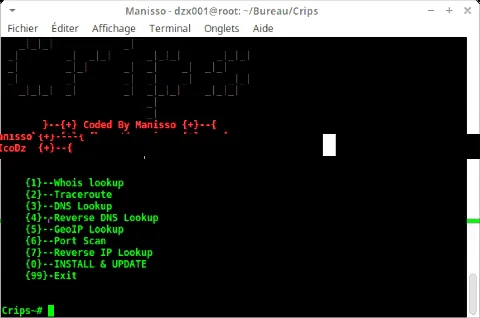
IP Tools To quickly get information about IP Address's, Web Pages and DNS records.



This Tools is a collection of online IP Tools that can be used to quickly get information about IP Address's, Web Pages and DNS records.
Determine the registered owner of a domain or IP address block with the whois tool.
Using mtr an advanced traceroute tool trace the path of an Internet connection.
Find DNS records for a domain, results are determined using the dig DNS tool
Find Reverse DNS records for an IP address or a range of IP addresses.
Find the location of an IP address using the GeoIP lookup location tool.
A simple TCP Port Scan to quickly determine the status of an Internet facing service or firewall.
Discover web hosts sharing an IP address with a reverse IP lookup.
To install the tools directly in the system and get new update directly using terminal

[✓] git clone https://github.com/Manisso/Crips.git
[✓] cd Crips && python Crips.py
[◉] 0 : INSTALL & UPDATE
[◉] -> 0
[✓] press 0
[✓] Congratulation Crips is Installed !
[✔] Download
[✓] Download Crips
[✓] Extract Crips into Desktop
[◉]Open CMD and type the following commands:
[✓] $cd Desktop/Crips-master/
[✓] $python crips.py