 mandatoryprogrammer/thermoptic
A next-generation HTTP stealth proxy which perfectly cloaks requests as the Chrome browser across all layers of the stack.


"I don't believe it, thermoptic camouflage!"
This is an HTTP proxy designed to bypass services that use fingerprinting such as JA4+ to block certain HTTP clients. Using this proxy, you can use your preferred HTTP clients like curl and still have magically indistinguishable fingerprints from a real (Chrome/Chromium) web browser. thermoptic also comes with some fun features to mitigate JavaScript-based fingerprinting. It also makes it easy to do hybrid scraping using both a web browser and low-level HTTP clients together.
Even if you’re unfamiliar with JA4+ fingerprinting, if you’ve done any scraping you’ve probably been blocked by it before. Popular services such as Cloudflare use such techniques (and other tricks) to detect use of "non-human" HTTP clients to block requests. These services can also use this fingerprinting to detect if you start a session with a real browser and then switch to a low-level client like curl later. thermoptic solves all of these problems by presenting a unified "real" browser fingerprint for all scraping requests.
Here's an example JA4H (HTTP) fingerprint of curl without the proxy:
$ curl https://ja4db.com/id/ja4h/
ge11nn090000_b6a016211e8a_000000000000_e3b0c44298fc
This is quite different from the fingerprint that Chrome produces when you visit the URL directly:
ge11cn19enus_f2808f0d04cf_9a10d4221160_7068f58def6e
However, when we use the proxy to make the request, our JA4H fingerprint is magically identical:
$ curl --proxy http://thermoptic:1234 https://ja4db.com/id/ja4h/
ge11cn19enus_f2808f0d04cf_9a10d4221160_7068f58def6e
(The same goes for our JA4 TLS fingerprint as well, etc).
To start a thermoptic proxy which cloaks your traffic through a containerized Chrome instance on Ubuntu 22.04:
Regular Docker setup (works on hosts without a GPU runtime):
docker compose up --build
That's all, now you can proxy traffic through it:
curl --proxy http://127.0.0.1:1234 --insecure https://ja4db.com/id/ja4h/
Important notes:
PROXY_USERNAME and PROXY_PASSWORD.---insecure you need to use the generated CA file located in ./ssl/rootCA.crt. This is generated the first time you run thermoptic.thermoptic to any Chrome/Chromium instance launched with the --remote-debugging-port flag. This is essential as you'll want to set up and proxy through more commonly used environments to keep your fingerprint as low profile as possible (e.g. Chrome on Windows)./dev/dri, and lets the bundled Chrome container switch to the NVIDIA/Vulkan rendering path. To use this, run docker compose -f docker-compose.yml -f docker-compose.gpu.yml up --build.curl, requests, etc) with thermoptic, just set the proxy and your fingerprints are taken care of../hooks/onstart.js.http://127.0.0.1:14111) to control the Dockerized Chrome browser window. Useful to manually log into sites manually and then seemlessly use the proxy to make requests as your logged-in session (and for debugging).UPSTREAM_PROXY environment variable in docker-compose.yml.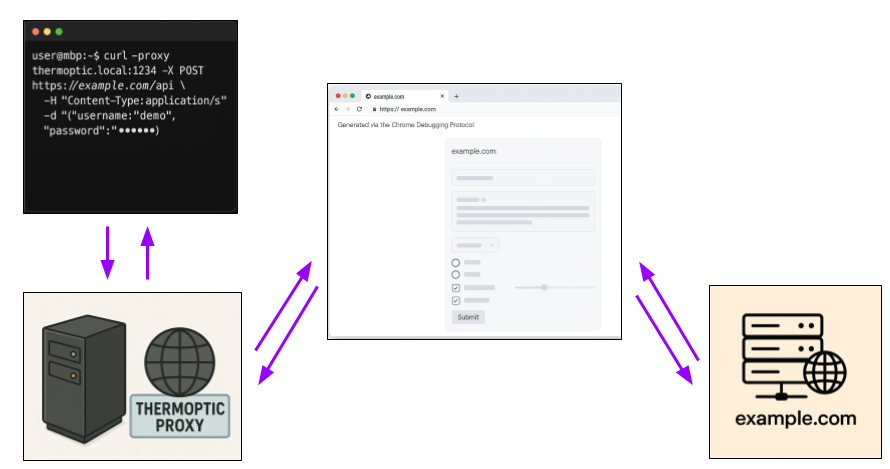
curl with thermoptic set as a proxy.thermoptic analyzes the request to best determine what type of browser request it's supposed to be (e.g. manual URL visit? Form submission? A fetch() request?).thermoptic uses the Chrome Debugging Protocol (CDP) to puppet the browser and set up a page that mocks the request exactly as it normally would occur in a real web browser.thermoptic triggers the request via the mocked context and captures the HTTP response.thermoptic sends the HTTP response back to the client.Due to the fact that the browser is actually making the request using its full stack, the resulting JA4 fingerprints are identitical.
NOTE: Due to many WAFs employing JavaScript-level fingerprinting of web browsers, thermoptic also exposes hooks to utilize the browser for key steps of the scraping process. See this section for more information on this.
To put it bluntly: other approaches have fundamental flaws which prevent them from being a practical long term solution to the browser fingerprinting problem.
Many other attempts to "beat" browser JA4+ fingerprinting do so by reimplementing the various layers of the browser stack. This approach has a number of serious drawbacks, such as:
In contrast, because thermoptic uses the browser itself to perform HTTP requests:
thermoptic controls just needs to be updated in order to match the latest set of fingerprints.Of course, no solution is without drawbacks. See the DOWNSIDES.md docs for a fleshed out list of downsides to the thermoptic approach.
thermoptic?"Thermoptic" (short for "thermoptic camouflage") is a reference to the fictional camouflage used by the Major in the Ghost in the Shell (1995) anime. In the movie, this camouflage is shown to be able to hide the wearer across multiple spectrums of detection including both visual light and thermal radiation. Similarly, this tool attempts to cloak the user from fingerprinting across multiple channels (HTTP, TLS, etc).
This tool will spoof the following JA4 fingerprints to be exactly like the Chrome/Chromium browser you're connected to:
thermoptic now routes the controlled Chrome instance through an internal proxyrouter service, so you can point Chrome at upstream HTTP or SOCKS proxies (including ones that require credentials). Set the upstream proxy URI by editing the UPSTREAM_PROXY value in docker-compose.yml under the proxyrouter service. When you leave it empty, Chrome talks directly to the internet through the unauthenticated in-cluster proxy.
Example for setting an upstream SOCKS proxy:
  proxyrouter:
    environment:
      UPSTREAM_PROXY: "socks5://username:[email protected]:1080"
Be aware that some upstream proxies can change low-level fingerprints (for example, TCP metadata) which may reduce parity with a residential browser.
thermoptic will load the browser with the cookies your client specifies in the Cookie header. The request will then include these once it is executed in the browser context. This is done to ensure the server cannot fingerprint the ordering of the cookies or any other cheap tricks like that.
NOTE: these cookies will stick around after the request as well. If you'd like to implement cleanup logic for cookies, please write a thermoptic hook.
Yep, thermoptic supports hybrid usage like this, see this section for more information.
You need to make sure that you're setting headers like X-Fetch-*, Origin, and Referer correctly. If you don't tell thermoptic about these headers then it won't be able to execute the request in the appropriately stealthy way.
Without setting contextual headers thermoptic will set default values which may not reflect exactly what your target site expects. For example, if you don't set an Origin header it will set an Origin of null, if you don't set a Referer header then it will simply not send a Referer at all.
It's in your best interest to include these contextual headers so that your request is as stealthy as possible! thermoptic can't read your mind, it can only read your request :).
Generally this would only apply in the case of thermoptic hooks which temporarily utilize the full web browser to pass JavaScript/browser-level checks. When temporarily using these hooks and full browser mode you'll have to take care to not be fingerprinted as a bot (e.g. avoid gotchas like Runtime.enable).
The ethical considerations and the complex game theory at play here is greater than can be answered in a README. Feel free to argue against any one of these over-simplified points when you flame me via email/Twitter/Github though:
For further banter around the scraping arms race I ask that you at least buy me a beer first. To be honest, I hate writing these boring ethical essays in my READMEs so feel free to just imagine me as an evil nerd who wants to make your life harder.
thermoptic hooksthermoptic allows you to configure custom scripting in order to perform browser actions when:
ON_START_HOOK_FILE_PATH)BEFORE_REQUEST_HOOK_FILE_PATH)AFTER_REQUEST_HOOK_FILE_PATH)This allows you to use the Chrome Debugging Protocol to click around and set the appropriate cookies for sites that require a real web browser for a verification step. You can then use the thermoptic proxy to continue your session cloaked through the same browser.
To do this, modify the appropriate hook JavaScript file with your custom code to orchestrate the browser appropriately via the provided chrome-remote-interface interface:
// `cdp` is an instance of a connected browser, use it to run your browser actions
export async function hook(cdp) {
    console.log(`[STATUS] Browser start hook called successfully!`);
}
For an example implementation, see the ./hooks/onstart.js file which bypasses the Cloudflare turnstile CAPTCHA (and other Cloudflare anti-bot checks).
thermoptic comes with Xpra web UI which is available at http://127.0.0.1:14111. This allows you to manually control the Dockerized Chrome browser with ease:
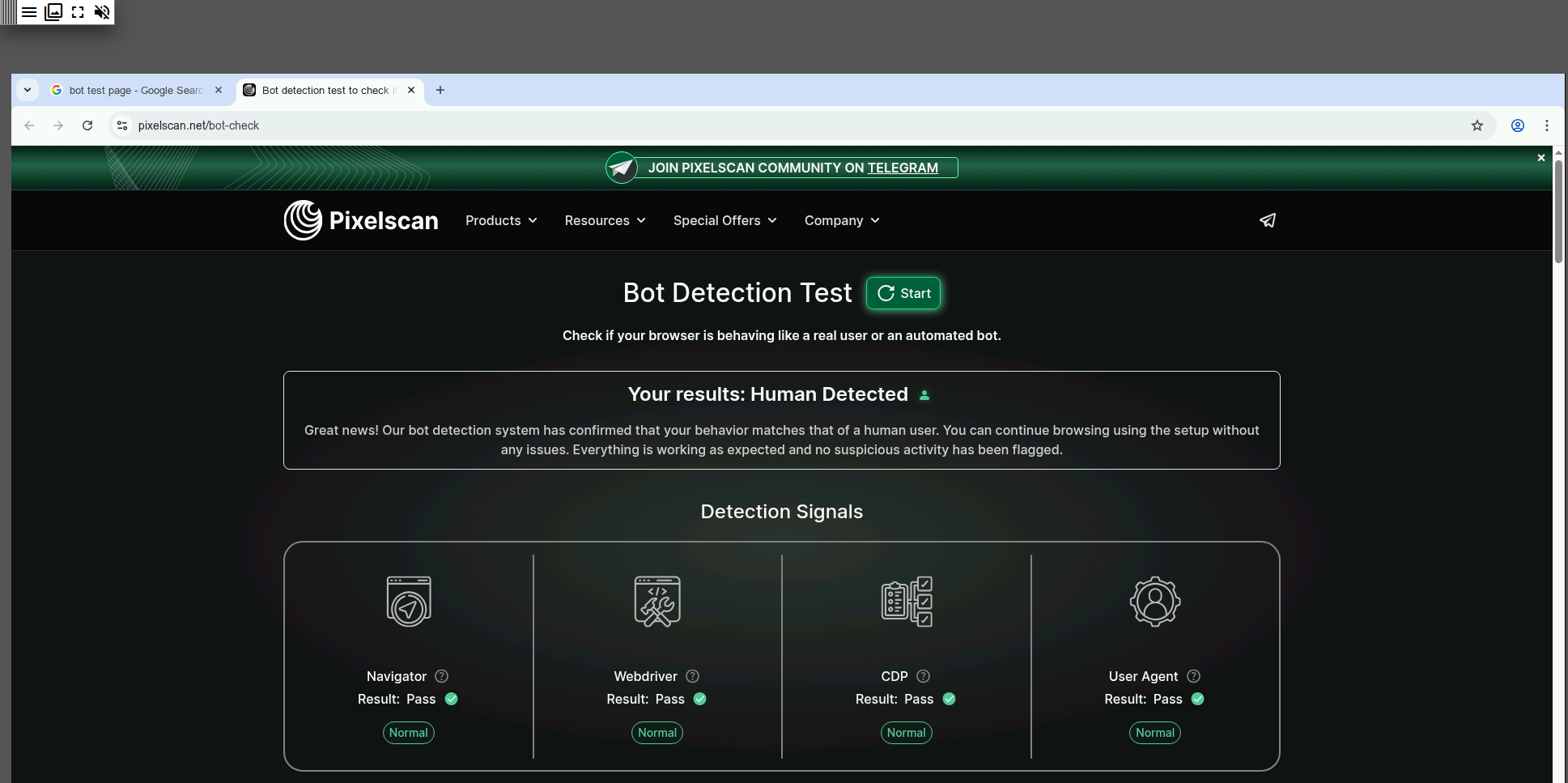
This is useful for things such as:
thermoptic using your preferred HTTP client like curl.
reddit.com with the browser, then all requests you make to Reddit through thermoptic will automatically be authenticated as your Reddit account!thermoptic hooks and checking for issues with websites.These environment variables specify how thermoptic should be configured when it runs.
HTTP_PROXY_PORT: The port that the thermoptic proxy should listen on. If you're running thermoptic in Docker you'll also need to change the ports mapping field to match.
CHROME_DEBUGGING_PORT: The port that the Chrome Debugging Protocol is exposed on. This port is specified when you launch Chrome/Chromium with the --remote-debugging-port flag set to a value such as 9222.
CHROME_DEBUGGING_HOST: The host that the Chrome Debugging Protocol is exposed on. This is often 127.0.0.1 if the browser is launched locally and thermoptic is not running in Docker. If it is running in Docker you may have to use host.docker.internal, see the Docker docs for information.
PORT: The CDP port the Chrome container publishes to the rest of the stack. Keep it aligned with CHROME_DEBUGGING_PORT so the socat bridge keeps working as expected.
CHROME_CONTROL_PORT: Chrome's control-service port that thermoptic uses to manage the browser (for example, sending restart requests).
CHROME_CONTROL_COOLDOWN_MS: Minimum time in milliseconds between Chrome restart attempts. Use this to avoid rapid restart loops when multiple failures occur in quick succession.
ENABLE_GUI_CONTROL: Set to true to launch the xpra web panel so you can drive the containerized Chrome by visiting http://127.0.0.1:14111. Disable it for headless-only runs.
CHROME_SCREEN_WIDTH / CHROME_SCREEN_HEIGHT: The pixel dimensions of the dockerized headful Chrome display.
CHROME_ENABLE_GPU: Controls whether the bundled Chrome container should try to use host GPU acceleration. auto (default) enables the NVIDIA/Vulkan path when the required runtime and device nodes are present, otherwise it falls back to software rendering. Set it to false to force the old software-only behavior.
CHROME_PROFILE_RECOVERY: When true (default), the bundled Chrome launcher will make one recovery attempt if Chrome immediately dies with the same crash-loop exit code observed in a poisoned profile (133). The bad profile contents are moved under /tmp/chrome-profile-recovery/ inside the container before retrying with a clean profile.
PROXY_USERNAME: The username which is used to authenticate you to the proxy, default is changeme. If unset then the proxy runs without requiring authentication.
PROXY_PASSWORD: The password which is used to authenticate you to the proxy, default is changeme. If unset then the proxy runs without requiring authentication.
THERMOPTIC_CONTAINER_RUNTIME: Signals that thermoptic is running inside the bundled container. Leave this set to true; it gates behaviors like the built-in health checks that only make sense in the full Docker setup.
HEALTHCHECK_ENDPOINT_PORT: The port where thermoptic exposes its health-check web endpoint. The health worker calls this through the proxy; if it stops responding, Chrome is automatically restarted to unstick frozen sessions.
HEALTHCHECK_ENDPOINT_PATH: The HTTP path served by the health-check endpoint described above. Change it if you need a different URL.
ON_START_HOOK_FILE_PATH: Custom Node code to run on proxy start. The proxy will not begin listening until this hook has completed, see the example in ./hooks/. The sample demonstrates using the browser to click through Cloudflare's JavaScript browser check before starting the proxy.
BEFORE_REQUEST_HOOK_FILE_PATH: Custom Node code to run before a request has been proxied. This is useful if you need the browser to pass some check before a site HTTP request is made.
AFTER_REQUEST_HOOK_FILE_PATH: Custom Node code to run after a request has been proxied. Often this is useful to do things like clean up cookies that have been set by the client via Cookie header.
DEBUG: Set this to true when you hit a bug so thermoptic prints verbose diagnostics before you file an issue; leave it false during normal operation.
Note that at this time thermoptic is only meant to be used with HTTP clients you explicitly trust. It's not meant to be exposed to untrusted users.
For any security vulnerabilities please send a report to me at mandatory@ Gmail.
