 m4lwhere/profilehound
ProfileHound - BloodHound OpenGraph collector for user profiles stored on domain machines. Make informed decisions about looting secrets by identifying active user profiles on domain machines.

    ____             _____ __     __  __                      __
   / __ \_________  / __(_) /__  / / / /___  __  ______  ____/ /
  / /_/ / ___/ __ \/ /_/ / / _ \/ /_/ / __ \/ / / / __ \/ __  /
 / ____/ /  / /_/ / __/ / /  __/ __  / /_/ / /_/ / / / / /_/ /
/_/   /_/   \____/_/ /_/_/\___/_/ /_/\____/\__,_/_/ /_/\__,_/
ProfileHound is a post-escalation tool to help find and achieve red-teaming objectives by locating domain user profiles on machines. It uses the BloodHound OpenGraph format to build a new edge called HasUserProfile which determines if a user profile exists on a computer. This edge allows operators to make informed decisions about which computers to target for looting secrets.
This tool requires administrative access to the C$ share on target machines to enumerate user profiles.
Huge thank you to Remi Gascou (@podalirius) for the ShareHound and bhopengraph tools. I've wanted to build a tool to collect this data for a while and using these libraries allowed me to focus on building instead of plumbing.
[!WARNING] ProfileHound is in early stages of development and does not have all collection modes implemented yet. Use with caution in production environments, you assume the risk of using this tool.
Post-exploitation objectives in Active Directory have shifted from data stored on-site into SaaS applications and the cloud. To prove value in offsec, we need to demonstrate how access to these services can be compromised. In many cases, these services are used only by certain groups or users, such as HR, Finance, etc. In some scenarios, certain SaaS applications can only be accessed from specific machines.
BloodHound's HasSession edge is great, but it's only useful when a user is logged into a machine. If a user is not logged into a machine when the data is collected, it can be difficult to find which computer may contain secrets to facilitate further exploitation. User profiles may contain a significant amount of valuable intel within DPAPI, cached credentials, SSH keys, cloud keys, and more - these don't require an active user session to access.
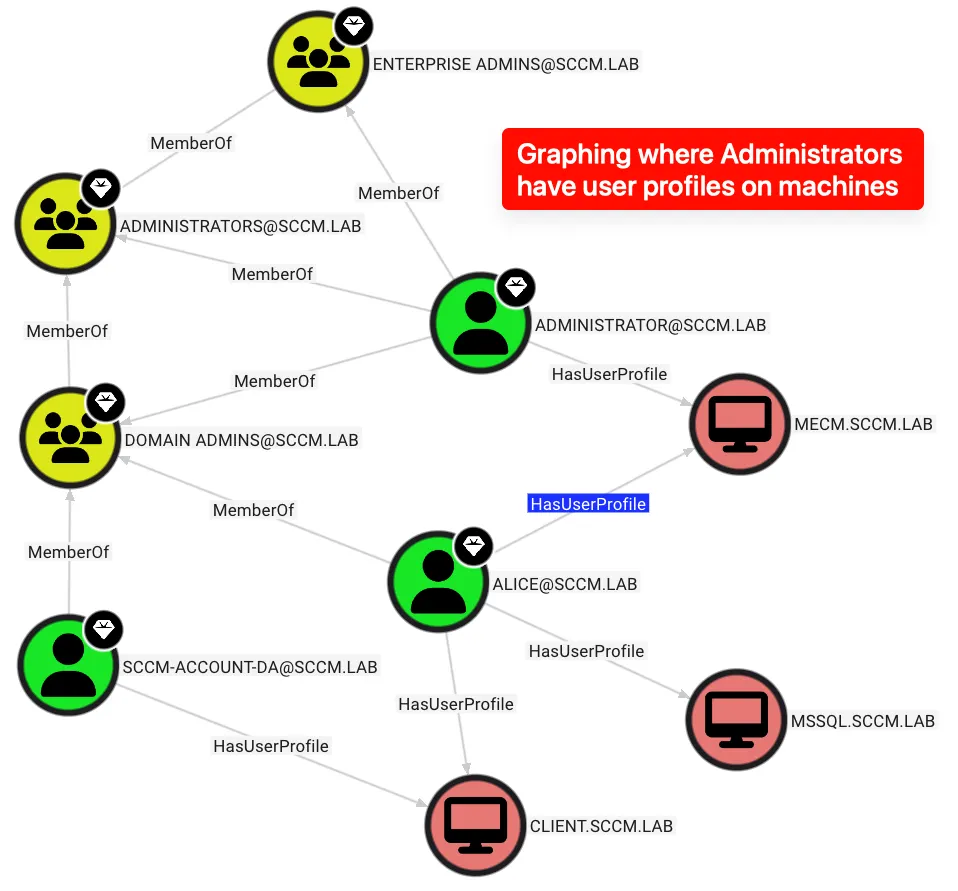
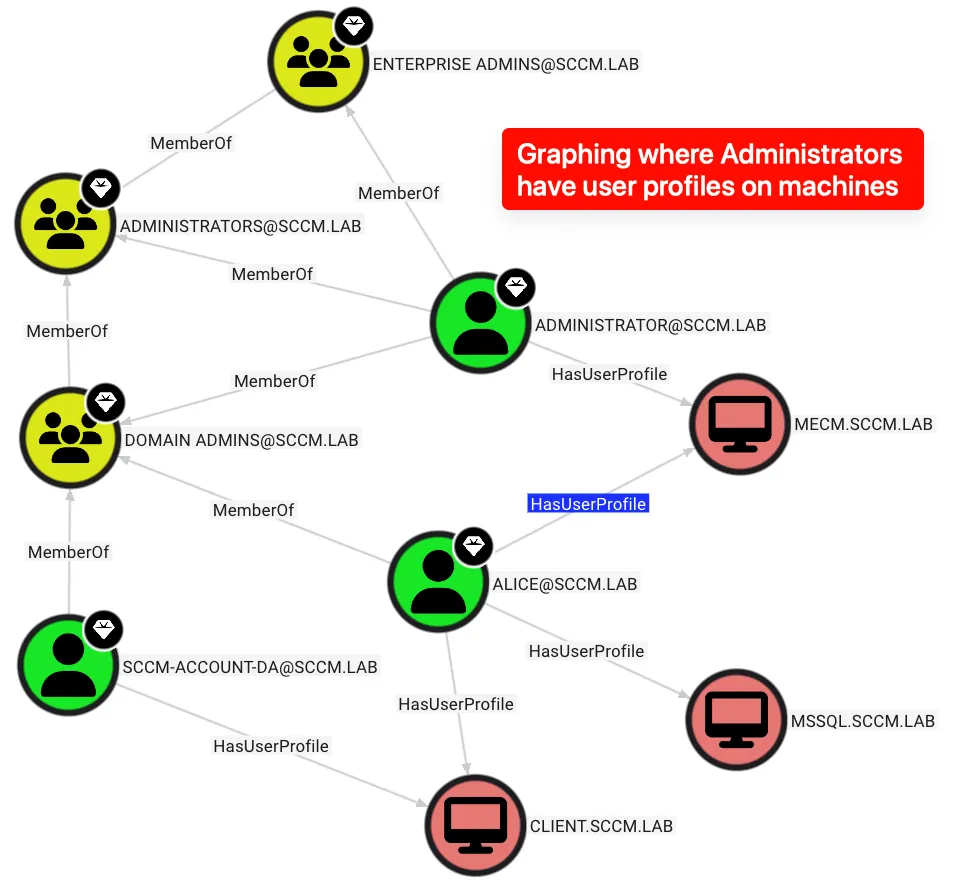
ProfileHound uses BloodHound's OpenGraph format to build a new graph edge called HasUserProfile which determines if a user profile exists on a domain machine. This can help operators focus on machines where a high-value user or group has a profile.
The HasUserProfile edge contains properties for the profile’s creation date and last modified date. That information helps to determine:
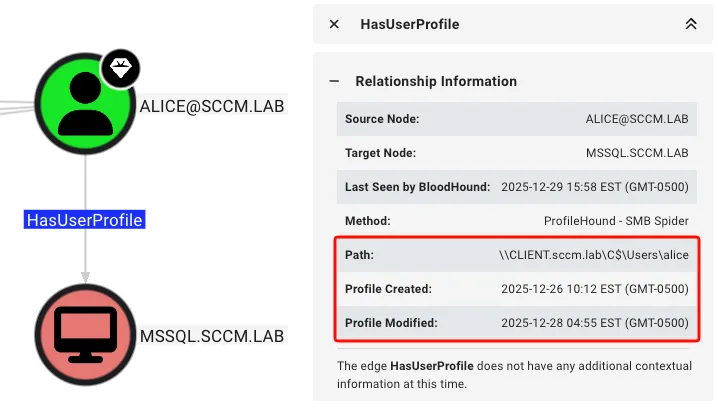
This edge also has properties for the profile creation and modification timestamps, allowing specific Cypher queries to find active or long-term user profiles on specific machines.
Install ProfileHound using pipx (unless you enjoy dependency hell):
pipx install profilehound
To use the bleeding edge version, you can install from source:
pipx install git+https://github.com/m4lwhere/profilehound.git
To use a containerized approach, build the image and run the tool with the following:
docker build -t profilehound .
docker run --rm profilehound --help
docker run --rm -v ${PWD}:/profilehound profilehound --auth-user alice --auth-password whiteRabbit --auth-domain sccm.lab --dns 192.168.57.10 --auth-dc-ip 192.168.57.10
For example, to run using a Domain Admin account sccm.lab\alice with password whiteRabbit:
$ profilehound --auth-user alice --auth-password whiteRabbit --auth-domain sccm.lab --target 192.168.57.0/27
    ____             _____ __     __  __                      __
   / __ \_________  / __(_) /__  / / / /___  __  ______  ____/ /
  / /_/ / ___/ __ \/ /_/ / / _ \/ /_/ / __ \/ / / / __ \/ __  /
 / ____/ /  / /_/ / __/ / /  __/ __  / /_/ / /_/ / / / / /_/ /
/_/   /_/   \____/_/ /_/_/\___/_/ /_/\____/\__,_/_/ /_/\__,_/    v0.1.1
@m4lwhere

BloodHound CE OpenGraph collector for user profiles stored on domain machines.

[12/30/25 11:58:05] INFO     Loaded 32 targets
[12/30/25 11:58:08] INFO     Successful authentication on 192.168.57.10 (192.168.57.10) as sccm.lab\alice
                    INFO     Successfully connected to share \\192.168.57.10\C$ as sccm.lab\alice
                    INFO     Enumerating profiles in \\192.168.57.10\C$\Users\...
                    INFO         vagrant:    S-1-5-21-3016982856-3796307652-1246469985-1000  created:2025-11-07      modified:2025-11-07
                    INFO     Found 1 domain profile(s) for 192.168.57.10
                    INFO     Successful authentication on 192.168.57.11 (192.168.57.11) as sccm.lab\alice
[12/30/25 11:58:09] INFO     Successfully connected to share \\192.168.57.11\C$ as sccm.lab\alice
                    INFO     Enumerating profiles in \\192.168.57.11\C$\Users\...
                    INFO         administrator:      S-1-5-21-3016982856-3796307652-1246469985-500   created:2025-11-07      modified:2025-11-07
                    INFO         alice:      S-1-5-21-3016982856-3796307652-1246469985-1112  created:2025-12-28      modified:2025-11-07
                    INFO         eve:        S-1-5-21-3016982856-3796307652-1246469985-1116  created:2025-12-27      modified:2025-11-07
                    INFO     Found 3 domain profile(s) for 192.168.57.11
                    INFO     Successful authentication on 192.168.57.12 (192.168.57.12) as sccm.lab\alice
                    INFO     Successfully connected to share \\192.168.57.12\C$ as sccm.lab\alice
                    INFO     Enumerating profiles in \\192.168.57.12\C$\Users\...
                    INFO         alice:      S-1-5-21-3016982856-3796307652-1246469985-1112  created:2025-12-28      modified:2025-12-28
                    INFO         franck:     S-1-5-21-3016982856-3796307652-1246469985-1117  created:2025-12-27      modified:2025-11-07
                    INFO         sccm-sql:   S-1-5-21-3016982856-3796307652-1246469985-1121  created:2025-11-07      modified:2025-11-07
                    INFO     Found 3 domain profile(s) for 192.168.57.12
                    INFO     Successful authentication on 192.168.57.13 (192.168.57.13) as sccm.lab\alice
                    INFO     Successfully connected to share \\192.168.57.13\C$ as sccm.lab\alice
                    INFO     Enumerating profiles in \\192.168.57.13\C$\Users\...
                    INFO         alice:      S-1-5-21-3016982856-3796307652-1246469985-1112  created:2025-12-26      modified:2025-12-28
                    INFO         sccm-account-da:    S-1-5-21-3016982856-3796307652-1246469985-1119  created:2025-12-26      modified:2025-11-07
                    INFO     Found 2 domain profile(s) for 192.168.57.13
[12/30/25 11:59:27] INFO     Found 4 machines with profiles
                    INFO     Exported OpenGraph intel to profilehound_20251230-115805.json
This created a file called profilehound_20251230-115805.json in the current directory. This file can be imported directly into BHCE by dragging and dropping the file into the BloodHound UI. It will automatically be parsed and correlate nodes via SID. The new edge HasUserProfile will be created to show the relationship between the user and the profile.
