
Skip to content
KitploitKITPLOIT
ToolsBlog
Submit
ToolsBlog
Submit

Hacking, PenTest, and Cybersecurity Tools for Your Security Arsenal!

Kitploit is a directory of hacking, cybersecurity, and pentesting tools. Discover the latest project updates to find vulnerabilities, analyze systems, automate testing, and strengthen your security.

··Feeds·Contact·Privacy·© 2026 Kitploit

Tool Directory

Categories

View all categories
Loading categories
Tools/GitHubGitHub/m3ngx1ng/cve-2025-55182-gui
Vulnerability ScannersExploitationWeb Application ExploitationPenetration TestingCommand and ControlRed TeamingRemote Access ToolPayload Development
GitHubm3ngx1ng/cve-2025-55182-gui

CVE-2025-55182-GUI

CVE-2025-55182 漏洞检测与利用工具(GUI版)

View Repository
17 months agoNot yet reviewed

Most Popular

View all →

Discover the most used tools by our community.

Explore all tools

Browse our collection of tools

View all tools →
Share

CVE-2025-55182 Vulnerability Detection and Exploitation Tool (GUI Version)

Project Overview

This project is a graphical detection and exploitation tool targeting the high-risk CVE-2025-55182 vulnerability, developed with Python + tkinter to provide a fully graphical interface. It eliminates the need for complex command-line operations, combining ease of use with practicality.

CVE-2025-55182 exists in the Next.js framework within the React Server Components (RSC) ecosystem. Attackers can achieve remote command execution by crafting malicious multipart/form-data requests, thereby taking over server privileges. This tool is intended solely for authorized security research and compliant penetration testing, helping security professionals quickly verify the impact of the vulnerability on target assets and facilitate incident response and security hardening.

Core Features

Feature ModuleDetailed Description
Vulnerability DetectionSupports single-target / batch detection, integrates passive feature identification (response headers, page keywords) and active fingerprint verification (React Flight Protocol). Results can be exported in TXT/CSV format.
One-Click Command ExecutionNo need to manually construct payloads. Enter the target URL and a system command (whoami/ls/cat, etc.); the tool automatically performs the exploit and returns the execution result.
Memory Web Shell Deployment & UseOne-click deployment of fileless memory web shells, supporting custom access paths. Commands can be executed via the tool or a browser flexibly.
Reverse ShellBuilt-in reverse shell function. After configuring the attacker IP and listening port, you can quickly obtain an interactive shell on the target server.
Compatibility AdaptationAutomatically repairs URL formats, ignores SSL verification, supports multi-threaded batch scanning, and adapts to different operating systems and network environments.

User Guide

Launch the Tool

root@kitploit:~
cve-2025-55182-gui.exe

Step-by-Step Operations

  1. Vulnerability Detection

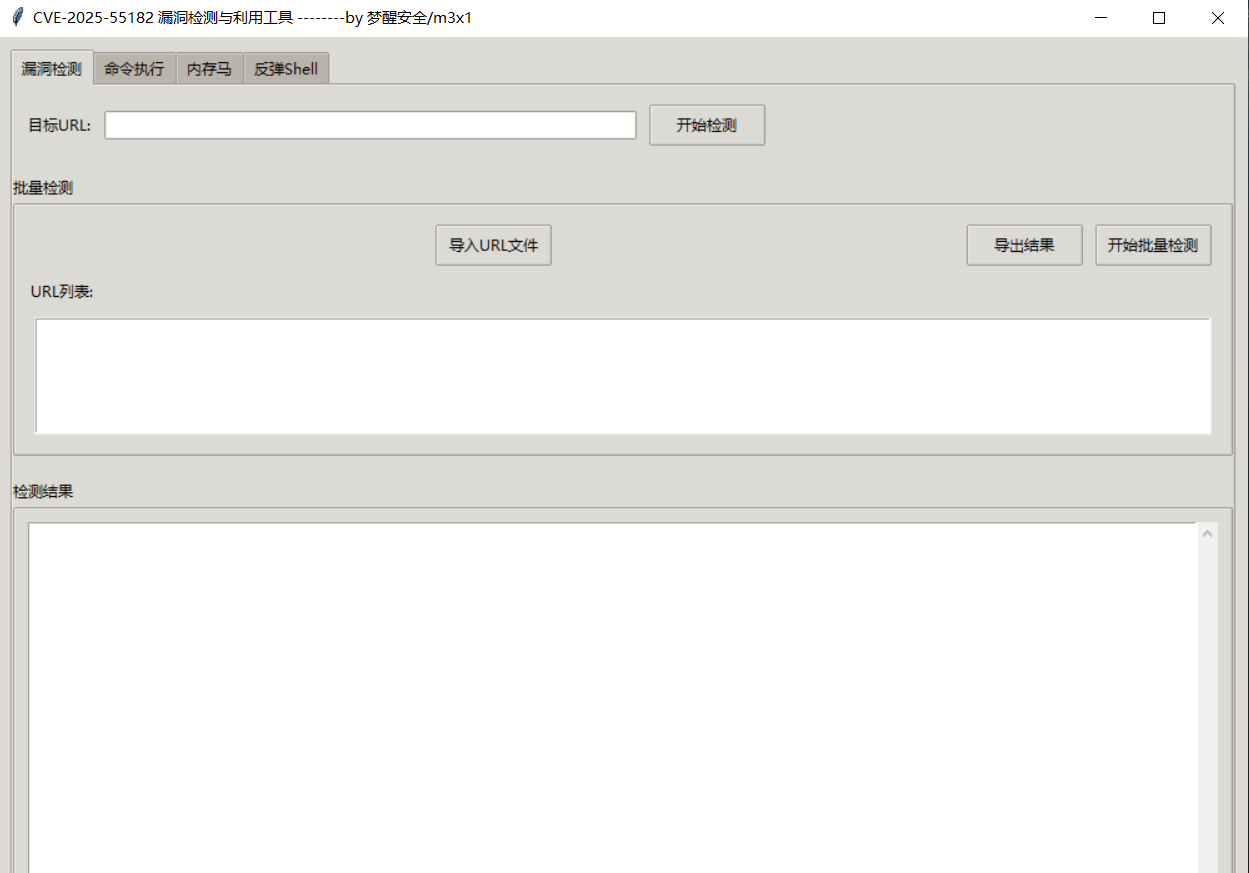
    1. Single Target: Switch to the "Vulnerability Detection" tab, enter the target URL (supports http/https), click "Start Detection", and view the score and judgment result.
    2. Batch Detection: Click "Import URL File" (one URL per line), execute "Start Batch Detection", and export the results after scanning.

    image-20260103215221114

  2. Command Execution

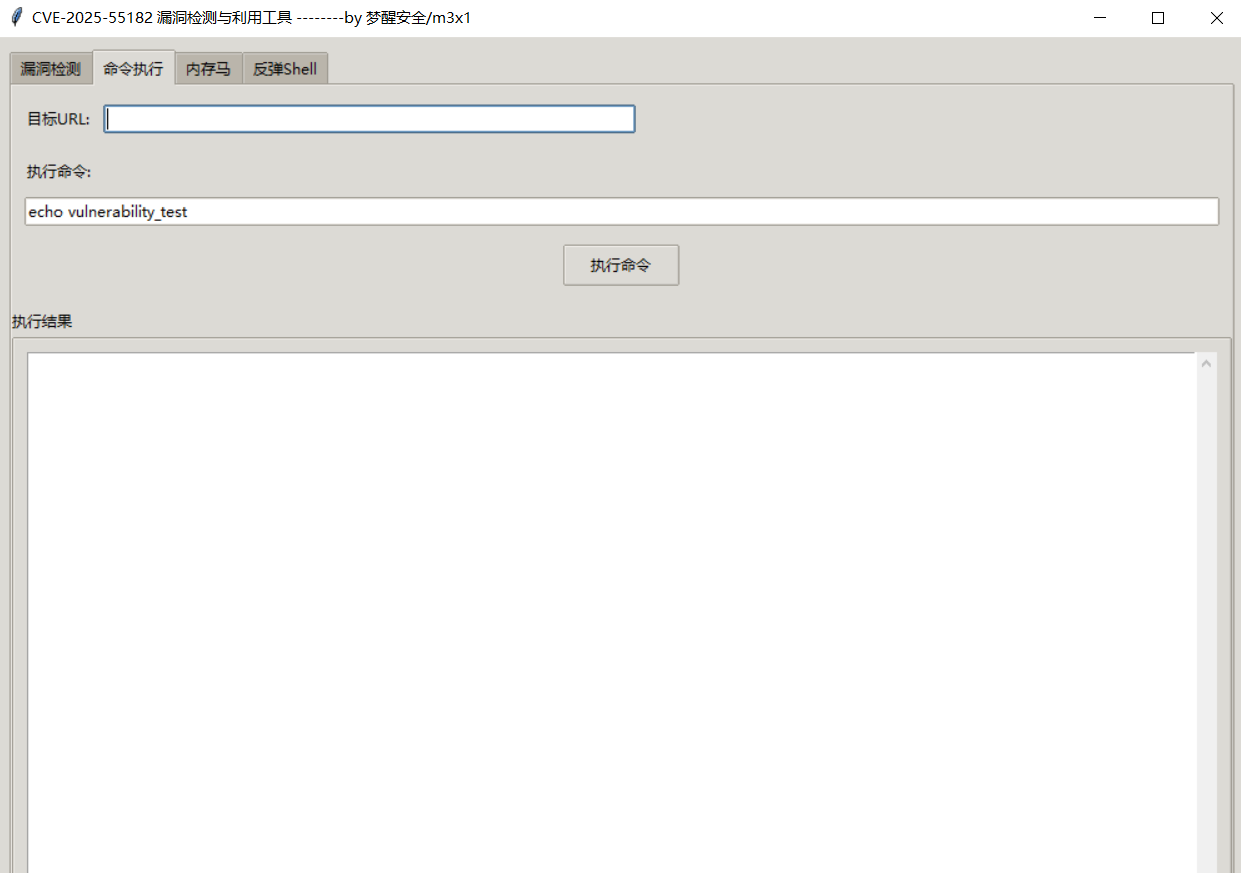
    1. Switch to the "Command Execution" tab, enter the target URL and the command to execute.
    2. Click "Execute Command" to view the command output in real time.

    image-20260103215242145

  3. Memory Web Shell Deployment & Use

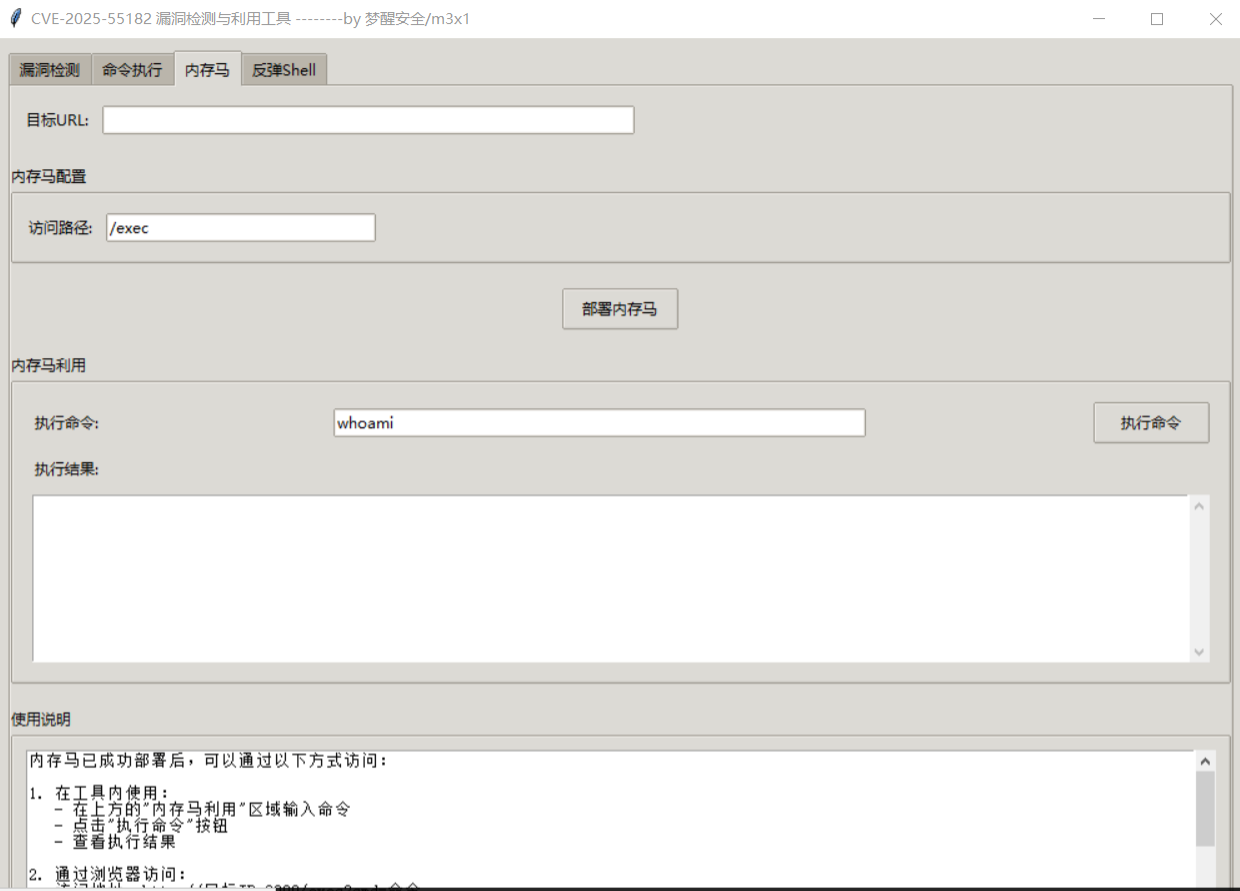
    1. Deployment: In the "Memory Web Shell" tab, configure the target URL and a custom access path, then click "Deploy Memory Web Shell".
    2. Use: Execute commands directly within the tool, or access via browser at http://target-ip:3000/custom-path?cmd=command-to-execute.
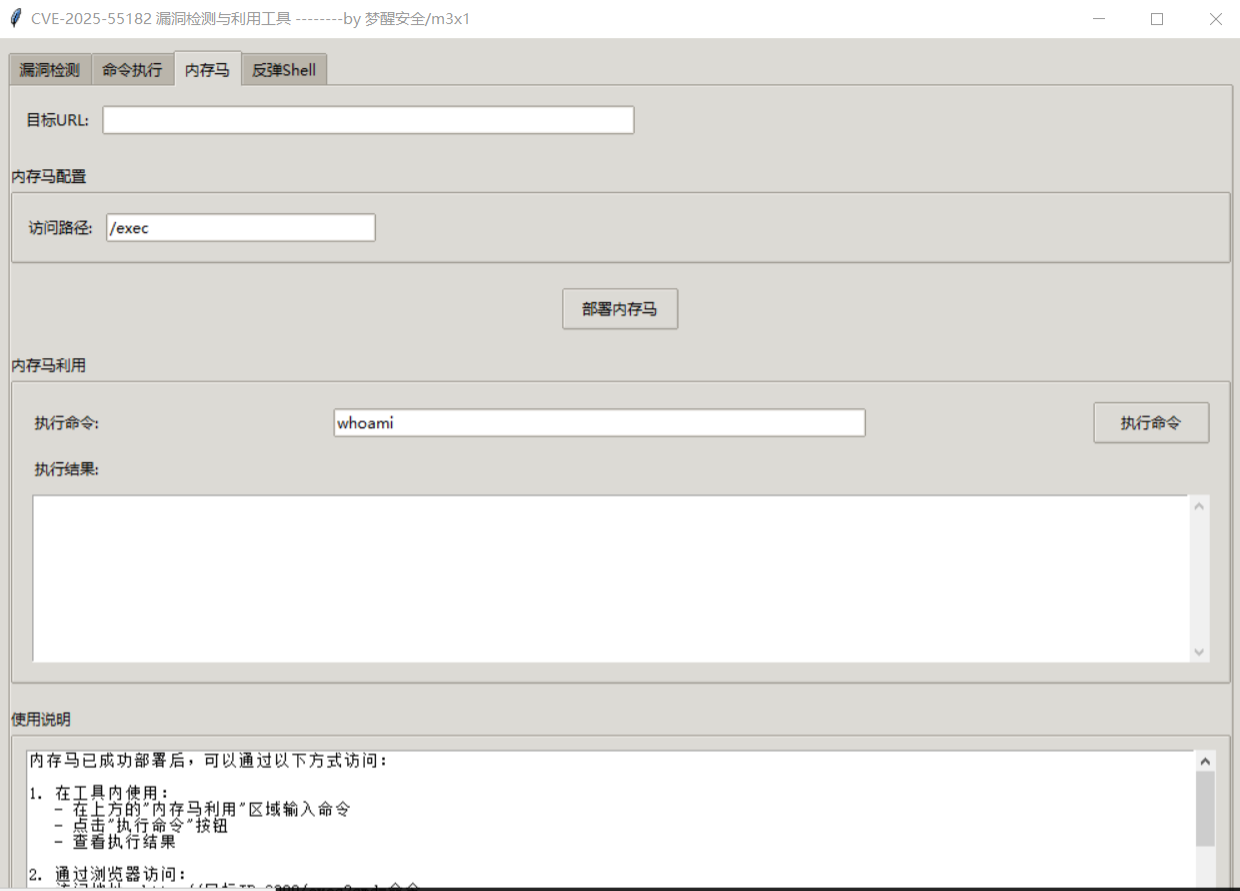
    image-20260103215308304

  4. Reverse Shell

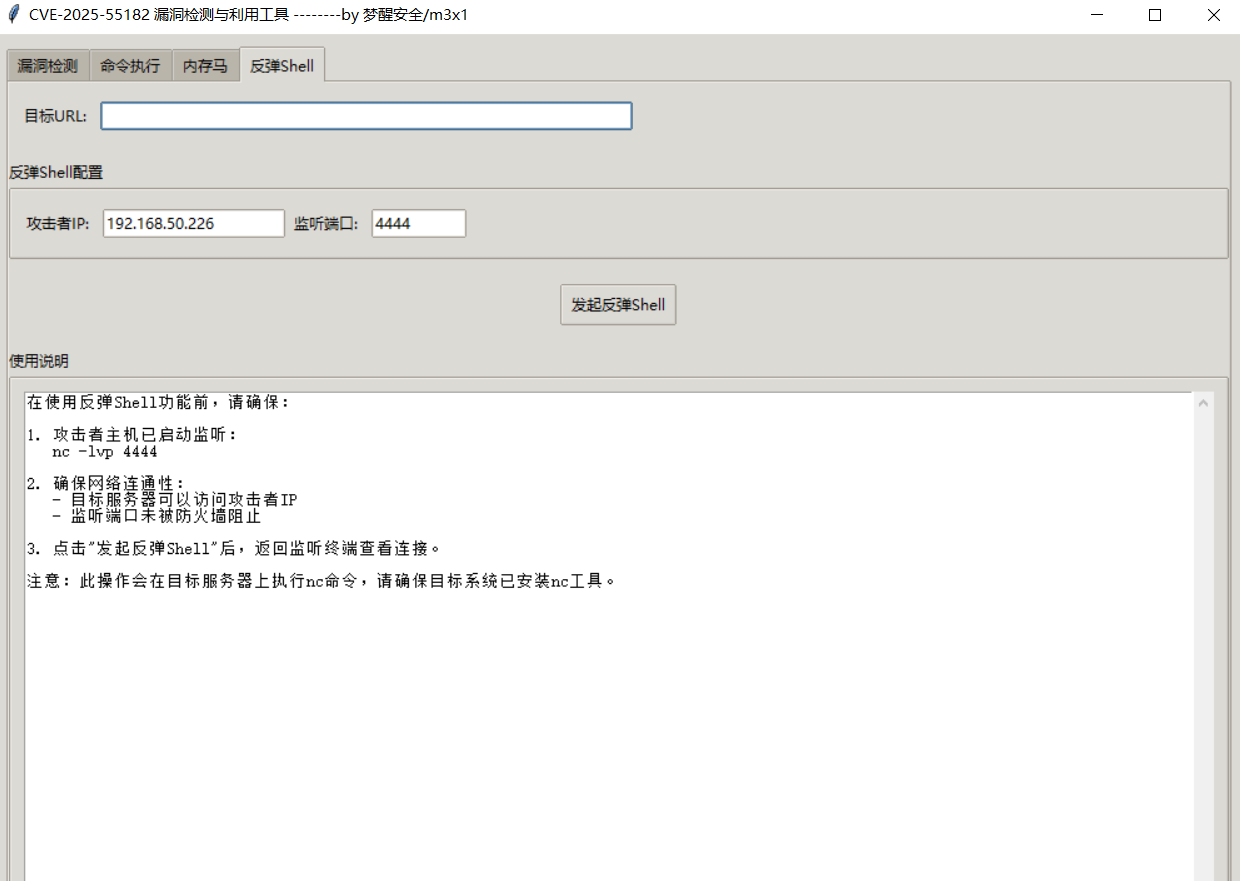
    1. First, start a listener on the attacker host (e.g., using nc): nc -lvp listening-port
    2. In the tool, switch to the "Reverse Shell" tab, enter the target URL, attacker IP, and listening port.
    3. Click "Initiate Reverse Shell", and you will obtain an interactive shell in the listening terminal.

    image-20260103215326872

Security Recommendations

Defensive Measures

  1. Immediately upgrade the Next.js framework to the latest stable version to fix the RSC parsing logic flaw.
  2. Configure WAF rules to block requests containing malicious RSC headers or special multipart/form-data formats, and filter the child_process keyword.
  3. Restrict the execution permissions of the child_process module on the server side, and minimize the runtime privileges of business services.
  4. Regularly use this tool (or similar vulnerability scanning tools) for periodic security inspections of assets.

Tool Usage Guidelines

  1. Before using this tool, you must obtain legal written authorization from the target system.
  2. Strictly comply with the "Cybersecurity Law of the People's Republic of China", "Cybersecurity Review Measures", and other relevant laws and regulations.
  3. Perform data backups during testing to avoid irreversible damage to the target system.
  4. Control the number of threads during batch scanning to avoid causing a denial of service (DoS) risk to the target server.

Disclaimer

This project is intended solely for security research and authorized penetration testing. It is prohibited to use it for any illegal attacks, unauthorized system probing, or data theft.

All legal liabilities, economic losses, system damage, or other consequences arising from the use of this tool shall be borne solely by the user. The project developers assume no joint liability.

About the Author

Welcome to follow the Mengxing Security WeChat Official Account, which will continuously update cybersecurity-related content. image

Welcome to join the discussion group to exchange and learn together. image

Download Tool