
 luke-goddard/enumy
Linux post exploitation privilege escalation enumeration








Enumy is an ultra fast portable executable that you drop on target Linux machine during a pentest or CTF in the post exploitation phase. Running enumy will enumerate the box for common security vulnerabilities.
You can download the final binary from the release x86 or x64 tab. Statically linked to musl Transfer the final enumy binary to the target machine.
./enumy
$ ./enumy64 -h
 ▄█▀─▄▄▄▄▄▄▄─▀█▄  _____
 ▀█████████████▀ |   __|___ _ _ _____ _ _
     █▄███▄█     |   __|   | | |     | | |
      █████      |_____|_|_|___|_|_|_|_  |
      █▀█▀█                          |___|

 https://github.com/luke-goddard/enumy

 Enumy - Used to enumerate the target the target environment & look for
 common security vulnerabilities and hostspots
 ----------------------------------------------------------------------

 Output
  -o <loc>     OUTPUT results to location (default enumy.json)

 Walking Filesystem
  -i <loc>     IGNORE files in this directory (usefull for network shares)
  -w <loc>     Only WALK files in this directory (usefull for devlopment)

 Scan Options
  -f           run FULL scans (CPU intensive scan's enabled)
  -t <num>     THREADS (default 4)

 Printing Options
  -a           Print all security AUDIT issues to screen (probably won't help duing a CTF)
               Issues are ALWAYS logged in result files regardless of this flag being set.
  -d <1|2>     Print DEBUG mode (1 low, 2 high) to enable error being printed to screen.
  -g <H|M|L>   print to screen values GREATER than or equal to high, medium & low
  -p <H|M|L|I> do not PRINT to screen high, medium, low & info issues (see below for example)
  -m 1-100     MAXIMUM number of issues with same name to print to screen default (unlimited)
To compile during devlopment, make and libcap libary is all that is required.
sudo apt-get install libcap-dev
make
To remove the glibc dependency and statically link all libaries/compile with musl do the following. Note to do this you will have to have docker installed to create the apline build environment.
./build.sh 64bit
./build.sh 32bit
./build.sh all
cd output
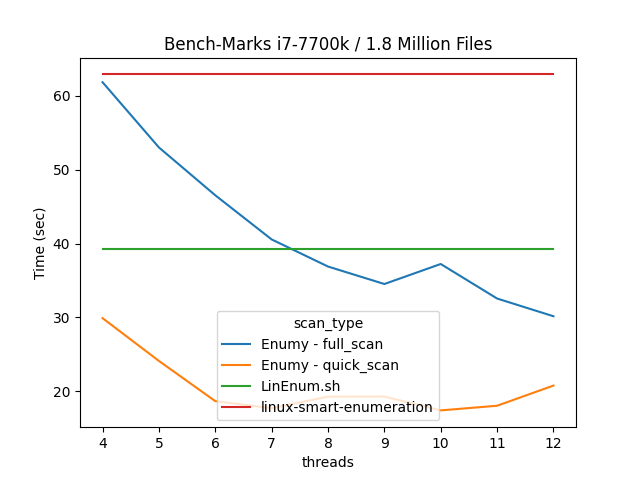
Below is the ever growing list of scans that have been implemented.
| Scan Type | Quick Scan | Full Scan | Implemented | Printed To Screen | Save In Log |
|---|---|---|---|---|---|
| Kernel Exploit Surgestor | ✔️ | ✔️ | ✔️ | ✔️ | ✔️ |
| SUID/GUID Scan | ✔️ | ✔️ | ✔️ | ✔️ | ✔️ |
| File Capabilities Scan | ✔️ | ✔️ | ✔️ | ❌ | ✔️ |
| Intresting Files Scan | ✔️ | ✔️ | ✔️ | ✔️ | ✔️ |
| Coredump Scan | ✔️ | ✔️ | ✔️ | ✔️ | ✔️ |
| Breakout Binaries Scan | ✔️ | ✔️ | ✔️ | ✔️ | ✔️ |
| SSHD Configuration Scan | ✔️ | ✔️ | ✔️ | ❌ | ✔️ |
| Sysctl Scan | ✔️ | ✔️ | ✔️ | ✔️ | ✔️ |
| Living Off The Land Scan | ✔️ | ✔️ | ✔️ | ✔️ | ✔️ |
| Current User Scan | ✔️ | ✔️ | ✔️ | ✔️ | ✔️ |
| *.so Injection Scan | ❌ | ✔️ | ✔️ | ❌ | ✔️ |
| Permissions Scan | ❌ | ✔️ | ✔️ | ❌ | ✔️ |
| File System Scan | ❌ | ✔️ | ✔️ | ❌ | ✔️ |
| Docker Scan | ✔️ | ✔️ | ❌ | ✔️ | |
| Environment Scan | ✔️ | ✔️ | ❌ | ✔️ | |
| Privilaged Access Scan | ✔️ | ✔️ | ❌ | ✔️ | |
| Networking Scan | ✔️ | ✔️ | ❌ | ✔️ | |
| System Info Scan | ✔️ | ✔️ | ❌ | ✔️ | |
| Version Information Scan | ✔️ | ✔️ | ❌ | ✔️ | |
| Default Weak Credentials Scan | ✔️ | ✔️ | ❌ | ✔️ | |
| Weak Crypto Scan | ❌ | ✔️ | ❌ | ✔️ |
Note to print results marked as ❌, enable audit mode with the -a flag.
