 linuztx/alter-zero
RAM efficient terminal agent harness for coding, cybersecurity, and automation.


Read, build, debug, and review code with an agent that works alongside you.
Use the same tools for cybersecurity research, technical investigation, and everyday automation.



Quick start · Features · Model providers · Commands & shortcuts · Support · Acknowledgements
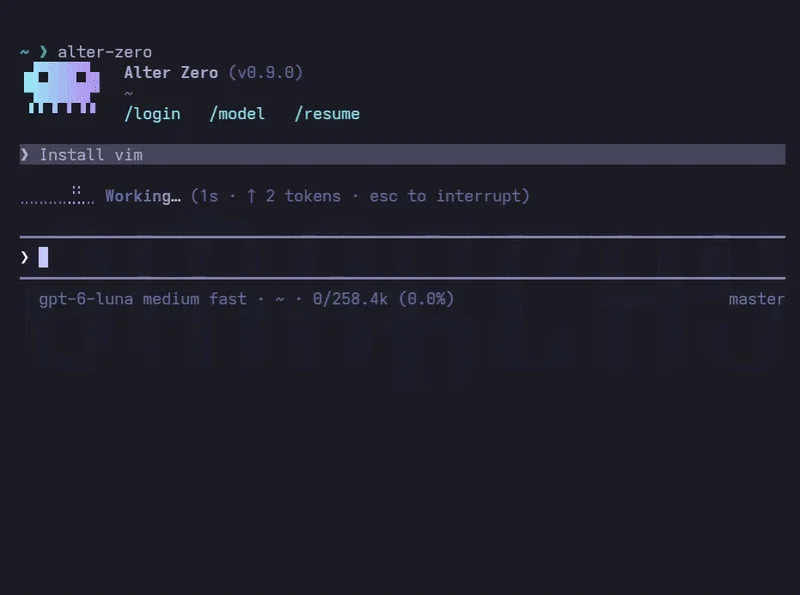
Alter Zero is an open-source AI coding agent written in Rust. It works directly in your project: reading files, making edits, running commands, and checking results while you follow along in your terminal. Coding is its focus, with the flexibility to investigate security issues, explore unfamiliar systems, and automate tasks using your existing tools.
| What you get | Why it matters |
|---|---|
| Work you can follow | Live command output, readable diffs, and a task checklist make progress easy to inspect. |
| Control over execution | Choose a permission mode, review proposed changes, and steer the agent while it works. |
| Your choice of model | Connect with a supported subscription or API key, or run local models with Ollama. |
| Room to extend | Add specialist subagents, reusable skills, lifecycle hooks, and MCP servers to fit your workflow. |
| A native terminal experience | A single Rust binary with persistent sessions, inline images, and keyboard-driven controls. |
Alter Zero runs on Linux (x86_64, arm64) and macOS (Intel, Apple silicon) in a modern terminal.
One line on Linux or macOS:
curl -fsSL https://raw.githubusercontent.com/linuztx/alter-zero/main/install.sh | sh
It picks the build for your machine, verifies its SHA-256 against the checksum published with the release, installs alter-zero into ~/.local/bin, and tells you if that directory is not on your PATH.
Set ALTER_ZERO_INSTALL_DIR to install somewhere else, or ALTER_ZERO_VERSION=vX.Y.Z to pin a release. CHANGELOG.md records what changed between versions.
ALTER_ZERO_INSTALL_DIR="$HOME/bin" ALTER_ZERO_VERSION=v0.1.0 \
  sh -c "$(curl -fsSL https://raw.githubusercontent.com/linuztx/alter-zero/main/install.sh)"
For a manual install, each release's notes list every archive with its SHA-256, so you can download, verify, and extract one by hand.
docker/ builds a small headless Kali Rolling image around the latest release, with a working set of command-line tools, for Docker or Podman. One command builds it and starts a container on a folder of yours:
docker/build.sh ~/projects/site              # add --engine podman for Podman
docker exec -it -e TERM -e COLORTERM -e TERM_PROGRAM -e KITTY_WINDOW_ID -e TMUX \
  alter-zero-kali alter-zero
Outside a multiplexer, the -e flags hand over your terminal's identity so
pictures render as real images rather than half-blocks. The
container guide covers workspaces, the published ports,
pasting images, and adding tools.
Inside tmux, enable allow-passthrough on the host and explicitly select the
outer terminal's image protocol for that docker exec; the
tmux instructions include a
ready-to-run Podman example.
You need rustup and a C compiler. The repository pins the Rust toolchain, which rustup installs automatically.
git clone https://github.com/linuztx/alter-zero.git
cd alter-zero
cargo install --path .
alter-zero
Without a configured provider, Alter Zero opens an offline demo with scripted turns so you can explore the interface. To work on your own tasks:
/login and choose a supported subscription, API provider, or local model server. Follow the prompts to connect./model to choose a model. Alter Zero remembers your selection for this directory.Sign-ins added through /login are saved to ~/.alter-zero/.env, outside your repository. Use / to browse commands or ? in an empty composer to see shortcuts.
You can also select your provider before launch. Set its API key variable and provider ID, then start the app. For example, with OpenRouter:
export OPENROUTER_API_KEY="your-api-key"
export ALTER_ZERO_PROVIDER=openrouter
alter-zero
Choose a model with /model, or set ALTER_ZERO_MODEL to its model ID before launching.
Start with a concrete task and let the agent work through it with you.