 li4n0/revsuit
RevSuit is a flexible and powerful reverse connection platform designed for receiving connection from target host in penetration.

English |简体中文
RevSuit is a flexible and powerful reverse connection platform designed for receiving connection from target host in penetration. It currently supports HTTP, DNS, RMI, LDAP, MySQL and FTP protocols.
Flexible:
Powerful:
Download the latest release directly or build by following steps:
git clone https://github.com/Li4n0/revsuit.git
cd revsuit/frontend && yarn install && yarn build
cd ../ && go build ./cmd/revsuit/revsuit.go
RevSuit will generate default configuration file on first run. Modify the configuration file according to your needs, then re-run. A detailed description of the configuration file can be found at: Configuration Notes
In order to confirm the IP location, it needs to use the IP location database. QQwry is used as the data source by
default, you can also modify the configuration to use GeoIP. If the selected database is not available in the current
directory or the database is updated for more than a week, RevSuit will automatically download the latest database. If
the download fails, the IpArea field will always be null.
$ ./revsuit
2021/05/16 22:55:10 [ INFO] Downloading qqwry.dat...

    ____            _____       _ __
   / __ \___ _   __/ ___/__  __(_) /_
  / /_/ / _ \ | / /\__ \/ / / / / __/
 / _, _/  __/ |/ /___/ / /_/ / / /_
/_/ |_|\___/|___//____/\__,_/_/\__/
                                   vBeta0.1
     https://revsuit.pro
2021/05/16 22:55:22 [ INFO] Starting HTTP Server at :80, token:your_token
2021/05/16 22:55:22 [ INFO] Start to listen FTP PASV port at :2020, PasvIP is 10.9.8.7
2021/05/16 22:55:22 [ INFO] Starting FTP Server at :21
2021/05/16 22:55:22 [ INFO] Starting MySQL Server at :3306
2021/05/16 22:55:22 [ INFO] Starting RMI Server at :1099
2021/05/16 22:55:22 [ INFO] Starting DNS Server at :53
After running, you can visit the /revsuit/admin/ path of HTTP Server and enter the token to access the control panel.
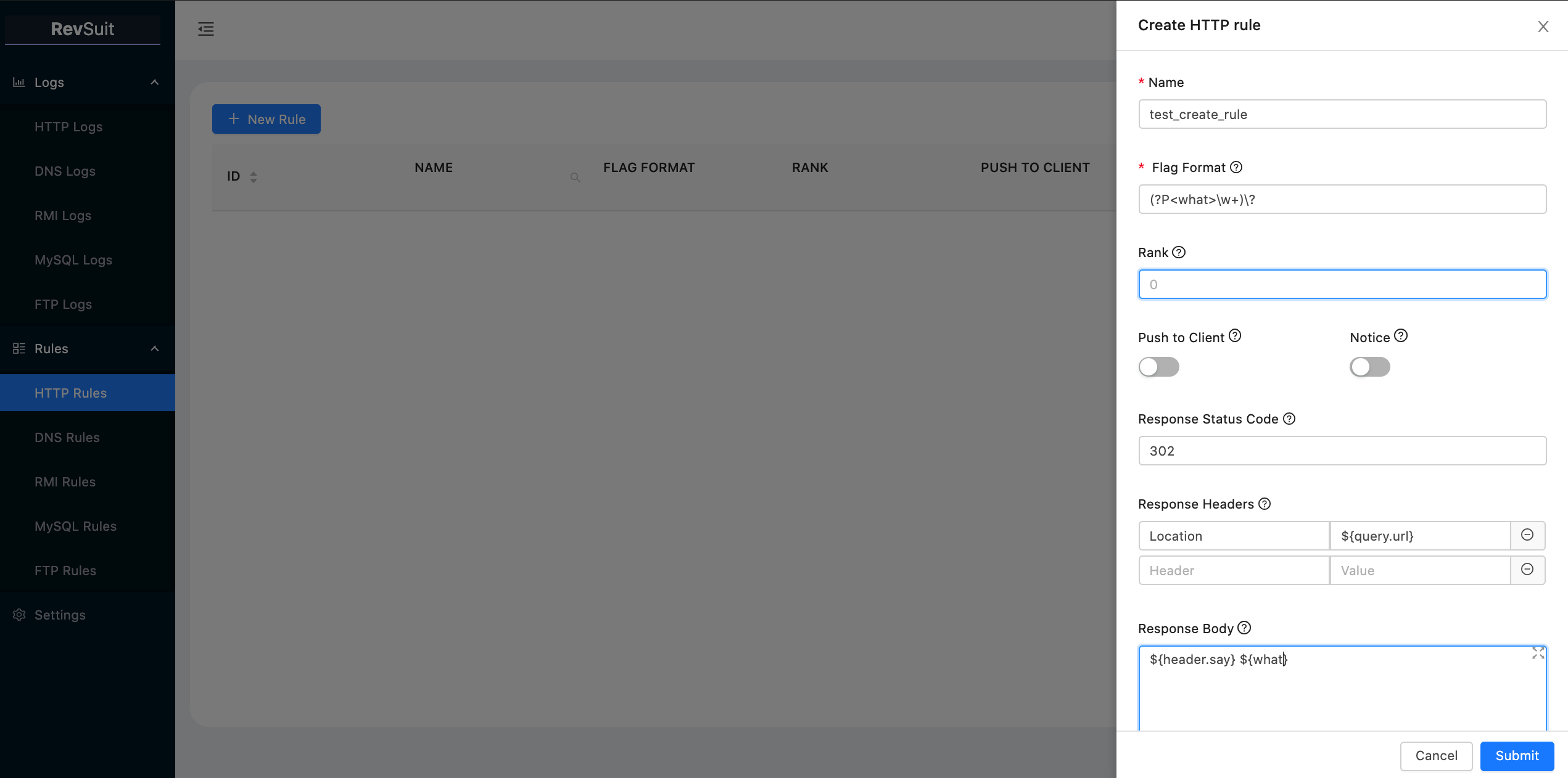
Take the creation of HTTP rules as an example:
A few notes are as follows:
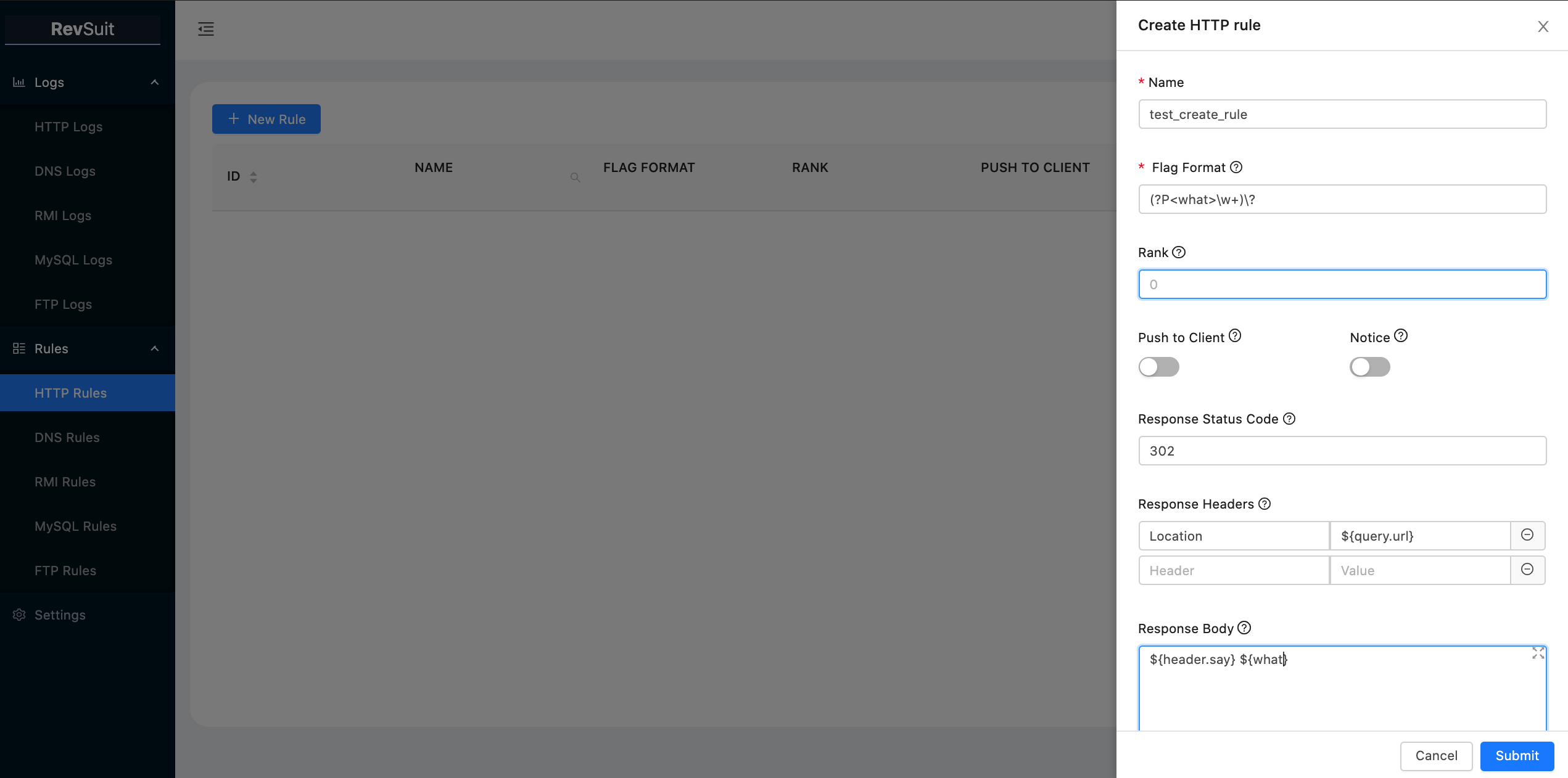
name and flagFormat of rule are unique.FlagFormat uses regular expression syntax, and for different protocols, the fields matched by flagFormat are
different, you can check the corresponding hints to get details when creating rules.flagFormat, and the result of the matching grouping will
also be used as a template variable.As shown below, we create a rule that uses the built-in template variables and custom template variables of the http
protocol, and names it test_create_rule:
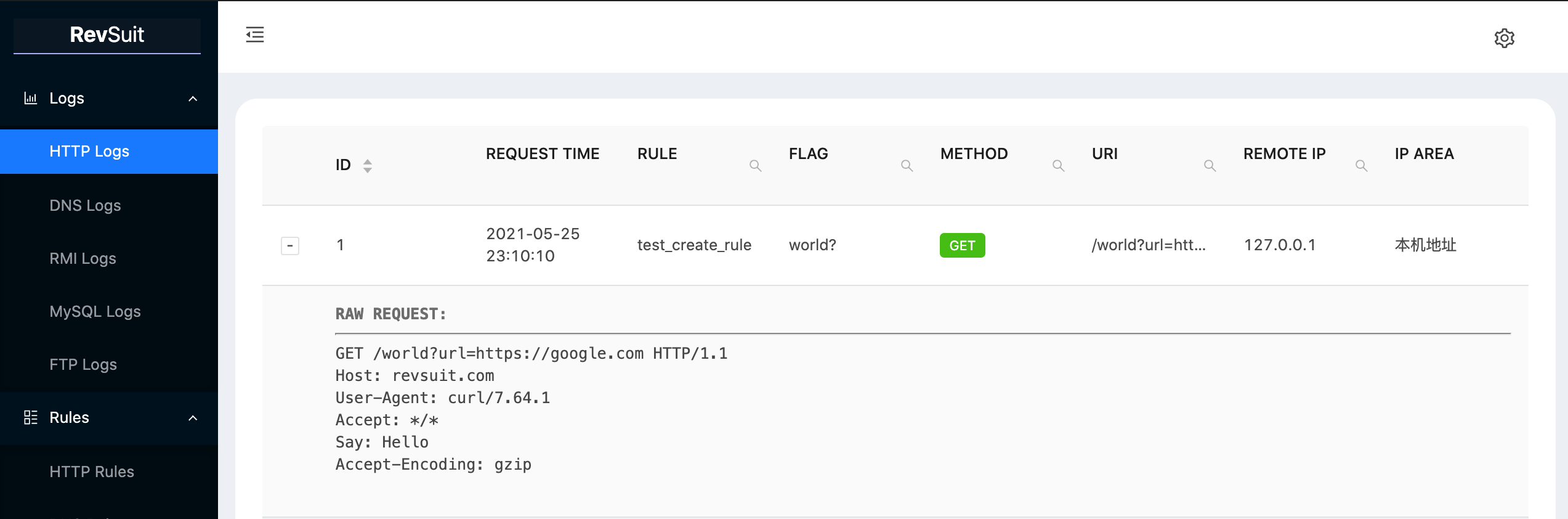
Then make a request that satisfies the rule and view the response.

The request will be logged on the platform at the same time.
If you want to be notified of new connections on your office software, you can configure the webhook address of the
relevant software in the configuration file and turn on the Notice switch for the corresponding rule. Only support to
four software types currently: dingtalk,wechat,lark,slack.(Discord and telegram support is in the plan.)
If you're migrating platforms or purging data, it can be a hassle to recreate rules. That's why the platform supports import and export of rules.
The entry point for this function is located at Settings>RULES.
The rules are stored in yaml format for import and export, like the following:
http:
  - name: test_create_rule
    flag_format: (?P<what>\w+)\?
    rank: 0
    push_to_client: false
    notice: false
    response_status_code: "302"
    response_headers:
      Location: ${query.url}
    response_body: ${header.say} ${what}
  - name: other_rule
    flag_format: other
    rank: 1
    push_to_client: false
    notice: true
    response_status_code: "200"
    response_headers: { }
    response_body: Hello Revsuit!
dns:
  ... ...
RevSuit was split from my scanner project, so its native support works with scanners.
From RevSuit's perspective, we call a scanner a client.
RevSuit uses HTTP Server-sent Events (SSE) to establish a one-way communication channel with the client.
The API for the channel is: /revsuit/api/events?message .The client first needs to add the Token: your token header
to the Header, and then access the API to establish the channel. When the platform receives a new connection, the flag
captured by the rule will be passed to the client through this channel.
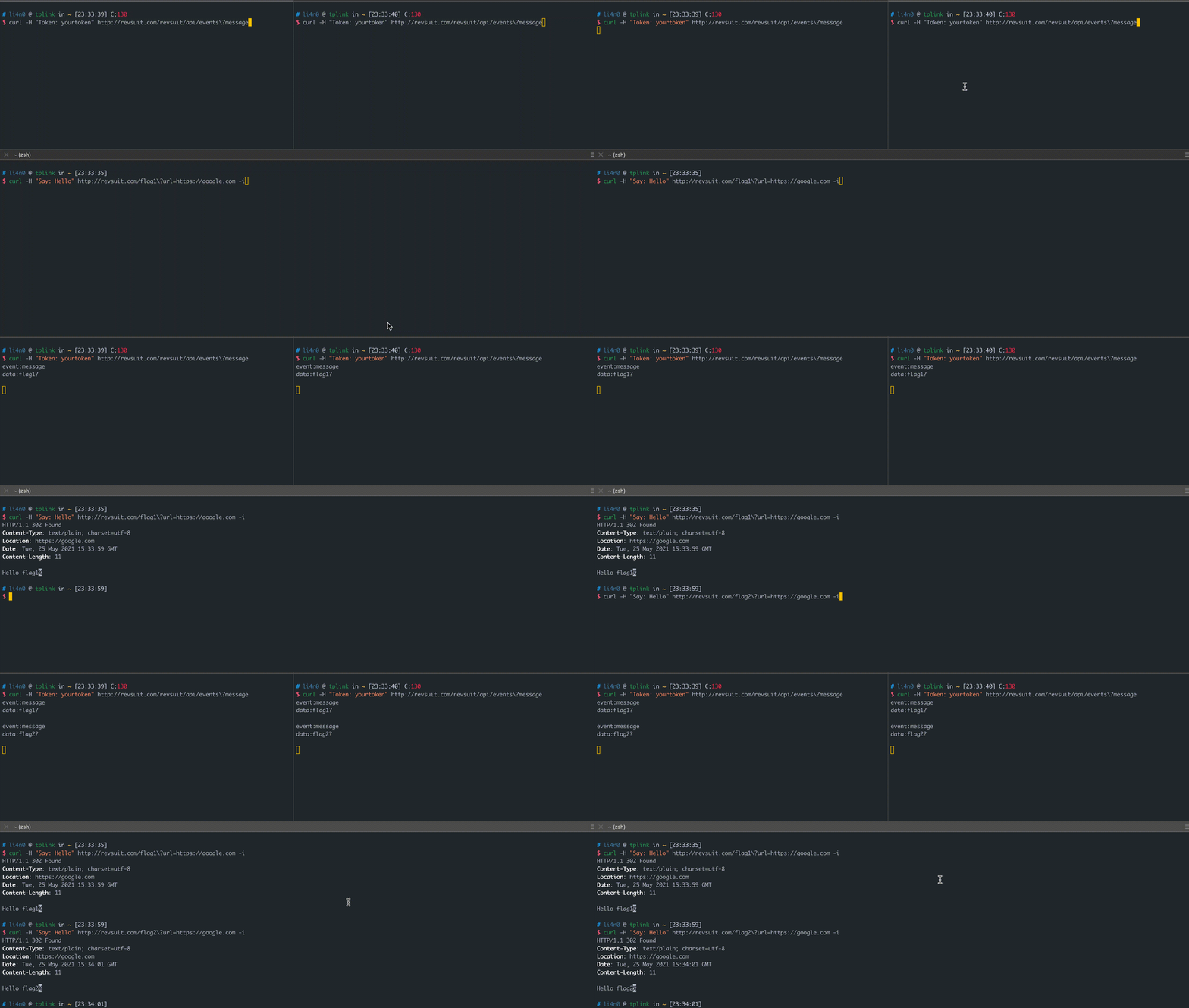
Here is a simple demo using Golang's sse library as an example.
As shown above, RevSuit supports multiple clients, and each client in the connected state receives a push of flag,
so distributed scanning can be supported.
If you don't want every client to receive all flag pushes, you can use the Flag-Filter request header when creating an sse connection to set the format(regular expressions) of the flag you want that client to receive:
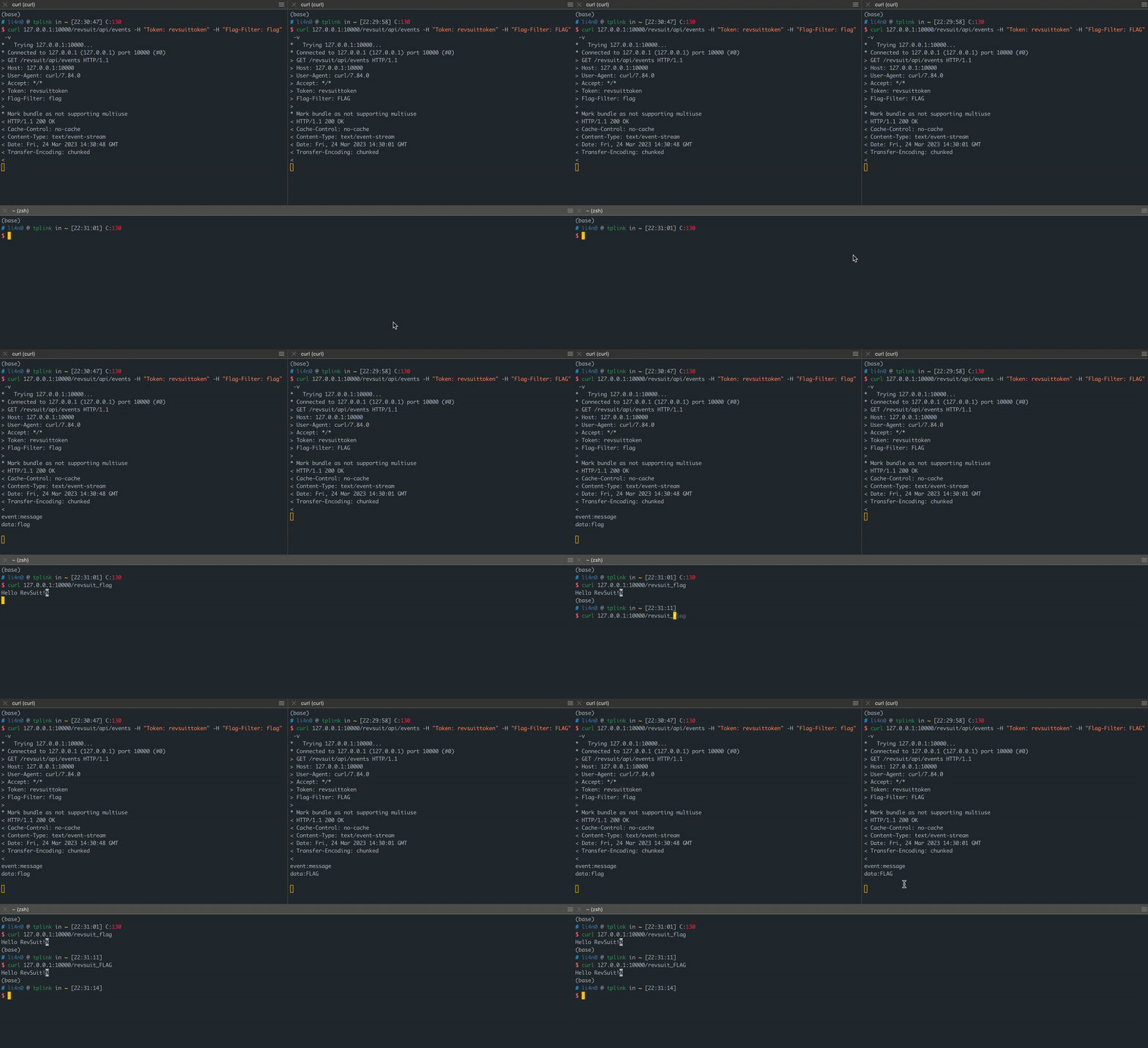
RevSuit will store flag temporarily in the queue when there is no client connection and send it when the client
connects, so you don't have to worry about missing the vulnerability because the client disconnects. (This is especially
helpful for discovering delay-triggered vulnerabilities.)
In a real-world vulnerability scanning scenario, you may send a large number of different payloads for a single
vulnerability point, and they may all be valid, which can result in the backlink platform receiving many requests, yet
they are caused by the same vulnerability. If you don't want the client to receive so many flags for the same
vulnerability, you can take advantage of the flagGroup feature of rule's flagFormat.
FlagGroup is the content matched by the anonymous group in the flagFormat field of the rule. The platform will check
the content matched in the grouping,and the flag is only pushed to the client when then content(flagGroup) captured
for the first time.
