 lautarovculic/ioscpy
Now you can mirror and control your jailbroken iPhone over USB

ioscpy is running (Reserved, Author will implement this fully)ioscpy wireless (BLE, Wi-Fi) (Reserved, Author will implement this fully)A macOS, Linux, and Windows CLI that mirrors and controls a jailbroken iPhone over USB.
With one device attached, that is all you need. It connects on its own.
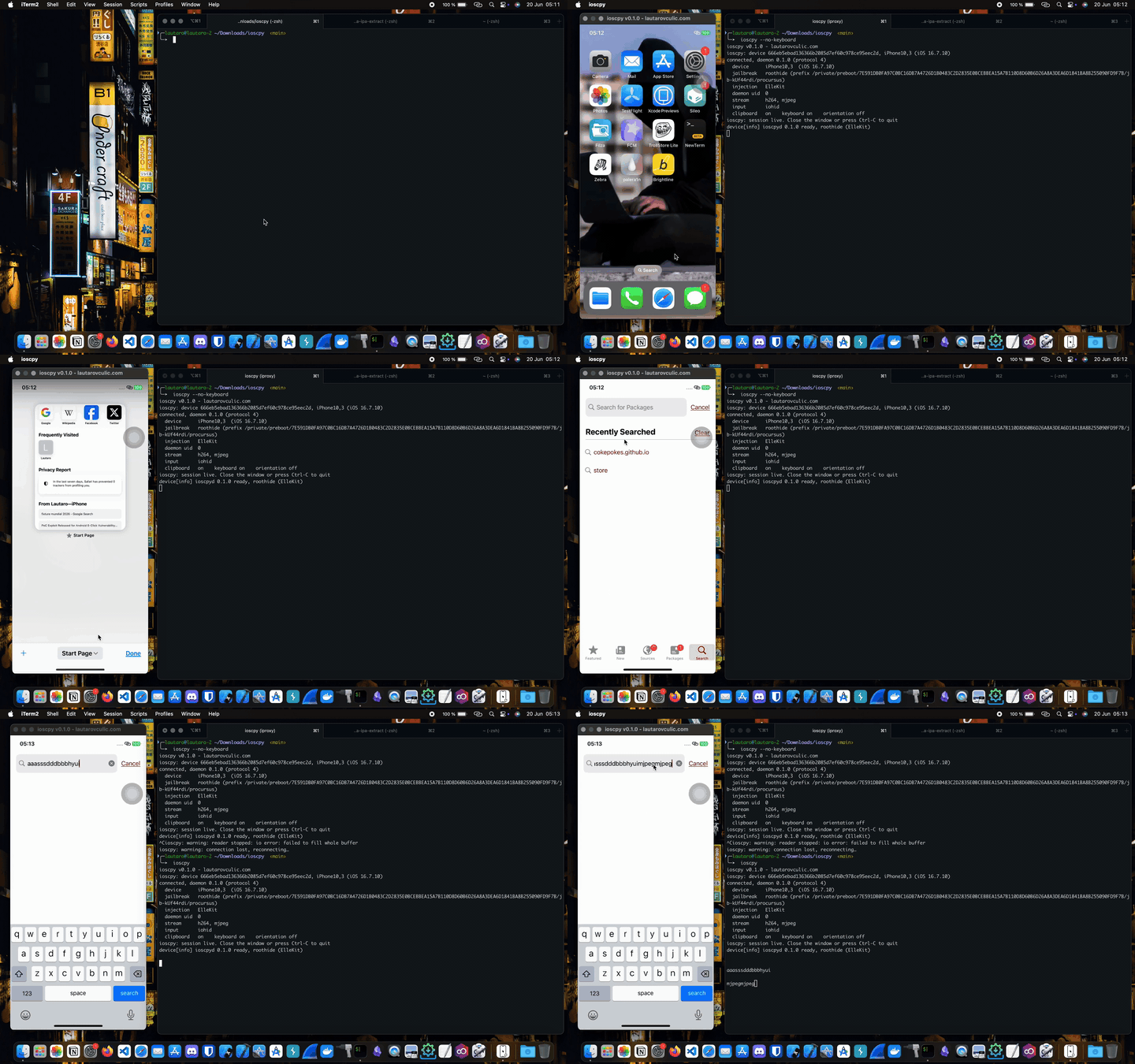
There are two sides. The Mac app runs the mirror, the iPhone package lets the phone be controlled. Install both.
On the Mac, with Homebrew:
brew tap lautarovculic/ioscpy   # the Mac app
brew trust lautarovculic/ioscpy
brew install ioscpy
ioscpy --version
On the jailbroken iPhone, add this repository in Sileo or Zebra, then install ioscpy from it and respring:
https://lautarovculic.github.io/ioscpy-repo/
The repository carries both rootless and rootful builds, and the package manager picks the one that matches the jailbreak.
ioscpy --device <UDID>   # pick a device when several are attached
ioscpy --list            # list attached devices
ioscpy --no-keyboard     # hide the on-screen keyboard, type from the Mac
ioscpy --mjpeg           # force MJPEG video instead of the default H.264
ioscpy --debug           # full diagnostics
ioscpy --version
There is no prebuilt for Linux yet. Build the host from source. The device package is the same as on macOS, installed from the Sileo/Zebra repo above.
Clone this repo, then run the installer:
./install.sh
--yes skips the confirmation prompts. --prefix DIR installs to DIR instead of /usr/local and omits sudo when the directory is under $HOME. --uninstall removes the installed binary.
Prereqs on Debian/Ubuntu:
sudo apt install build-essential pkg-config nasm \
                 libimobiledevice-utils usbmuxd \
                 libxkbcommon-dev libwayland-dev \
                 libxcb1-dev libxkbcommon-x11-dev
curl --proto '=https' --tlsv1.2 -sSf https://sh.rustup.rs | sh
Make sure usbmuxd is running so the device shows up:
sudo systemctl enable --now usbmuxd
idevice_id -l   # should print the UDID with the phone attached
Build the host as your user, then install:
make host-release
sudo make install-host    # installs to /usr/local/bin/ioscpy
ioscpy --version
./install.sh also works on Arch Linux.
sudo pacman -S --needed \
  base-devel pkgconf nasm \
  libimobiledevice usbmuxd \
  libxkbcommon wayland libxcb libxkbcommon-x11 \
  rustup curl git
rustup default stable
Enable the service
sudo systemctl enable --now usbmuxd.service
Check if device is connected
idevice_id -l
Then run the binary
cd host/target/release && chmod +x ioscpy
./ioscpy
The build step stays as your user so a rustup-installed cargo is found.
install-host is a separate target that just copies the built binary, so it
runs fine under sudo without needing cargo on root's PATH. For a no-sudo
install in your home, use make install-host PREFIX=$HOME/.local and make
sure $HOME/.local/bin is on your PATH.
H.264 decoding works on Linux through the openh264 software decoder. Pass
--mjpeg if you prefer the MJPEG path.
On Wayland compositors that refuse server-side decorations (GNOME/mutter),
ioscpy automatically falls back to X11/XWayland so the window gets a normal
titlebar. Pass --wayland to stay on native Wayland instead.
There is no prebuilt for Windows yet. Build the host from source. The device package is the same as on macOS and Linux, installed from the Sileo/Zebra repo.
ioscpy on Windows reuses the USB tooling an iOS setup already has, and does not replace any driver, so Frida, objection, grapefruit, ideviceinfo, iTunes, and any other usbmux tool keep working while it runs.
Apple Mobile Device Support: installed with iTunes from apple.com (get the Apple-website build, not the Microsoft Store one), or the standalone AMDS package. This provides the USB driver and usbmuxd. iTunes must see the phone.
libimobiledevice-win32: provides iproxy.exe, idevice_id.exe,
ideviceinfo.exe. Install with Scoop:
scoop install libimobiledevice
or with MSYS2:
pacman -S mingw-w64-x86_64-libimobiledevice
Make sure the three .exe files are on your PATH (or drop them next to
ioscpy.exe). Check with idevice_id -l, which should print your device UDID.
openh264 decoder
compiles a small C library through cc).PATH: openh264's assembler (scoop install nasm).git clone https://github.com/lautarovculic/ioscpy
cd ioscpy
cargo build --release --manifest-path host/Cargo.toml
.\host\target\release\ioscpy.exe --list # confirms the device is seen
.\host\target\release\ioscpy.exe # opens the mirror window
Pass --mjpeg if you prefer the MJPEG path over H.264. If openh264 fails to
build, confirm nasm is on PATH.
After a respring or a fresh connection, give the phone one physical tap on its screen before driving it from the host. iOS only trusts touch events that come from the real digitizer, so that first real tap is what lets the injected ones through. You do it once, then the host takes over.
On Linux and Windows, use Ctrl in place of Cmd for these shortcuts (Ctrl+C, Ctrl+V, and so on); the clipboard still syncs both ways.
Rotating the phone rotates and resizes the mirror.
Hosts:
Devices:
| layout | device | iOS | injection |
|---|---|---|---|
| roothide | iPhone11,2 | 15.5 | ElleKit |
| roothide | iPhone10,4 | 16.7.12 | ElleKit |
| roothide | iPhone10,3 | 16.7.10 | ElleKit |
| roothide | iPhone14 | 16.3 | ------- |
| rootless | iPhone13 | 15.5 | ElleKit |
ioscpy is developed and tested on the devices above. I don't have a rootful device or every iOS version on hand, so coverage by layout is incomplete:
| layout | status |
|---|---|
| rootless | builds; runs on the roothide unit via /var/jb |
| roothide | working (rootless .deb via /var/jb) |
| rootful | builds and layout validated; runtime not tested |
If you run ioscpy on a different iPhone, iOS version, or jailbreak, please help fill this in. Rootful and other iOS versions especially need testing.
