 l4rm4nd/pyadrecon
Python3 implementation of ADRecon with support for NTLM and Kerberos authentication querying LDAP. Generates individual CSV files and a single XSLX + HTML report about your AD domain.


Python3 implementation of an improved ADRecon for Pentesters and Blue Teams.
ADRecon is a tool which gathers information about MS Active Directory and generates an XSLX report to provide a holistic picture of the current state of the target AD environment.
[!TIP] If you are a Red Team, may check out ADRecon-ADWS instead.
# stable release from pypi
pipx install pyadrecon

# latest commit from github
pipx install git+https://github.com/l4rm4nd/PyADRecon
Then verify installation:
pyadrecon --version
[!TIP] For Windows, may read this. NTLM + Kerberos supported.
usage: pyadrecon.py [-h] [--version] [--generate-excel-from CSV_DIR] [-dc DOMAIN_CONTROLLER] [-u USERNAME] [-p [PASSWORD]] [-d DOMAIN] [--auth {ntlm,kerberos}] [--tgt-file TGT_FILE] [--tgt-base64 TGT_BASE64]
                    [--ssl] [--port PORT] [-o OUTPUT] [--page-size PAGE_SIZE] [--threads THREADS] [--dormant-days DORMANT_DAYS] [--password-age PASSWORD_AGE] [--only-enabled] [--collect COLLECT]
                    [--no-excel] [-v]

PyADRecon - Python Active Directory Reconnaissance Tool

options:
  -h, --help            show this help message and exit
  --version             show program's version number and exit
  --generate-excel-from CSV_DIR
                        Generate Excel report from CSV directory (standalone mode, no AD connection needed)
  --generate-dashboard-from CSV_DIR
                        Generate HTML dashboard from existing CSV files (standalone mode)
  -dc, --domain-controller DOMAIN_CONTROLLER
                        Domain Controller IP or hostname
  -u, --username USERNAME
                        Username for authentication
  -p, --password [PASSWORD]
                        Password for authentication (optional if using TGT)
  -d, --domain DOMAIN   Domain name (e.g., DOMAIN.LOCAL) - Required for Kerberos auth
  --auth {ntlm,kerberos}
                        Authentication method (default: ntlm)
  --tgt-file TGT_FILE   Path to Kerberos TGT ccache file (for Kerberos auth)
  --tgt-base64 TGT_BASE64
                        Base64-encoded Kerberos TGT ccache (for Kerberos auth)
  --ssl                 Force SSL/TLS (LDAPS). No LDAP fallback allowed.
  --port PORT           LDAP port (default: 389, use 636 for LDAPS)
  -o, --output OUTPUT   Output directory (default: PyADRecon-Report-<timestamp>)
  --page-size PAGE_SIZE
                        LDAP page size (default: 500)
  --dormant-days DORMANT_DAYS
                        Days for dormant account threshold (default: 90)
  --password-age PASSWORD_AGE
                        Days for password age threshold (default: 180)
  --only-enabled        Only collect enabled objects
  --collect COLLECT     Comma-separated modules to collect (default: all)
  --workstation WORKSTATION
                        Explicitly spoof workstation name for NTLM authentication (default: empty string, bypasses userWorkstations restrictions)
  --no-excel            Skip Excel report generation
  --no-dashboard        Skip interactive HTML dashboard generation
  -v, --verbose         Verbose output

Examples:
  # Basic usage with NTLM authentication
  pyadrecon.py -dc 192.168.1.1 -u admin -p password123 -d DOMAIN.LOCAL

  # With Kerberos authentication (bypasses channel binding)
  pyadrecon.py -dc dc01.domain.local -u admin -p password123 -d DOMAIN.LOCAL --auth kerberos

  # With Kerberos using TGT from file (bypasses channel binding)
  pyadrecon.py -dc dc01.domain.local -u admin -d DOMAIN.LOCAL --auth kerberos --tgt-file /tmp/admin.ccache

  # With Kerberos using TGT from base64 string (bypasses channel binding)
  pyadrecon.py -dc dc01.domain.local -u admin -d DOMAIN.LOCAL --auth kerberos --tgt-base64 BQQAAAw...

  # Only collect specific modules
  pyadrecon.py -dc 192.168.1.1 -u admin -p pass -d DOMAIN.LOCAL --collect users,groups,computers

  # Output to specific directory
  pyadrecon.py -dc 192.168.1.1 -u admin -p pass -d DOMAIN.LOCAL -o /tmp/adrecon_output

  # Generate Excel report from existing CSV files (standalone mode)
  pyadrecon.py --generate-excel-from /path/to/CSV-Files -o report.xlsx
[!TIP] PyADRecon always tries LDAPS on TCP/636 first.
If flag
--sslis not used, LDAP on TCP/389 may be tried as fallback.
[!WARNING] If LDAP channel binding is enabled, this script will fail with
automatic bind not successful - strongerAuthRequired, as ldap3 does not support it (see here). You must use Kerberos authentication instead.If you use Kerberos auth under Linux, please create a valid
/etc/krb5.confand DC hostname entry in/etc/hosts. May read this. If you are on Windows, please make sure you have valid Kerberos tickets. May read this. Note that you can provide an already existing TGT ticket to the script via--tgt-fileor--tgt-base64. For example, obtained by Netexec vianetexec smb <TARGET> <ARGS> --generate-tgt <FILEMAME>.
There is also a Docker image available on GHCR.IO.
docker run --rm -v /etc/krb5.conf:/etc/krb5.conf:ro -v /etc/hosts:/etc/hosts:ro -v ./:/tmp/pyadrecon_output ghcr.io/l4rm4nd/pyadrecon:latest -dc dc01.domain.local -u admin -p password123 -d DOMAIN.LOCAL -o /tmp/pyadrecon_output
As default, PyADRecon runs all collection modules. They are referenced to as default or all.
Though, you can freely select your own collection of modules to run:
| Icon | Meaning |
|---|---|
| 🛑 | Requires administrative domain privileges (e.g. Domain Admins) |
| ✅ | Requires regular domain privileges (e.g. Authenticated Users) |
| 💥 | New collection modul in beta state. Results may be incorrect. |
Forest & Domain
forest ✅domain ✅trusts ✅sites ✅subnets ✅schema or schemahistory ✅Domain Controllers
dcs or domaincontrollers ✅Users & Groups
users ✅userspns ✅groups ✅groupmembers ✅protectedgroups ✅💥krbtgt ✅asreproastable ✅kerberoastable ✅Computers & Printers
computers ✅computerspns ✅printers ✅OUs & Group Policy
ous ✅gpos ✅gplinks ✅Passwords & Credentials
passwordpolicy ✅fgpp or finegrainedpasswordpolicy 🛑laps 🛑bitlocker 🛑💥Managed Service Accounts
gmsa or groupmanagedserviceaccounts ✅💥dmsa or delegatedmanagedserviceaccounts ✅💥
Certificates
adcs or certificates ✅💥
DNS
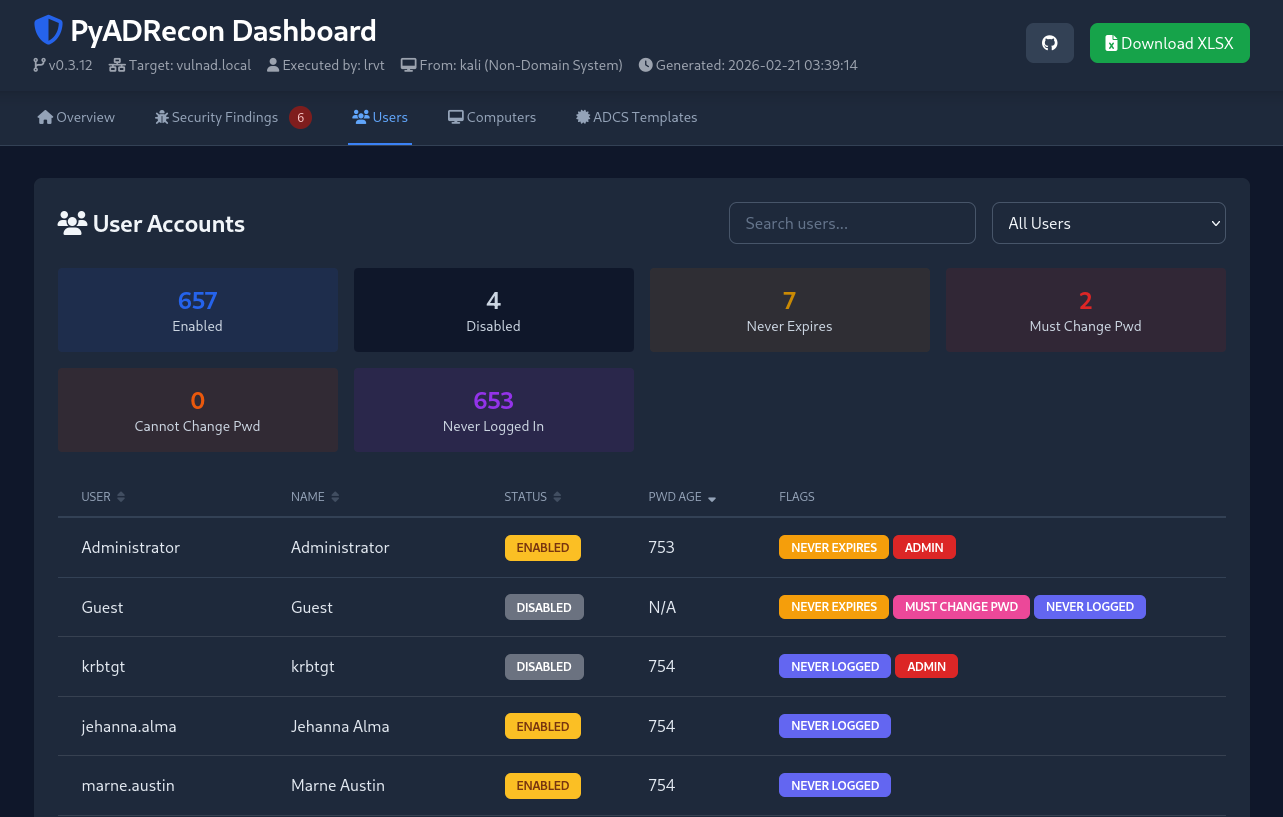
dnszones ✅dnsrecords ✅PyADRecon automatically generates an HTML dashboard containing key statistics and security findings when all collection modules are executed.
If needed, you can disable dashboard creation during initial data collection using --no-dashboard. The dashboard can later be generated from existing CSV files with --generate-dashboard-from <CSV_DIR>.
[!CAUTION] This is a beta feature. Displayed data may be falsely parsed or reported as issue. Take it with a grain of salt!
