 kuleuven-cosic/whisperpair
The official reference implementation & vulnerability verification of our attack WhisperPair (CVE-2025-36911) which affects Google's Fast Pair protocol.


-green)

A practical tool to test whether Google Fast Pair devices are vulnerable to pairing, account-binding, and protocol-level attacks.
This repository provides the WhisperPair testing harness, a tool for evaluating the security of Google Fast Pair devices. It is designed for both researchers and practitioners to reproduce our findings and to test their own devices.
For an overview of the project, affected devices, and additional context, please visit our website.
This repository also contains the artefact for the paper One Tap to Hijack Them All: A Security Analysis of the Google Fast Pair Protocol, which appeared at IEEE S&P 2026.
Full version of the paper can be found here. If you find this work useful, please consider citing the paper:
@inproceedings{whisperpair2026,
  title     = {One Tap to Hijack Them All: A Security Analysis of the Google Fast Pair Protocol},
  author    = {Duttagupta, Sayon and Wyns, Seppe and Antonijević, Nikola and Singelée, Dave and Preneel, Bart},
  booktitle = {2026 IEEE Symposium on Security and Privacy (S\&P)},
  year      = {2026},
}
The materials are provided to enable reproducibility of our evaluation and to assist researchers in performing defensive testing. Use these materials only for authorized security research and defensive verification on devices you own or have explicit permission to test. As the code in this repository demonstrates vulnerabilities in consumer accessories, do not use it to attack third-party devices without clear written permission. The authors performed all experiments on devices owned by the project team or donated with informed consent. By running these tools you agree to use them only for defensive research, reproduction of our results, or device self-testing.
[!NOTE] Summary: ensure that you have a Linux machine with a Bluetooth adapter, and that Node.js (LTS) and pnpm are installed.
You can run both the UI and server on the same machine by runningbash build.shfollowed bybash start.sh.
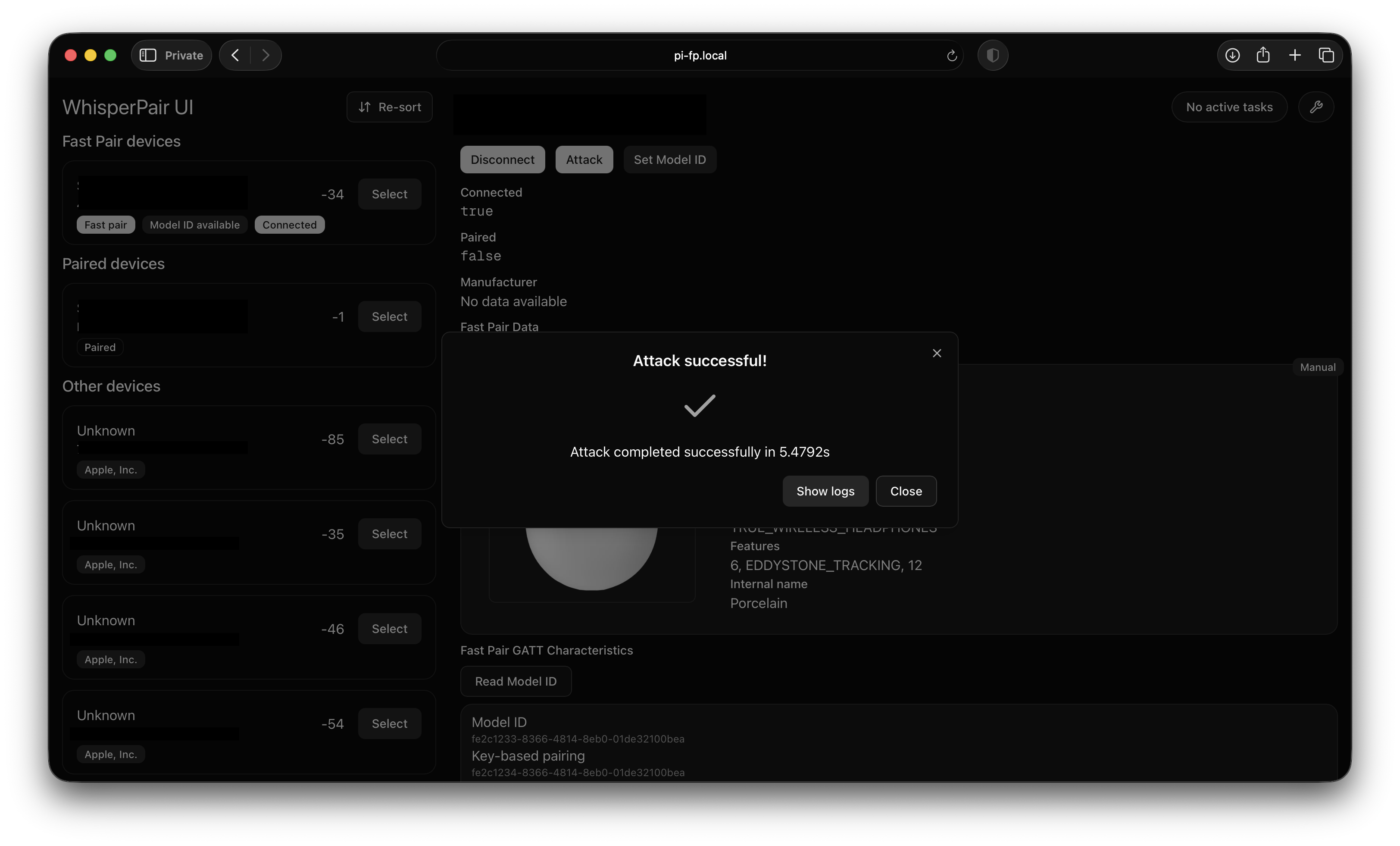
This repository contains a testing harness for evaluating whether a target device correctly implements certain security requirements of Google Fast Pair. The harness can test whether the pairing state predicate is correctly implemented, whether messages with reused nonces are rejected, and whether the device is vulnerable to an invalid curve attack. The harness consists of a backend server and a frontend web UI.
[!NOTE] If you're looking for the implementation of the attacks specifically:
./toolkit-server/src/fast-pair-service.tsand./toolkit-server/src/protocol.tscontain the implementation of the attacks and the Fast Pair protocol.
The toolkit consists of two components: the server and the UI.
The server needs to be run on a Linux system, and has been tested with a Raspberry Pi 4.
The UI is a Next.js frontend that can be used to control the server, and it can run anywhere Node.js is supported.
The UI must be able to connect to the server over the network.
We tested the harness with Raspberry Pi OS Lite (64-bit) (6.12.47+rpt-rpi-v8), BlueZ version 5.82.
A Linux machine with BlueZ, Node.js, and pnpm installed.
We highly recommend using the current Long-Term-Support (LTS) version of Node.js (v24.14.0).
We have ensured that the toolkit works using this version.
Older versions may work up to v18, but older versions will likely crash or produce unexpected results.
nvm.shIf you use nvm to manage your installed Node.js versions, you have to make sure that root has access to the nvm-managed Node.js version as well.
As explained in this StackOverflow post, you might need to create a new symbolic link.
# Source - https://stackoverflow.com/a/40078875
# Posted by SimpleJ, modified by community. See post 'Timeline' for change history
# Retrieved 2026-03-30, License - CC BY-SA 4.0

sudo ln -s "$NVM_DIR/versions/node/$(nvm version)/bin/node" "/usr/local/bin/node"
sudo ln -s "$NVM_DIR/versions/node/$(nvm version)/bin/npm" "/usr/local/bin/npm"
sudo ln -s "$NVM_DIR/versions/node/$(nvm version)/bin/npx" "/usr/local/bin/npx"
[!NOTE] To run the server, you only need to link
node.
If Node.js is also installed using an external package manager, the version available to sudo may be different from the one used by nvm.
You can check this by comparing the output of node -v and sudo node -v.
While we recommend Node.js LTS v24, the server should be able to function correctly up until v18.
pnpmIf Node.js v24 LTS is installed, you should be able to enable pnpm using the following command:
corepack enable
The harness also requires hcitool and l2ping.
Depending on your Linux distribution, hcitool might not be available. You might have to install bluez-deprecated-tools.
It remains preinstalled on the latest Raspberry Pi OS Lite version at the time of writing. (1 Oct 2025)
If the Bluetooth adapter is not powered on, the server will attempt to use rfkill to turn it on.
Testing the Audio Switch extension requires rfcomm.
[!NOTE] The server will check for the availability of these tools on startup. Additional information about features that may not be available will be displayed in the console.
Reproducing the results requires physical access to a vulnerable device.
Beware that most vendors have released software updates for WhisperPair, so you may need devices with outdated firmware.
See Selecting a device for more information on what devices we used in our evaluation.
If you want to run the UI and server on the same (Linux) machine, you can use the build.sh and start.sh scripts.
First, install the required dependencies and build the components using:
bash build.sh
Ensure Bluetooth is enabled:
sudo rfkill unblock bluetooth
Then, run the UI and the server using:
bash start.sh
The UI should now be reachable at http://localhost:3000.
You can run the UI and server on different hosts.
This allows you to run the server on a Linux machine, while the UI runs locally.
Although this isn't recommended, you can do this as follows:

