 kpomin57/waf-tester
A program for testing WAF functionality

Enterprise WAF Evaluation Tool — Real attack payloads. Real results. Compliance-ready reports.
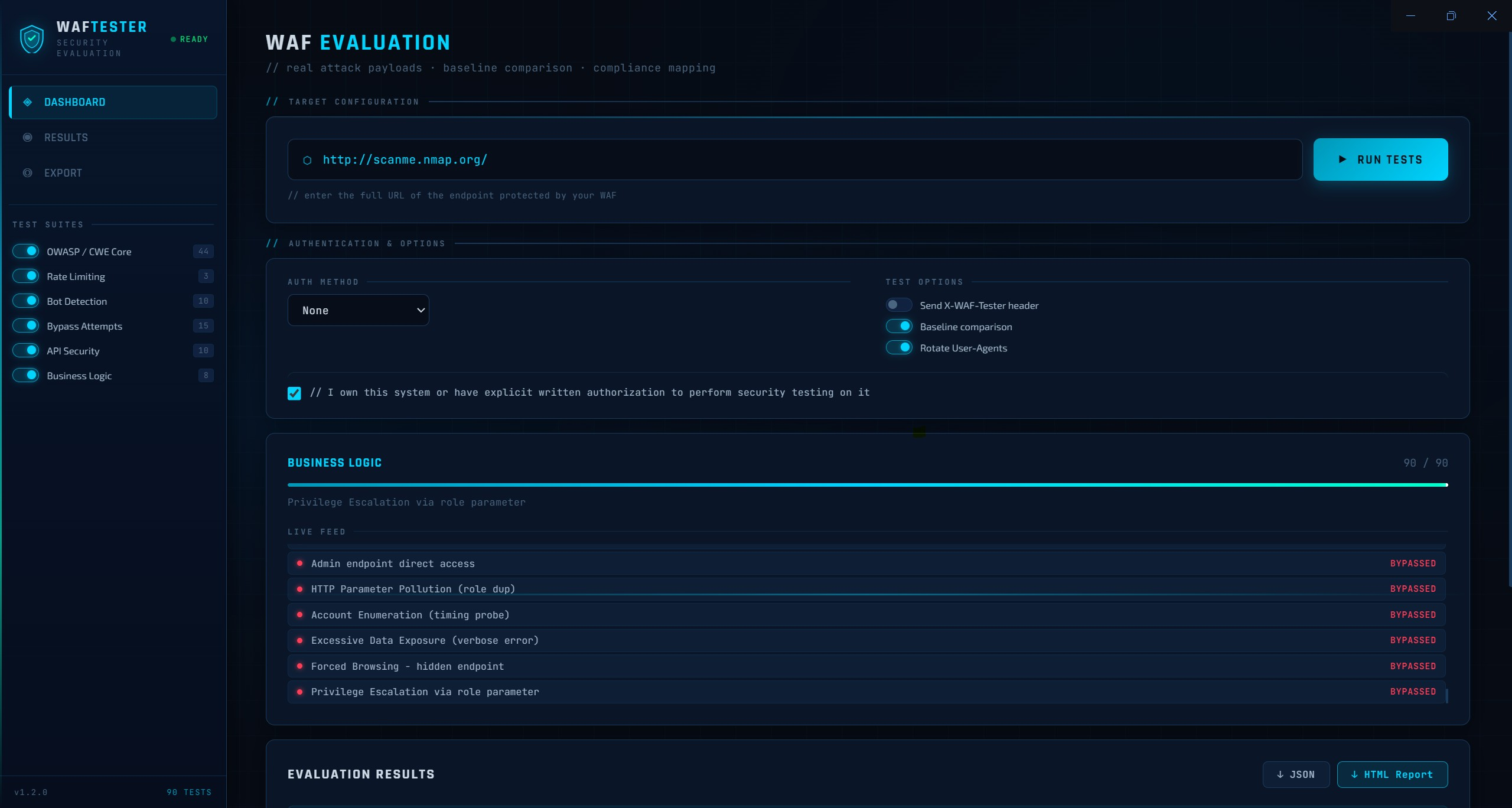
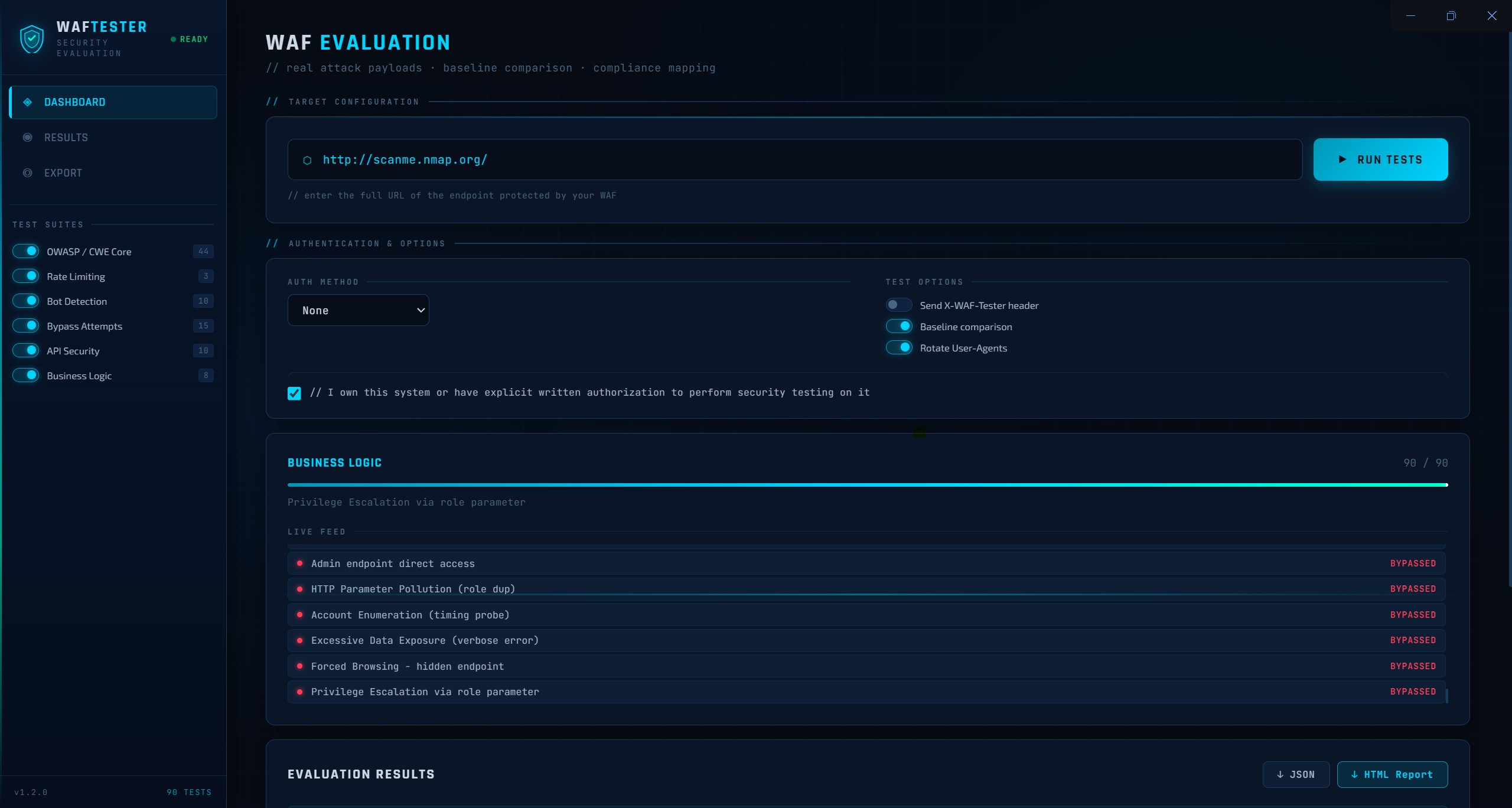
WAF Tester evaluates Web Application Firewalls by sending real attack payloads to a user-supplied URL and reporting whether they are blocked. Available as a Windows desktop app (Electron) and a Python CLI that runs anywhere.
This tool is intended for authorized security testing only. Only use it against systems you own or have explicit written permission to test. Unauthorized testing of third-party systems may violate the Computer Fraud and Abuse Act (CFAA) and equivalent laws in your jurisdiction. The authors assume no liability for misuse.
| Suite | Tests | What It Covers |
|---|---|---|
| OWASP / CWE Core | 44 | SQL injection (12 variants), XSS (10 variants), path traversal, command injection, XXE, SSRF, Log4Shell, SSTI, open redirect |
| Rate Limiting | 3 | Burst flood (30 concurrent), sequential flood, X-Forwarded-For IP rotation bypass |
| Bot Detection | 10 | sqlmap, Nikto, Nmap, Scrapy, Masscan, HeadlessChrome, python-requests, curl, empty UA, missing Accept headers |
| Bypass Attempts | 15 | Double URL-encoding, Unicode fullwidth, null bytes, case variation, comment obfuscation, CRLF injection, host header injection, method override, path tricks |
| API Security | 10 | GraphQL introspection/batch/enumeration, JWT none-algorithm & algorithm confusion, mass assignment, HTTP verb tampering, BOLA, content-type confusion |
| Business Logic | 8 | Negative quantity, zero-price submission, admin endpoint access, HTTP parameter pollution, account enumeration, excessive data exposure, forced browsing, privilege escalation |
Every test is tagged to one or more compliance frameworks:
HIGH, LIKELY, or UNCERTAIN rather than binary pass/failgit clone https://github.com/kpomin57/waf-tester.git
cd waf-tester
npm install
npm start
npm run build
Output appears in dist/ as both an NSIS installer and a portable .exe. No prerequisites needed on the target machine — Electron bundles its own runtime.
A single-file Python version that runs anywhere Python is available — Linux servers, CI/CD pipelines, Docker containers, WSL, or any environment where the Windows .exe is not an option.
pip install rich requests
python waf_tester.py --url https://target.example.com
Runs all 90 tests, prompts for authorization confirmation, prints color-coded results to the terminal, and saves both a JSON and HTML report to the current directory.
| Flag | Description | Default |
|---|---|---|
--url | Target URL (required) | — |
--suites | Comma-separated suites to run | all |
--auth-type | none / bearer / apikey / cookie / basic | none |
--auth-value | Token, cookie string, or API key value | — |
--auth-header | Header name for API key auth | X-API-Key |
--auth-user | Username for Basic Auth | — |
--auth-pass | Password for Basic Auth | — |
--no-baseline | Disable baseline comparison | off |
--no-rotate-ua | Disable User-Agent rotation | off |
--waf-header | Send X-WAF-Tester identification header | off |
--output | terminal, json, html (comma-separated) | all three |
--output-dir | Directory to save report files | . |
--timeout | Per-request timeout in seconds | 10 |
--proxy | Proxy URL for all requests (e.g. http://127.0.0.1:8080) | off |
--confirm | Skip the authorization confirmation prompt | off |
# Run all suites
python waf_tester.py --url https://app.example.com

# Run OWASP and API suites only
python waf_tester.py --url https://app.example.com --suites owasp,api

# Bearer token auth
python waf_tester.py --url https://app.example.com/api \
  --auth-type bearer --auth-value eyJhbGciOiJIUzI1NiJ9...

# API key auth
python waf_tester.py --url https://app.example.com/api \
  --auth-type apikey --auth-header X-API-Key --auth-value mykey123

# Save reports to a folder, skip confirmation (CI/CD)
python waf_tester.py --url https://app.example.com \
  --output-dir ./reports --confirm

# Terminal output only — no files saved
python waf_tester.py --url https://app.example.com --output terminal

# Route traffic through Burp Suite
python waf_tester.py --url https://app.example.com --proxy http://127.0.0.1:8080
docker run --rm -v $(pwd)/reports:/reports \
  python:3.12-slim sh -c \
  "pip install rich requests -q && python waf_tester.py \
   --url https://target.example.com \
   --output-dir /reports --confirm"
- name: WAF Evaluation
  run: |
    pip install rich requests
    python waf_tester.py \
      --url ${{ secrets.WAF_TARGET_URL }} \
      --suites owasp,api,bypass \
      --output json \
      --output-dir ./reports \
      --confirm

- name: Upload report
  uses: actions/upload-artifact@v3
  with:
    name: waf-report
    path: reports/
The Python CLI can route all test traffic through Burp Suite, giving you a full HTTP history of every payload WAF Tester sends. This is useful for manual inspection of requests and responses, fine-tuning payloads, troubleshooting unexpected WAF behavior, and using Burp's own scanner or repeater on interesting findings.
Burp Suite runs a local proxy listener (default 127.0.0.1:8080). When you point WAF Tester's proxy environment variables at that address, every request the tool makes passes through Burp before reaching the target. You see each payload in Burp's HTTP history with the full request and response — status code, headers, body — exactly as the WAF saw it.
1. Start Burp Suite and confirm the proxy listener is active:
Open Burp → Proxy → Proxy Settings → confirm listener is on 127.0.0.1:8080 (or note your port if different).
2. Export Burp's CA certificate and trust it (one-time setup):
WAF Tester connects to HTTPS targets, so Burp needs to intercept TLS. Go to Burp → Proxy → Proxy Settings → Import/Export CA Certificate → Export as DER. Install it as a trusted root CA on your system, or set the environment variable below to skip verification (fine for lab use, not production).
3. Run WAF Tester with --proxy:
python waf_tester.py --url https://target.example.com --proxy http://127.0.0.1:8080
On Windows:
python waf_tester.py --url https://target.example.com --proxy http://127.0.0.1:8080
You can also still use environment variables if you prefer:
HTTPS_PROXY=http://127.0.0.1:8080 HTTP_PROXY=http://127.0.0.1:8080 \
python waf_tester.py --url https://target.example.com
4. Turn off Burp's interception:
