

VPN Overall Reconnaissance, Testing, Enumeration and eXploitation Toolkit
🚩 This is the public repository of vortex, for latest version and updates please consider supporting us through https://porchetta.industries/
VPN Overall Reconnaissance, Testing, Enumeration and Exploitation Toolkit
If you want to sponsors this project and have the latest updates on vortex, latest issues fixed, latest features, please support us on https://porchetta.industries/
Come hang out on Discord!
A very simple Python framework, inspired by [SprayingToolkit][1], that tries to automate most of the process required to detect, enumerate and attack common O365 and VPN endpoints (like Cisco, Citrix, Fortinet, Pulse, etc...).
Make the VPN spraying phase much quicker and easier. Also, due to its flexibility, this tool can be added to an existing OSINT workflow pretty easily.
Vortex mainly provide assistance with performing the following tasks:
Install the pre-requisites with pip3 as follows:
sudo -H pip3 install -r requirements.txt
Otherwise, you can install the pre-requisites using a virtual environment:
virtualenv venv
venv\Scripts\activate
pip install -r requirements.txt
python3 -m virtualenv venv
source venv/bin/activate
pip install -r requirements.txt
Using the tool is pretty straight forward, but there is a workflow to respect. The tool uses as SQLite database to store information about the current attack.
The workspace represents the database file used by the tool. The name should be just a simple name to label the current attack, project or target.
To each workspace is assigned one SQLite database. When you specify a workspace name, such as:
python manage.py -w workspace1
What you're actually saying is "I want to operate on the workspace1.db file".
In order to work properly, Vortex needs to initialise the DB with the correct schemas. To do that, the only thing to do is executing the command:
python manage.py -w workspace1 db -c init
If a user tries to skip this phase, Vortex will just print to screen the correct command to launch first.
[-] Workspace not initialized. Please initialise it using:
    python manage.py -w workspace1 db -c init
Instead, when running the same command against an existing, initialised DB, Vortex will ask for confirmation before overwrite the DB file:
[-] The DB file exists and it was initialised, overwrite?
 [y|n] $> y
Vortex works with one positional argument, the 'Action', and other keyed values.
The most important among them is the command argument (-c cmd). In combination with
the action value, the command define what Vortex should do.
It is possible to see the list of supported actions from the Help:
python manage.py -h

Vortex: VPN Overall Reconnaissance, Enumeration and eXploitation

positional arguments:
  {db,domain,import,office,profile,search,tor,validate,vpn}
                        Action to execute

optional arguments:
  -h, --help            show this help message and exit
  -w WORKSPACE, --workspace WORKSPACE
                        Workspace to use
  -c COMMAND, --command COMMAND
                        Command for the action
  -D DOMAIN, --domain DOMAIN
                        Domain under attack
  -C COMPANY, --company COMPANY
                        Company under attack
  -l LOCATION, --location LOCATION
                        Location of the company under attack (IE, UK, US, ...)
  -u URL, --url URL     VPN Endpoint Origin (schema://domain:port)
  -t ENDPOINT_TYPE, --endpoint-type ENDPOINT_TYPE
                        Target Endpoint Type
  -U USER, --user USER  User name
  -E EMAIL, --email EMAIL
                        User email
  -N NAME, --name NAME  User full name
  -R ROLE, --role ROLE  User job
  -s SQL, --sql SQL     SQL statement
  -O EXPORT_FILE, --export-file EXPORT_FILE
                        Export file
  -Q QUOTES, --quotes QUOTES
                        Produce an Excel safe CSV
  -nh, --no-headers     Remove CSV headers
  -k KEYWORDS, --keywords KEYWORDS
                        Search keywords
  -P PASSWORDS_FILE, --passwords-file PASSWORDS_FILE
                        Password file for spraying
  -L, --leaks           Use leaks for spraying
  -I IMPORT_FILE, --import-file IMPORT_FILE
                        Import file
As observable from the help, the list of supported commands per action is not specified anywhere. This is because is not necessary to specify a command directly. Indeed, if a command is not specified, Vortex will ask the user to select one among the commands available for the specified action.
python manage.py -w workspace1 db

   ,d#####F^      ,yy############yy       ^9#######,
  ,######"      y###################by      ^9######,
  ######^     y#####F""       ^"9######y      "######]
 d#####^    ,#####" by klezVirus ^9#####,     ^######,
,#####]    ,####F    yy#######y,    ^9####b     ^######
[#####     ####F   ,###F""'"9####,    9####]     9#####
#####F    [####   ,##F^  yy   "###b    9####,    ^#####]
#####]    [###]   ###  dF""#b  ^###]   ^####]     #####]
9####b    [####   9##, 9bd [#]  [##b    #####     [#####
[#####     ####,   9##y, ,y##^  d##F    #####     [####]
 #####b    ^####y   ^"#####"   d###^   ,####]     d#####
 [#####,    ^####by          ,d###^    d####^     #####F
  9#####y     "#####byyyyyyd####F^    d####F     [#####9
   9#####b,     ""############"^    ,d####F     ,######
    ^######b,       ""'""'"^      ,d#####F      d#####F

[*] Select a command:
0 : init
1 : sql
2 : add-endpoint
3 : add-user
4 : drop-user
5 : truncate-table
6 : export
 $>
The same applies for argument needed by a specific routine. If an argument is difficult to be inputted at runtime, Vortex will kindly remind the user that the parameter is required. Otherwise, Vortex will guide the user into selecting or inputting the necessary arguments.
For example, if a user wanted to export a specific table or even a column, the only required thing would be to launch the export command, as observable from the image, below:

This kind of behaviour makes Vortex really easy to use.
Vortex has been designed to adhere to a specific operation workflow, summarized in the below schema:
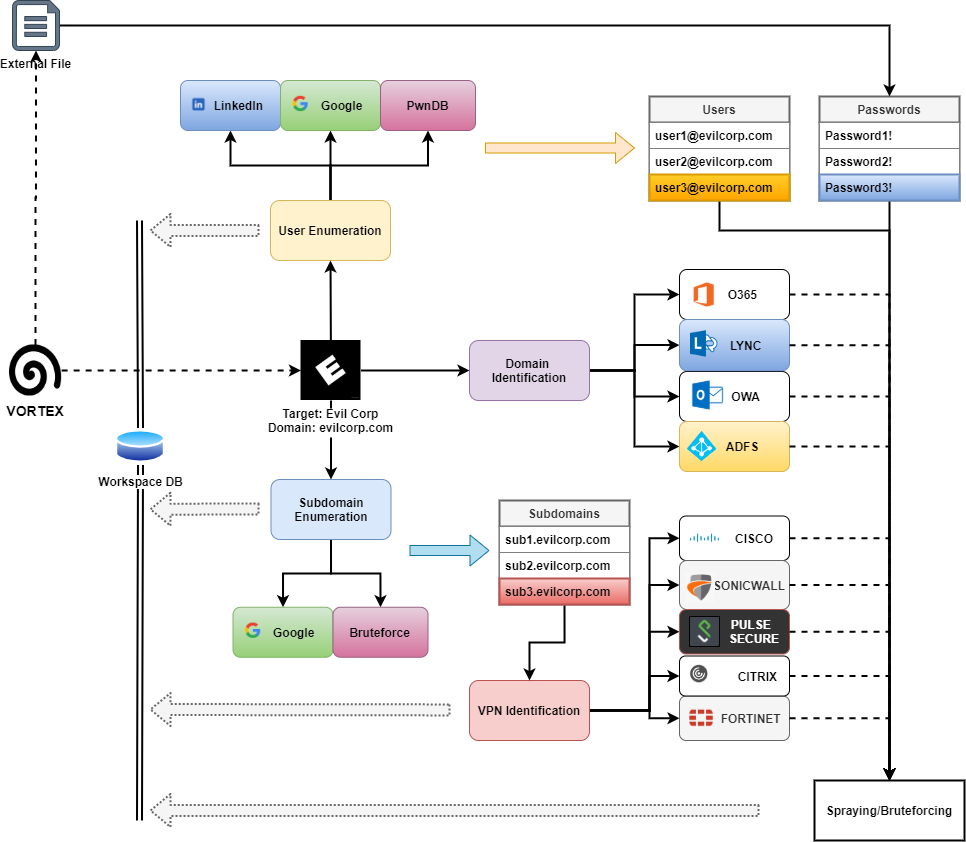
Collect valid users for a specific target can be done using three different sources:
This source has been removed for infringement of LinkedIn user policies.
You can still operate on LinkedIn using GoMapEnum,
and then import the email addresses using the import command.
Again, please be aware that using this functionality is a breach of the LinkedIn user agreement, as observable at point 8.2 of the LinkedIn user agreement:

