 kimd155/quickresponsec2
Covert C2 framework using QR codes for indirect command execution and result retrieval via HTTP/S, designed for stealthy penetration testing and red team operations.


QuickResponseC2 is a stealthy Command and Control (C2) framework that enables indirect and covert communication between the attacker and victim machines via an intermediate HTTP/S server. All network activity is limited to uploading and downloading images, making it difficult to detect by conventional IPS/IDS systems and an ideal tool for security research and penetration testing.
Command Execution via QR Codes:
Users can send custom commands to the victim machine, encoded as QR codes.
Victims scan the QR code, which triggers the execution of the command on their system.
The command can be anything from simple queries to complex operations based on the test scenario.
Result Retrieval:
Results of the executed command are returned from the victim system and encoded into a QR code.
The server decodes the result and provides feedback to the attacker for further analysis or follow-up actions.
Built-in HTTP Server:
The tool includes a lightweight HTTP server that facilitates the victim machine’s retrieval of command QR codes.
Results are sent back to the server as QR code images, and they are automatically saved with unique filenames for easy management.
The attacker’s machine handles multiple requests, with HTTP logs organized and saved separately.
Stealthy Communication:
QuickResponseC2 operates under the radar, with minimal traces, providing a covert way to interact with the victim machine without alerting security defenses.
Ideal for security assessments or testing command-and-control methodologies without being detected.
File Handling:
The tool automatically saves all QR codes (command and result) to the server_files directory, using sequential filenames like command0.png, command1.png, etc.
Decoding and processing of result files are handled seamlessly.
User-Friendly Interface:
The tool is operated via a simple command-line interface, allowing users to set up a C2 server, send commands, and receive results with ease.
No additional complex configurations or dependencies are needed.
First, install the Dependencies -
pip3 install -r requirements.txt
Then, run the main.py
python3 main.py
Choose between the options:
1 - Run the C2 Server
2 - Build the Victim Implant
Enjoy!
8080).commandX.png on the HTTP server.commandX.png), it downloads and decodes the image to retrieve the command.resultX.png.resultX.png).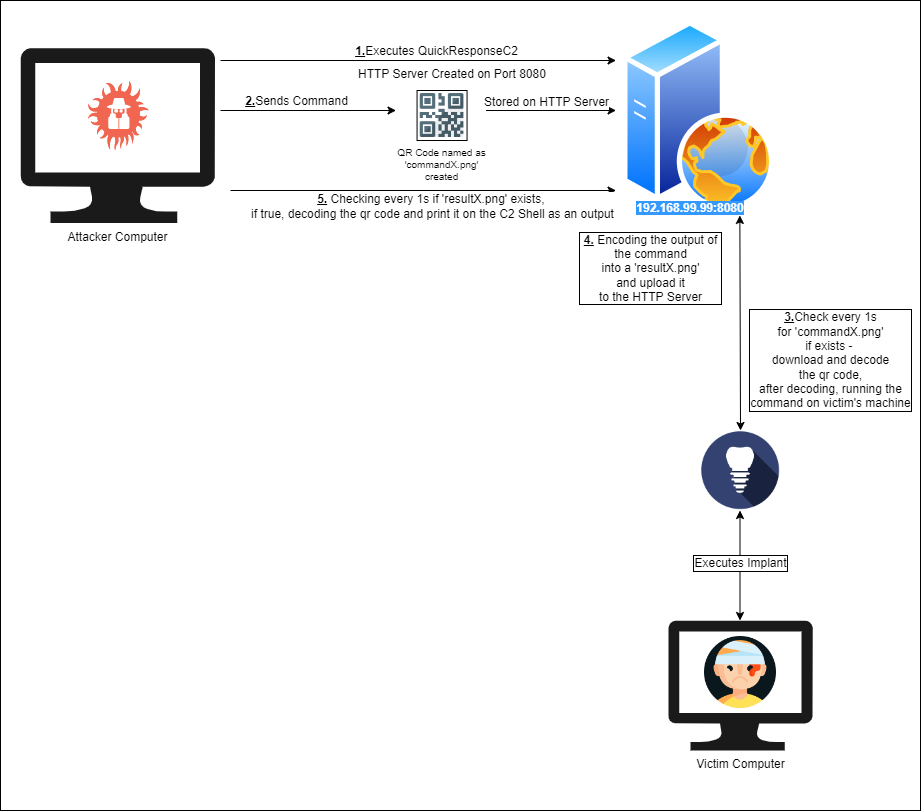
Feel free to fork and contribute! Pull requests are welcome.

