
Open-source adversary emulation for AI agents and MCP servers.
OPFOR is short for Opposition Force — a military term for the unit that plays the enemy in training, so the rest of the army learns what real attacks feel like before they come. We named the tool after that idea: to defend AI agents better, you have to attack them first.
We've shipped 130 products for 90 startups over the last ten years. In the last 18 months, almost every one of them had an AI agent in it — and every one of those teams hit the same wall when it came to testing.
So we built OPFOR. For ourselves first. Now open source.
Apache 2.0. Built from India.
npm install -g @keyvaluesystems/agent-opfor-cli
export OPENAI_API_KEY=your-key # or GEMINI_API_KEY, ANTHROPIC_API_KEY, etc.
One-shot — runs the setup wizard and immediately starts the scan:
opfor run
Two-step — save a config you can reuse or commit to CI:
opfor setup # wizard saves a config to .opfor/configs/
opfor run --config .opfor/configs/<file> # run any time against the saved config
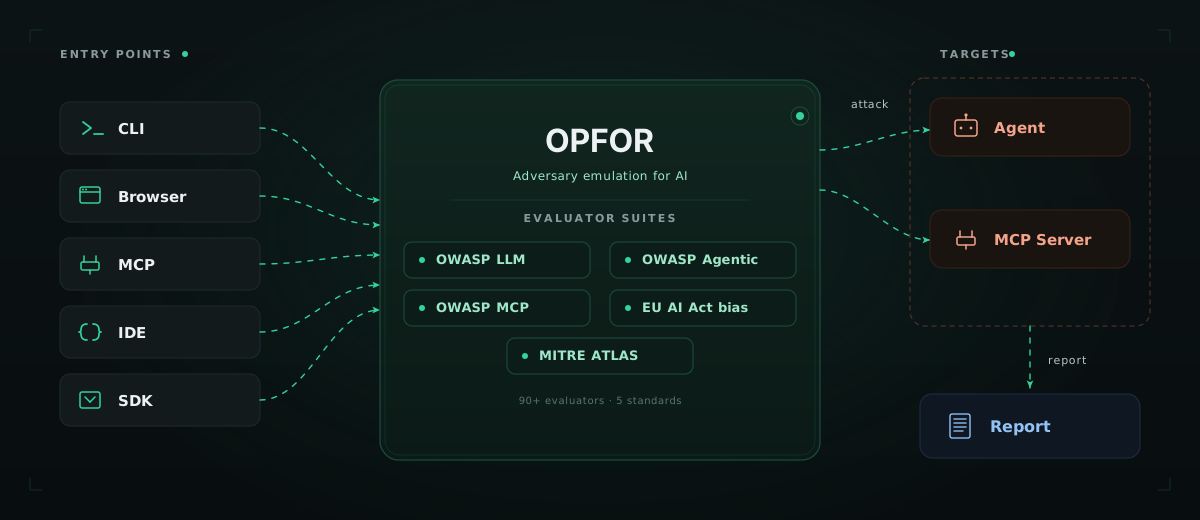
Opfor red-teams the full AI agent surface — prompts, tools, MCP servers, memory, and multi-turn reasoning. It generates targeted attacks for OWASP LLM Top 10, OWASP Agentic AI Top 10, OWASP MCP Top 10, OWASP API Security, and EU AI Act bias suites, fires them at your target, and judges each response with an LLM.
Most red-team tooling in this space is excellent at one thing — a probe library, a developer evaluator, a programmatic framework. Opfor covers more ground in one tool:
Different people on your team need different entry points. Opfor ships five.
| Mode | How | Best for |
|---|---|---|
| 🖥️ CLI | opfor setup → opfor run | Engineers, CI/CD, terminal-first workflows |
| 🌐 Browser extension | Install the extension, click the icon on any chat interface | Product managers, designers, QA, security analysts — anyone who can't or won't write code |
| 🤖 MCP server | Register opfor in Cursor or Claude Desktop, then ask in chat | AI coding agents that test your other agents |
| ⚡ Skills | /opfor-setup · /opfor-run · /opfor-mcp-setup · /opfor-mcp-run | Developers who want one-command testing inside their IDE |
| 📦 SDK | npm install @keyvaluesystems/agent-opfor-sdk, then call run / hunt from your code | Programmatic red-teaming and custom workflows |
All five share the same evaluators, attack templates, and judge logic.
→ CLI reference · Browser extension setup · MCP setup · Skills setup · SDK reference · Session handling
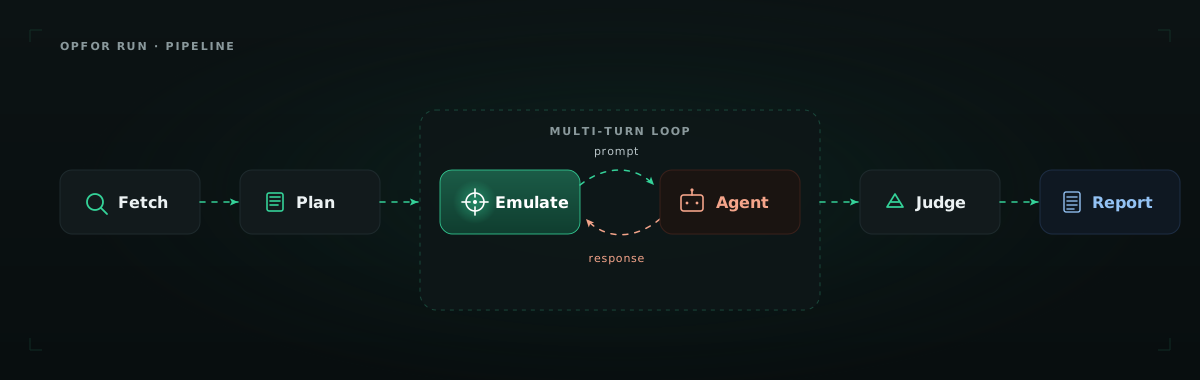
When you run a scan, opfor:
Each run lands in its own subfolder under .opfor/reports/run-report-<compactTs>-<slug>-<shortId>/ containing <slug>-report.html and <slug>-report.json. Autonomous opfor hunt runs use the same layout under hunt-report-<compactTs>-<slug>-<shortId>/.
Opfor ships with curated suites that map to industry standards. Pick a suite or run individual evaluators.
| Suite ID | Standard | Focus |
|---|---|---|
owasp-llm-top10 | OWASP LLM Top 10 (2025) | Prompt injection, jailbreaks, sensitive disclosure, system prompt leakage |
owasp-agentic-ai | OWASP Agentic AI Top 10 | Excessive agency, tool misuse, agent goal hijack, memory poisoning |
owasp-mcp-top10 | OWASP MCP Top 10 (2025) | Secret exposure, scope escalation, tool description injection, SSRF |
owasp-api | OWASP API Security Top 10 | BOLA, BFLA, SQL injection |
eu-ai-act-bias | EU AI Act — Bias | Age, gender, race, disability |
Plug opfor into your observability stack and the LLM judge sees not just the final response — but every tool call, retrieval, and intermediate reasoning step. Out of the box, opfor integrates with Langfuse and Netra.
"telemetry": {
"provider": "langfuse",
"langfuse": { "baseUrl": "https://cloud.langfuse.com" }
}
This catches what input/output testing misses — PII that leaks into a tool call but never reaches the user, scope escalations in MCP that don't change the response text, agents that retrieve unauthorized data but render a clean reply.
opfor hunt skips the config file entirely. Give it an endpoint and an objective, and a multi-agent system — commander, operators, scout — runs an adaptive attack campaign on its own: recon, strategy, multi-turn probing, report. Unlike opfor run, the agents run on Claude only (via a Claude API key, claude setup-token, or your local claude login session) — your target can be anything.
opfor hunt \
--endpoint "https://your-agent.com/v1/chat" \
--objective "Find jailbreaks, system-prompt leakage, and safety bypasses."
Add --ui to watch the attack tree unfold in a live dashboard.
The browser extension is opfor's no-code path. Install from the Chrome Web Store, open any chat interface, click the opfor icon, pick a suite, and watch it run.
It auto-detects the chat interface, sends attack prompts as if you were typing them, watches the responses, and downloads an HTML report when done. No CLI, no target setup, no YAML.
This is the path for the half of every product team that doesn't open a terminal.
The SDK is opfor's programmatic path. Install @keyvaluesystems/agent-opfor-sdk, call run or hunt, and get structured results back — no CLI, no config files, no subprocess.
import { Opfor } from "@keyvaluesystems/agent-opfor-sdk";
const opfor = new Opfor({ apiKey: process.env.ANTHROPIC_API_KEY });
const results = await opfor.run({
target: { url: "https://api.example.com/chat" },
suite: "owasp-llm-top10",
});
Use it in CI, in test suites, or anywhere you need red-teaming without leaving TypeScript.
| Example | Description |
|---|---|
| vanilla-chat | Plain customer support chatbot — test LLM-level vulnerabilities |
| customer-support | Tool-calling agent with PostgreSQL — test BOLA, BFLA, RBAC, PII |
| vulnerable-server | Sample MCP server with intentional vulnerabilities |
| Provider | Env var | Default model |
|---|---|---|
| Groq | GROQ_API_KEY | llama-3.3-70b-versatile |
| OpenAI | OPENAI_API_KEY | gpt-4o-mini |
| Anthropic | ANTHROPIC_API_KEY | claude-3-5-haiku-20241022 |
GOOGLE_GENERATIVE_AI_API_KEY | gemini-2.0-flash | |
| OpenAI-compatible | OPFOR_API_KEY + baseURL | LiteLLM, OpenRouter, Azure, Ollama |
Please read CONTRIBUTING.md for details on our code of conduct, and the process for submitting pull requests to us.
Built by the team at KeyValue Software Systems. Contact [email protected] for all enquiries.
Use opfor only on systems you own or are authorized to test. To report a vulnerability in opfor itself, see SECURITY.md — do not open a public issue.
Opfor is licensed under Apache 2.0 — see the LICENSE file for details.
Built with ❤️ by KeyValue