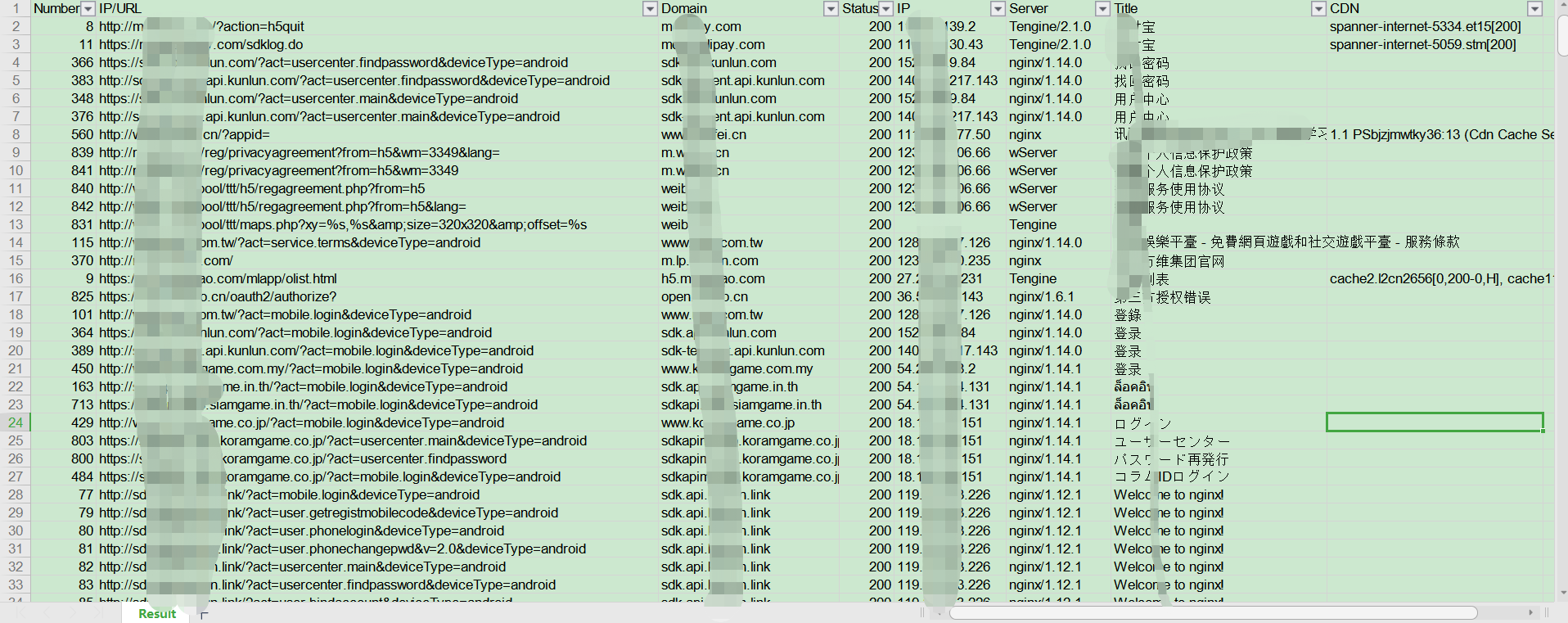

一款适用于以HW行动/红队/渗透测试团队为场景的移动端(Android、iOS、WEB、H5、静态网站)信息收集扫描工具,可以帮助渗透测试工程师、攻击队成员、红队成员快速收集到移动端或者静态WEB站点中关键的资产信息并提供基本的信息输出,如:Title、Domain、CDN、指纹信息、状态信息等。
This project is currently just the tip of the iceberg of the planned project. If you are interested in this project or want to participate in subsequent development or translation work, please send an email to [email protected] stating your skills and requests.
A mobile (Android, iOS, WEB, H5, static website) information gathering scanning tool suitable for HW actions / Red Teams / Penetration Testing Teams. It helps penetration test engineers, attack team members, and red team members quickly collect key asset information from mobile or static web sites and provide basic information output, such as: Title, Domain, CDN, fingerprint information, status information, etc.
Do not apply the technology or code of this project to illegal uses such as malware creation, software copyright/intellectual property theft, or improper profit. Implementing the above acts or using this project to sniff data from programs not owned by you may violate Article 217 and Article 286 of the Criminal Law of the People's Republic of China, the Cybersecurity Law of the People's Republic of China, the Regulations on the Protection of Computer Software of the People's Republic of China, and other legal provisions. The technology mentioned in this project may only be used in legal scenarios such as private learning and testing. Any criminal or civil liability arising from improper use of this technology has nothing to do with the author of this project.

AppInfoScanner
|-- libs Core code of the program
|-- core
|-- __init__.py Global configuration information
|-- parses.py Used to parse static information in files
|-- download.py Used to automatically download APPs or H5 pages
|-- net.py Used for network sniffing and obtaining basic information
|-- task
|-- __init__.py Directory initialization file
|-- base_task.py Unified task scheduling center
|-- android_task.py Used to handle Android-related tasks
|-- download_task.py Used to handle automatic download of APPs or H5 tasks
|-- ios_task.py Used to handle iOS-related tasks
|-- net_task.py Used to handle network sniffing-related tasks
|-- web_task.py Used to handle Web-related tasks, such as web page right-click source code, H5-related static information
|-- tools Tools that the program depends on
|-- apktool.jar Used to decompile APK files, may need to switch for different platforms
|-- baksmali.jar Used to decompile DEX files, may need to switch for different platforms
|-- strings.exe Used to obtain IPA string information under Windows 32-bit
|-- strings64.exe Used to obtain IPA string information under Windows 64-bit
|-- __init__.py Directory initialization file
|-- app.py Main running program
|-- config.py Configuration file for the entire program
|-- README.md Program usage instructions
|-- requirements.txt Dependency libraries to be installed in the program
|-- update.md Program historical version information
git clone https://github.com/kelvinBen/AppInfoScanner.git
Or copy the following link to your browser to download the latest official version
https://github.com/kelvinBen/AppInfoScanner/releases/latest
Domestic fast download:
git clone https://gitee.com/kelvin_ben/AppInfoScanner.git
cd AppInfoScanner
python -m pip install -r requirements.txt
python app.py android -i <Your APK File or DEX File or APK Download Url or Save File Dir>
python app.py ios -i <Your IPA file or Mach-o File or IPA Download Url or Save File Dir>
python app.py web -i <Your Web file or Save Web Dir or Web Cache Url>
python app.py [TYPE] [OPTIONS] <The URL or directory to scan>
<> Indicates the file, directory, or URL to be scanned
| OR relationship – choose only one
[] Indicates the parameters to be entered
This parameter type corresponds to [TYPE] in the basic command format. Currently only [android/ios/web] are supported, and one must be specified.
android: Used to scan content related to Android applications
ios: Used to scan content related to iOS applications
web: Used to scan WEB sites or H5-related content
Automatically corrects based on the file extension. For example, if "ios" is specified but the file name entered with -i is XXX.apk, the Android scanning will be executed.
This parameter type corresponds to [OPTIONS] in the basic command format. Multiple parameters can be used together.
-i or --inputs: The file, directory, or URL for automatic download to be scanned. If the path is too long, enclose it in quotes. This parameter is required.
-r or --rules: Temporary scanning rules for the file content to be scanned.
-s or --sniffer: Enable network sniffing functionality; enabled by default.
-n or --no-resource: Ignore all resource files, including those in network sniffing (requires configuring sniffer_filter rules in config.py); resources are not ignored by default.
-a or --all: Output all results that match the scanning rules; enabled by default.
-t or --threads: Set the number of concurrent threads; 10 threads by default.
-o or --output: Specify the output directory for scan results and temporary files; defaults to the script's directory.
-p or --package: Specify the JAVA package name to scan in APK or DEX files. This parameter can only be used with the android type.
python app.py android -i <Your apk file>
Example:
python app.py android -i C:\Users\Administrator\Desktop\Demo.apk
python app.py android -i <Your DEX file>
Example:
python app.py android -i C:\Users\Administrator\Desktop\Demo.dex
python app.py android -i <APK Download Url>
Example:
python app.py android -i "https://127.0.0.1/Demo.apk"
Note: If the URL is too long, enclose it in double quotes.
python app.py ios -i <Your ipa file>
Example:
python app.py ios -i "C:\Users\Administrator\Desktop\Demo.ipa"
python app.py ios -i <Your Mach-o file>
Example:
python app.py ios -i "C:\Users\Administrator\Desktop\Demo\Payload\Demo.app\Demo"
python app.py ios -i <IPA Download Url>
Example:
python app.py ios -i "https://127.0.0.1/Demo.ipa"
Note: If the URL is too long, enclose it in double quotes. Scanning IPA files from the Apple Store is not supported at this time.
python app.py web -i <Your web file>
Example:
python app.py web -i "C:\Users\Administrator\Desktop\Demo.html"
python app.py web -i <Web Download Url>
Example:
python app.py web -i "https://127.0.0.1/Demo.html"
The following examples use the android type:
python app.py android -i <Your Dir>
Example:
python app.py android -i C:\Users\Administrator\Desktop\Demo
python app.py android -i <Your apk> -r <the keyword | the rules>
Example:
Add scanning for Baidu domains
python app.py android -i C:\Users\Administrator\Desktop\Demo.apk -r ".*baidu.com.*"
python app.py android -i <Your apk> -s
Example:
python app.py android -i C:\Users\Administrator\Desktop\Demo.apk -s
python app.py android -i <Your apk> -n
Example:
python app.py android -i C:\Users\Administrator\Desktop\Demo.apk -n
python app.py android -i <Your apk> -a
Example:
python app.py android -i C:\Users\Administrator\Desktop\Demo.apk -a
python app.py android -i <Your apk> -t 20
Example:
Set 20 concurrent threads
python app.py android -i C:\Users\Administrator\Desktop\Demo.apk -t 20
python app.py android -i <Your apk> -o <output path>
Example:
Output to the Temp directory on the desktop
python app.py android -i C:\Users\Administrator\Desktop\Demo.apk -o C:\Users\Administrator\Desktop\Temp
python app.py android -i <Your apk> -p <Java package name>
Example:
To filter content under the com.baidu package
python app.py android -i C:\Users\Administrator\Desktop\Demo.apk -p "com.baidu"
The program in this project serves as a basic framework with some built-in rules. Not every input will complete the scanning tasks. Therefore, you can configure rules according to your needs. Good configuration can achieve qualitative results.
filter_components: This configuration item is used to configure related component content, including JSON components or XML components, etc.
filter_strs: Used to configure the file content to be scanned. For example, to scan port numbers, configure: "r'.*://([\d{1,3}\.]{3}\d{1,3}).*'"
filter_no: Used to ignore unwanted content in scanned files.
shell_list: Used to configure Android packer characteristics.
web_file_suffix: Used to configure the file extensions for WEB files to be scanned.
sniffer_filter: Used to configure file extensions to be ignored during network sniffing.
headers: Used to configure request header information required during automatic download.
data: Used to configure the request body required during automatic download.
method: Used to configure the request method required during automatic download.
Method 1: Adjust the rules in config.py according to the actual situation.
Method 2: Ignore resource files.
Indicates that the scanned application has a packer. It must be unpacked before scanning. The following tools can be used for unpacking:
Android:
xposed module: dexdump
frida module: FRIDA-DEXDump
Rootless unpacking: blackdex
iOS:
frida module:
Windows: frida-ipa-dump
macOS: frida-ios-dump
File download failed.
1) Check if the entered URL is correct.
2) Check network connectivity, or configure the request headers (headers), request body (data), and request method (method) in config.py, then retry.
File decompilation failed.
Please submit a screenshot of the error and the corresponding APK file to https://github.com/kelvinBen/AppInfoScanner/issues. The author will process it promptly.
Custom rule submission link:
Submission format:
1. APP custom component addition
Example: fastjson rule as follows:
APP component: fastjson com.alibaba.fastjson
2. Strings to be searched
Example: Alibaba AK rule as follows:
String:
Alibaba Cloud AK .*accessKeyId.*".*"
3. WEB file extensions to search
Example: jsp file rule as follows:
Website: Java language jsp
4. Android packer rules
Example: A digital company's packer rule:
Packer: Digital company com.stub.StubApp
WeChat: bromomo (Add friend note: GitHub)
WeChat Group:

If you cannot join, add the WeChat friend first and then join the group.
Email: [email protected]
Submit requirements, bug fixes, technical exchanges, and business cooperation can all be done by adding the author.

AppInfoScanner is part of 404Team's StarLink Project 2.0. If you have any questions about AppInfoScanner or want to communicate with peers, please refer to the StarLink project's group joining method.