
Skip to content
KitploitKITPLOIT
ToolsBlog
Submit
ToolsBlog
Submit

Hacking, PenTest, and Cybersecurity Tools for Your Security Arsenal!

Kitploit is a directory of hacking, cybersecurity, and pentesting tools. Discover the latest project updates to find vulnerabilities, analyze systems, automate testing, and strengthen your security.

··Feeds·Contact·Privacy·© 2026 Kitploit

Tool Directory

Categories

View all categories
Loading categories
betwixt — :zap: Web Debugging Proxy based on Chrome DevTools Network panel. | Kitploit
Tools/GitHubGitHub/kdzwinel/betwixt
Packet Sniffing & AnalysisWeb Proxies & InterceptionDebuggersWeb Security
GitHubkdzwinel/betwixt

betwixt

⚡ Web Debugging Proxy based on Chrome DevTools Network panel.

View Repository
4.6k1227 years agoReviewed by Kitploit

Most Popular

View all →

Discover the most used tools by our community.

Explore all tools

Browse our collection of tools

View all tools →
Share

Betwixt

Build Status Dependency Status

Betwixt will help you analyze web traffic outside the browser using familiar Chrome DevTools interface.

Betwixt in action

Even more Betwixt action!

Installing

Download the latest release for your operating system, build your own bundle or run Betwixt from the source code.

Setting up

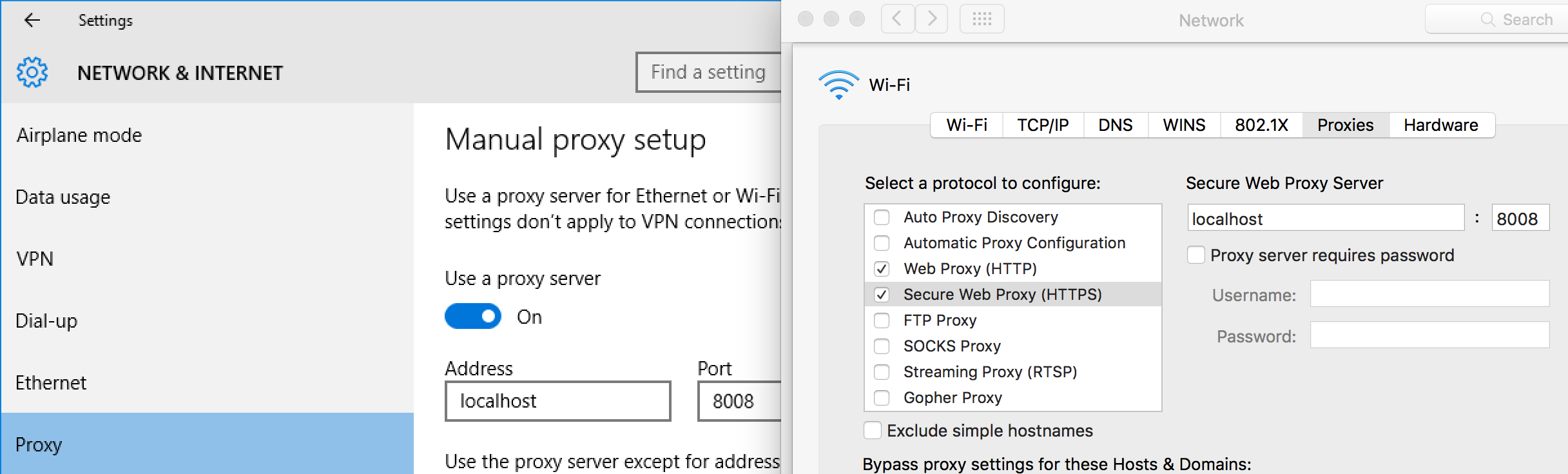
In order to capture traffic, you'll have to direct it to the proxy created by Betwixt in the background (http://localhost:8008).

If you wish to analyze traffic system wide:

  • on macOS - System Preferences → Network → Advanced → Proxies → Web Proxy (HTTP)
  • on Windows - Settings → Network & Internet → Proxy
  • on Ubuntu - All Settings → Network → Network Proxy

Setting up proxy on Windows 10 and macOS

If you want to capture traffic coming from a single terminal use export http_proxy=http://localhost:8008.

Capturing encrypted traffic (HTTPS) requires additional step, see this doc for instructions.

Contributing

All contributors are very welcome. See CONTRIBUTING.md fore more details.

License MIT

Download Tool