 kaisonox/apiscope
An API hooking framework for intercepting and monitoring Windows applications


ApiScope is a Windows x64 research tool for tracing selected API calls in a new or running process. It follows DLL load events through the Windows debugger API and installs hooks before the debuggee continues from each event.
Included hooks:
ntdll.dll!NtCreateFile (records the target path)ntdll.dll!NtOpenFile (records the target path)ntdll.dll!NtReadFilentdll.dll!NtWriteFilentdll.dll!NtClosentdll.dll!NtOpenKey (records the key path)ntdll.dll!NtSetValueKeyntdll.dll!NtQueryValueKeybcrypt.dll!BCryptOpenAlgorithmProvider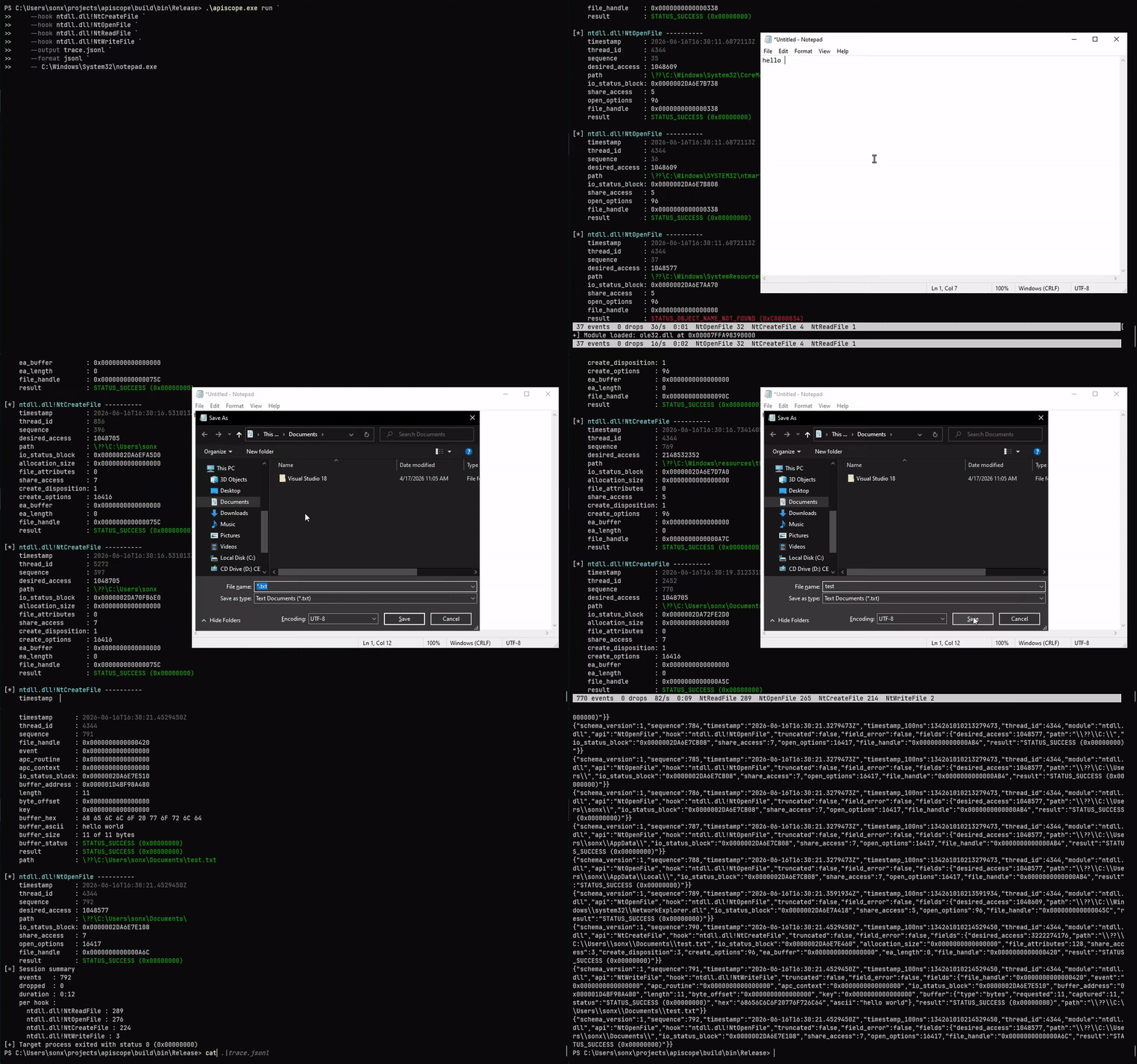
Requirements:
cmake -S . -B build -A x64
cmake --build build --config Release
ctest --test-dir build -C Release --output-on-failure
powershell -ExecutionPolicy Bypass -File .\scripts\validate-apiscope-hooks.ps1 .\build\bin\Release\apiscope-hooks.dll
powershell -ExecutionPolicy Bypass -File .\scripts\smoke.ps1 -SkipBuild
Zydis v4.1.1 is fetched at a pinned commit and linked only into
apiscope.exe. The injected apiscope-hooks.dll remains import-free.
apiscope.exe [--help | --version | --list-hooks]
apiscope.exe run -k <module!export|all> [-k <module!export>] [-f text|jsonl] [-o <path>] [-q] -- <program> [args...]
apiscope.exe attach -p <pid> -k <module!export|all> [-k <module!export>] [-f text|jsonl] [-o <path>] [-q]
Hook names are always module-qualified. Module matching is case-insensitive; export matching is case-sensitive.
.\apiscope.exe run `
  --hook ntdll.dll!NtCreateFile `
  --hook bcrypt.dll!BCryptOpenAlgorithmProvider `
  -- C:\path\app.exe

.\apiscope.exe attach --pid 4242 --hook all

.\apiscope.exe run --hook all --format jsonl --output trace.jsonl --quiet -- app.exe
Terminal events remain readable while --output optionally tees text or JSONL
to a file. --quiet suppresses the terminal event mirror. --color auto|always|never controls terminal color (default auto: on for a TTY, off
when piped or under NO_COLOR); color never appears in --output files. On a
TTY ApiScope also shows a live status footer (events, drops, rate, and per-hook
counts) that redraws in place; control it with --status auto|always|never.
[*] ntdll.dll!NtWriteFile ----------
    timestamp      : 2026-06-07T17:44:23.3834340Z
    thread_id      : 3508
    sequence       : 3
    file_handle    : 0x000000000000008C
    length         : 16
    buffer_ascii   : Hello, ApiScope!
    result         : STATUS_SUCCESS (0x00000000)
JSONL events contain generic metadata and hook-local fields:
{"schema_version":1,"sequence":1,"module":"bcrypt.dll","api":"BCryptOpenAlgorithmProvider","hook":"bcrypt.dll!BCryptOpenAlgorithmProvider","fields":{"flags":0,"result":"STATUS_SUCCESS (0x00000000)"}}
See SCHEMA.md for the event envelope and per-type field
encodings (pointers and statuses render as 0x hex strings).
Press Ctrl+C or Ctrl+Break to restore active hooks, release remote instrumentation, and detach. The target continues running. On natural exit, ApiScope prints the target status in decimal and hexadecimal, followed by a session summary (events, drops, and per-hook counts) on stderr.
NtCreateFile, NtOpenFile, and NtOpenKey resolve the target path from
OBJECT_ATTRIBUTES and report the resulting handle. ApiScope records each
successful open and annotates later operations on the same handle — reads,
writes, registry value access, and the matching NtClose — with the resolved
path, so activity is readable without manually tracking handles. NtClose
also evicts the handle, and relative opens are resolved through a previously
seen root_directory handle.
[*] ntdll.dll!NtCreateFile ----------
    sequence          : 2
    path              : test_file.txt
    file_handle       : 0x000000000000008C
    result            : STATUS_SUCCESS (0x00000000)

[*] ntdll.dll!NtReadFile ----------
    sequence       : 3
    file_handle    : 0x000000000000008C
    buffer_ascii   : Hello, ApiScope!
    result         : STATUS_SUCCESS (0x00000000)
    path           : test_file.txt
The path on read and write events is correlated from the handle, not observed
on the call itself.
Each hook is one file under src/apiscope-hooks/hooks/ and declares its source
module, export, handler, trampoline slot, calling convention, and signature
together:
DEFINE_API_HOOK(
    BCryptOpenAlgorithmProvider,
    "bcrypt.dll",
    "BCryptOpenAlgorithmProvider",
    NTSTATUS,
    WINAPI,
    PVOID* Algorithm,
    const wchar_t* AlgorithmId,
    const wchar_t* Implementation,
    ULONG Flags) {
    TraceEvent event;
    InitializeTraceEvent(&event, "bcrypt.dll", "BCryptOpenAlgorithmProvider");
    AddTraceUInt32(&event, "flags", Flags);

    NTSTATUS result = CALL_ORIGINAL(
        BCryptOpenAlgorithmProvider,
        Algorithm,
        AlgorithmId,
        Implementation,
        Flags);
    AddTraceStatus(&event, "result", result);
    EmitTraceEvent(&event);
    return result;
}
apiscope.exe --list-hooks discovers fixed-layout descriptors exported by the
hook DLL. No central API list or launcher-side event schema is required.
sequenceDiagram
    actor User
    participant ApiScope as apiscope.exe
    participant Debugger as Windows debugger API
    participant Target as Target process
    participant Modules as Loaded DLLs
    participant Hooks as apiscope-hooks.dll
    participant Ring as Shared-memory ring

    User->>ApiScope: run program or attach PID
    alt run
        ApiScope->>Debugger: CreateProcess(DEBUG_ONLY_THIS_PROCESS)
    else attach
        ApiScope->>Debugger: DebugActiveProcess(PID)
    end
    ApiScope->>Debugger: DebugSetProcessKillOnExit(FALSE)
    Debugger-->>ApiScope: CREATE_PROCESS_DEBUG_EVENT
    ApiScope->>Target: Map import-free hook image
    ApiScope->>Ring: Create and initialize bounded ring
    ApiScope->>Target: Map shared section with NtMapViewOfSection

    loop CREATE_PROCESS / LOAD_DLL events
        Debugger-->>ApiScope: Module base and file handle
        ApiScope->>Modules: Register module name and base
        alt ntdll.dll loaded
            ApiScope->>Target: Build unpatched NtReadVirtualMemory bypass
        end
        ApiScope->>Modules: Resolve module.dll!Export and forwarders
        alt export and dependencies are loaded
            ApiScope->>Hooks: Resolve handler and trampoline slot
            ApiScope->>Target: Allocate trampoline and patch export
        else dependency is not loaded yet
            ApiScope->>ApiScope: Keep hook pending
        end
        ApiScope->>Debugger: ContinueDebugEvent
    end

    Target->>Hooks: Call patched API
    Hooks->>Target: CALL_ORIGINAL through trampoline
    Hooks->>Ring: Publish bounded TLV event
    opt first event in a pending batch
        Hooks->>Target: Signal reader through unpatched NtSetEvent
    end
    Ring-->>ApiScope: Drain event batches
    ApiScope-->>User: Readable text and optional JSONL
