jxroot/zeropulse
🔒 Modern C2 Platform with Cloudflare Tunnel Integration | WinRM & SSH Remote Management | Real-time Terminal & Remote Desktop | Built with FastAPI & React
ZeroPulse is a comprehensive Command & Control (C2) platform designed for secure remote management and monitoring. It leverages Cloudflare Tunnel technology to provide secure, encrypted connections without exposing your infrastructure to the public internet.
⚠️ Development Status: This project is currently in active development. This version is a demo/alpha release and some features may be:
- Unstable or subject to breaking changes
- Incomplete or partially implemented
- Under active development with frequent updates
We recommend using this software for testing and evaluation purposes only. For production use, please wait for a stable release or use at your own risk.
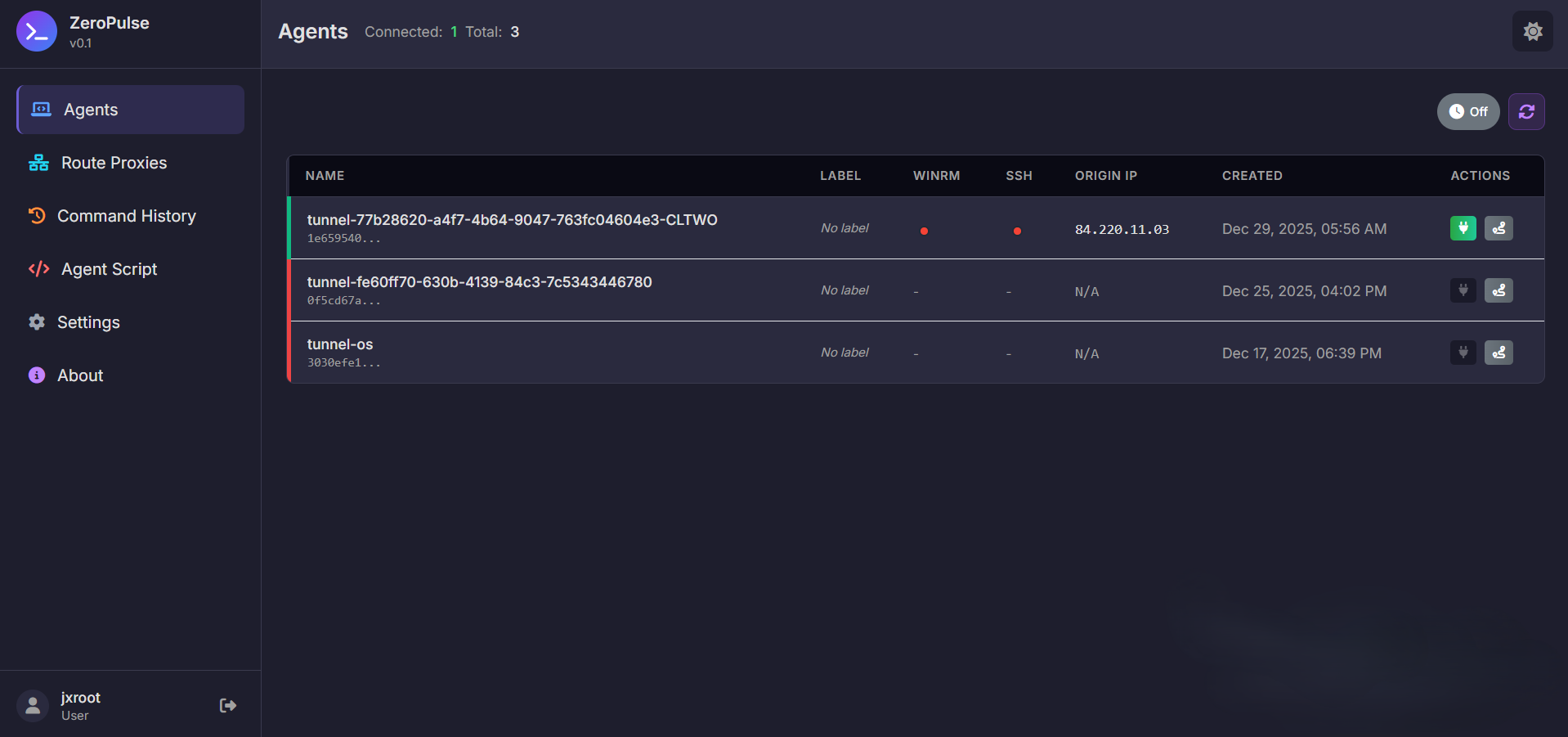
ZeroPulse Dashboard - Overview of all tunnels and system status
Tunnel Management
Remote Command Execution
Remote Desktop
Session & Security
DNS Management
Local Shell Access
Module Control System
| Layer | Technology | Purpose |
|---|---|---|
| Frontend | React 19, Redux Toolkit, React Router, TailwindCSS, xterm.js | User interface |
| Backend | FastAPI, Uvicorn | API server |
| Database | SQLite (with optimized queries and indexes) | Data persistence |
| Authentication | JWT, python-jose | Token-based auth |
| Remote Execution | pywinrm, paramiko, evil-winrm | WinRM & SSH integration |
| Terminal | xterm.js, WebSocket | Interactive terminal |
| External APIs | requests, cloudflare | Service integration |
| Process Management | subprocess, asyncio, threading | Background tasks |
.nvmrc in frontend directory)gem install evil-winrm)# Ubuntu/Debian
sudo apt update
sudo apt install -y python3 python3-pip python3-venv git curl
# Install Node.js 20+ (using nvm recommended)
curl -o- https://raw.githubusercontent.com/nvm-sh/nvm/v0.39.0/install.sh | bash
source ~/.bashrc
nvm install 20.19.0
nvm use 20.19.0
# Optional: Install Ruby for evil-winrm
sudo snap install ruby --classic
gem install evil-winrm
# Verify versions
python3 --version # Should be 3.8+
node --version # Should be 20.19.0+ or 22.12.0+
npm --version

Installation Process - Setting up ZeroPulse on a new system
git clone https://github.com/yourusername/zeropulse.git
cd zeropulse
# Create virtual environment
python3 -m venv venv

# Activate virtual environment
source venv/bin/activate

# Upgrade pip
pip install --upgrade pip

# Install dependencies
pip install -r requirements.txt
cd frontend

# Check Node.js version (should be 20.19.0+ or 22.12.0+)
node --version

# If using nvm, switch to required version
nvm use  # Automatically uses version from .nvmrc

# Install dependencies
npm install

# Build frontend
npm run build

cd ..
Create a .env file in the project root:
cat > .env << EOF
# Authentication Settings
ADMIN_USERNAME=admin
ADMIN_PASSWORD=your-secure-password-here
JWT_SECRET_KEY=$(python3 -c "import secrets; print(secrets.token_urlsafe(32))")
JWT_ALGORITHM=HS256
JWT_EXPIRATION_HOURS=24

# Cloudflare Settings
CLOUDFLARE_API_TOKEN=your-cloudflare-api-token-here
CLOUDFLARE_ACCOUNT_ID=your-cloudflare-account-id-here
CLOUDFLARE_DOMAIN=your-domain.com

# WinRM Settings (optional)
WINRM_USERNAME=WinRMUser
WINRM_PASSWORD=your-secure-password-here

# SSH Settings (optional)
SSH_KEY_PATH=/path/to/ssh/key
SSH_USERNAME=ssh_user

# C2 Server Settings
C2_SERVER_HOST=0.0.0.0
C2_SERVER_PORT=8000
ENVIRONMENT=production

# Database Settings
DATABASE_PATH=data/database.db
EOF

# Set permissions
chmod 600 .env
# Ensure virtual environment is active
source venv/bin/activate

# Start the server
python3 run_server.py
The server will be accessible at http://localhost:8000