 juice-shop/multi-juicer
Host and manage multiple Juice Shop instances for security trainings and Capture The Flags


Running CTFs and Security Trainings with OWASP Juice Shop is usually quite tricky, Juice Shop just isn't intended to be used by multiple users at a time. Instructing everybody how to start Juice Shop on their own machine works ok, but takes away too much valuable time.
MultiJuicer gives you the ability to run separate Juice Shop instances for every participant on a central kubernetes cluster, to run events without the need for local Juice Shop instances.
What it does:
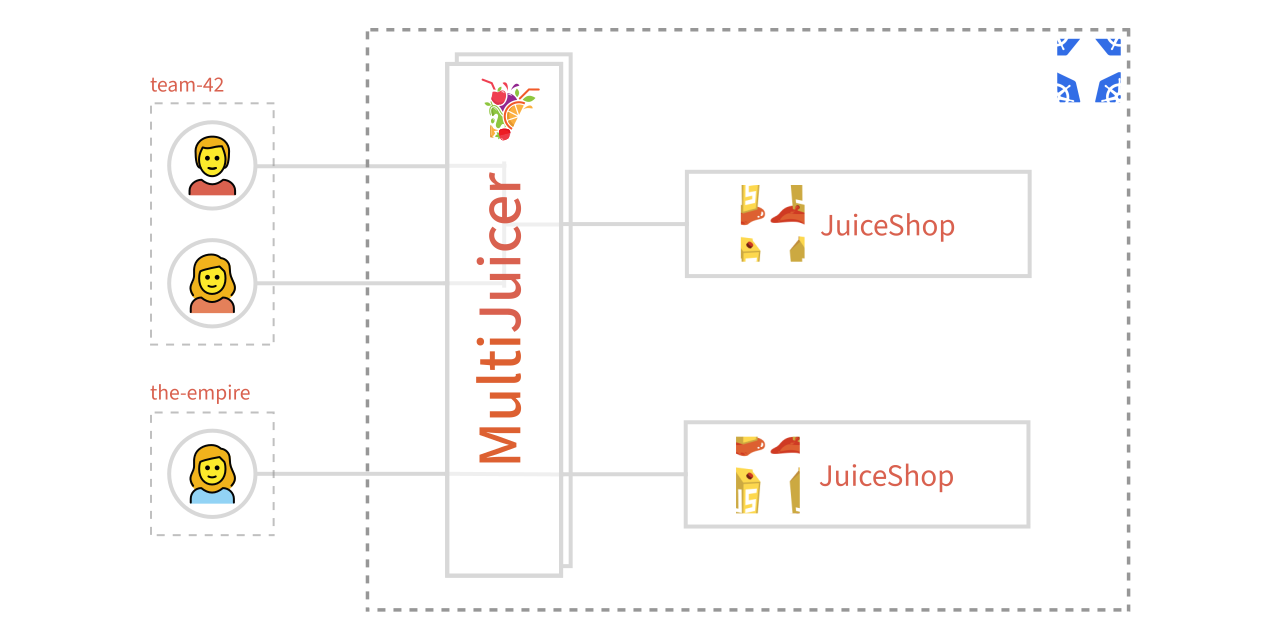
For a detailed description of the architecture and individual components, see the Architecture Documentation.
👉 New to MultiJuicer? See the visual walkthrough for how participants register, get their JuiceShop instances and how the scores are tracked on the scoreboard.
MultiJuicer runs on kubernetes, to install it you'll need helm
helm install multi-juicer oci://ghcr.io/juice-shop/multi-juicer/helm/multi-juicer
See production notes for a checklist of values you'll likely need to configure before using MultiJuicer in proper events.
To setup MultiJuicer with support for the JuiceShop v20+ AI/LLM realted challenges, see AI/LLM configuration guide
Generally MultiJuicer runs on pretty much any kubernetes cluster, but to make it easier for anybody who is new to kubernetes we got some guides on how to setup a kubernetes cluster with MultiJuicer installed for some specific Cloud providers.
You got some options on how to setup the stack, with some option to customize the JuiceShop instances to your own liking. You can find the default config values under: helm/multi-juicer/values.yaml
Download & Save the file and tell helm to use your config file over the default by running:
helm install -f values.yaml multi-juicer ./multi-juicer/helm/multi-juicer/
To customize the theming of the JuiceShop instances and the MultiJuicer UI (theme, logo, enabled challenges, ...), see the JuiceShop customization guide.
helm delete multi-juicer
To be on the safe side calculate with:
The numbers above reflect the default resource limits. These can be tweaked, see: Customizing the Setup
There is no real fixed limit. (Even thought you can configure one 😉) The custom LoadBalancer, through which all traffic for the individual Instances flows, can be replicated as much as you'd like. You can also attach a Horizontal Pod Autoscaler to automatically scale the LoadBalancer.
There are some special requirements which we didn't find to be easily solved with any pre build load balancer:
If you have awesome ideas on how to overcome these issues without a custom load balancer, please write us, we'd love to hear from you!
There are some pretty good reasons for this:
kubectl.kubectl?You can list all JuiceShops with relevant information using the custom-columns feature of kubectl.
$ kubectl get -l app.kubernetes.io/name=juice-shop -o custom-columns="TEAM:metadata.labels.team,SOLVED-CHALLENGES:metadata.annotations.multi-juicer\.owasp-juice\.shop/challengesSolved,LAST-REQUEST:metadata.annotations.multi-juicer\.owasp-juice\.shop/lastRequestReadable" deployments
TEAM         SOLVED-CHALLENGES   LAST-REQUEST
foobar       3                   Wed May 4 2042 18:14:22 GMT+0000 (Coordinated Universal Time)
team-42      0                   Wed May 4 2042 18:14:30 GMT+0000 (Coordinated Universal Time)
the-empire   0                   Wed May 4 2042 18:14:46 GMT+0000 (Coordinated Universal Time)
The project start at iteratec, a german based software development company, to run their security trainings for their own developers and their clients. The project was then open sourced in 2019 and donated to the OWASP organisation / the OWASP Juice Shop project in 2023.
You can reach us in the #project-juiceshop channel of the OWASP Slack Workspace. We'd love to hear any feedback or usage reports you got. If you are not already in the OWASP Slack Workspace, you can join via this link
