 juanschallibaum/cve-2024-38473-nuclei-template
Nuclei template to detect Apache servers vulnerable to CVE-2024-38473

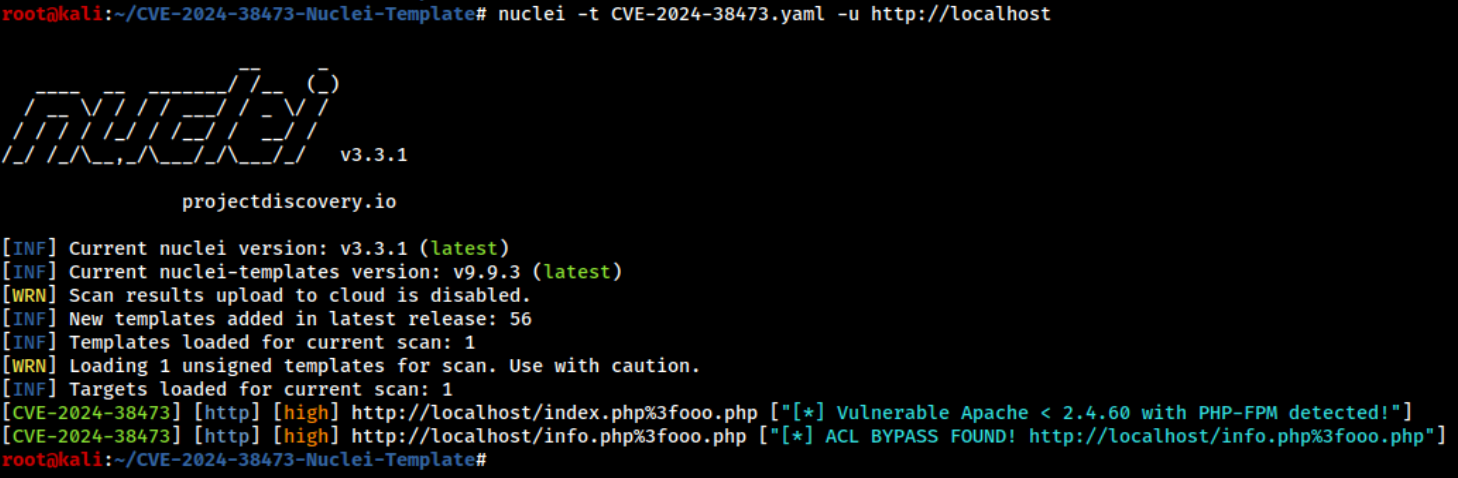
Nuclei template designed to detect Apache servers vulnerable to CVE-2024-38473. It first identifies servers running Apache < 2.4.60 with default PHP-FPM settings. Then, it fuzzes for potential PHP files protected by ACLs that might be bypassed due to this vulnerability.
To use this Nuclei template, you need to clone the repository. You can do this by running the following command:
git clone https://github.com/juanschallibaum/CVE-2024-38473-Nuclei-Template
Navigate to the cloned repository directory:
cd CVE-2024-38473-Nuclei-Template
Run nuclei template in single host:
nuclei -t CVE-2024-38473.yaml -u http://example.com
Run nuclei template against a list of hosts:
nuclei -t CVE-2024-38473.yaml -l hosts.txt
Run nuclei template in single host specifying a valid .html or .php file:
nuclei -t CVE-2024-38473.yaml -u http://example.com/valid.php
Running Nuclei this way may yield a higher detection rate. You can also include URLs in this format within the hosts file to run the template against that list.
To easily test the CVE-2024-38473 vulnerability, you can set up a vulnerable environment using Docker. Follow these steps to quickly verify the effectiveness of the Nuclei template:
Ensure Docker Daemon is Running: Make sure the Docker daemon is running on your system. You can start it with the following command if it's not already running:
sudo systemctl start docker
Run the Docker Container: Within the repository directory, use the following Docker command to start a container with a vulnerable Apache and PHP-FPM setup:
docker run -p 8787:80 -v "$(pwd)/test-env-webroot:/app" webdevops/php-apache:7.1
Test the Vulnerability:
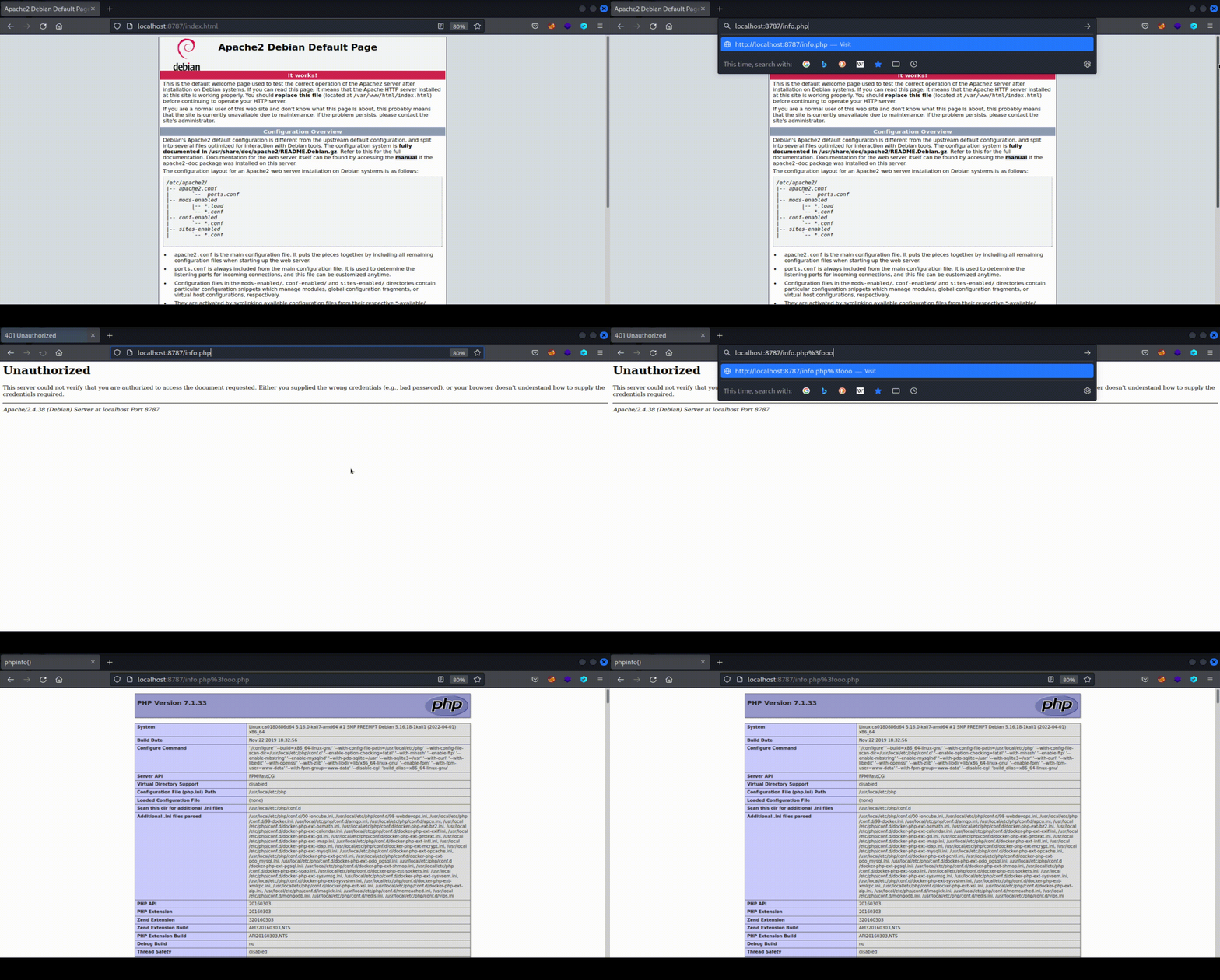
Manually: Open your web browser and navigate to http://localhost:8787 to interact with the Apache server running in the Docker container. Access http://localhost:8787/info.php to test the vulnerability. This file is protected by an ACL, and if the ACL bypass is successful, you will see the output of phpinfo():
Using Nuclei Template: Run the following Nuclei command to test the server with the template:
nuclei -t CVE-2024-38473.yaml -u http://localhost:8787
On August 8, 2024, security researcher Orange Tsai gave a presentation at Black Hat USA 2024 titled: Confusion Attacks: Exploiting Hidden Semantic Ambiguity in Apache HTTP Server!. In this presentation, he reported multiple vulnerabilities affecting Apache HTTP Server. He explained that Apache has a highly modular architecture, composed of hundreds of modules, each performing its function while reading and writing to a shared structure called request_rec, which consists of nearly 100 fields.
The root cause of the vulnerabilities reported by the security researcher lies in the inconsistency in how different Apache modules treats the various fields of the shared structure. For example, mod_authz_core treats the field r->filename as a file, while mod_proxy treats it as a URL, leading to discrepancies that result in a wide range of vulnerabilities.
In his presentation, Orange Tsai defines a type of attack called "Filename Confusion." Although this attack has a varied attack surface, CVE-2024-38473, which we cover in this template, refers to how we can apply the "Filename Confusion" attack to bypass Apache ACLs and gain access to restricted files.
The issue arises when Apache's authentication module, mod_authz_core, treats the r->filename attribute as a file, while mod_proxy treats it as a URL. Due to this, Apache installations with PHP-FPM in their default configuration are affected by this vulnerability. Imagine that a server running Apache and PHP-FPM has an ACL configured like the following to protect access to the admin.php file with credentials:
<Files "admin.php">
    AuthType Basic
    AuthName "Admin Panel"
    AuthUserFile "/etc/apache2/.htpasswd"
    Require valid-user
</Files>
Due to the vulnerability, it is possible to bypass ACLs like the one above that involve protecting an individual file. In fact, this can be done as easily as sending the following request: http://server/admin.php%3fooo.php.
To understand this in depth, it's important to consider that when Apache processes a request like the one above, the mod_authz_core module reads the value admin.php?fooo.php from the r->filename field of the shared structure. It treats this value as the name of the requested file, and when it compares it against the ACL, it does not match because admin.php?fooo.php is different from admin.php.
Then, since admin.php?fooo.php ends in .php, the request is handled by PHP-FPM. PHP-FPM removes everything following the ? in the filename received from Apache before processing it, treating it as a URL rather than a file. As a result, PHP-FPM will process admin.php directly. Because the ACL check was passed earlier, the attacker can access admin.php without authentication.
The current Nuclei template aims not only to discover protected files by brute force but also includes logic to identify when a server has a vulnerable Apache < 2.4.60 configuration with PHP-FPM, even if cases of files protected by ACLs are not detected. In the basic flow, it first tries to identify if the server has a vulnerable configuration, and then, if positive, it attempts to identify common files that may be protected by ACLs.
The idea behind detecting vulnerable configurations with Apache < 2.4.60 and PHP-FPM is based on two basic premises:
In a vulnerable configuration, if file.php exists on the server, then the request to http://server/file.php%3fooo.php would return the same 200 status code and the same body length as the request to http://server/file.php (because after PHP-FPM removes %3fooo.php, the requested file would be the same).
In a vulnerable configuration, if file.html exists on the server, then the request to http://server/file.html%3fooo.php would return 403 Access Denied. This is because PHP-FPM would attempt to load a file with a .html extension instead of .php, which by default is not allowed.
The template flow consists of 7 groups of requests. They need to be executed in order and must meet the respective match conditions to proceed to the next group of requests. This helps minimize the number of requests sent in vain when conditions are already known to be unmet.
The template sends a request to index.phpooo.php%3fooo.php, which is a non-existent file. The idea is to filter out false positives in cases where index.php%3fooo.php returns a 200 status code and the same body as index.php, even when PHP-FPM is not configured. This could occur, for example, when there are rules that rewrite any requested file or files that start with "index" to index.php, such as:
RewriteRule . /index.php [L]
RewriteRule ^index\.php(.*)$ index.php [L]
RewriteRule ^index(.*)$ index.php [L]
