jpillora/chisel
Fast TCP/UDP tunnel over HTTP with SSH encryption, supporting reverse port forwarding, SOCKS5 proxy, and client authentication for secure network traversal and firewall evasion.


Chisel is a fast TCP/UDP tunnel, transported over HTTP, secured via SSH. Single executable including both client and server. Written in Go (golang). Chisel is mainly useful for passing through firewalls, though it can also be used to provide a secure endpoint into your network.
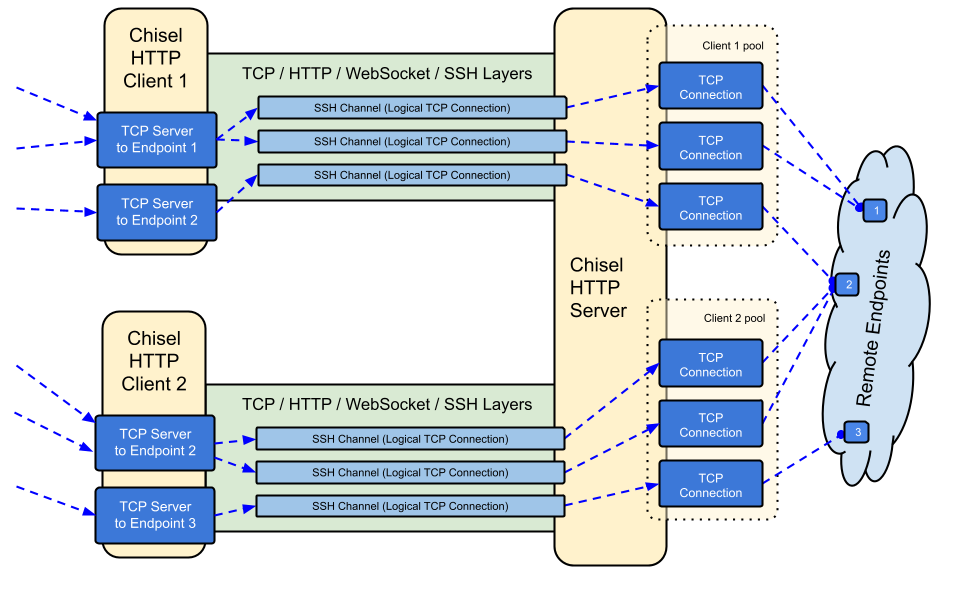
crypto/ssh)--min/max-retry-interval); keepalive pings time out, so silently dead connections (sleep/wake, NAT timeouts, server restarts) are detected and re-establishedssh -o ProxyCommand providing SSH over HTTP

See the latest release or download and install it now with curl https://i.jpillora.com/chisel! | bash
Binaries are built with the latest Go release, which sets the minimum OS versions: Windows 10 / Server 2016, macOS 12, Linux kernel 3.2, FreeBSD 12.2. For older systems (e.g. Windows 7), use release v1.8.1 or earlier.

docker run --rm -it jpillora/chisel --help
Images are multi-arch and published to both Docker Hub (jpillora/chisel) and GitHub Container Registry (ghcr.io/jpillora/chisel).
The package is maintained by the Fedora community. If you encounter issues related to the usage of the RPM, please use this issue tracker.
sudo dnf -y install chisel
$ go install github.com/jpillora/chisel@latest
You can run your own demo server in minutes (the old Heroku demo went away with Heroku's free tier). example/fly.toml deploys this chisel server to fly.io's free allowance:
$ chisel server --port $PORT --backend http://example.com
# listens on $PORT, proxies normal web requests to http://example.com
Deploy it with fly launch --copy-config from the example/ directory, then tunnel to any service running beside the server, e.g.:
$ chisel client https://<your-app>.fly.dev 3000
# connects to your chisel server,
# tunnels your localhost:3000 to the server's localhost:3000
Visiting your app's URL in a browser hits the server's default backend proxy and shows a copy of example.com.
$ chisel --help

  Usage: chisel [command] [--help]

  Version: X.Y.Z

  Commands:
    server - runs chisel in server mode
    client - runs chisel in client mode

  Read more:
    https://github.com/jpillora/chisel
$ chisel server --help

  Usage: chisel server [options]

  Options:

    --host, Defines the HTTP listening host – the network interface
    (defaults the environment variable HOST and falls back to 0.0.0.0).

    --port, -p, Defines the HTTP listening port (defaults to the environment
    variable PORT and falls back to port 8080).

    --key, (deprecated use --keygen and --keyfile instead)
    An optional string to seed the generation of a ECDSA public
    and private key pair. All communications will be secured using this
    key pair. Share the subsequent fingerprint with clients to enable detection
    of man-in-the-middle attacks (defaults to the CHISEL_KEY environment
    variable, otherwise a new key is generate each run).

    --keygen, A path to write a newly generated PEM-encoded SSH private key file.
    If users depend on your --key fingerprint, you may also include your --key to
    output your existing key. Use - (dash) to output the generated key to stdout.

    --keyfile, An optional path to a PEM-encoded SSH private key. When
    this flag is set, the --key option is ignored, and the provided private key
    is used to secure all communications. (defaults to the CHISEL_KEY_FILE
    environment variable). Since ECDSA keys are short, you may also set keyfile
    to the inline key string itself, exactly as printed by --keygen (a base64
    string with a "ck-" prefix); no extra base64 encoding is needed.

    --authfile, An optional path to a users.json file. This file should
    be an object with users defined like:
      {
        "<user:pass>": ["<addr-regex>","<addr-regex>"]
      }
    when <user> connects, their <pass> will be verified and then
    each of the remote addresses will be compared against the list
    of address regular expressions for a match. Patterns are NOT
    anchored by default: "10.0.0.1:80" also matches
    "210.0.0.1:8080", and "." matches any character. Anchor your
    patterns, e.g. "^10\.0\.0\.1:80$". The empty string ""
    matches every address. Addresses will
    always come in the form "<remote-host>:<remote-port>" for normal remotes,
    "R:<local-interface>:<local-port>" for reverse port forwarding
    remotes, and "socks" for SOCKS5 proxy access. Note that SOCKS5
    access previously bypassed this list; existing authfiles which
    should allow SOCKS5 must add an entry matching "socks" (the
    empty wildcard "" matches everything, including "socks"). This
    file will be automatically reloaded on change. Reloads apply
    to new connections and to new tunnels of connected clients;
    established tunnels are not interrupted.