 jonathansalwan/triton
Triton is a dynamic binary analysis library. Build your own program analysis tools, automate your reverse engineering, perform software verification or just emulate code.


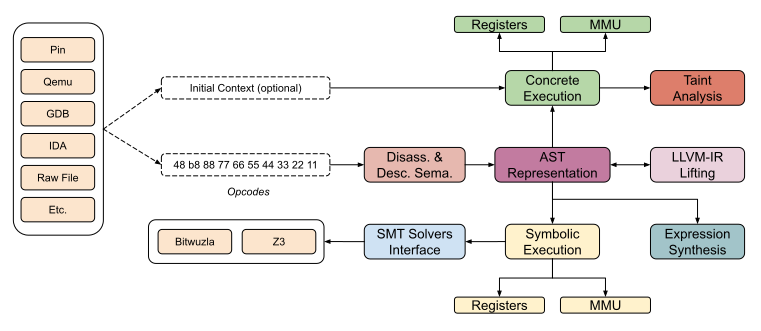
Triton is a dynamic binary analysis library. It provides internal components that allow you to build your program analysis tools, automate reverse engineering, perform software verification or just emulate code.

As Triton is a kind of a part-time project, please, don't blame us if it is not fully reliable. Open issues or pull requests are always better than trolling =). However, you can follow the development on twitter @qb_triton.







from triton import *

>>> # Create the Triton context with a defined architecture
>>> ctx = TritonContext(ARCH.X86_64)

>>> # Define concrete values (optional)
>>> ctx.setConcreteRegisterValue(ctx.registers.rip, 0x40000)

>>> # Symbolize data (optional)
>>> ctx.symbolizeRegister(ctx.registers.rax, 'my_rax')

>>> # Execute instructions
>>> ctx.processing(Instruction(b"\x48\x35\x34\x12\x00\x00")) # xor rax, 0x1234
>>> ctx.processing(Instruction(b"\x48\x89\xc1")) # mov rcx, rax

>>> # Get the symbolic expression
>>> rcx_expr = ctx.getSymbolicRegister(ctx.registers.rcx)
>>> print(rcx_expr)
(define-fun ref!8 () (_ BitVec 64) ref!1) ; MOV operation - 0x40006: mov rcx, rax

>>> # Solve constraint
>>> ctx.getModel(rcx_expr.getAst() == 0xdead)
{0: my_rax:64 = 0xcc99}

>>> # 0xcc99 XOR 0x1234 is indeed equal to 0xdead
>>> hex(0xcc99 ^ 0x1234)
'0xdead'
Triton can be installed using pip:
pip install triton-library
Triton relies on the following dependencies:
* libcapstone                >= 5.0.x   https://github.com/capstone-engine/capstone
* libboost      (optional)   >= 1.68
* libpython     (optional)   >= 3.6
* libz3         (optional)   >= 4.6.0   https://github.com/Z3Prover/z3
* libbitwuzla   (optional)   >= 0.4.x   https://github.com/bitwuzla/bitwuzla
* llvm          (optional)   >= 12
$ git clone https://github.com/JonathanSalwan/Triton
$ cd Triton
$ mkdir build ; cd build
$ cmake ..
$ make -j3
$ sudo make install
By default, LLVM and Bitwuzla are not compiled. If you want to enjoy the full power of Triton, the cmake compile is:
$ cmake -DLLVM_INTERFACE=ON -DCMAKE_PREFIX_PATH=$(llvm-config --prefix) -DBITWUZLA_INTERFACE=ON ..
In case if you get compilation errors like:
Could NOT find PythonLibs (missing: PYTHON_LIBRARIES PYTHON_INCLUDE_DIRS)
Try to specify PYTHON_EXECUTABLE, PYTHON_LIBRARIES and PYTHON_INCLUDE_DIRS for your specific Python version:
cmake -DCMAKE_INSTALL_PREFIX=/opt/homebrew/ \
      -DPYTHON_EXECUTABLE=/opt/homebrew/bin/python3 \
      -DPYTHON_LIBRARIES=/opt/homebrew/Cellar/[email protected]/3.10.8/Frameworks/Python.framework/Versions/3.10/lib/libpython3.10.dylib \
      -DPYTHON_INCLUDE_DIRS=/opt/homebrew/opt/[email protected]/Frameworks/Python.framework/Versions/3.10/include/python3.10/ \
      ..
This information you can get out from this snippet:
from sysconfig import get_paths
info = get_paths()
print(info)
If Python autocompletion is not working, follow these steps:
/usr/lib/python3.13/).Your IDE must support parsing .pyi files.
You can use cmake to generate the .sln file of libTriton.
> git clone https://github.com/JonathanSalwan/Triton.git
> cd Triton
> mkdir build
> cd build
> cmake -G "Visual Studio 14 2015 Win64" \
  -DBOOST_ROOT="C:/Users/jonathan/Works/Tools/boost_1_61_0" \
  -DPYTHON_INCLUDE_DIRS="C:/Python36/include" \
  -DPYTHON_LIBRARIES="C:/Python36/libs/python36.lib" \
  -DZ3_INCLUDE_DIRS="C:/Users/jonathan/Works/Tools/z3-4.6.0-x64-win/include" \
  -DZ3_LIBRARIES="C:/Users/jonathan/Works/Tools/z3-4.6.0-x64-win/bin/libz3.lib" \
  -DCAPSTONE_INCLUDE_DIRS="C:/Users/jonathan/Works/Tools/capstone-5.0.1-win64/include" \
  -DCAPSTONE_LIBRARIES="C:/Users/jonathan/Works/Tools/capstone-5.0.1-win64/capstone.lib" ..
You can use setup.py to generate the debug version of triton.pyd on Windows.
> git clone https://github.com/JonathanSalwan/Triton.git
> cd Triton
> $env:COMPILER_DIR="C:/deps/llvm/llvm2116r/bin"
> $env:CMAKE_PREFIX_PATH="C:/deps/llvm/llvm-project-21.1.6.src/install/lib/cmake/llvm;C:/code/cxx-common-cmake/build/install"
> python_d -m build --wheel
> python_d -m pip install (Get-ChildItem .\dist\triton_library*)
However, if you prefer to directly download the precompiled library, check out our AppVeyor's artefacts. Note that if you use AppVeyor's artefacts, you probably have to install the Visual C++ Redistributable packages for Visual Studio 2012.
