
Skip to content
KitploitKITPLOIT
ToolsBlog
Submit
ToolsBlog
Submit

Hacking, PenTest, and Cybersecurity Tools for Your Security Arsenal!

Kitploit is a directory of hacking, cybersecurity, and pentesting tools. Discover the latest project updates to find vulnerabilities, analyze systems, automate testing, and strengthen your security.

··Feeds·Contact·Privacy·© 2026 Kitploit

Tool Directory

Categories

View all categories
Loading categories
IDA2Obj — Static binary instrumentation tool that dumps COFF object files from executables, enabling code/data insertion at any location for black-box fuzzing and binary patching via IDA Pro. | Kitploit
Tools/GitHubGitHub/jhftss/ida2obj
Static AnalysisReverse EngineeringDebuggersFuzzingBinary Analysis
GitHubjhftss/ida2obj

IDA2Obj

Static binary instrumentation tool that dumps COFF object files from executables, enabling code/data insertion at any location for black-box fuzzing and binary patching via IDA Pro.

View Repository
121154 years agoReviewed by Kitploit

Most Popular

View all →

Discover the most used tools by our community.

Explore all tools

Browse our collection of tools

View all tools →
Share

IDA2Obj

IDA2Obj is a tool to implement SBI (Static Binary Instrumentation).

The working flow is simple:

  • Dump object files (COFF) directly from one executable binary.
  • Link the object files into a new binary, almost the same as the old one.
  • During the dumping process, you can insert any data/code at any location.
    • SBI is just one of the using scenarios, especially useful for black-box fuzzing.

How to use

  1. Prepare the enviroment:

    • Set AUTOIMPORT_COMPAT_IDA695 = YES in the idapython.cfg to support the API with old IDA 6.x style.
    • Install dependency: pip install cough
  2. Create a folder as the workspace.

  3. Copy the target binary which you want to fuzz into the workspace.

  4. Load the binary into IDA Pro, choose Load resources and manually load to load all the segments from the binary.
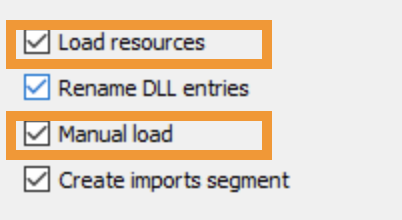
    image-20210813134907705
  5. Wait for the auto-analysis done.

  6. Dump object files by running the script MagicIDA/main.py.

    • The output object files will be inside ${workspace}/${module}/objs/afl.
    • If you create an empty file named TRACE_MODE inside the workspace, then the output object files will be inside ${workspace}/${module}/objs/trace.
    • By the way, it will also generate 3 files inside ${workspace}/${module} :
      • exports_afl.def (used for linking)
      • exports_trace.def (used for linking)
      • hint.txt (used for patching)
  7. Generate lib files by running the script utils/LibImports.py.

    • The output lib files will be inside ${workspace}/${module}/libs, used for linking later.
  8. Open a terminal and change the directory to the workspace.

  9. Link all the object files and lib files by using utils/link.bat.

    • e.g. utils/link.bat GdiPlus dll afl /RELEASE
    • It will generate the new binary with the pdb file inside ${workspace}/${module}.
  10. Patch the new built binary by using utils/PatchPEHeader.py.

    • e.g. utils/PatchPEHeader.py GdiPlus/GdiPlus.afl.dll
    • For the first time, you may need to run utils/register_msdia_run_as_administrator.bat as administrator.
  11. Run & Fuzz.

More details

HITB Slides : https://github.com/jhftss/jhftss.github.io/blob/main/res/slides/HITB2021SIN%20-%20IDA2Obj%20-%20Mickey%20Jin.pdf

Demo : https://drive.google.com/file/d/1N3DXJCts5jG0Y5B92CrJOTIHedWyEQKr/view?usp=sharing

Download Tool