
Fast and customisable vulnerability scanner based on simple YAML based DSL.


Vulnerability scanning using Nuclei



How it works
- The plugin downloads the latest release of Nuclei from GitHub, based on the build executor's operating system and architecture
- The downloaded artifact is uncompressed
- If the currently executing build already has a Nuclei binary within it's workspace, the first two steps are skipped
- Nuclei Templates are downloaded/updated
- Scan is executed using the provided user-input
Usage
- Create or edit a Freestyle project
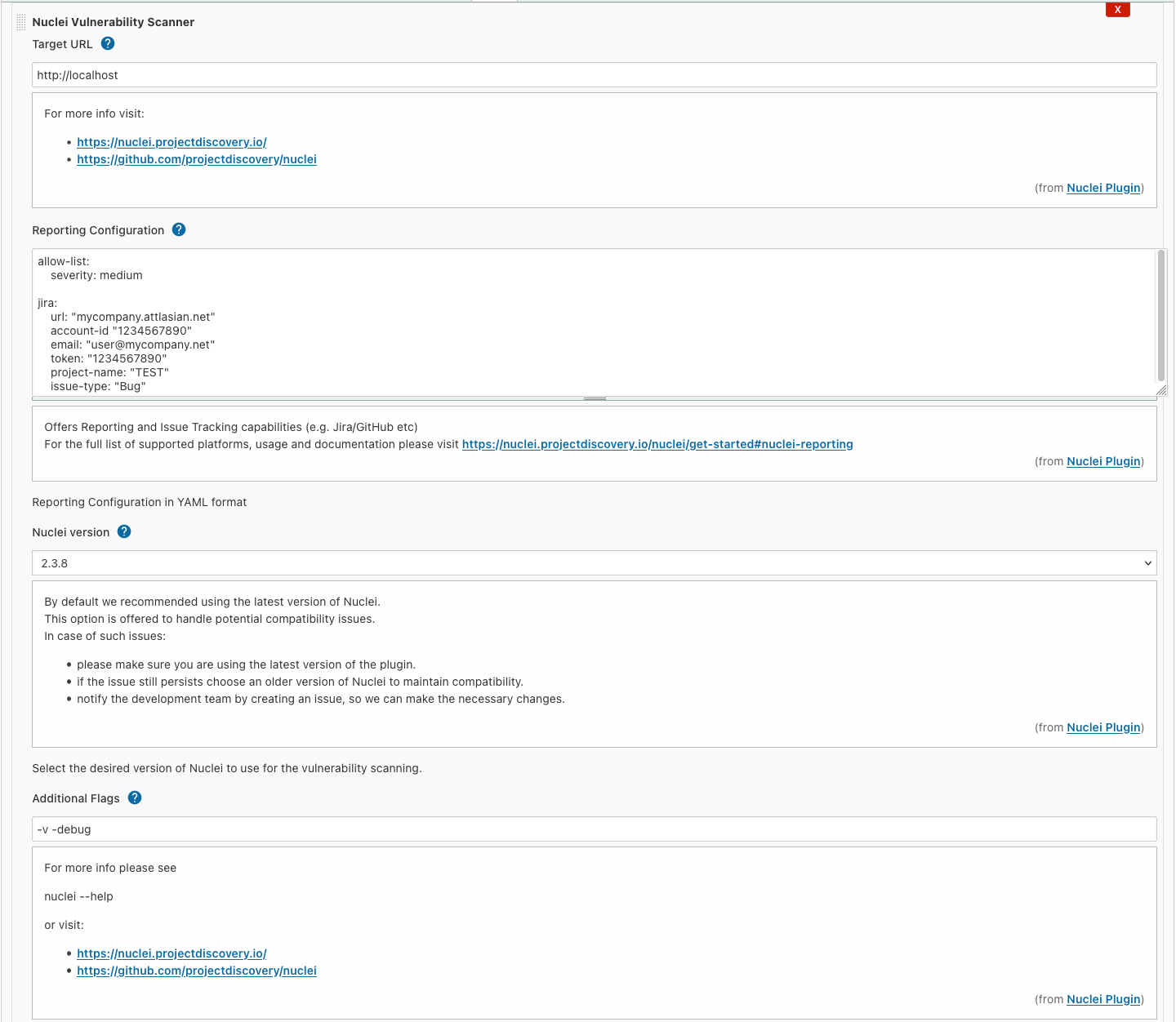
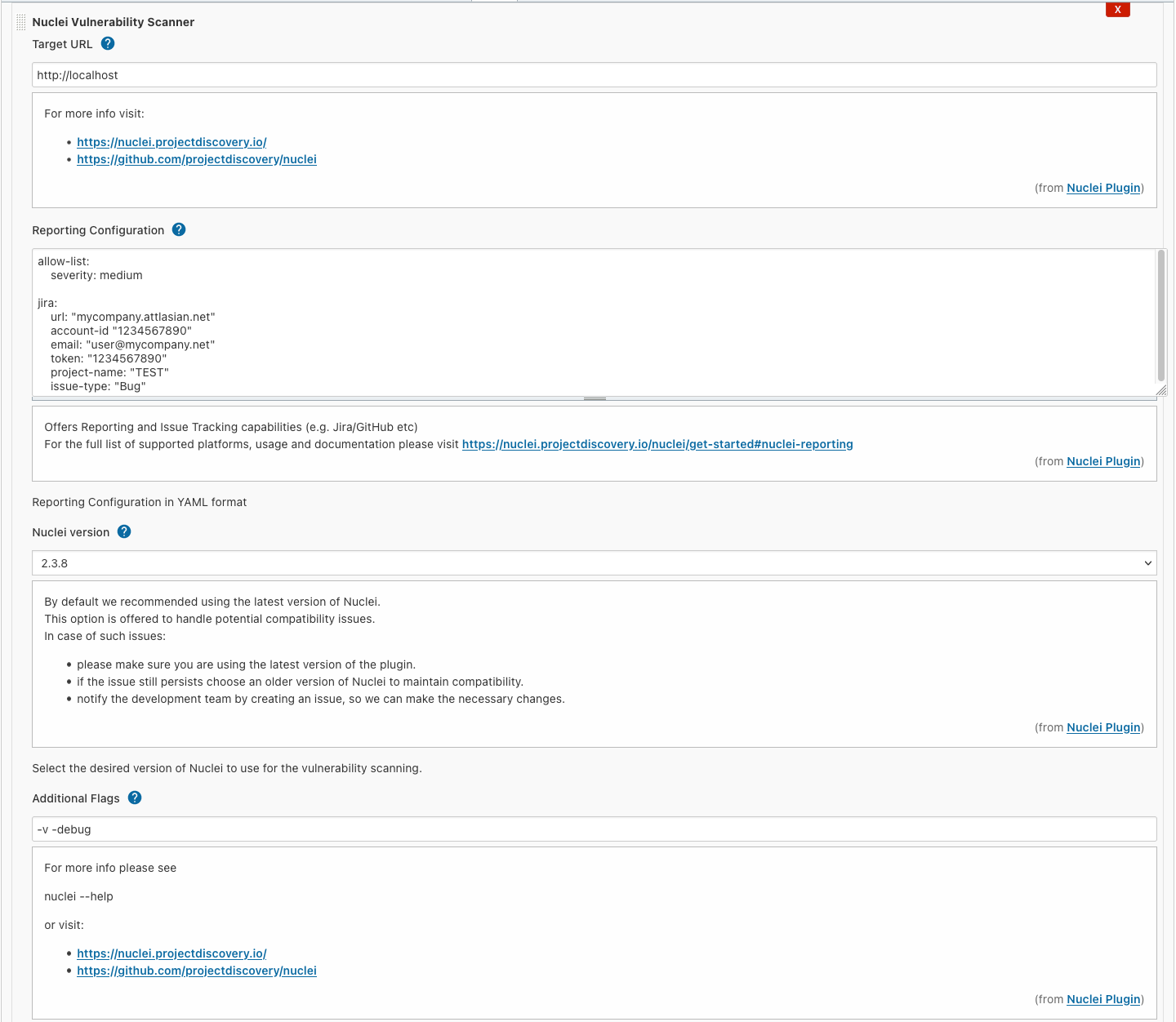
- Add a Nuclei Vulnerability Scanner build step
- Introduce the URL of the target web application you intend to test
- Optionally:
- add reporting configuration that allows automatic issue creation on platforms like Jira and GitHub.
Using the additional flags below, you can increase the log level to debug potential problems with the issue tracker integrations.
- add additional CLI arguments (e.g.
-v, -debug)
- By default this plugin uses the latest released version of Nuclei.
In the rare case if a new major version is not backward compatible with the CLI interface used by the plugin, you can manually choose an older version to temporarily work around the issue.
Please create a ticket to request updating the plugin.
Building it manually
- You can build the code using Maven within the root directory where the
pom.xml resides.
mvn clean package -DskipTests
- The built artifact can be found under
./target/nuclei.hpi
- You can start a Jenkins deployment with the plugin pre-installed using:
mvn hpi:run
- To enable debugging use
mvnDebug hpi:run, then attach a remote debugger by adding the following parameters to your run configuration: -agentlib:jdwp=transport=dt_socket,server=y,suspend=n,address=*:8000
Before creating a pull request, please make sure to do the following steps:
- Run the tests withing the project (remove the
-DskipTests flag)
- Test the plugin in a fully-fledged Jenkins instance:
- You can "install" the plugin by copying/overwriting the
nuclei.hpi file within the <jenkins_install_dir>/plugins (e.g. /var/lib/jenkins/plugins/nuclei.hpi)
- Make sure to restart the Jenkins service (
sudo service jenkins restart)
- Test the plugin execution on the Primary (master) node and remote agents as well
Starting fresh
- Delete the compiled classes and generated artifacts within the
target folder: mvn clean
- Remove the Nuclei configuration from the current user (if any):
rm -rf ~/.config/nuclei
- Remove the Nuclei configuration from the jenkins user (if any):
sudo rm -rf <jenkins_install_dir>/.config/nuclei (e.g. /var/lib/jenkins/.config/nuclei)
- Remove the Nuclei binary, its templates and the generated output:
sudo rm -rf <jenkins_install_dir>/workspace/<build_name>/nuclei*
- Connect to the remote agent and do the same
Limitations
- Freestyle project support only (no pipelines)
- No bundled scanner binary, the agents require internet access
Nuclei documentation
 jenkinsci/nuclei-plugin
