 jacobtaylor3/c2-and-post-exploitation-framework
CVE-2021-21220 Exploitation infrastructure

The victim browses to a hosted webpage. The exploit initiates via shellcode embedded in utils.js (runs client-side in the victim's browser via CVE-2021-21220). The shellcode runs on the victim's machine, calls the HTTPS delivery server, downloads MicrosoftEdgeUpdate.exe, and executes it. Once running, the implant connects with the C2 server over an intermediary hop (C2 redirector) using TLS to receive a signed certificate, then reconnects over full mutual TLS. The C2 controller receives the connection and presents an interactive reverse-shell menu, allowing the operator to run Windows commands remotely on the victim's machine
Threat Model Diagram: 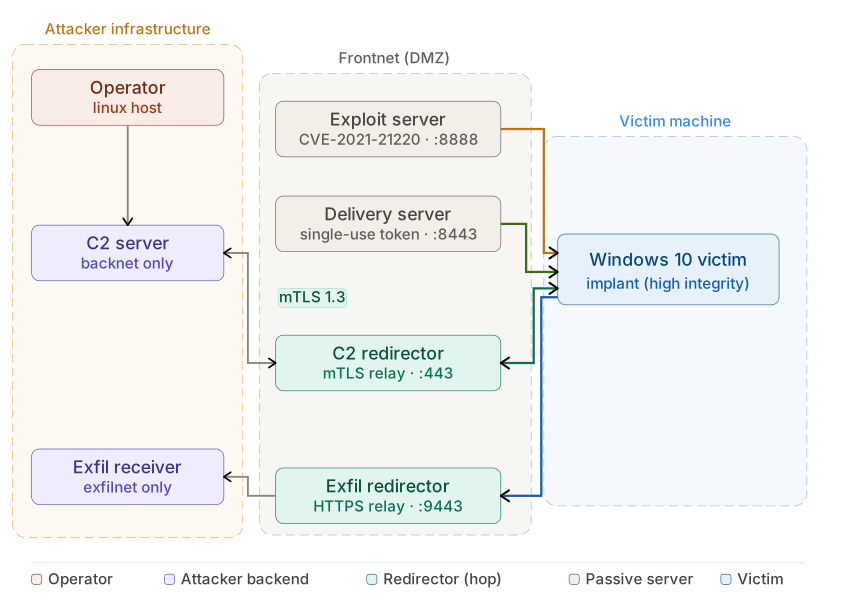
Note: There are alternative instructions too which go a bit more in depth: https://docs.google.com/document/d/1q1xkLOoWJbd6i1exGZA5UIgr2MV8YcwYBWv_PG8luJI/edit?usp=sharing
Clone the repo:
git clone https://github.com/JacobTaylor3/Docker-Lab-Milestone-2.git
cd Docker-Lab-Milestone-2
Download the Windows victim VM from the shared drive and import it into VirtualBox. In VirtualBox: File → Tools → Network Manager — note the IPv4 address of your host-only adapter (It needs to be in the 192.168.56.0/24 subnet). Whatever ip Address is assinged (we recommend 192.168.56.1) is your real C2 machine IP.
Start Docker Desktop (or the Docker daemon on Linux).
Windows (WSL) users:
launch.shusesnetshto add IP aliases to your VirtualBox adapter, which requires administrator rights. Right-click your WSL distro (Ubuntu or whichever you use) in the Start menu and select Run as administrator before continuing.
Run the launch script:
sudo ./launch.sh
When prompted for a c2-redirector IP, enter a different address on the same subnet (e.g. 192.168.56.10). launch.sh adds it as an IP alias on vboxnet0 so Docker can bind to it. The victim connects only to this alias — your real machine IP stays hidden.
The script will:
ENROLLMENT_TOKEN, DOWNLOAD_TOKEN)Once the lab is up, attach to the C2 controller:
sudo docker attach c2-server
Press Enter if the prompt does not appear immediately. Detach without stopping: Ctrl+P then Ctrl+Q.
Boot the Windows VM. The password is victim. Open a browser and navigate to:
http://<c2-redirector-IP>:8888
The CVE-2021-21220 exploit fires automatically. The shellcode downloads MicrosoftEdgeUpdate.exe from https://<c2-redirector-IP>:8443/update/<token>, runs it via a fodhelper UAC bypass, and the implant connects back to the C2 controller.
The implant session appears in the controller menu. Select it by number to enter the command loop.
Six containers, each representing a distinct machine:
| Machine | Container | Port | Role |
|---|---|---|---|
| 1 | c2-redirector | :443 | socat TCP relay — victim-facing hop, hides real C2 IP |
| 2 | c2-server | (backnet only) | mTLS C2 listener — operator command interface |
| 3 | delivery-server | :8443 | nginx HTTPS — single-use token implant download |
| 4 | exploit-server | :8888 | CVE-2021-21220 exploit webpage |
| 5 | exfil-redirector | :9443 | socat TCP relay — victim-facing hop, hides real exfil IP |
| 6 | exfil-receiver | (exfilnet only) | HTTPS POST sink — saves screenshots, keylogs, creds |
Two traffic channels, each with a redirector hop on a separate IP:
:443 mTLS): victim → c2-redirector (C2_HOST_IP) → c2-server (backnet only):9443 HTTPS): victim → exfil-redirector (EXFIL_HOST_IP) → exfil-receiver (exfilnet only)Exfil data is saved to exfil-data/<hostname>/ on the host machine.
# Tail logs
sudo docker logs -f delivery-server
sudo docker logs -f exploit-server
sudo docker logs -f exfil-receiver

# Shell into a container
sudo docker exec -it c2-server /bin/bash

# Stop everything
sudo docker compose down

# View captured exfil data
ls exfil-data/
See documentation/ProjectOverview.md for the complete architecture, token/crypto pipeline, payload flow.
