 iqsec-lab/freemoca
Memory-free continual learning framework for malware classification using mode connectivity-based interpolation. Supports class-incremental and domain-incremental scenarios on EMBER and Androzoo datasets.

Zahra Asadi*, Haeseung Jeon*, Sohyun Han, Md Mahmuduzzaman Kamol, Se Eun Oh, Mohammad Saidur Rahman†
*Equally credited authors. †Corresponding author.
[!NOTE] This is official implementation of the paper FreeMOCA: Memory-Free Continual Learning for Malicious Code Analysis.
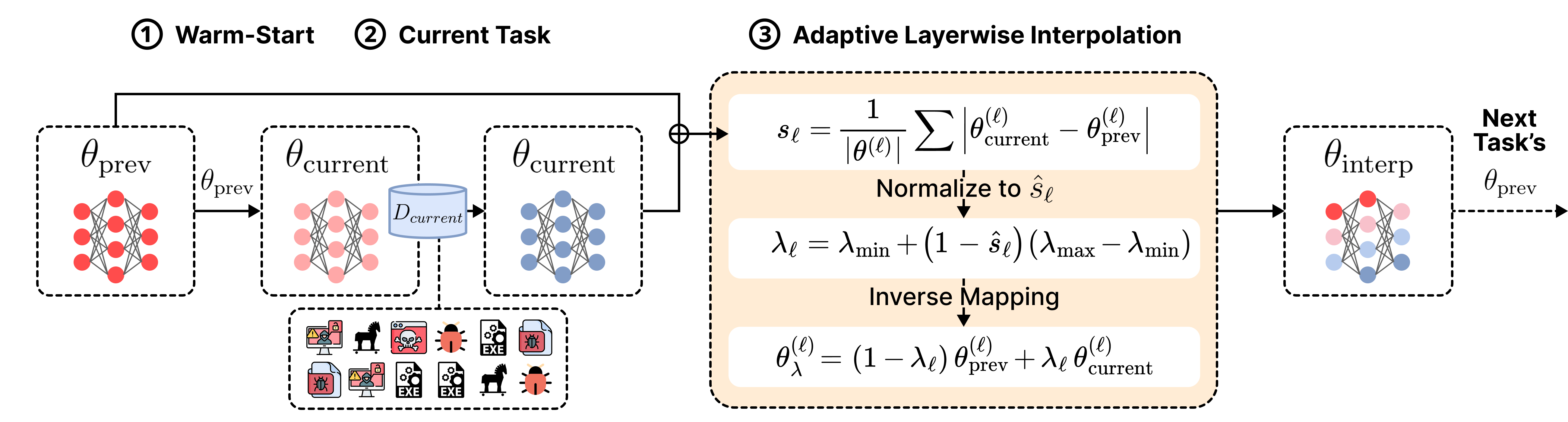
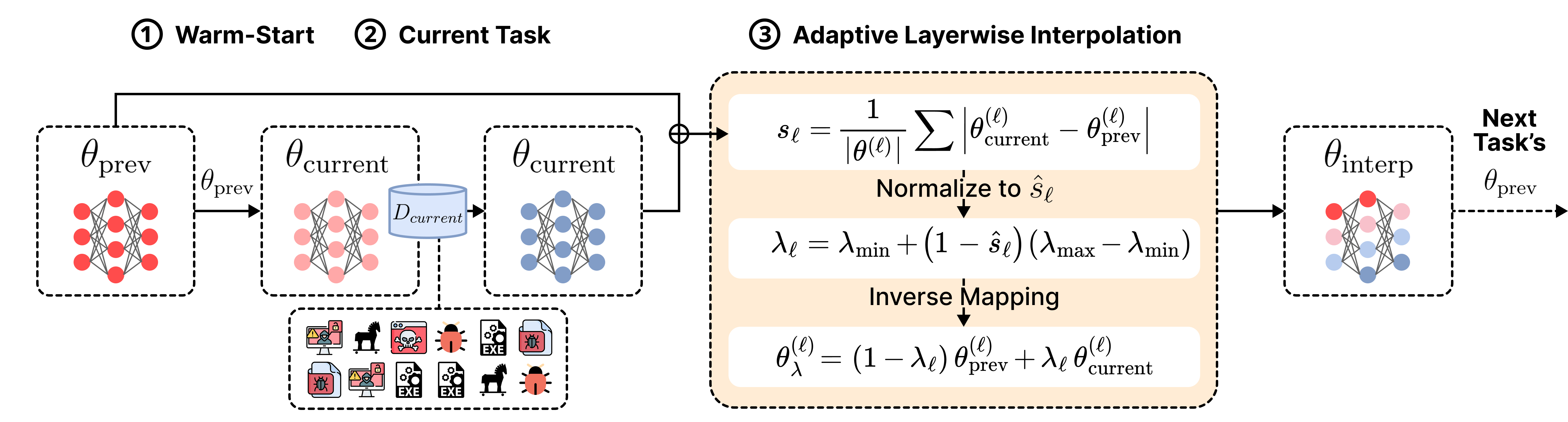
FreeMOCA operates in the following process:
The entire process constructs a chain of connected solutions that lie on a low-loss manifold, significantly reducing catastrophic forgetting.
FreeMOCA was evaluated with two large-scale malware datasets, EMBER and Androzoo. Dataset sources:
Download and set up the dataset in the following directory:
FreeMOCA/data/
├── AZ_Class
│   ├── AZ_Class_Test.npz
│   └── AZ_Class_Train.npz
│
├── AZ_Domain
│   ├── 2008_Domain_AZ_Test_Transfo...
│   ├── 2008_Domain_AZ_Train_Transfo...
│   ├── 2009_Domain_AZ_Test_Transfo...
│   └── ...
│
├── EMBER_Class
│   ├── XY_test.npz
│   └── XY_train.npz
│
└── EMBER_Domain
    ├── 2018-01
    ├── 2018-02
    ├── 2018-03
    └── ...
This repository supports two continual learning scenarios:
Run following command for the
conda create -n freemoca python=3.9
conda activate freemoca
pip install -r requirements.txt
# EMBER Class-IL
cd ./FreeMOCA_Class/EMBER_Class
CUDA_VISIBLE_DEVICES=0 python main.py --train_data /path/to/data --test_data /path/to/data
# AZ Class-IL
cd ./FreeMOCA_Class/AZ_Class
CUDA_VISIBLE_DEVICES=0 python main.py --train_data /path/to/data --test_data /path/to/data
# EMBER Domain-IL
cd ./FreeMOCA_Domain/EMBER_Domain
CUDA_VISIBLE_DEVICES=0 python main.py --data_root /path/to/data/directory
# AZ Domain-IL
cd ./FreeMOCA_Domain/AZ_Domain
CUDA_VISIBLE_DEVICES=0 python main.py --data_root /path/to/data/directory
For a more detailed setup in hyperparameters, check up Appendix A. Common Arguments for FreeMOCA.
To adjust the hyperparameters or experimental settings, use the following arguments:
| Argument | Description |
|---|---|
--init_classes | Number of classes at task 0 |
--epochs | Epochs per task |
--batchsize | Batch size |
--lr | Learning rate |
--momentum | SGD momentum |
--weight_decay | Weight decay |
--lambda_min | Minimum interpolation weight |
--lambda_max | Maximum interpolation weight |
To change the default setting of arguments, check the arguments.py file.
Our repository supports experiments on the following standard baselines:
You can run it with the following command:
cd /path/to/experiment/directory
CUDA_VISIBLE_DEVICES=0 python none.py --arugment_you_want
CUDA_VISIBLE_DEVICES=0 python joint.py --arugment_you_want
and following previous works:
You can run baselines with the following command:
# CLeWI for EMBER-Class
cd ./baselines/CLeWI
CUDA_VISIBLE_DEVICES=6 python main.py --model="clewi" \
  --dataset="seq_ember" --n_tasks=11 \
  --lr=0.001 --buffer_size=500 --n_epochs=50 \
  --seed=42 --optim_wd=0.0 --optim_mom=0.0 \
  --batch_size=512 --sub_dataset="ember"

# CLeWI for AZ-Class
cd ./baselines/CLeWI
CUDA_VISIBLE_DEVICES=6 python main.py --model="clewi" \
  --dataset="seq_ember" --n_tasks=11 \
  --lr=0.001 --buffer_size=500 --n_epochs=50 \
  --seed=42 --optim_wd=0.0 --optim_mom=0.0 \
  --batch_size=512 --sub_dataset="az"
# WSC for EMBER-Class
cd ./baselines/WSC
MODEL_NAME=wsc_20_ember
python main.py --config=./exps/wsc_memory/$MODEL_NAME.json
# WSC for AZ-Class
cd ./baselines/WSC
MODEL_NAME=wsc_20_az
python main.py --config=./exps/wsc_memory/$MODEL_NAME.json
# GR for EMBER-Class
cd ./baselines/GR_EWC_LwF_iCaRL_EMBER
CUDA_VISIBLE_DEVICES=0 python main.py --data_set=EMBER --tasks=11 --replay=generative --metrics --logger_file gr --scenario=class

# GR for AZ-Class
cd ./baselines/GR_EWC_LwF_iCaRL_AZ
CUDA_VISIBLE_DEVICES=0 python main.py --data_set=ANDROZOO --tasks=11 --replay=generative --metrics --logger_file gr --scenario=class
# EWC for EMBER-Class
cd ./baselines/GR_EWC_LwF_iCaRL_EMBER
CUDA_VISIBLE_DEVICES=0 python main.py --data_set=EMBER --tasks=11 --ewc --lambda=50 --metrics --logger_file ewc --scenario=class
