Hacking, PenTest, and Cybersecurity Tools for Your Security Arsenal!
CVE-2024-56924 — Proof-of-concept for a Cross-Site Request Forgery (CSRF) vulnerability in code astro Internet Banking System 2.0.0, enabling unauthorized account modification via crafted HTML pages. | Kitploit
Proof-of-concept for a Cross-Site Request Forgery (CSRF) vulnerability in code astro Internet Banking System 2.0.0, enabling unauthorized account modification via crafted HTML pages.
A Cross-Site Request Forgery (CSRF) vulnerability exists in the code astro Internet Banking System version 2.0.0, which allows remote attackers to perform unauthorized actions on behalf of authenticated users, such as administrators, without their knowledge. By crafting a malicious HTML page, an attacker can trick an authenticated user (such as an admin) into submitting a request to modify sensitive account details (e.g., name, email) on the target system. This vulnerability arises due to the lack of CSRF protection on the account modification page (e.g., pages_account.php), allowing an attacker to bypass security mechanisms and execute unauthorized actions on the user's behalf.
Versions Affected
2.0.0
Researcher
Pratheep M
Proof Of Concept
STEP BY STEP PROCEDURE
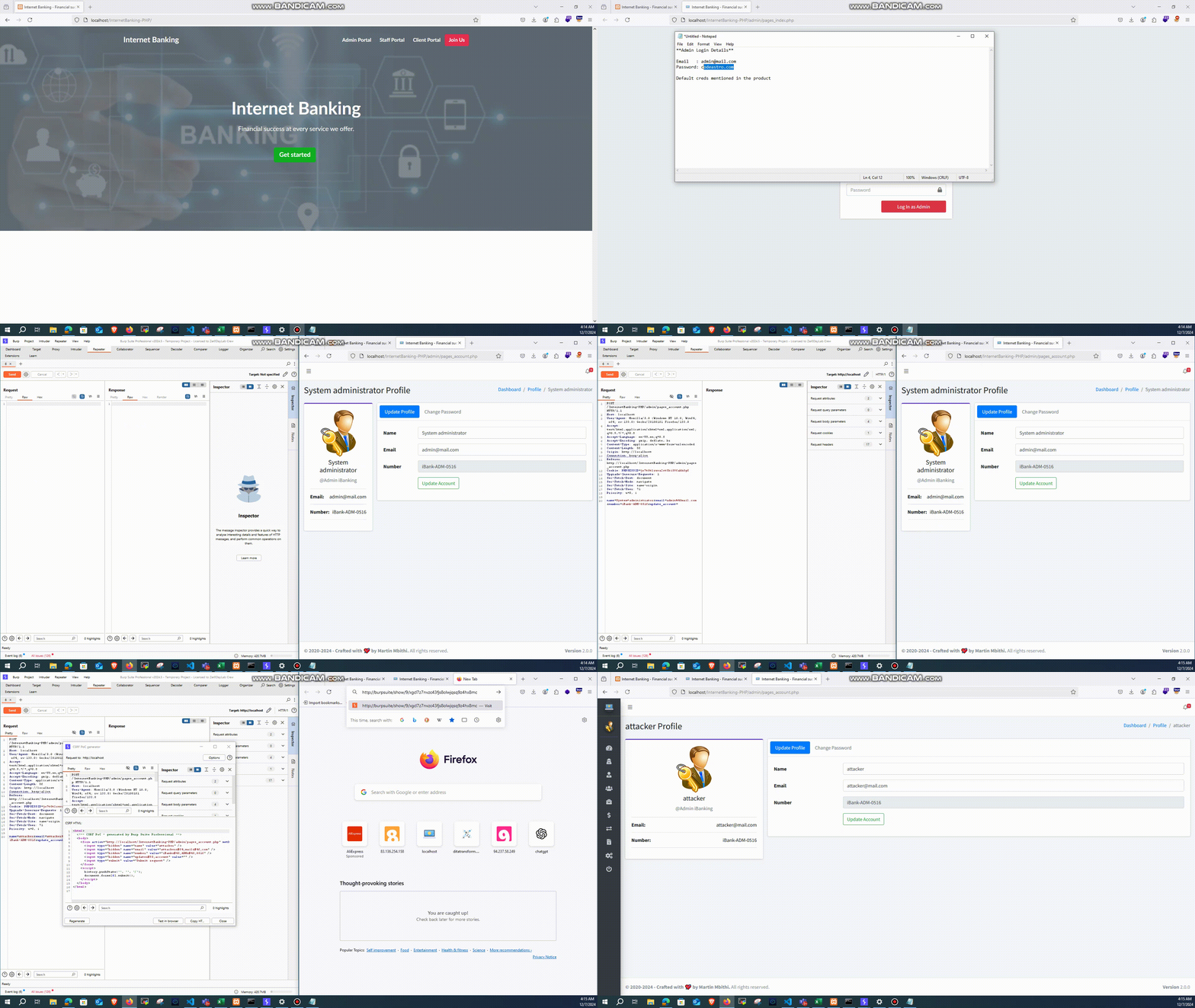
I have added the video POC for your reference below.
STEP 1: Click on the Admin Portal and log in using the default credentials.
STEP 2: Navigate to the Accounts section and use Burp Suite to intercept the request.
STEP 3: Click the Update button and capture the request. Then, right-click on the panel, go to Engagement Tools → Generate CSRF PoC.
STEP 4: Modify the request to update the name and email fields, and click Test in Browser.
STEP 5: Paste the PoC into the browser, and you will observe that the name and email have been successfully changed.
 ipratheep/cve-2024-56924